Compare commits
65 Commits
v0.23.1-al
...
v0.23.1-al
| Author | SHA1 | Date | |
|---|---|---|---|

|
88ae3485c2 | ||
|
|
e5caf170c8 | ||
|
|
089f8ba66a | ||
|
|
fbf1a451c8 | ||
|
|
4541336514 | ||
|
|
346e7b4f4d | ||
|
|
15641c8475 | ||
|
|
2fd85af33c | ||
|
|
401a7a7f71 | ||
|
|
e35e4135c9 | ||
|
|
8ae4403b63 | ||
|
|
11076d0af3 | ||
|
|
9cfb133a98 | ||
|
|
4548a9b7e2 | ||
|
|
61af0d9906 | ||
|
|
c0991cc576 | ||
|
|
301366c4fa | ||
|
|
3bda372847 | ||
|
|
082cbcbc50 | ||
|
|
cbf86da0e7 | ||
|
|
32e461953c | ||
|
|
d67fa2c00d | ||
|
|
c3155a2489 | ||
|
|
c5ea656385 | ||
|
|
be55a5fbcd | ||
|
|
21303f2167 | ||
|
|
c9b8e7cf41 | ||
|
|
5498a889ae | ||
|
|
0fe738500c | ||
|
|
dd9a8df03a | ||
|
|
0c7d547db1 | ||
|
|
638d596a3b | ||
|
|
d4976d4b63 | ||
|
|
a7bf4b3f36 | ||
|
|
94af2a29e1 | ||
|
|
42f816999e | ||
|
|
1414fbcc05 | ||
|
|
1947c58c60 | ||
|
|
1e20475061 | ||
|
|
af36282df5 | ||
|
|
322e46f15d | ||
|
|
983ea7f7a5 | ||
|
|
384e616231 | ||
|
|
6b8725f091 | ||
|
|
17797d83da | ||
|
|
ebd3680a47 | ||
|
|
74c5244be1 | ||
|
|
3cf0b83bda | ||
|
|
127813120e | ||
|
|
0c68ebed4f | ||
|
|
232be80325 | ||
|
|
c95a75c5d5 | ||
|
|
c8ab2d5908 | ||
|
|
572df758ba | ||
|
|
b996102837 | ||
|
|
080a05bbd3 | ||
|
|
343c6cdc47 | ||
|
|
5c785b2270 | ||
|
|
ca9bcd3156 | ||
|
|
82b40be4ab | ||
|
|
e098731d6c | ||
|
|
5f6aa30be5 | ||
|
|
ea70bffe5d | ||
|
|
47ae602df4 | ||
|
|
878b6fc258 |
83
.github/workflows/check-pr.yml
vendored
Normal file
83
.github/workflows/check-pr.yml
vendored
Normal file
@@ -0,0 +1,83 @@
|
||||
name: Check Pull Requests
|
||||
|
||||
on:
|
||||
pull_request_target:
|
||||
types:
|
||||
- opened
|
||||
- edited
|
||||
- synchronize
|
||||
- labeled
|
||||
- unlabeled
|
||||
merge_group:
|
||||
|
||||
permissions:
|
||||
pull-requests: write
|
||||
|
||||
jobs:
|
||||
check-title:
|
||||
runs-on: ubuntu-latest
|
||||
steps:
|
||||
- name: Check PR title
|
||||
if: github.event_name == 'pull_request_target'
|
||||
uses: amannn/action-semantic-pull-request@v5
|
||||
id: check_pr_title
|
||||
env:
|
||||
GITHUB_TOKEN: ${{ secrets.GITHUB_TOKEN }}
|
||||
# Add comment indicating we require pull request titles to follow conventional commits specification
|
||||
- uses: marocchino/sticky-pull-request-comment@v2
|
||||
if: always() && (steps.check_pr_title.outputs.error_message != null)
|
||||
with:
|
||||
header: pr-title-lint-error
|
||||
message: |
|
||||
Thank you for opening this pull request!
|
||||
|
||||
We require pull request titles to follow the [Conventional Commits specification](https://www.conventionalcommits.org/en/v1.0.0/) and it looks like your proposed title needs to be adjusted.
|
||||
|
||||
Details:
|
||||
|
||||
> ${{ steps.check_pr_title.outputs.error_message }}
|
||||
|
||||
# Delete a previous comment when the issue has been resolved
|
||||
- if: ${{ steps.check_pr_title.outputs.error_message == null }}
|
||||
uses: marocchino/sticky-pull-request-comment@v2
|
||||
with:
|
||||
header: pr-title-lint-error
|
||||
delete: true
|
||||
|
||||
check-breaking-change-label:
|
||||
runs-on: ubuntu-latest
|
||||
steps:
|
||||
- name: Check breaking change label
|
||||
id: check_breaking_change
|
||||
run: |
|
||||
pattern='^(build|chore|ci|docs|feat|fix|perf|refactor|revert|style|test)(\(\w+\))?!:'
|
||||
# Check if pattern matches
|
||||
if echo "${{ github.event.pull_request.title }}" | grep -qE "$pattern"; then
|
||||
echo "breaking_change=true" >> $GITHUB_OUTPUT
|
||||
else
|
||||
echo "breaking_change=false" >> $GITHUB_OUTPUT
|
||||
fi
|
||||
- name: Add label
|
||||
if: steps.check_breaking_change.outputs.breaking_change == 'true'
|
||||
uses: actions/github-script@v6
|
||||
with:
|
||||
github-token: ${{ secrets.GITHUB_TOKEN }}
|
||||
script: |
|
||||
github.rest.issues.addLabels({
|
||||
issue_number: context.issue.number,
|
||||
owner: context.repo.owner,
|
||||
repo: context.repo.repo,
|
||||
labels: ['breaking change']
|
||||
})
|
||||
|
||||
do-not-merge:
|
||||
if: ${{ contains(github.event.*.labels.*.name, 'do not merge') }}
|
||||
name: Prevent Merging
|
||||
runs-on: ubuntu-latest
|
||||
steps:
|
||||
- name: Check for label
|
||||
run: |
|
||||
echo "Pull request is labeled as 'do not merge'"
|
||||
echo "This workflow fails so that the pull request cannot be merged"
|
||||
exit 1
|
||||
|
||||
18
.github/workflows/ci.yml
vendored
18
.github/workflows/ci.yml
vendored
@@ -36,6 +36,16 @@ jobs:
|
||||
uses: actions/checkout@v3
|
||||
with:
|
||||
ref: ${{ github.event.pull_request.head.sha }}
|
||||
- name: Install Rust nightly
|
||||
uses: dtolnay/rust-toolchain@nightly
|
||||
with:
|
||||
components: rustfmt
|
||||
- name: Install cargo-make
|
||||
uses: taiki-e/install-action@cargo-make
|
||||
- name: Check formatting
|
||||
run: cargo make lint-format
|
||||
- name: Check documentation
|
||||
run: cargo make lint-docs
|
||||
- name: Check conventional commits
|
||||
uses: crate-ci/committed@master
|
||||
with:
|
||||
@@ -45,14 +55,6 @@ jobs:
|
||||
uses: crate-ci/typos@master
|
||||
- name: Lint dependencies
|
||||
uses: EmbarkStudios/cargo-deny-action@v1
|
||||
- name: Install Rust nightly
|
||||
uses: dtolnay/rust-toolchain@nightly
|
||||
with:
|
||||
components: rustfmt
|
||||
- name: Install cargo-make
|
||||
uses: taiki-e/install-action@cargo-make
|
||||
- name: Check formatting
|
||||
run: cargo make fmt
|
||||
|
||||
clippy:
|
||||
runs-on: ubuntu-latest
|
||||
|
||||
@@ -1,10 +1,13 @@
|
||||
# configuration for https://github.com/DavidAnson/markdownlint
|
||||
|
||||
first-line-heading: false
|
||||
no-inline-html:
|
||||
allowed_elements:
|
||||
- img
|
||||
- details
|
||||
- summary
|
||||
- div
|
||||
- br
|
||||
line-length:
|
||||
line_length: 100
|
||||
|
||||
|
||||
225
BREAKING-CHANGES.md
Normal file
225
BREAKING-CHANGES.md
Normal file
@@ -0,0 +1,225 @@
|
||||
# Breaking Changes
|
||||
|
||||
This document contains a list of breaking changes in each version and some notes to help migrate
|
||||
between versions. It is compile manually from the commit history and changelog. We also tag PRs on
|
||||
github with a [breaking change] label.
|
||||
|
||||
[breaking change]: (https://github.com/ratatui-org/ratatui/issues?q=label%3A%22breaking+change%22)
|
||||
|
||||
## Summary
|
||||
|
||||
This is a quick summary of the sections below:
|
||||
|
||||
- [Unreleased (v0.24.0)](#unreleased-0240)
|
||||
- `ScrollbarState`: `position`, `content_length`, and `viewport_content_length` are now `usize`
|
||||
- `BorderType`: `line_symbols` is now `border_symbols` and returns `symbols::border::set`
|
||||
- `Frame<'a, B: Backend>` is now `Frame<'a>`
|
||||
- `Stylize` shorthands for `String` now consume the value and return `Span<'static>`
|
||||
- `Spans` is removed
|
||||
- [v0.23.0](#v0230)
|
||||
- `Scrollbar`: `track_symbol` now takes `Option<&str>`
|
||||
- `Scrollbar`: symbols moved to `symbols` module
|
||||
- MSRV is now 1.67.0
|
||||
- [v0.22.0](#v0220)
|
||||
- serde representation of `Borders` and `Modifiers` has changed
|
||||
- [v0.21.0](#v0210)
|
||||
- MSRV is now 1.65.0
|
||||
- `terminal::ViewPort` is now an enum
|
||||
- `"".as_ref()` must be annotated to implement `Into<Text<'a>>`
|
||||
- `Marker::Block` renders as a block char instead of a bar char
|
||||
- [v0.20.0](#v0200)
|
||||
- MSRV is now 1.63.0
|
||||
- `List` no longer ignores empty strings
|
||||
|
||||
## Unreleased (0.24.0)
|
||||
|
||||
### ScrollbarState field type changed from `u16` to `usize` ([#456])
|
||||
|
||||
[#456]: https://github.com/ratatui-org/ratatui/pull/456
|
||||
|
||||
In order to support larger content lengths, the `position`, `content_length` and
|
||||
`viewport_content_length` methods on `ScrollbarState` now take `usize` instead of `u16`
|
||||
|
||||
### `BorderType::line_symbols` renamed to `border_symbols` ([#529])
|
||||
|
||||
[#529]: https://github.com/ratatui-org/ratatui/issues/529
|
||||
|
||||
Applications can now set custom borders on a `Block` by calling `border_set()`. The
|
||||
`BorderType::line_symbols()` is renamed to `border_symbols()` and now returns a new struct
|
||||
`symbols::border::Set`. E.g.:
|
||||
|
||||
```rust
|
||||
let line_set: symbols::line::Set = BorderType::line_symbols(BorderType::Plain);
|
||||
// becomes
|
||||
let border_set: symbols::border::Set = BorderType::border_symbols(BorderType::Plain);
|
||||
```
|
||||
|
||||
### Generic `Backend` parameter removed from `Frame` ([#530])
|
||||
|
||||
[#530]: https://github.com/ratatui-org/ratatui/issues/530
|
||||
|
||||
`Frame` is no longer generic over Backend. Code that accepted `Frame<Backend>` will now need to
|
||||
accept `Frame`. To migrate existing code, remove any generic parameters from code that uses an
|
||||
instance of a Frame. E.g.:
|
||||
|
||||
```rust
|
||||
fn ui<B: Backend>(frame: &mut Frame<B>) { ... }
|
||||
// becomes
|
||||
fn ui(frame: Frame) { ... }
|
||||
```
|
||||
|
||||
### `Stylize` shorthands now consume rather than borrow `String` ([#466])
|
||||
|
||||
[#466]: https://github.com/ratatui-org/ratatui/issues/466
|
||||
|
||||
In order to support using `Stylize` shorthands (e.g. `"foo".red()`) on temporary `String` values, a
|
||||
new implementation of `Stylize` was added that returns a `Span<'static>`. This causes the value to
|
||||
be consumed rather than borrowed. Existing code that expects to use the string after a call will no
|
||||
longer compile. E.g.
|
||||
|
||||
```rust
|
||||
let s = String::new("foo");
|
||||
let span1 = s.red();
|
||||
let span2 = s.blue(); // will no longer compile as s is consumed by the previous line
|
||||
// becomes
|
||||
let span1 = s.clone().red();
|
||||
let span2 = s.blue();
|
||||
```
|
||||
|
||||
### Deprecated `Spans` type removed (replaced with `Line`) ([#426])
|
||||
|
||||
[#426]: https://github.com/ratatui-org/ratatui/issues/426
|
||||
|
||||
`Spans` was replaced with `Line` in 0.21.0. `Buffer::set_spans` was replaced with
|
||||
`Buffer::set_line`.
|
||||
|
||||
```rust
|
||||
let spans = Spans::from(some_string_str_span_or_vec_span);
|
||||
buffer.set_spans(0, 0, spans, 10);
|
||||
// becomes
|
||||
let line - Line::from(some_string_str_span_or_vec_span);
|
||||
buffer.set_line(0, 0, line, 10);
|
||||
```
|
||||
|
||||
## [v0.23.0](https://github.com/ratatui-org/ratatui/releases/tag/v0.23.0)
|
||||
|
||||
### `Scrollbar::track_symbol()` now takes an `Option<&str>` instead of `&str` ([#360])
|
||||
|
||||
[#360]: https://github.com/ratatui-org/ratatui/issues/360
|
||||
|
||||
The track symbol of `Scrollbar` is now optional, this method now takes an optional value.
|
||||
|
||||
```rust
|
||||
let scrollbar = Scrollbar::default().track_symbol("|");
|
||||
// becomes
|
||||
let scrollbar = Scrollbar::default().track_symbol(Some("|"));
|
||||
```
|
||||
|
||||
### `Scrollbar` symbols moved to `symbols::scrollbar` and `widgets::scrollbar` module is private ([#330])
|
||||
|
||||
[#330]: https://github.com/ratatui-org/ratatui/issues/330
|
||||
|
||||
The symbols for defining scrollbars have been moved to the `symbols` module from the
|
||||
`widgets::scrollbar` module which is no longer public. To update your code update any imports to the
|
||||
new module locations. E.g.:
|
||||
|
||||
```rust
|
||||
use ratatui::{widgets::scrollbar::{Scrollbar, Set}};
|
||||
// becomes
|
||||
use ratatui::{widgets::Scrollbar, symbols::scrollbar::Set}
|
||||
```
|
||||
|
||||
### MSRV updated to 1.67 ([#361])
|
||||
|
||||
[#361]: https://github.com/ratatui-org/ratatui/issues/361
|
||||
|
||||
The MSRV of ratatui is now 1.67 due to an MSRV update in a dependency (`time`).
|
||||
|
||||
## [v0.22.0](https://github.com/ratatui-org/ratatui/releases/tag/v0.22.0)
|
||||
|
||||
### bitflags updated to 2.3 ([#205])
|
||||
|
||||
[#205]: https://github.com/ratatui-org/ratatui/issues/205
|
||||
|
||||
The serde representation of bitflags has changed. Any existing serialized types that have Borders or
|
||||
Modifiers will need to be re-serialized. This is documented in the [bitflags
|
||||
changelog](https://github.com/bitflags/bitflags/blob/main/CHANGELOG.md#200-rc2)..
|
||||
|
||||
## [v0.21.0](https://github.com/ratatui-org/ratatui/releases/tag/v0.21.0)
|
||||
|
||||
### MSRV is 1.65.0 ([#171])
|
||||
|
||||
[#171]: https://github.com/ratatui-org/ratatui/issues/171
|
||||
|
||||
The minimum supported rust version is now 1.65.0.
|
||||
|
||||
### `Terminal::with_options()` stabilized to allow configuring the viewport ([#114])
|
||||
|
||||
[#114]: https://github.com/ratatui-org/ratatui/issues/114
|
||||
|
||||
In order to support inline viewports, the unstable method `Terminal::with_options()` was stabilized
|
||||
and `ViewPort` was changed from a struct to an enum.
|
||||
|
||||
```rust
|
||||
let terminal = Terminal::with_options(backend, TerminalOptions {
|
||||
viewport: Viewport::fixed(area),
|
||||
});
|
||||
// becomes
|
||||
let terminal = Terminal::with_options(backend, TerminalOptions {
|
||||
viewport: Viewport::Fixed(area),
|
||||
});
|
||||
```
|
||||
|
||||
### Code that binds `Into<Text<'a>>` now requires type annotations ([#168])
|
||||
|
||||
[#168]: https://github.com/ratatui-org/ratatui/issues/168
|
||||
|
||||
A new type `Masked` was introduced that implements `From<Text<'a>>`. This causes any code that did
|
||||
previously did not need to use type annotations to fail to compile. To fix this, annotate or call
|
||||
to_string() / to_owned() / as_str() on the value. E.g.:
|
||||
|
||||
```rust
|
||||
let paragraph = Paragraph::new("".as_ref());
|
||||
// becomes
|
||||
let paragraph = Paragraph::new("".as_str());
|
||||
```
|
||||
|
||||
### `Marker::Block` now renders as a block rather than a bar character ([#133])
|
||||
|
||||
[#133]: https://github.com/ratatui-org/ratatui/issues/133
|
||||
|
||||
Code using the `Block` marker that previously rendered using a half block character (`'▀'``) now
|
||||
renders using the full block character (`'█'`). A new marker variant`Bar` is introduced to replace
|
||||
the existing code.
|
||||
|
||||
```rust
|
||||
let canvas = Canvas::default().marker(Marker::Block);
|
||||
// becomes
|
||||
let canvas = Canvas::default().marker(Marker::Bar);
|
||||
```
|
||||
|
||||
## [v0.20.0](https://github.com/ratatui-org/ratatui/releases/tag/v0.20.0)
|
||||
|
||||
v0.20.0 was the first release of Ratatui - versions prior to this were release as tui-rs. See the
|
||||
[Changelog](./CHANGELOG.md) for more details.
|
||||
|
||||
### MSRV is update to 1.63.0 ([#80])
|
||||
|
||||
[#80]: https://github.com/ratatui-org/ratatui/issues/80
|
||||
|
||||
The minimum supported rust version is 1.63.0
|
||||
|
||||
### List no longer ignores empty string in items ([#42])
|
||||
|
||||
[#42]: https://github.com/ratatui-org/ratatui/issues/42
|
||||
|
||||
The following code now renders 3 items instead of 2. Code which relies on the previous behavior will
|
||||
need to manually filter empty items prior to display.
|
||||
|
||||
```rust
|
||||
let items = vec![
|
||||
ListItem::new("line one"),
|
||||
ListItem::new(""),
|
||||
ListItem::new("line four"),
|
||||
];
|
||||
```
|
||||
@@ -29,6 +29,11 @@ change becomes a place where a bug may have been introduced. Consider splitting
|
||||
reformatting changes into a separate PR from those that make a behavioral change, as the tests help
|
||||
guarantee that the behavior is unchanged.
|
||||
|
||||
### Code formatting
|
||||
|
||||
Run `cargo make format` before committing to ensure that code is consistently formatted with
|
||||
rustfmt. Configuration is in [rustfmt.toml](./rustfmt.toml).
|
||||
|
||||
### Search `tui-rs` for similar work
|
||||
|
||||
The original fork of Ratatui, [`tui-rs`](https://github.com/fdehau/tui-rs/), has a large amount of
|
||||
@@ -142,6 +147,7 @@ let style = Style::default().fg(Color::Red).add_modifier(Modifiers::BOLD);
|
||||
#### Format
|
||||
|
||||
- First line is summary, second is blank, third onward is more detail
|
||||
|
||||
```rust
|
||||
/// Summary
|
||||
///
|
||||
@@ -155,6 +161,7 @@ See [vscode rewrap extension](https://marketplace.visualstudio.com/items?itemNam
|
||||
|
||||
- Doc comments are above macros
|
||||
i.e.
|
||||
|
||||
```rust
|
||||
/// doc comment
|
||||
#[derive(Debug)]
|
||||
|
||||
36
Cargo.toml
36
Cargo.toml
@@ -44,16 +44,19 @@ time = { version = "0.3.11", optional = true, features = ["local-offset"] }
|
||||
unicode-segmentation = "1.10"
|
||||
unicode-width = "0.1"
|
||||
document-features = { version = "0.2.7", optional = true }
|
||||
lru = "0.11.1"
|
||||
|
||||
[dev-dependencies]
|
||||
anyhow = "1.0.71"
|
||||
argh = "0.1"
|
||||
argh = "0.1.12"
|
||||
better-panic = "0.3.0"
|
||||
cargo-husky = { version = "1.5.0", default-features = false, features = [
|
||||
"user-hooks",
|
||||
] }
|
||||
criterion = { version = "0.5", features = ["html_reports"] }
|
||||
criterion = { version = "0.5.1", features = ["html_reports"] }
|
||||
fakeit = "1.1"
|
||||
rand = "0.8"
|
||||
rand = "0.8.5"
|
||||
palette = "0.7.3"
|
||||
pretty_assertions = "1.4.0"
|
||||
|
||||
[features]
|
||||
@@ -80,10 +83,18 @@ all-features = true
|
||||
cargo-args = ["-Zunstable-options", "-Zrustdoc-scrape-examples"]
|
||||
rustdoc-args = ["--cfg", "docsrs"]
|
||||
|
||||
[[bench]]
|
||||
name = "barchart"
|
||||
harness = false
|
||||
|
||||
[[bench]]
|
||||
name = "block"
|
||||
harness = false
|
||||
|
||||
[[bench]]
|
||||
name = "list"
|
||||
harness = false
|
||||
|
||||
[[bench]]
|
||||
name = "paragraph"
|
||||
harness = false
|
||||
@@ -92,10 +103,6 @@ harness = false
|
||||
name = "sparkline"
|
||||
harness = false
|
||||
|
||||
[[bench]]
|
||||
name = "list"
|
||||
harness = false
|
||||
|
||||
|
||||
[[example]]
|
||||
name = "barchart"
|
||||
@@ -128,6 +135,11 @@ required-features = ["crossterm"]
|
||||
# this example is a bit verbose, so we don't want to include it in the docs
|
||||
doc-scrape-examples = false
|
||||
|
||||
[[example]]
|
||||
name = "colors_rgb"
|
||||
required-features = ["crossterm"]
|
||||
doc-scrape-examples = true
|
||||
|
||||
[[example]]
|
||||
name = "custom_widget"
|
||||
required-features = ["crossterm"]
|
||||
@@ -138,6 +150,16 @@ name = "demo"
|
||||
# this runs for all of the terminal backends, so it can't be built using --all-features or scraped
|
||||
doc-scrape-examples = false
|
||||
|
||||
[[example]]
|
||||
name = "demo2"
|
||||
required-features = ["crossterm", "widget-calendar"]
|
||||
doc-scrape-examples = true
|
||||
|
||||
[[example]]
|
||||
name = "docsrs"
|
||||
required-features = ["crossterm"]
|
||||
doc-scrape-examples = false
|
||||
|
||||
[[example]]
|
||||
name = "gauge"
|
||||
required-features = ["crossterm"]
|
||||
|
||||
138
Makefile.toml
138
Makefile.toml
@@ -7,47 +7,62 @@ skip_core_tasks = true
|
||||
# all features except the backend ones
|
||||
ALL_FEATURES = "all-widgets,macros,serde"
|
||||
|
||||
# Windows does not support building termion, so this avoids the build failure by providing two
|
||||
# sets of flags, one for Windows and one for other platforms.
|
||||
# Windows: --features=all-widgets,macros,serde,crossterm,termwiz
|
||||
# Other: --all-features
|
||||
ALL_FEATURES_FLAG = { source = "${CARGO_MAKE_RUST_TARGET_OS}", default_value = "--all-features", mapping = { "windows" = "--features=all-widgets,macros,serde,crossterm,termwiz" } }
|
||||
|
||||
[tasks.default]
|
||||
alias = "ci"
|
||||
|
||||
[tasks.ci]
|
||||
description = "Run continuous integration tasks"
|
||||
dependencies = [
|
||||
"style-check",
|
||||
"clippy",
|
||||
"check",
|
||||
"test",
|
||||
]
|
||||
dependencies = ["lint-style", "clippy", "check", "test"]
|
||||
|
||||
[tasks.style-check]
|
||||
description = "Check code style"
|
||||
dependencies = ["fmt", "typos"]
|
||||
[tasks.lint-style]
|
||||
description = "Lint code style (formatting, typos, docs)"
|
||||
dependencies = ["lint-format", "lint-typos", "lint-docs"]
|
||||
|
||||
[tasks.fmt]
|
||||
description = "Format source code"
|
||||
[tasks.lint-format]
|
||||
description = "Lint code formatting"
|
||||
toolchain = "nightly"
|
||||
command = "cargo"
|
||||
args = ["fmt", "--all", "--check"]
|
||||
|
||||
[tasks.typos]
|
||||
[tasks.format]
|
||||
description = "Fix code formatting"
|
||||
toolchain = "nightly"
|
||||
command = "cargo"
|
||||
args = ["fmt", "--all"]
|
||||
|
||||
[tasks.lint-typos]
|
||||
description = "Run typo checks"
|
||||
install_crate = { crate_name = "typos-cli", binary = "typos", test_arg = "--version" }
|
||||
command = "typos"
|
||||
|
||||
[tasks.lint-docs]
|
||||
description = "Check documentation for errors and warnings"
|
||||
toolchain = "nightly"
|
||||
command = "cargo"
|
||||
args = [
|
||||
"rustdoc",
|
||||
"--no-default-features",
|
||||
"${ALL_FEATURES_FLAG}",
|
||||
"--",
|
||||
"-Zunstable-options",
|
||||
"--check",
|
||||
"-Dwarnings",
|
||||
]
|
||||
|
||||
[tasks.check]
|
||||
description = "Check code for errors and warnings"
|
||||
command = "cargo"
|
||||
args = [
|
||||
"check",
|
||||
"--all-targets",
|
||||
"--all-features"
|
||||
]
|
||||
|
||||
[tasks.check.windows]
|
||||
args = [
|
||||
"check",
|
||||
"--all-targets",
|
||||
"--no-default-features", "--features", "${ALL_FEATURES},crossterm,termwiz"
|
||||
"--no-default-features",
|
||||
"${ALL_FEATURES_FLAG}",
|
||||
]
|
||||
|
||||
[tasks.build]
|
||||
@@ -56,14 +71,8 @@ command = "cargo"
|
||||
args = [
|
||||
"build",
|
||||
"--all-targets",
|
||||
"--all-features",
|
||||
]
|
||||
|
||||
[tasks.build.windows]
|
||||
args = [
|
||||
"build",
|
||||
"--all-targets",
|
||||
"--no-default-features", "--features", "${ALL_FEATURES},crossterm,termwiz"
|
||||
"--no-default-features",
|
||||
"${ALL_FEATURES_FLAG}",
|
||||
]
|
||||
|
||||
[tasks.clippy]
|
||||
@@ -74,19 +83,8 @@ args = [
|
||||
"--all-targets",
|
||||
"--tests",
|
||||
"--benches",
|
||||
"--all-features",
|
||||
"--",
|
||||
"-D",
|
||||
"warnings",
|
||||
]
|
||||
|
||||
[tasks.clippy.windows]
|
||||
args = [
|
||||
"clippy",
|
||||
"--all-targets",
|
||||
"--tests",
|
||||
"--benches",
|
||||
"--no-default-features", "--features", "${ALL_FEATURES},crossterm,termwiz",
|
||||
"--no-default-features",
|
||||
"${ALL_FEATURES_FLAG}",
|
||||
"--",
|
||||
"-D",
|
||||
"warnings",
|
||||
@@ -94,41 +92,19 @@ args = [
|
||||
|
||||
[tasks.test]
|
||||
description = "Run tests"
|
||||
dependencies = [
|
||||
"test-doc",
|
||||
]
|
||||
dependencies = ["test-doc"]
|
||||
command = "cargo"
|
||||
args = [
|
||||
"test",
|
||||
"--all-targets",
|
||||
"--all-features",
|
||||
]
|
||||
|
||||
|
||||
[tasks.test-windows]
|
||||
description = "Run tests on Windows"
|
||||
dependencies = [
|
||||
"test-doc",
|
||||
]
|
||||
args = [
|
||||
"test",
|
||||
"--all-targets",
|
||||
"--no-default-features", "--features", "${ALL_FEATURES},crossterm,termwiz"
|
||||
"--no-default-features",
|
||||
"${ALL_FEATURES_FLAG}",
|
||||
]
|
||||
|
||||
[tasks.test-doc]
|
||||
description = "Run documentation tests"
|
||||
command = "cargo"
|
||||
args = [
|
||||
"test", "--doc",
|
||||
"--all-features",
|
||||
]
|
||||
|
||||
[tasks.test-doc.windows]
|
||||
args = [
|
||||
"test", "--doc",
|
||||
"--no-default-features", "--features", "${ALL_FEATURES},crossterm,termwiz"
|
||||
]
|
||||
args = ["test", "--doc", "--no-default-features", "${ALL_FEATURES_FLAG}"]
|
||||
|
||||
[tasks.test-backend]
|
||||
# takes a command line parameter to specify the backend to test (e.g. "crossterm")
|
||||
@@ -137,35 +113,35 @@ command = "cargo"
|
||||
args = [
|
||||
"test",
|
||||
"--all-targets",
|
||||
"--no-default-features", "--features", "${ALL_FEATURES},${@}"
|
||||
"--no-default-features",
|
||||
"--features",
|
||||
"${ALL_FEATURES},${@}",
|
||||
]
|
||||
|
||||
|
||||
[tasks.coverage]
|
||||
description = "Generate code coverage report"
|
||||
command = "cargo"
|
||||
args = [
|
||||
"llvm-cov",
|
||||
"--lcov",
|
||||
"--output-path", "target/lcov.info",
|
||||
"--all-features",
|
||||
]
|
||||
|
||||
[tasks.coverage.windows]
|
||||
command = "cargo"
|
||||
args = [
|
||||
"llvm-cov",
|
||||
"--lcov",
|
||||
"--output-path", "target/lcov.info",
|
||||
"--output-path",
|
||||
"target/lcov.info",
|
||||
"--no-default-features",
|
||||
"--features", "${ALL_FEATURES},crossterm,termwiz",
|
||||
"${ALL_FEATURES_FLAG}",
|
||||
]
|
||||
|
||||
[tasks.run-example]
|
||||
private = true
|
||||
condition = { env_set = ["TUI_EXAMPLE_NAME"] }
|
||||
command = "cargo"
|
||||
args = ["run", "--release", "--example", "${TUI_EXAMPLE_NAME}", "--features", "all-widgets"]
|
||||
args = [
|
||||
"run",
|
||||
"--release",
|
||||
"--example",
|
||||
"${TUI_EXAMPLE_NAME}",
|
||||
"--features",
|
||||
"all-widgets",
|
||||
]
|
||||
|
||||
[tasks.build-examples]
|
||||
description = "Compile project examples"
|
||||
|
||||
500
README.md
500
README.md
@@ -1,129 +1,347 @@
|
||||
# Ratatui
|
||||
|
||||
<img align="left" src="https://avatars.githubusercontent.com/u/125200832?s=128&v=4">
|
||||
|
||||
`ratatui` is a [Rust](https://www.rust-lang.org) library that is all about cooking up terminal user interfaces.
|
||||
It is a community fork of the original [tui-rs](https://github.com/fdehau/tui-rs)
|
||||
project.
|
||||
|
||||
[](https://crates.io/crates/ratatui)
|
||||
[](./LICENSE) [](https://github.com/ratatui-org/ratatui/actions?query=workflow%3ACI+)
|
||||
[](https://docs.rs/crate/ratatui/)
|
||||
[](https://deps.rs/repo/github/ratatui-org/ratatui)
|
||||
[](https://app.codecov.io/gh/ratatui-org/ratatui)
|
||||
[](https://discord.gg/pMCEU9hNEj)
|
||||
[](https://matrix.to/#/#ratatui:matrix.org)
|
||||
|
||||
<!-- See RELEASE.md for instructions on creating the demo gif --->
|
||||
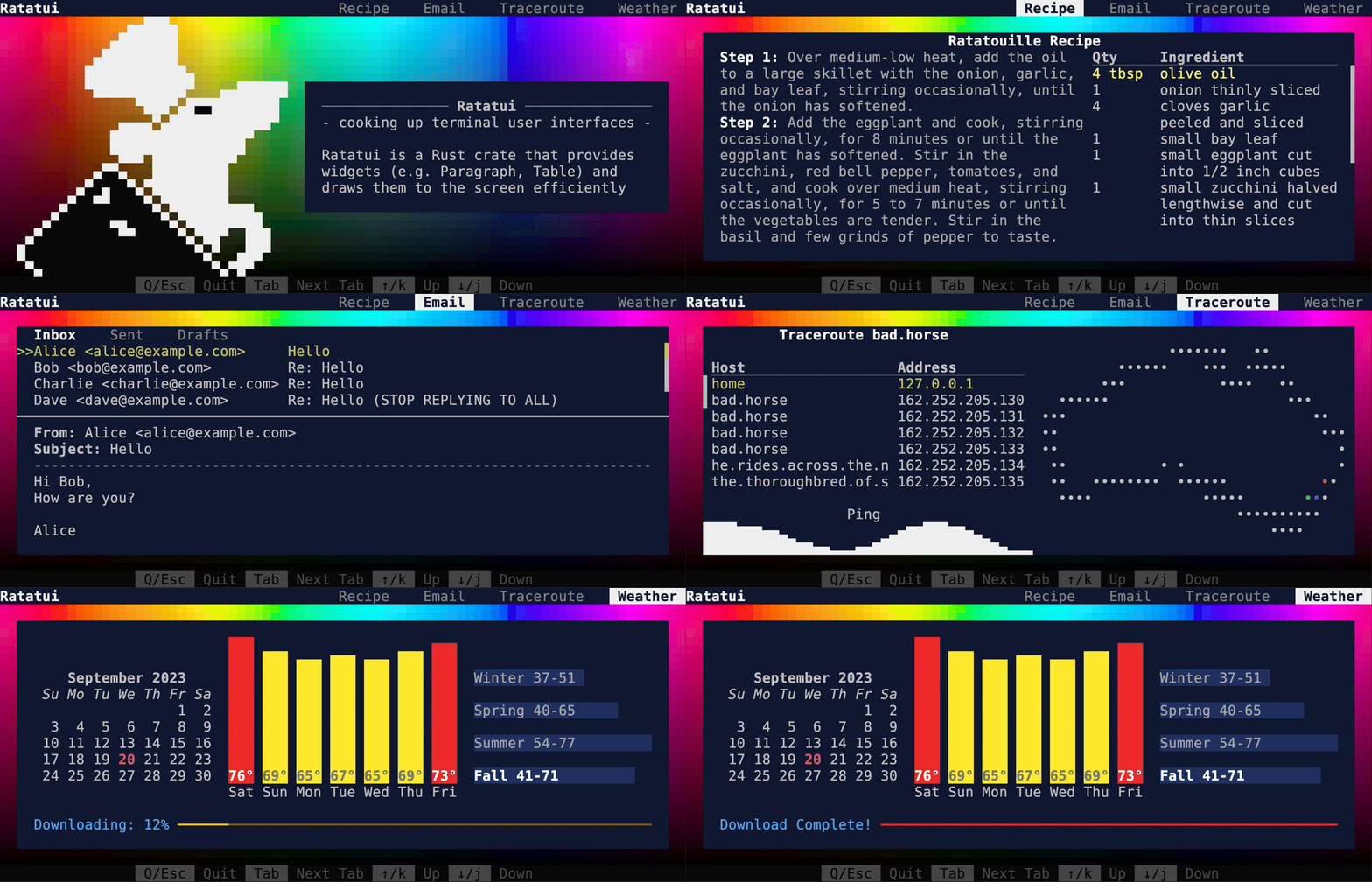
|
||||
|
||||
<details>
|
||||
<summary>Table of Contents</summary>
|
||||
|
||||
* [Ratatui](#ratatui)
|
||||
* [Installation](#installation)
|
||||
* [Introduction](#introduction)
|
||||
* [Quickstart](#quickstart)
|
||||
* [Status of this fork](#status-of-this-fork)
|
||||
* [Rust version requirements](#rust-version-requirements)
|
||||
* [Documentation](#documentation)
|
||||
* [Examples](#examples)
|
||||
* [Widgets](#widgets)
|
||||
* [Built in](#built-in)
|
||||
* [Third\-party libraries, bootstrapping templates and
|
||||
- [Ratatui](#ratatui)
|
||||
- [Installation](#installation)
|
||||
- [Introduction](#introduction)
|
||||
- [Other Documentation](#other-documentation)
|
||||
- [Quickstart](#quickstart)
|
||||
- [Status of this fork](#status-of-this-fork)
|
||||
- [Rust version requirements](#rust-version-requirements)
|
||||
- [Widgets](#widgets)
|
||||
- [Built in](#built-in)
|
||||
- [Third\-party libraries, bootstrapping templates and
|
||||
widgets](#third-party-libraries-bootstrapping-templates-and-widgets)
|
||||
* [Apps](#apps)
|
||||
* [Alternatives](#alternatives)
|
||||
* [Contributors](#contributors)
|
||||
* [Acknowledgments](#acknowledgments)
|
||||
* [License](#license)
|
||||
- [Apps](#apps)
|
||||
- [Alternatives](#alternatives)
|
||||
- [Acknowledgments](#acknowledgments)
|
||||
- [License](#license)
|
||||
|
||||
</details>
|
||||
|
||||
<!-- cargo-rdme start -->
|
||||
|
||||
|
||||
|
||||
<div align="center">
|
||||
|
||||
[![Crate Badge]](https://crates.io/crates/ratatui) [![License Badge]](./LICENSE) [![CI
|
||||
Badge]](https://github.com/ratatui-org/ratatui/actions?query=workflow%3ACI+) [![Docs
|
||||
Badge]](https://docs.rs/crate/ratatui/)<br>
|
||||
[![Dependencies Badge]](https://deps.rs/repo/github/ratatui-org/ratatui) [![Codecov
|
||||
Badge]](https://app.codecov.io/gh/ratatui-org/ratatui) [![Discord
|
||||
Badge]](https://discord.gg/pMCEU9hNEj) [![Matrix
|
||||
Badge]](https://matrix.to/#/#ratatui:matrix.org)<br>
|
||||
[Documentation](https://docs.rs/ratatui) · [Ratatui Book](https://ratatui.rs) ·
|
||||
[Examples](https://github.com/ratatui-org/ratatui/tree/main/examples) · [Report a
|
||||
bug](https://github.com/ratatui-org/ratatui/issues/new?labels=bug&projects=&template=bug_report.md)
|
||||
· [Request a
|
||||
Feature](https://github.com/ratatui-org/ratatui/issues/new?labels=enhancement&projects=&template=feature_request.md)
|
||||
· [Send a Pull Request](https://github.com/ratatui-org/ratatui/compare)
|
||||
|
||||
</div>
|
||||
|
||||
# Ratatui
|
||||
|
||||
[Ratatui] is a crate for cooking up terminal user interfaces in rust. It is a lightweight
|
||||
library that provides a set of widgets and utilities to build complex rust TUIs. Ratatui was
|
||||
forked from the [Tui-rs crate] in 2023 in order to continue its development.
|
||||
|
||||
## Installation
|
||||
|
||||
Add `ratatui` and `crossterm` as dependencies to your cargo.toml:
|
||||
|
||||
```shell
|
||||
cargo add ratatui --features all-widgets
|
||||
cargo add ratatui crossterm
|
||||
```
|
||||
|
||||
Or modify your `Cargo.toml`
|
||||
|
||||
```toml
|
||||
[dependencies]
|
||||
ratatui = { version = "0.23.0", features = ["all-widgets"]}
|
||||
```
|
||||
Ratatui uses [Crossterm] by default as it works on most platforms. See the [Installation]
|
||||
section of the [Ratatui Book] for more details on how to use other backends ([Termion] /
|
||||
[Termwiz]).
|
||||
|
||||
## Introduction
|
||||
|
||||
`ratatui` is a terminal UI library that supports multiple backends:
|
||||
Ratatui is based on the principle of immediate rendering with intermediate buffers. This means
|
||||
that for each frame, your app must render all widgets that are supposed to be part of the UI.
|
||||
This is in contrast to the retained mode style of rendering where widgets are updated and then
|
||||
automatically redrawn on the next frame. See the [Rendering] section of the [Ratatui Book] for
|
||||
more info.
|
||||
|
||||
* [crossterm](https://github.com/crossterm-rs/crossterm) [default]
|
||||
* [termion](https://github.com/ticki/termion)
|
||||
* [termwiz](https://github.com/wez/wezterm/tree/master/termwiz)
|
||||
## Other documentation
|
||||
|
||||
The library is based on the principle of immediate rendering with intermediate buffers. This means
|
||||
that at each new frame you should build all widgets that are supposed to be part of the UI. While
|
||||
providing a great flexibility for rich and interactive UI, this may introduce overhead for highly
|
||||
dynamic content. So, the implementation try to minimize the number of ansi escapes sequences
|
||||
generated to draw the updated UI. In practice, given the speed of `Rust` the overhead rather comes
|
||||
from the terminal emulator than the library itself.
|
||||
|
||||
Moreover, the library does not provide any input handling nor any event system and you may rely on
|
||||
the previously cited libraries to achieve such features.
|
||||
|
||||
We keep a [CHANGELOG](./CHANGELOG.md) generated by [git-cliff](https://github.com/orhun/git-cliff)
|
||||
utilizing [Conventional Commits](https://www.conventionalcommits.org/).
|
||||
- [Ratatui Book] - explains the library's concepts and provides step-by-step tutorials
|
||||
- [Examples] - a collection of examples that demonstrate how to use the library.
|
||||
- [API Documentation] - the full API documentation for the library on docs.rs.
|
||||
- [Changelog] - generated by [git-cliff] utilizing [Conventional Commits].
|
||||
- [Contributing] - Please read this if you are interested in contributing to the project.
|
||||
- [Breaking Changes] - a list of breaking changes in the library.
|
||||
|
||||
## Quickstart
|
||||
|
||||
The following example demonstrates the minimal amount of code necessary to setup a terminal and
|
||||
render "Hello World!". The full code for this example which contains a little more detail is in
|
||||
[hello_world.rs](./examples/hello_world.rs). For more guidance on how to create Ratatui apps, see
|
||||
the [Docs](https://docs.rs/ratatui) and [Examples](#examples). There is also a starter template
|
||||
available at [rust-tui-template](https://github.com/ratatui-org/rust-tui-template).
|
||||
[hello_world.rs]. For more guidance on different ways to structure your application see the
|
||||
[Application Patterns] and [Hello World tutorial] sections in the [Ratatui Book] and the various
|
||||
[Examples]. There are also several starter templates available:
|
||||
|
||||
- [rust-tui-template]
|
||||
- [ratatui-async-template] (book and template)
|
||||
- [simple-tui-rs]
|
||||
|
||||
Every application built with `ratatui` needs to implement the following steps:
|
||||
|
||||
- Initialize the terminal
|
||||
- A main loop to:
|
||||
- Handle input events
|
||||
- Draw the UI
|
||||
- Restore the terminal state
|
||||
|
||||
The library contains a [`prelude`] module that re-exports the most commonly used traits and
|
||||
types for convenience. Most examples in the documentation will use this instead of showing the
|
||||
full path of each type.
|
||||
|
||||
### Initialize and restore the terminal
|
||||
|
||||
The [`Terminal`] type is the main entry point for any Ratatui application. It is a light
|
||||
abstraction over a choice of [`Backend`] implementations that provides functionality to draw
|
||||
each frame, clear the screen, hide the cursor, etc. It is parametrized over any type that
|
||||
implements the [`Backend`] trait which has implementations for [Crossterm], [Termion] and
|
||||
[Termwiz].
|
||||
|
||||
Most applications should enter the Alternate Screen when starting and leave it when exiting and
|
||||
also enable raw mode to disable line buffering and enable reading key events. See the [`backend`
|
||||
module] and the [Backends] section of the [Ratatui Book] for more info.
|
||||
|
||||
### Drawing the UI
|
||||
|
||||
The drawing logic is delegated to a closure that takes a [`Frame`] instance as argument. The
|
||||
[`Frame`] provides the size of the area to draw to and allows the app to render any [`Widget`]
|
||||
using the provided [`render_widget`] method. See the [Widgets] section of the [Ratatui Book] for
|
||||
more info.
|
||||
|
||||
### Handling events
|
||||
|
||||
Ratatui does not include any input handling. Instead event handling can be implemented by
|
||||
calling backend library methods directly. See the [Handling Events] section of the [Ratatui
|
||||
Book] for more info. For example, if you are using [Crossterm], you can use the
|
||||
[`crossterm::event`] module to handle events.
|
||||
|
||||
### Example
|
||||
|
||||
```rust
|
||||
fn main() -> Result<(), Box<dyn Error>> {
|
||||
let mut terminal = setup_terminal()?;
|
||||
run(&mut terminal)?;
|
||||
restore_terminal(&mut terminal)?;
|
||||
use std::io::{self, stdout};
|
||||
use crossterm::{
|
||||
event::{self, Event, KeyCode},
|
||||
ExecutableCommand,
|
||||
terminal::{disable_raw_mode, enable_raw_mode, EnterAlternateScreen, LeaveAlternateScreen}
|
||||
};
|
||||
use ratatui::{prelude::*, widgets::*};
|
||||
|
||||
fn main() -> io::Result<()> {
|
||||
enable_raw_mode()?;
|
||||
stdout().execute(EnterAlternateScreen)?;
|
||||
let mut terminal = Terminal::new(CrosstermBackend::new(stdout()))?;
|
||||
|
||||
let mut should_quit = false;
|
||||
while !should_quit {
|
||||
terminal.draw(ui)?;
|
||||
should_quit = handle_events()?;
|
||||
}
|
||||
|
||||
disable_raw_mode()?;
|
||||
stdout().execute(LeaveAlternateScreen)?;
|
||||
Ok(())
|
||||
}
|
||||
|
||||
fn setup_terminal() -> Result<Terminal<CrosstermBackend<Stdout>>, Box<dyn Error>> {
|
||||
let mut stdout = io::stdout();
|
||||
enable_raw_mode()?;
|
||||
execute!(stdout, EnterAlternateScreen)?;
|
||||
Ok(Terminal::new(CrosstermBackend::new(stdout))?)
|
||||
}
|
||||
|
||||
fn restore_terminal(
|
||||
terminal: &mut Terminal<CrosstermBackend<Stdout>>,
|
||||
) -> Result<(), Box<dyn Error>> {
|
||||
disable_raw_mode()?;
|
||||
execute!(terminal.backend_mut(), LeaveAlternateScreen,)?;
|
||||
Ok(terminal.show_cursor()?)
|
||||
}
|
||||
|
||||
fn run(terminal: &mut Terminal<CrosstermBackend<Stdout>>) -> Result<(), Box<dyn Error>> {
|
||||
Ok(loop {
|
||||
terminal.draw(|frame| {
|
||||
let greeting = Paragraph::new("Hello World!");
|
||||
frame.render_widget(greeting, frame.size());
|
||||
})?;
|
||||
if event::poll(Duration::from_millis(250))? {
|
||||
if let Event::Key(key) = event::read()? {
|
||||
if KeyCode::Char('q') == key.code {
|
||||
break;
|
||||
}
|
||||
fn handle_events() -> io::Result<bool> {
|
||||
if event::poll(std::time::Duration::from_millis(50))? {
|
||||
if let Event::Key(key) = event::read()? {
|
||||
if key.kind == event::KeyEventKind::Press && key.code == KeyCode::Char('q') {
|
||||
return Ok(true);
|
||||
}
|
||||
}
|
||||
})
|
||||
}
|
||||
}
|
||||
Ok(false)
|
||||
}
|
||||
|
||||
fn ui(frame: &mut Frame) {
|
||||
frame.render_widget(
|
||||
Paragraph::new("Hello World!")
|
||||
.block(Block::default().title("Greeting").borders(Borders::ALL)),
|
||||
frame.size(),
|
||||
);
|
||||
}
|
||||
```
|
||||
|
||||
Running this example produces the following output:
|
||||
|
||||
![docsrs-hello]
|
||||
|
||||
## Layout
|
||||
|
||||
The library comes with a basic yet useful layout management object called [`Layout`] which
|
||||
allows you to split the available space into multiple areas and then render widgets in each
|
||||
area. This lets you describe a responsive terminal UI by nesting layouts. See the [Layout]
|
||||
section of the [Ratatui Book] for more info.
|
||||
|
||||
```rust
|
||||
use ratatui::{prelude::*, widgets::*};
|
||||
|
||||
fn ui(frame: &mut Frame) {
|
||||
let main_layout = Layout::default()
|
||||
.direction(Direction::Vertical)
|
||||
.constraints([
|
||||
Constraint::Length(1),
|
||||
Constraint::Min(0),
|
||||
Constraint::Length(1),
|
||||
])
|
||||
.split(frame.size());
|
||||
frame.render_widget(
|
||||
Block::new().borders(Borders::TOP).title("Title Bar"),
|
||||
main_layout[0],
|
||||
);
|
||||
frame.render_widget(
|
||||
Block::new().borders(Borders::TOP).title("Status Bar"),
|
||||
main_layout[2],
|
||||
);
|
||||
|
||||
let inner_layout = Layout::default()
|
||||
.direction(Direction::Horizontal)
|
||||
.constraints([Constraint::Percentage(50), Constraint::Percentage(50)])
|
||||
.split(main_layout[1]);
|
||||
frame.render_widget(
|
||||
Block::default().borders(Borders::ALL).title("Left"),
|
||||
inner_layout[0],
|
||||
);
|
||||
frame.render_widget(
|
||||
Block::default().borders(Borders::ALL).title("Right"),
|
||||
inner_layout[1],
|
||||
);
|
||||
}
|
||||
```
|
||||
|
||||
Running this example produces the following output:
|
||||
|
||||
![docsrs-layout]
|
||||
|
||||
## Text and styling
|
||||
|
||||
The [`Text`], [`Line`] and [`Span`] types are the building blocks of the library and are used in
|
||||
many places. [`Text`] is a list of [`Line`]s and a [`Line`] is a list of [`Span`]s. A [`Span`]
|
||||
is a string with a specific style.
|
||||
|
||||
The [`style` module] provides types that represent the various styling options. The most
|
||||
important one is [`Style`] which represents the foreground and background colors and the text
|
||||
attributes of a [`Span`]. The [`style` module] also provides a [`Stylize`] trait that allows
|
||||
short-hand syntax to apply a style to widgets and text. See the [Styling Text] section of the
|
||||
[Ratatui Book] for more info.
|
||||
|
||||
```rust
|
||||
use ratatui::{prelude::*, widgets::*};
|
||||
|
||||
fn ui(frame: &mut Frame) {
|
||||
let areas = Layout::default()
|
||||
.direction(Direction::Vertical)
|
||||
.constraints([
|
||||
Constraint::Length(1),
|
||||
Constraint::Length(1),
|
||||
Constraint::Length(1),
|
||||
Constraint::Length(1),
|
||||
Constraint::Min(0),
|
||||
])
|
||||
.split(frame.size());
|
||||
|
||||
let span1 = Span::raw("Hello ");
|
||||
let span2 = Span::styled(
|
||||
"World",
|
||||
Style::new()
|
||||
.fg(Color::Green)
|
||||
.bg(Color::White)
|
||||
.add_modifier(Modifier::BOLD),
|
||||
);
|
||||
let span3 = "!".red().on_light_yellow().italic();
|
||||
|
||||
let line = Line::from(vec![span1, span2, span3]);
|
||||
let text: Text = Text::from(vec![line]);
|
||||
|
||||
frame.render_widget(Paragraph::new(text), areas[0]);
|
||||
// or using the short-hand syntax and implicit conversions
|
||||
frame.render_widget(
|
||||
Paragraph::new("Hello World!".red().on_white().bold()),
|
||||
areas[1],
|
||||
);
|
||||
|
||||
// to style the whole widget instead of just the text
|
||||
frame.render_widget(
|
||||
Paragraph::new("Hello World!").style(Style::new().red().on_white()),
|
||||
areas[2],
|
||||
);
|
||||
// or using the short-hand syntax
|
||||
frame.render_widget(Paragraph::new("Hello World!").blue().on_yellow(), areas[3]);
|
||||
}
|
||||
```
|
||||
|
||||
Running this example produces the following output:
|
||||
|
||||
![docsrs-styling]
|
||||
|
||||
[Ratatui Book]: https://ratatui.rs
|
||||
[Installation]: https://ratatui.rs/installation.html
|
||||
[Rendering]: https://ratatui.rs/concepts/rendering/index.html
|
||||
[Application Patterns]: https://ratatui.rs/concepts/application_patterns/index.html
|
||||
[Hello World tutorial]: https://ratatui.rs/tutorial/hello_world.html
|
||||
[Backends]: https://ratatui.rs/concepts/backends/index.html
|
||||
[Widgets]: https://ratatui.rs/how-to/widgets/index.html
|
||||
[Handling Events]: https://ratatui.rs/concepts/event_handling.html
|
||||
[Layout]: https://ratatui.rs/how-to/layout/index.html
|
||||
[Styling Text]: https://ratatui.rs/how-to/render/style-text.html
|
||||
[rust-tui-template]: https://github.com/ratatui-org/rust-tui-template
|
||||
[ratatui-async-template]: https://ratatui-org.github.io/ratatui-async-template/
|
||||
[simple-tui-rs]: https://github.com/pmsanford/simple-tui-rs
|
||||
[Examples]: https://github.com/ratatui-org/ratatui/tree/main/examples
|
||||
[git-cliff]: https://github.com/orhun/git-cliff
|
||||
[Conventional Commits]: https://www.conventionalcommits.org
|
||||
[API Documentation]: https://docs.rs/ratatui
|
||||
[Changelog]: https://github.com/ratatui-org/ratatui/blob/main/CHANGELOG.md
|
||||
[Contributing]: https:://github.com/ratatui-org/ratatui/blob/main/CONTRIBUTING.md
|
||||
[Breaking Changes]: https:://github.com/ratatui-org/ratatui/blob/main/BREAKING-CHANGES.md
|
||||
[docsrs-hello]: https://github.com/ratatui-org/ratatui/blob/c3c3c289b1eb8d562afb1931adb4dc719cd48490/examples/docsrs-hello.png?raw=true
|
||||
[docsrs-layout]: https://github.com/ratatui-org/ratatui/blob/c3c3c289b1eb8d562afb1931adb4dc719cd48490/examples/docsrs-layout.png?raw=true
|
||||
[docsrs-styling]: https://github.com/ratatui-org/ratatui/blob/c3c3c289b1eb8d562afb1931adb4dc719cd48490/examples/docsrs-styling.png?raw=true
|
||||
[`Frame`]: terminal::Frame
|
||||
[`render_widget`]: terminal::Frame::render_widget
|
||||
[`Widget`]: widgets::Widget
|
||||
[`Layout`]: layout::Layout
|
||||
[`Text`]: text::Text
|
||||
[`Line`]: text::Line
|
||||
[`Span`]: text::Span
|
||||
[`Style`]: style::Style
|
||||
[`style` module]: style
|
||||
[`Stylize`]: style::Stylize
|
||||
[`Backend`]: backend::Backend
|
||||
[`backend` module]: backend
|
||||
[`crossterm::event`]: https://docs.rs/crossterm/latest/crossterm/event/index.html
|
||||
[Ratatui]: https://ratatui.rs
|
||||
[Crossterm]: https://crates.io/crates/crossterm
|
||||
[Termion]: https://crates.io/crates/termion
|
||||
[Termwiz]: https://crates.io/crates/termwiz
|
||||
[Tui-rs crate]: https://crates.io/crates/tui
|
||||
[hello_world.rs]: https://github.com/ratatui-org/ratatui/blob/main/examples/hello_world.rs
|
||||
[Crate Badge]: https://img.shields.io/crates/v/ratatui?logo=rust&style=flat-square
|
||||
[CI Badge]:
|
||||
https://img.shields.io/github/actions/workflow/status/ratatui-org/ratatui/ci.yml?style=flat-square&logo=github
|
||||
[Codecov Badge]:
|
||||
https://img.shields.io/codecov/c/github/ratatui-org/ratatui?logo=codecov&style=flat-square&token=BAQ8SOKEST
|
||||
[Dependencies Badge]: https://deps.rs/repo/github/ratatui-org/ratatui/status.svg?style=flat-square
|
||||
[Discord Badge]:
|
||||
https://img.shields.io/discord/1070692720437383208?label=discord&logo=discord&style=flat-square
|
||||
[Docs Badge]: https://img.shields.io/docsrs/ratatui?logo=rust&style=flat-square
|
||||
[License Badge]: https://img.shields.io/crates/l/ratatui?style=flat-square
|
||||
[Matrix Badge]:
|
||||
https://img.shields.io/matrix/ratatui-general%3Amatrix.org?style=flat-square&logo=matrix&label=Matrix
|
||||
|
||||
<!-- cargo-rdme end -->
|
||||
|
||||
## Status of this fork
|
||||
|
||||
In response to the original maintainer [**Florian Dehau**](https://github.com/fdehau)'s issue
|
||||
@@ -146,35 +364,6 @@ you are interested in working on a PR or issue opened in the previous repository
|
||||
|
||||
Since version 0.23.0, The Minimum Supported Rust Version (MSRV) of `ratatui` is 1.67.0.
|
||||
|
||||
## Documentation
|
||||
|
||||
The documentation can be found on [docs.rs.](https://docs.rs/ratatui)
|
||||
|
||||
## Examples
|
||||
|
||||
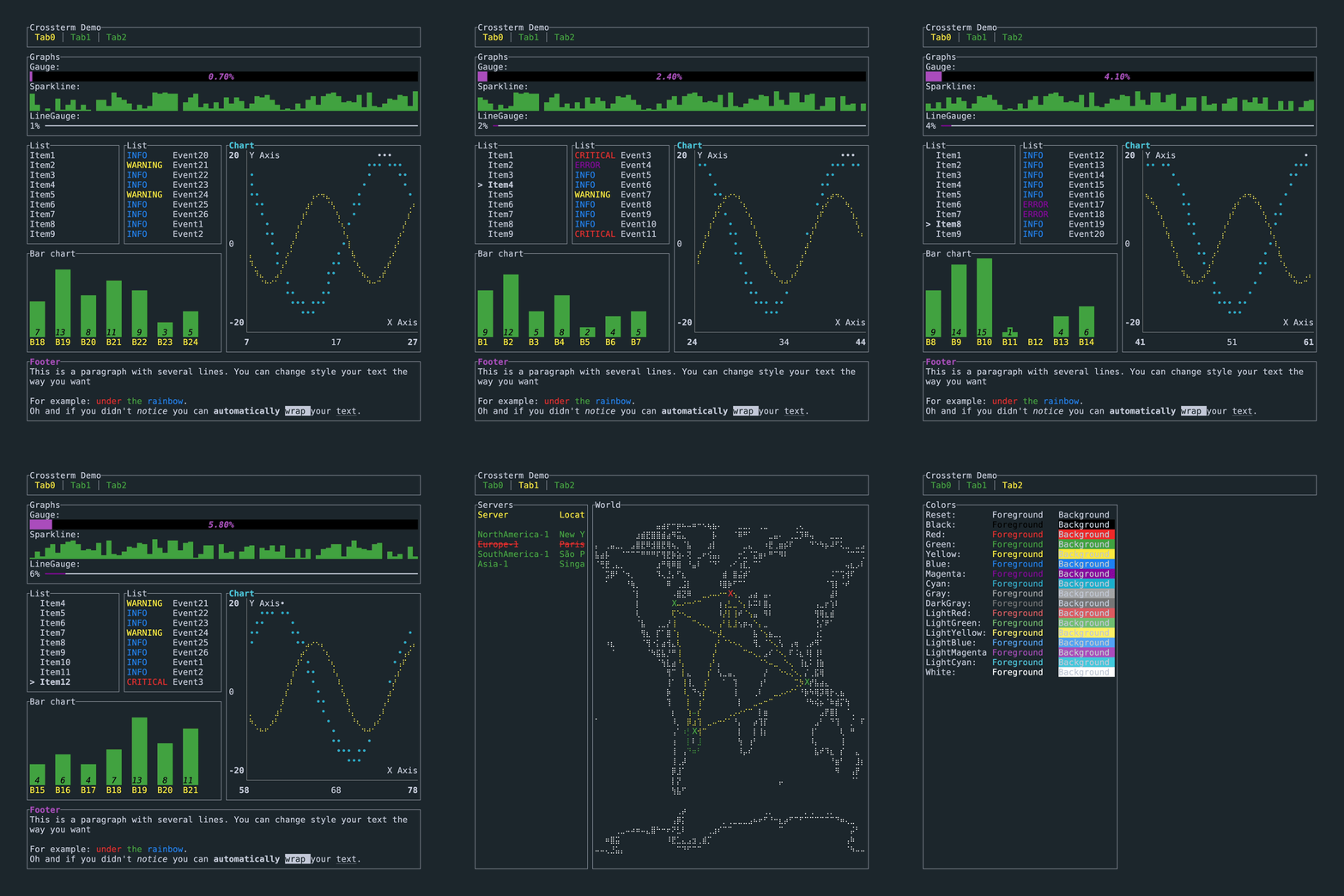
The demo shown in the gif above is available on all available backends.
|
||||
|
||||
```shell
|
||||
# crossterm
|
||||
cargo run --example demo
|
||||
# termion
|
||||
cargo run --example demo --no-default-features --features=termion
|
||||
# termwiz
|
||||
cargo run --example demo --no-default-features --features=termwiz
|
||||
```
|
||||
|
||||
The UI code for this is in [examples/demo/ui.rs](./examples/demo/ui.rs) while the application state
|
||||
is in [examples/demo/app.rs](./examples/demo/app.rs).
|
||||
|
||||
If the user interface contains glyphs that are not displayed correctly by your terminal, you may
|
||||
want to run the demo without those symbols:
|
||||
|
||||
```shell
|
||||
cargo run --example demo --release -- --tick-rate 200 --enhanced-graphics false
|
||||
```
|
||||
|
||||
More examples are available in the [examples](./examples/) folder.
|
||||
|
||||
## Widgets
|
||||
|
||||
### Built in
|
||||
@@ -182,21 +371,21 @@ More examples are available in the [examples](./examples/) folder.
|
||||
The library comes with the following
|
||||
[widgets](https://docs.rs/ratatui/latest/ratatui/widgets/index.html):
|
||||
|
||||
* [BarChart](https://docs.rs/ratatui/latest/ratatui/widgets/struct.BarChart.html)
|
||||
* [Block](https://docs.rs/ratatui/latest/ratatui/widgets/block/struct.Block.html)
|
||||
* [Calendar](https://docs.rs/ratatui/latest/ratatui/widgets/calendar/index.html)
|
||||
* [Canvas](https://docs.rs/ratatui/latest/ratatui/widgets/canvas/struct.Canvas.html) which allows
|
||||
- [BarChart](https://docs.rs/ratatui/latest/ratatui/widgets/struct.BarChart.html)
|
||||
- [Block](https://docs.rs/ratatui/latest/ratatui/widgets/block/struct.Block.html)
|
||||
- [Calendar](https://docs.rs/ratatui/latest/ratatui/widgets/calendar/index.html)
|
||||
- [Canvas](https://docs.rs/ratatui/latest/ratatui/widgets/canvas/struct.Canvas.html) which allows
|
||||
rendering [points, lines, shapes and a world
|
||||
map](https://docs.rs/ratatui/latest/ratatui/widgets/canvas/index.html)
|
||||
* [Chart](https://docs.rs/ratatui/latest/ratatui/widgets/struct.Chart.html)
|
||||
* [Clear](https://docs.rs/ratatui/latest/ratatui/widgets/struct.Clear.html)
|
||||
* [Gauge](https://docs.rs/ratatui/latest/ratatui/widgets/struct.Gauge.html)
|
||||
* [List](https://docs.rs/ratatui/latest/ratatui/widgets/struct.List.html)
|
||||
* [Paragraph](https://docs.rs/ratatui/latest/ratatui/widgets/struct.Paragraph.html)
|
||||
* [Scrollbar](https://docs.rs/ratatui/latest/ratatui/widgets/scrollbar/struct.Scrollbar.html)
|
||||
* [Sparkline](https://docs.rs/ratatui/latest/ratatui/widgets/struct.Sparkline.html)
|
||||
* [Table](https://docs.rs/ratatui/latest/ratatui/widgets/struct.Table.html)
|
||||
* [Tabs](https://docs.rs/ratatui/latest/ratatui/widgets/struct.Tabs.html)
|
||||
- [Chart](https://docs.rs/ratatui/latest/ratatui/widgets/struct.Chart.html)
|
||||
- [Clear](https://docs.rs/ratatui/latest/ratatui/widgets/struct.Clear.html)
|
||||
- [Gauge](https://docs.rs/ratatui/latest/ratatui/widgets/struct.Gauge.html)
|
||||
- [List](https://docs.rs/ratatui/latest/ratatui/widgets/struct.List.html)
|
||||
- [Paragraph](https://docs.rs/ratatui/latest/ratatui/widgets/struct.Paragraph.html)
|
||||
- [Scrollbar](https://docs.rs/ratatui/latest/ratatui/widgets/scrollbar/struct.Scrollbar.html)
|
||||
- [Sparkline](https://docs.rs/ratatui/latest/ratatui/widgets/struct.Sparkline.html)
|
||||
- [Table](https://docs.rs/ratatui/latest/ratatui/widgets/struct.Table.html)
|
||||
- [Tabs](https://docs.rs/ratatui/latest/ratatui/widgets/struct.Tabs.html)
|
||||
|
||||
Each widget has an associated example which can be found in the [examples](./examples/) folder. Run
|
||||
each examples with cargo (e.g. to run the gauge example `cargo run --example gauge`), and quit by
|
||||
@@ -207,31 +396,31 @@ be installed with `cargo install cargo-make`).
|
||||
|
||||
### Third-party libraries, bootstrapping templates and widgets
|
||||
|
||||
* [ansi-to-tui](https://github.com/uttarayan21/ansi-to-tui) — Convert ansi colored text to
|
||||
- [ansi-to-tui](https://github.com/uttarayan21/ansi-to-tui) — Convert ansi colored text to
|
||||
`ratatui::text::Text`
|
||||
* [color-to-tui](https://github.com/uttarayan21/color-to-tui) — Parse hex colors to
|
||||
- [color-to-tui](https://github.com/uttarayan21/color-to-tui) — Parse hex colors to
|
||||
`ratatui::style::Color`
|
||||
* [rust-tui-template](https://github.com/ratatui-org/rust-tui-template) — A template for bootstrapping a
|
||||
Rust TUI application with Tui-rs & crossterm
|
||||
* [simple-tui-rs](https://github.com/pmsanford/simple-tui-rs) — A simple example tui-rs app
|
||||
* [tui-builder](https://github.com/jkelleyrtp/tui-builder) — Batteries-included MVC framework for
|
||||
- [rust-tui-template](https://github.com/ratatui-org/rust-tui-template) — A template for
|
||||
bootstrapping a Rust TUI application with Tui-rs & crossterm
|
||||
- [simple-tui-rs](https://github.com/pmsanford/simple-tui-rs) — A simple example tui-rs app
|
||||
- [tui-builder](https://github.com/jkelleyrtp/tui-builder) — Batteries-included MVC framework for
|
||||
Tui-rs + Crossterm apps
|
||||
* [tui-clap](https://github.com/kegesch/tui-clap-rs) — Use clap-rs together with Tui-rs
|
||||
* [tui-log](https://github.com/kegesch/tui-log-rs) — Example of how to use logging with Tui-rs
|
||||
* [tui-logger](https://github.com/gin66/tui-logger) — Logger and Widget for Tui-rs
|
||||
* [tui-realm](https://github.com/veeso/tui-realm) — Tui-rs framework to build stateful applications
|
||||
- [tui-clap](https://github.com/kegesch/tui-clap-rs) — Use clap-rs together with Tui-rs
|
||||
- [tui-log](https://github.com/kegesch/tui-log-rs) — Example of how to use logging with Tui-rs
|
||||
- [tui-logger](https://github.com/gin66/tui-logger) — Logger and Widget for Tui-rs
|
||||
- [tui-realm](https://github.com/veeso/tui-realm) — Tui-rs framework to build stateful applications
|
||||
with a React/Elm inspired approach
|
||||
* [tui-realm-treeview](https://github.com/veeso/tui-realm-treeview) — Treeview component for
|
||||
- [tui-realm-treeview](https://github.com/veeso/tui-realm-treeview) — Treeview component for
|
||||
Tui-realm
|
||||
* [tui-rs-tree-widgets](https://github.com/EdJoPaTo/tui-rs-tree-widget): Widget for tree data
|
||||
- [tui-rs-tree-widgets](https://github.com/EdJoPaTo/tui-rs-tree-widget): Widget for tree data
|
||||
structures.
|
||||
* [tui-windows](https://github.com/markatk/tui-windows-rs) — Tui-rs abstraction to handle multiple
|
||||
- [tui-windows](https://github.com/markatk/tui-windows-rs) — Tui-rs abstraction to handle multiple
|
||||
windows and their rendering
|
||||
* [tui-textarea](https://github.com/rhysd/tui-textarea): Simple yet powerful multi-line text editor
|
||||
- [tui-textarea](https://github.com/rhysd/tui-textarea): Simple yet powerful multi-line text editor
|
||||
widget supporting several key shortcuts, undo/redo, text search, etc.
|
||||
* [tui-input](https://github.com/sayanarijit/tui-input): TUI input library supporting multiple
|
||||
- [tui-input](https://github.com/sayanarijit/tui-input): TUI input library supporting multiple
|
||||
backends and tui-rs.
|
||||
* [tui-term](https://github.com/a-kenji/tui-term): A pseudoterminal widget library
|
||||
- [tui-term](https://github.com/a-kenji/tui-term): A pseudoterminal widget library
|
||||
that enables the rendering of terminal applications as ratatui widgets.
|
||||
|
||||
## Apps
|
||||
@@ -244,11 +433,6 @@ Check out the list of more than 50 [Apps using
|
||||
You might want to checkout [Cursive](https://github.com/gyscos/Cursive) for an alternative solution
|
||||
to build text user interfaces in Rust.
|
||||
|
||||
## Contributors
|
||||
|
||||
[](https://github.com/ratatui-org/ratatui/graphs/contributors)
|
||||
|
||||
## Acknowledgments
|
||||
|
||||
Special thanks to [**Pavel Fomchenkov**](https://github.com/nawok) for his work in designing **an
|
||||
|
||||
28
RELEASE.md
28
RELEASE.md
@@ -7,19 +7,39 @@ actions](.github/workflows/cd.yml) and triggered by pushing a tag.
|
||||
[vhs](https://github.com/charmbracelet/vhs) (installation instructions in README).
|
||||
|
||||
```shell
|
||||
cargo build --example demo
|
||||
vhs examples/demo.tape --publish --quiet
|
||||
cargo build --example demo2
|
||||
vhs examples/demo2.tape
|
||||
```
|
||||
|
||||
Then update the link in the [examples README](./examples/README) and the main README. Avoid
|
||||
adding the gif to the git repo as binary files tend to bloat repositories.
|
||||
1. Switch branches to the images branch and copy demo2.gif to examples/, commit, and push.
|
||||
1. Grab the permalink from <https://github.com/ratatui-org/ratatui/blob/images/examples/demo2.gif> and
|
||||
append `?raw=true` to redirect to the actual image url. Then update the link in the main README.
|
||||
Avoid adding the gif to the git repo as binary files tend to bloat repositories.
|
||||
|
||||
1. Bump the version in [Cargo.toml](Cargo.toml).
|
||||
1. Bump versions in the doc comments of [lib.rs](src/lib.rs).
|
||||
1. Ensure [CHANGELOG.md](CHANGELOG.md) is updated. [git-cliff](https://github.com/orhun/git-cliff)
|
||||
can be used for generating the entries.
|
||||
1. Ensure that any breaking changes are documented in [BREAKING-CHANGES.md](./BREAKING-CHANGES.md)
|
||||
1. Commit and push the changes.
|
||||
1. Create a new tag: `git tag -a v[X.Y.Z]`
|
||||
1. Push the tag: `git push --tags`
|
||||
1. Wait for [Continuous Deployment](https://github.com/ratatui-org/ratatui/actions) workflow to
|
||||
finish.
|
||||
|
||||
## Alpha Releases
|
||||
|
||||
Alpha releases are automatically released every Saturday via [cd.yml](./.github/workflows/cd.yml)
|
||||
and can be manually be created when necessary by triggering the [Continuous
|
||||
Deployment](https://github.com/ratatui-org/ratatui/actions/workflows/cd.yml) workflow.
|
||||
|
||||
We automatically release an alpha release with a patch level bump + alpha.num weekly (and when we
|
||||
need to manually). E.g. the last release was 0.22.0, and the most recent alpha release is
|
||||
0.22.1-alpha.1.
|
||||
|
||||
These releases will have whatever happened to be in main at the time of release, so they're useful
|
||||
for apps that need to get releases from crates.io, but may contain more bugs and be generally less
|
||||
tested than normal releases.
|
||||
|
||||
See [#147](https://github.com/ratatui-org/ratatui/issues/147) and
|
||||
[#359](https://github.com/ratatui-org/ratatui/pull/359) for more info on the alpha release process.
|
||||
|
||||
BIN
assets/favicon.ico
Normal file
BIN
assets/favicon.ico
Normal file
Binary file not shown.
|
After Width: | Height: | Size: 15 KiB |
BIN
assets/logo.png
Normal file
BIN
assets/logo.png
Normal file

Binary file not shown.
|
After Width: | Height: | Size: 1.1 KiB |
73
benches/barchart.rs
Normal file
73
benches/barchart.rs
Normal file
@@ -0,0 +1,73 @@
|
||||
use criterion::{criterion_group, criterion_main, Bencher, BenchmarkId, Criterion};
|
||||
use rand::Rng;
|
||||
use ratatui::{
|
||||
buffer::Buffer,
|
||||
layout::Rect,
|
||||
prelude::Direction,
|
||||
widgets::{Bar, BarChart, BarGroup, Widget},
|
||||
};
|
||||
|
||||
/// Benchmark for rendering a barchart.
|
||||
pub fn barchart(c: &mut Criterion) {
|
||||
let mut group = c.benchmark_group("barchart");
|
||||
let mut rng = rand::thread_rng();
|
||||
|
||||
for data_count in [64, 256, 2048] {
|
||||
let data: Vec<Bar> = (0..data_count)
|
||||
.map(|i| {
|
||||
Bar::default()
|
||||
.label(format!("B{i}").into())
|
||||
.value(rng.gen_range(0..data_count))
|
||||
})
|
||||
.collect();
|
||||
|
||||
let bargroup = BarGroup::default().bars(&data);
|
||||
|
||||
// Render a basic barchart
|
||||
group.bench_with_input(
|
||||
BenchmarkId::new("render", data_count),
|
||||
&BarChart::default().data(bargroup.clone()),
|
||||
render,
|
||||
);
|
||||
|
||||
// Render an horizontal barchart
|
||||
group.bench_with_input(
|
||||
BenchmarkId::new("render_horizontal", data_count),
|
||||
&BarChart::default()
|
||||
.direction(Direction::Horizontal)
|
||||
.data(bargroup.clone()),
|
||||
render,
|
||||
);
|
||||
|
||||
// Render a barchart with multiple groups
|
||||
group.bench_with_input(
|
||||
BenchmarkId::new("render_grouped", data_count),
|
||||
&BarChart::default()
|
||||
// We call `data` multiple time to add multiple groups.
|
||||
// This is not a duplicated call.
|
||||
.data(bargroup.clone())
|
||||
.data(bargroup.clone())
|
||||
.data(bargroup.clone()),
|
||||
render,
|
||||
);
|
||||
}
|
||||
|
||||
group.finish();
|
||||
}
|
||||
|
||||
/// Render the widget in a classical size buffer
|
||||
fn render(bencher: &mut Bencher, barchart: &BarChart) {
|
||||
let mut buffer = Buffer::empty(Rect::new(0, 0, 200, 50));
|
||||
// We use `iter_batched` to clone the value in the setup function.
|
||||
// See https://github.com/ratatui-org/ratatui/pull/377.
|
||||
bencher.iter_batched(
|
||||
|| barchart.clone(),
|
||||
|bench_barchart| {
|
||||
bench_barchart.render(buffer.area, &mut buffer);
|
||||
},
|
||||
criterion::BatchSize::LargeInput,
|
||||
)
|
||||
}
|
||||
|
||||
criterion_group!(benches, barchart);
|
||||
criterion_main!(benches);
|
||||
@@ -21,8 +21,8 @@ body = """
|
||||
{% endif -%}
|
||||
|
||||
{% macro commit(commit) -%}
|
||||
- *({{commit.scope | default(value = "uncategorized")}})* {{ commit.message | upper_first }}
|
||||
([{{ commit.id | truncate(length=7, end="") }}]({{ "https://github.com/ratatui-org/ratatui/commit/" ~ commit.id }}))
|
||||
- [{{ commit.id | truncate(length=7, end="") }}]({{ "https://github.com/ratatui-org/ratatui/commit/" ~ commit.id }})
|
||||
*({{commit.scope | default(value = "uncategorized") | lower }})* {{ commit.message | upper_first }}
|
||||
{%- if commit.breaking %} [**breaking**]{% endif %}
|
||||
{%- if commit.body %}
|
||||
|
||||
|
||||
@@ -1,2 +1,3 @@
|
||||
ignore:
|
||||
- "examples"
|
||||
- "benches"
|
||||
|
||||
@@ -6,9 +6,10 @@ VHS has a problem rendering some background color transitions, which shows up in
|
||||
below. See <https://github.com/charmbracelet/vhs/issues/344> for more info. These problems don't
|
||||
occur in a terminal.
|
||||
|
||||
## Demo ([demo.rs](./demo/))
|
||||
## Demo
|
||||
|
||||
This is the demo example from the main README. It is available for each of the backends.
|
||||
This is the previous demo example from the main README. It is available for each of the backends. Source:
|
||||
[demo.rs](./demo/).
|
||||
|
||||
```shell
|
||||
cargo run --example=demo --features=crossterm
|
||||
@@ -18,7 +19,21 @@ cargo run --example=demo --no-default-features --features=termwiz
|
||||
|
||||
![Demo][demo.gif]
|
||||
|
||||
## Barchart ([barchart.rs](./barchart.rs)
|
||||
## Hello World
|
||||
|
||||
This is a pretty boring example, but it contains some good documentation
|
||||
on writing tui apps. Source: [hello_world.rs](./hello_world.rs).
|
||||
|
||||
```shell
|
||||
cargo run --example=hello_world --features=crossterm
|
||||
```
|
||||
|
||||
![Hello World][hello_world.gif]
|
||||
|
||||
## Barchart
|
||||
|
||||
Demonstrates the [`BarChart`](https://docs.rs/ratatui/latest/ratatui/widgets/struct.BarChart.html)
|
||||
widget. Source: [barchart.rs](./barchart.rs).
|
||||
|
||||
```shell
|
||||
cargo run --example=barchart --features=crossterm
|
||||
@@ -26,7 +41,10 @@ cargo run --example=barchart --features=crossterm
|
||||
|
||||
![Barchart][barchart.gif]
|
||||
|
||||
## Block ([block.rs](./block.rs))
|
||||
## Block
|
||||
|
||||
Demonstrates the [`Block`](https://docs.rs/ratatui/latest/ratatui/widgets/block/struct.Block.html)
|
||||
widget. Source: [block.rs](./block.rs).
|
||||
|
||||
```shell
|
||||
cargo run --example=block --features=crossterm
|
||||
@@ -34,15 +52,23 @@ cargo run --example=block --features=crossterm
|
||||
|
||||
![Block][block.gif]
|
||||
|
||||
## Calendar ([calendar.rs](./calendar.rs))
|
||||
## Calendar
|
||||
|
||||
Demonstrates the [`Calendar`](https://docs.rs/ratatui/latest/ratatui/widgets/calendar/index.html)
|
||||
widget. Source: [calendar.rs](./calendar.rs).
|
||||
|
||||
```shell
|
||||
cargo run --example=calendar --features=crossterm widget-calendar
|
||||
cargo run --example=calendar --features="crossterm widget-calendar"
|
||||
```
|
||||
|
||||
![Calendar][calendar.gif]
|
||||
|
||||
## Canvas ([canvas.rs](./canvas.rs))
|
||||
## Canvas
|
||||
|
||||
Demonstrates the [`Canvas`](https://docs.rs/ratatui/latest/ratatui/widgets/canvas/index.html) widget
|
||||
and related shapes in the
|
||||
[`canvas`](https://docs.rs/ratatui/latest/ratatui/widgets/canvas/index.html) module. Source:
|
||||
[canvas.rs](./canvas.rs).
|
||||
|
||||
```shell
|
||||
cargo run --example=canvas --features=crossterm
|
||||
@@ -50,7 +76,10 @@ cargo run --example=canvas --features=crossterm
|
||||
|
||||
![Canvas][canvas.gif]
|
||||
|
||||
## Chart ([chart.rs](./chart.rs))
|
||||
## Chart
|
||||
|
||||
Demonstrates the [`Chart`](https://docs.rs/ratatui/latest/ratatui/widgets/struct.Chart.html) widget.
|
||||
Source: [chart.rs](./chart.rs).
|
||||
|
||||
```shell
|
||||
cargo run --example=chart --features=crossterm
|
||||
@@ -58,7 +87,10 @@ cargo run --example=chart --features=crossterm
|
||||
|
||||
![Chart][chart.gif]
|
||||
|
||||
## Colors ([colors.rs](./colors.rs))
|
||||
## Colors
|
||||
|
||||
Demonstrates the available [`Color`](https://docs.rs/ratatui/latest/ratatui/style/enum.Color.html)
|
||||
options. These can be used in any style field. Source: [colors.rs](./colors.rs).
|
||||
|
||||
```shell
|
||||
cargo run --example=colors --features=crossterm
|
||||
@@ -66,21 +98,38 @@ cargo run --example=colors --features=crossterm
|
||||
|
||||
![Colors][colors.gif]
|
||||
|
||||
## Custom Widget ([custom_widget.rs](./custom_widget.rs))
|
||||
## Colors (RGB)
|
||||
|
||||
Demonstrates the available RGB
|
||||
[`Color`](https://docs.rs/ratatui/latest/ratatui/style/enum.Color.html) options. These can be used
|
||||
in any style field. Source: [colors_rgb.rs](./colors_rgb.rs).
|
||||
|
||||
```shell
|
||||
cargo run --example=colors_rgb --features=crossterm
|
||||
```
|
||||
|
||||
![Colors RGB][colors_rgb.gif]
|
||||
|
||||
## Custom Widget
|
||||
|
||||
Demonstrates how to implement the
|
||||
[`Widget`](https://docs.rs/ratatui/latest/ratatui/widgets/trait.Widget.html) trait. Source:
|
||||
[custom_widget.rs](./custom_widget.rs).
|
||||
|
||||
```shell
|
||||
cargo run --example=custom_widget --features=crossterm
|
||||
```
|
||||
|
||||
This is not a particularly exciting example visually, but it demonstrates how to implement your own widget.
|
||||
|
||||
![Custom Widget][custom_widget.gif]
|
||||
|
||||
## Gauge ([gauge.rs](./gauge.rs))
|
||||
## Gauge
|
||||
|
||||
Please note: the background renders poorly when we generate this example using VHS.
|
||||
This problem doesn't generally happen during normal rendering in a terminal.
|
||||
See <https://github.com/charmbracelet/vhs/issues/344> for more details
|
||||
Demonstrates the [`Gauge`](https://docs.rs/ratatui/latest/ratatui/widgets/struct.Gauge.html) widget.
|
||||
Source: [gauge.rs](./gauge.rs).
|
||||
|
||||
> [!NOTE] The backgrounds render poorly when we generate this example using VHS. This problem
|
||||
> doesn't generally happen during normal rendering in a terminal. See
|
||||
> [vhs#344](https://github.com/charmbracelet/vhs/issues/344) for more details.
|
||||
|
||||
```shell
|
||||
cargo run --example=gauge --features=crossterm
|
||||
@@ -88,18 +137,11 @@ cargo run --example=gauge --features=crossterm
|
||||
|
||||
![Gauge][gauge.gif]
|
||||
|
||||
## Hello World ([hello_world.rs](./hello_world.rs))
|
||||
## Inline
|
||||
|
||||
```shell
|
||||
cargo run --example=hello_world --features=crossterm
|
||||
```
|
||||
|
||||
This is a pretty boring example, but it contains some good comments of documentation on some of the
|
||||
standard approaches to writing tui apps.
|
||||
|
||||
![Hello World][hello_world.gif]
|
||||
|
||||
## Inline ([inline.rs](./inline.rs))
|
||||
Demonstrates the
|
||||
[`Inline`](https://docs.rs/ratatui/latest/ratatui/terminal/enum.Viewport.html#variant.Inline)
|
||||
Viewport mode for ratatui apps. Source: [inline.rs](./inline.rs).
|
||||
|
||||
```shell
|
||||
cargo run --example=inline --features=crossterm
|
||||
@@ -107,7 +149,10 @@ cargo run --example=inline --features=crossterm
|
||||
|
||||
![Inline][inline.gif]
|
||||
|
||||
## Layout ([layout.rs](./layout.rs))
|
||||
## Layout
|
||||
|
||||
Demonstrates the [`Layout`](https://docs.rs/ratatui/latest/ratatui/layout/struct.Layout.html) and
|
||||
interaction between each constraint. Source: [layout.rs](./layout.rs).
|
||||
|
||||
```shell
|
||||
cargo run --example=layout --features=crossterm
|
||||
@@ -115,7 +160,10 @@ cargo run --example=layout --features=crossterm
|
||||
|
||||
![Layout][layout.gif]
|
||||
|
||||
## List ([list.rs](./list.rs))
|
||||
## List
|
||||
|
||||
Demonstrates the [`List`](https://docs.rs/ratatui/latest/ratatui/widgets/struct.List.html) widget.
|
||||
Source: [list.rs](./list.rs).
|
||||
|
||||
```shell
|
||||
cargo run --example=list --features=crossterm
|
||||
@@ -123,7 +171,11 @@ cargo run --example=list --features=crossterm
|
||||
|
||||
![List][list.gif]
|
||||
|
||||
## Modifiers ([modifiers.rs](./modifiers.rs))
|
||||
## Modifiers
|
||||
|
||||
Demonstrates the style
|
||||
[`Modifiers`](https://docs.rs/ratatui/latest/ratatui/style/struct.Modifier.html). Source:
|
||||
[modifiers.rs](./modifiers.rs).
|
||||
|
||||
```shell
|
||||
cargo run --example=modifiers --features=crossterm
|
||||
@@ -131,7 +183,10 @@ cargo run --example=modifiers --features=crossterm
|
||||
|
||||
![Modifiers][modifiers.gif]
|
||||
|
||||
## Panic ([panic.rs](./panic.rs))
|
||||
## Panic
|
||||
|
||||
Demonstrates how to handle panics by ensuring that panic messages are written correctly to the
|
||||
screen. Source: [panic.rs](./panic.rs).
|
||||
|
||||
```shell
|
||||
cargo run --example=panic --features=crossterm
|
||||
@@ -139,7 +194,10 @@ cargo run --example=panic --features=crossterm
|
||||
|
||||
![Panic][panic.gif]
|
||||
|
||||
## Paragraph ([paragraph.rs](./paragraph.rs))
|
||||
## Paragraph
|
||||
|
||||
Demonstrates the [`Paragraph`](https://docs.rs/ratatui/latest/ratatui/widgets/struct.Paragraph.html)
|
||||
widget. Source: [paragraph.rs](./paragraph.rs)
|
||||
|
||||
```shell
|
||||
cargo run --example=paragraph --features=crossterm
|
||||
@@ -147,19 +205,27 @@ cargo run --example=paragraph --features=crossterm
|
||||
|
||||
![Paragraph][paragraph.gif]
|
||||
|
||||
## Popup ([popup.rs](./popup.rs))
|
||||
## Popup
|
||||
|
||||
Demonstrates how to render a widget over the top of previously rendered widgets using the
|
||||
[`Clear`](https://docs.rs/ratatui/latest/ratatui/widgets/struct.Clear.html) widget. Source:
|
||||
[popup.rs](./popup.rs).
|
||||
|
||||
>
|
||||
```shell
|
||||
cargo run --example=popup --features=crossterm
|
||||
```
|
||||
|
||||
Please note: the background renders poorly when we generate this example using VHS.
|
||||
This problem doesn't generally happen during normal rendering in a terminal.
|
||||
See <https://github.com/charmbracelet/vhs/issues/344> for more details
|
||||
> [!NOTE] The background renders poorly after the popup when we generate this example using VHS.
|
||||
> This problem doesn't generally happen during normal rendering in a terminal. See
|
||||
> [vhs#344](https://github.com/charmbracelet/vhs/issues/344) for more details.
|
||||
|
||||
![Popup][popup.gif]
|
||||
|
||||
## Scrollbar ([scrollbar.rs](./scrollbar.rs))
|
||||
## Scrollbar
|
||||
|
||||
Demonstrates the [`Scrollbar`](https://docs.rs/ratatui/latest/ratatui/widgets/struct.Scrollbar.html)
|
||||
widget. Source: [scrollbar.rs](./scrollbar.rs).
|
||||
|
||||
```shell
|
||||
cargo run --example=scrollbar --features=crossterm
|
||||
@@ -167,7 +233,14 @@ cargo run --example=scrollbar --features=crossterm
|
||||
|
||||
![Scrollbar][scrollbar.gif]
|
||||
|
||||
## Sparkline ([sparkline.rs](./sparkline.rs))
|
||||
## Sparkline
|
||||
|
||||
Demonstrates the [`Sparkline`](https://docs.rs/ratatui/latest/ratatui/widgets/struct.Sparkline.html)
|
||||
widget. Source: [sparkline.rs](./sparkline.rs).
|
||||
|
||||
> [!NOTE] The background renders poorly in the second sparkline when we generate this example using
|
||||
> VHS. This problem doesn't generally happen during normal rendering in a terminal. See
|
||||
> [vhs#344](https://github.com/charmbracelet/vhs/issues/344) for more details.
|
||||
|
||||
```shell
|
||||
cargo run --example=sparkline --features=crossterm
|
||||
@@ -175,7 +248,10 @@ cargo run --example=sparkline --features=crossterm
|
||||
|
||||
![Sparkline][sparkline.gif]
|
||||
|
||||
## Table ([table.rs](./table.rs))
|
||||
## Table
|
||||
|
||||
Demonstrates the [`Table`](https://docs.rs/ratatui/latest/ratatui/widgets/struct.Table.html) widget.
|
||||
Source: [table.rs](./table.rs).
|
||||
|
||||
```shell
|
||||
cargo run --example=table --features=crossterm
|
||||
@@ -183,7 +259,10 @@ cargo run --example=table --features=crossterm
|
||||
|
||||
![Table][table.gif]
|
||||
|
||||
## Tabs ([tabs.rs](./tabs.rs))
|
||||
## Tabs
|
||||
|
||||
Demonstrates the [`Tabs`](https://docs.rs/ratatui/latest/ratatui/widgets/struct.Tabs.html) widget.
|
||||
Source: [tabs.rs](./tabs.rs).
|
||||
|
||||
```shell
|
||||
cargo run --example=tabs --features=crossterm
|
||||
@@ -191,7 +270,12 @@ cargo run --example=tabs --features=crossterm
|
||||
|
||||
![Tabs][tabs.gif]
|
||||
|
||||
## User Input ([user_input.rs](./user_input.rs))
|
||||
## User Input
|
||||
|
||||
Demonstrates one approach to accepting user input. Source [user_input.rs](./user_input.rs).
|
||||
|
||||
> [!NOTE] Consider using [`tui-textarea`](https://crates.io/crates/tui-textarea) or
|
||||
> [`tui-input`](https://crates.io/crates/tui-input) crates for more functional text entry UIs.
|
||||
|
||||
```shell
|
||||
cargo run --example=user_input --features=crossterm
|
||||
@@ -205,36 +289,29 @@ These are generated with `vhs publish examples/xxx.gif`
|
||||
|
||||
To update these examples in bulk:
|
||||
```shell
|
||||
# build to ensure that running the examples doesn't have to wait so long
|
||||
cargo build --examples --features=crossterm,all-widgets
|
||||
for i in examples/*.tape
|
||||
do
|
||||
echo -n "[${i:s:examples/:::s:.tape:.gif:}]: "
|
||||
vhs $i --publish --quiet
|
||||
# may need to adjust this depending on if you see rate limiting from VHS
|
||||
sleep 1
|
||||
done
|
||||
examples/generate.bash
|
||||
```
|
||||
-->
|
||||
[barchart.gif]: https://vhs.charm.sh/vhs-6ioxdeRBVkVpyXcjIEVaJU.gif
|
||||
[block.gif]: https://vhs.charm.sh/vhs-1TyeDa5GN7kewhNjKxJ4Br.gif
|
||||
[calendar.gif]: https://vhs.charm.sh/vhs-1dBcpMSSP80WkBgm4lBhNo.gif
|
||||
[canvas.gif]: https://vhs.charm.sh/vhs-4zeWEPF6bLEFSHuJrvaHlN.gif
|
||||
[chart.gif]: https://vhs.charm.sh/vhs-zRzsE2AwRixQhcWMTAeF1.gif
|
||||
[colors.gif]: https://vhs.charm.sh/vhs-2ZCqYbTbXAaASncUeWkt1z.gif
|
||||
[custom_widget.gif]: https://vhs.charm.sh/vhs-32mW1TpkrovTcm79QXmBSu.gif
|
||||
[demo.gif]: https://vhs.charm.sh/vhs-tF0QbuPbtHgUeG0sTVgFr.gif
|
||||
[gauge.gif]: https://vhs.charm.sh/vhs-2rvSeP5r4lRkGTzNCKpm9a.gif
|
||||
[hello_world.gif]: https://vhs.charm.sh/vhs-3CKUwxFuQi8oKQMS5zkPfQ.gif
|
||||
[inline.gif]: https://vhs.charm.sh/vhs-miRl1mosKFoJV7LjjvF4T.gif
|
||||
[layout.gif]: https://vhs.charm.sh/vhs-1ZNoNLNlLtkJXpgg9nCV5e.gif
|
||||
[list.gif]: https://vhs.charm.sh/vhs-4goo9reeUM9r0nYb54R7SP.gif
|
||||
[modifiers.gif]: https://vhs.charm.sh/vhs-2ovGBz5l3tfRGdZ7FCw0am.gif
|
||||
[panic.gif]: https://vhs.charm.sh/vhs-HrvKCHV4yeN69fb1EadTH.gif
|
||||
[paragraph.gif]: https://vhs.charm.sh/vhs-2qIPDi79DUmtmeNDEeHVEF.gif
|
||||
[popup.gif]: https://vhs.charm.sh/vhs-2QnC682AUeNYNXcjNlKTyp.gif
|
||||
[scrollbar.gif]: https://vhs.charm.sh/vhs-2p13MMFreW7Gwt1xIonIWu.gif
|
||||
[sparkline.gif]: https://vhs.charm.sh/vhs-4t59Vxw5Za33Rtvt9QrftA.gif
|
||||
[table.gif]: https://vhs.charm.sh/vhs-6IrGHgT385DqA6xnwGF9oD.gif
|
||||
[tabs.gif]: https://vhs.charm.sh/vhs-61WkbfhyDk0kbkjncErdHT.gif
|
||||
[user_input.gif]: https://vhs.charm.sh/vhs-4fxUgkpEWcVyBRXuyYKODY.gif
|
||||
[barchart.gif]: https://github.com/ratatui-org/ratatui/blob/images/examples/barchart.gif?raw=true
|
||||
[block.gif]: https://github.com/ratatui-org/ratatui/blob/images/examples/block.gif?raw=true
|
||||
[calendar.gif]: https://github.com/ratatui-org/ratatui/blob/images/examples/calendar.gif?raw=true
|
||||
[canvas.gif]: https://github.com/ratatui-org/ratatui/blob/images/examples/canvas.gif?raw=true
|
||||
[chart.gif]: https://github.com/ratatui-org/ratatui/blob/images/examples/chart.gif?raw=true
|
||||
[colors.gif]: https://github.com/ratatui-org/ratatui/blob/images/examples/colors.gif?raw=true
|
||||
[colors_rgb.gif]: https://github.com/ratatui-org/ratatui/blob/images/examples/colors_rgb.gif?raw=true
|
||||
[custom_widget.gif]: https://github.com/ratatui-org/ratatui/blob/images/examples/custom_widget.gif?raw=true
|
||||
[demo.gif]: https://github.com/ratatui-org/ratatui/blob/images/examples/demo.gif?raw=true
|
||||
[gauge.gif]: https://github.com/ratatui-org/ratatui/blob/images/examples/gauge.gif?raw=true
|
||||
[hello_world.gif]: https://github.com/ratatui-org/ratatui/blob/images/examples/hello_world.gif?raw=true
|
||||
[inline.gif]: https://github.com/ratatui-org/ratatui/blob/images/examples/inline.gif?raw=true
|
||||
[layout.gif]: https://github.com/ratatui-org/ratatui/blob/images/examples/layout.gif?raw=true
|
||||
[list.gif]: https://github.com/ratatui-org/ratatui/blob/images/examples/list.gif?raw=true
|
||||
[modifiers.gif]: https://github.com/ratatui-org/ratatui/blob/images/examples/modifiers.gif?raw=true
|
||||
[panic.gif]: https://github.com/ratatui-org/ratatui/blob/images/examples/panic.gif?raw=true
|
||||
[paragraph.gif]: https://github.com/ratatui-org/ratatui/blob/images/examples/paragraph.gif?raw=true
|
||||
[popup.gif]: https://github.com/ratatui-org/ratatui/blob/images/examples/popup.gif?raw=true
|
||||
[scrollbar.gif]: https://github.com/ratatui-org/ratatui/blob/images/examples/scrollbar.gif?raw=true
|
||||
[sparkline.gif]: https://github.com/ratatui-org/ratatui/blob/images/examples/sparkline.gif?raw=true
|
||||
[table.gif]: https://github.com/ratatui-org/ratatui/blob/images/examples/table.gif?raw=true
|
||||
[tabs.gif]: https://github.com/ratatui-org/ratatui/blob/images/examples/tabs.gif?raw=true
|
||||
[user_input.gif]: https://github.com/ratatui-org/ratatui/blob/images/examples/user_input.gif?raw=true
|
||||
|
||||
@@ -136,11 +136,10 @@ fn run_app<B: Backend>(
|
||||
}
|
||||
}
|
||||
|
||||
fn ui<B: Backend>(f: &mut Frame<B>, app: &App) {
|
||||
fn ui(f: &mut Frame, app: &App) {
|
||||
let chunks = Layout::default()
|
||||
.direction(Direction::Vertical)
|
||||
.margin(2)
|
||||
.constraints([Constraint::Ratio(1, 3), Constraint::Ratio(2, 3)].as_ref())
|
||||
.constraints([Constraint::Ratio(1, 3), Constraint::Ratio(2, 3)])
|
||||
.split(f.size());
|
||||
|
||||
let barchart = BarChart::default()
|
||||
@@ -153,7 +152,7 @@ fn ui<B: Backend>(f: &mut Frame<B>, app: &App) {
|
||||
|
||||
let chunks = Layout::default()
|
||||
.direction(Direction::Horizontal)
|
||||
.constraints([Constraint::Percentage(50), Constraint::Percentage(50)].as_ref())
|
||||
.constraints([Constraint::Percentage(50), Constraint::Percentage(50)])
|
||||
.split(chunks[1]);
|
||||
|
||||
draw_bar_with_group_labels(f, app, chunks[0]);
|
||||
@@ -199,10 +198,7 @@ fn create_groups<'a>(app: &'a App, combine_values_and_labels: bool) -> Vec<BarGr
|
||||
.collect()
|
||||
}
|
||||
|
||||
fn draw_bar_with_group_labels<B>(f: &mut Frame<B>, app: &App, area: Rect)
|
||||
where
|
||||
B: Backend,
|
||||
{
|
||||
fn draw_bar_with_group_labels(f: &mut Frame, app: &App, area: Rect) {
|
||||
let groups = create_groups(app, false);
|
||||
|
||||
let mut barchart = BarChart::default()
|
||||
@@ -229,10 +225,7 @@ where
|
||||
}
|
||||
}
|
||||
|
||||
fn draw_horizontal_bars<B>(f: &mut Frame<B>, app: &App, area: Rect)
|
||||
where
|
||||
B: Backend,
|
||||
{
|
||||
fn draw_horizontal_bars(f: &mut Frame, app: &App, area: Rect) {
|
||||
let groups = create_groups(app, true);
|
||||
|
||||
let mut barchart = BarChart::default()
|
||||
@@ -261,10 +254,7 @@ where
|
||||
}
|
||||
}
|
||||
|
||||
fn draw_legend<B>(f: &mut Frame<B>, area: Rect)
|
||||
where
|
||||
B: Backend,
|
||||
{
|
||||
fn draw_legend(f: &mut Frame, area: Rect) {
|
||||
let text = vec![
|
||||
Line::from(Span::styled(
|
||||
TOTAL_REVENUE,
|
||||
|
||||
@@ -1,6 +1,7 @@
|
||||
# This is a vhs script. See https://github.com/charmbracelet/vhs for more info.
|
||||
# To run this script, install vhs and run `vhs ./examples/barchart.tape`
|
||||
Output "target/barchart.gif"
|
||||
Set Theme "OceanicMaterial"
|
||||
Set Width 1200
|
||||
Set Height 800
|
||||
Hide
|
||||
|
||||
@@ -21,7 +21,6 @@ use ratatui::{
|
||||
|
||||
// These type aliases are used to make the code more readable by reducing repetition of the generic
|
||||
// types. They are not necessary for the functionality of the code.
|
||||
type Frame<'a> = ratatui::Frame<'a, CrosstermBackend<Stdout>>;
|
||||
type Terminal = ratatui::Terminal<CrosstermBackend<Stdout>>;
|
||||
type Result<T> = std::result::Result<T, Box<dyn Error>>;
|
||||
|
||||
@@ -106,18 +105,18 @@ fn ui(frame: &mut Frame) {
|
||||
fn calculate_layout(area: Rect) -> (Rect, Vec<Vec<Rect>>) {
|
||||
let layout = Layout::default()
|
||||
.direction(Direction::Vertical)
|
||||
.constraints(vec![Constraint::Length(1), Constraint::Min(0)])
|
||||
.constraints([Constraint::Length(1), Constraint::Min(0)])
|
||||
.split(area);
|
||||
let title_area = layout[0];
|
||||
let main_areas = Layout::default()
|
||||
.direction(Direction::Vertical)
|
||||
.constraints(vec![Constraint::Max(4); 9])
|
||||
.constraints([Constraint::Max(4); 9])
|
||||
.split(layout[1])
|
||||
.iter()
|
||||
.map(|&area| {
|
||||
Layout::default()
|
||||
.direction(Direction::Horizontal)
|
||||
.constraints(vec![Constraint::Percentage(50), Constraint::Percentage(50)])
|
||||
.constraints([Constraint::Percentage(50), Constraint::Percentage(50)])
|
||||
.split(area)
|
||||
.to_vec()
|
||||
})
|
||||
|
||||
@@ -1,7 +1,7 @@
|
||||
# This is a vhs script. See https://github.com/charmbracelet/vhs for more info.
|
||||
# To run this script, install vhs and run `vhs ./examples/block.tape`
|
||||
Output "target/block.gif"
|
||||
Set Theme "Builtin Dark"
|
||||
Set Theme "OceanicMaterial"
|
||||
Set Width 1200
|
||||
Set Height 1200
|
||||
Hide
|
||||
|
||||
@@ -16,7 +16,7 @@ fn main() -> Result<(), Box<dyn Error>> {
|
||||
let mut terminal = Terminal::new(backend)?;
|
||||
|
||||
loop {
|
||||
let _ = terminal.draw(|f| draw(f));
|
||||
let _ = terminal.draw(draw);
|
||||
|
||||
if let Event::Key(key) = event::read()? {
|
||||
#[allow(clippy::single_match)]
|
||||
@@ -35,7 +35,7 @@ fn main() -> Result<(), Box<dyn Error>> {
|
||||
Ok(())
|
||||
}
|
||||
|
||||
fn draw<B: Backend>(f: &mut Frame<B>) {
|
||||
fn draw(f: &mut Frame) {
|
||||
let app_area = f.size();
|
||||
|
||||
let calarea = Rect {
|
||||
@@ -69,14 +69,11 @@ fn split_rows(area: &Rect) -> Rc<[Rect]> {
|
||||
let list_layout = Layout::default()
|
||||
.direction(Direction::Vertical)
|
||||
.margin(0)
|
||||
.constraints(
|
||||
[
|
||||
Constraint::Percentage(33),
|
||||
Constraint::Percentage(33),
|
||||
Constraint::Percentage(33),
|
||||
]
|
||||
.as_ref(),
|
||||
);
|
||||
.constraints([
|
||||
Constraint::Percentage(33),
|
||||
Constraint::Percentage(33),
|
||||
Constraint::Percentage(33),
|
||||
]);
|
||||
|
||||
list_layout.split(*area)
|
||||
}
|
||||
@@ -85,15 +82,12 @@ fn split_cols(area: &Rect) -> Rc<[Rect]> {
|
||||
let list_layout = Layout::default()
|
||||
.direction(Direction::Horizontal)
|
||||
.margin(0)
|
||||
.constraints(
|
||||
[
|
||||
Constraint::Percentage(25),
|
||||
Constraint::Percentage(25),
|
||||
Constraint::Percentage(25),
|
||||
Constraint::Percentage(25),
|
||||
]
|
||||
.as_ref(),
|
||||
);
|
||||
.constraints([
|
||||
Constraint::Percentage(25),
|
||||
Constraint::Percentage(25),
|
||||
Constraint::Percentage(25),
|
||||
Constraint::Percentage(25),
|
||||
]);
|
||||
|
||||
list_layout.split(*area)
|
||||
}
|
||||
|
||||
@@ -1,6 +1,7 @@
|
||||
# This is a vhs script. See https://github.com/charmbracelet/vhs for more info.
|
||||
# To run this script, install vhs and run `vhs ./examples/calendar.tape`
|
||||
Output "target/calendar.gif"
|
||||
Set Theme "OceanicMaterial"
|
||||
Set Width 1200
|
||||
Set Height 800
|
||||
Hide
|
||||
|
||||
@@ -1,28 +1,29 @@
|
||||
use std::{
|
||||
error::Error,
|
||||
io,
|
||||
io::{self, stdout, Stdout},
|
||||
time::{Duration, Instant},
|
||||
};
|
||||
|
||||
use crossterm::{
|
||||
event::{self, DisableMouseCapture, EnableMouseCapture, Event, KeyCode},
|
||||
execute,
|
||||
event::{self, Event, KeyCode},
|
||||
terminal::{disable_raw_mode, enable_raw_mode, EnterAlternateScreen, LeaveAlternateScreen},
|
||||
ExecutableCommand,
|
||||
};
|
||||
use ratatui::{
|
||||
prelude::*,
|
||||
widgets::{canvas::*, *},
|
||||
};
|
||||
|
||||
fn main() -> io::Result<()> {
|
||||
App::run()
|
||||
}
|
||||
|
||||
struct App {
|
||||
x: f64,
|
||||
y: f64,
|
||||
ball: Rectangle,
|
||||
ball: Circle,
|
||||
playground: Rect,
|
||||
vx: f64,
|
||||
vy: f64,
|
||||
dir_x: bool,
|
||||
dir_y: bool,
|
||||
tick_count: u64,
|
||||
marker: Marker,
|
||||
}
|
||||
@@ -32,155 +33,166 @@ impl App {
|
||||
App {
|
||||
x: 0.0,
|
||||
y: 0.0,
|
||||
ball: Rectangle {
|
||||
x: 10.0,
|
||||
y: 30.0,
|
||||
width: 10.0,
|
||||
height: 10.0,
|
||||
ball: Circle {
|
||||
x: 20.0,
|
||||
y: 40.0,
|
||||
radius: 10.0,
|
||||
color: Color::Yellow,
|
||||
},
|
||||
playground: Rect::new(10, 10, 100, 100),
|
||||
playground: Rect::new(10, 10, 200, 100),
|
||||
vx: 1.0,
|
||||
vy: 1.0,
|
||||
dir_x: true,
|
||||
dir_y: true,
|
||||
tick_count: 0,
|
||||
marker: Marker::Dot,
|
||||
}
|
||||
}
|
||||
|
||||
fn on_tick(&mut self) {
|
||||
self.tick_count += 1;
|
||||
// only change marker every 4 ticks (1s) to avoid stroboscopic effect
|
||||
if (self.tick_count % 4) == 0 {
|
||||
self.marker = match self.marker {
|
||||
Marker::Dot => Marker::Block,
|
||||
Marker::Block => Marker::Bar,
|
||||
Marker::Bar => Marker::Braille,
|
||||
Marker::Braille => Marker::Dot,
|
||||
};
|
||||
}
|
||||
if self.ball.x < self.playground.left() as f64
|
||||
|| self.ball.x + self.ball.width > self.playground.right() as f64
|
||||
{
|
||||
self.dir_x = !self.dir_x;
|
||||
}
|
||||
if self.ball.y < self.playground.top() as f64
|
||||
|| self.ball.y + self.ball.height > self.playground.bottom() as f64
|
||||
{
|
||||
self.dir_y = !self.dir_y;
|
||||
}
|
||||
|
||||
if self.dir_x {
|
||||
self.ball.x += self.vx;
|
||||
} else {
|
||||
self.ball.x -= self.vx;
|
||||
}
|
||||
|
||||
if self.dir_y {
|
||||
self.ball.y += self.vy;
|
||||
} else {
|
||||
self.ball.y -= self.vy
|
||||
}
|
||||
}
|
||||
}
|
||||
|
||||
fn main() -> Result<(), Box<dyn Error>> {
|
||||
// setup terminal
|
||||
enable_raw_mode()?;
|
||||
let mut stdout = io::stdout();
|
||||
execute!(stdout, EnterAlternateScreen, EnableMouseCapture)?;
|
||||
let backend = CrosstermBackend::new(stdout);
|
||||
let mut terminal = Terminal::new(backend)?;
|
||||
|
||||
// create app and run it
|
||||
let tick_rate = Duration::from_millis(250);
|
||||
let app = App::new();
|
||||
let res = run_app(&mut terminal, app, tick_rate);
|
||||
|
||||
// restore terminal
|
||||
disable_raw_mode()?;
|
||||
execute!(
|
||||
terminal.backend_mut(),
|
||||
LeaveAlternateScreen,
|
||||
DisableMouseCapture
|
||||
)?;
|
||||
terminal.show_cursor()?;
|
||||
|
||||
if let Err(err) = res {
|
||||
println!("{err:?}");
|
||||
}
|
||||
|
||||
Ok(())
|
||||
}
|
||||
|
||||
fn run_app<B: Backend>(
|
||||
terminal: &mut Terminal<B>,
|
||||
mut app: App,
|
||||
tick_rate: Duration,
|
||||
) -> io::Result<()> {
|
||||
let mut last_tick = Instant::now();
|
||||
loop {
|
||||
terminal.draw(|f| ui(f, &app))?;
|
||||
|
||||
let timeout = tick_rate
|
||||
.checked_sub(last_tick.elapsed())
|
||||
.unwrap_or_else(|| Duration::from_secs(0));
|
||||
if event::poll(timeout)? {
|
||||
if let Event::Key(key) = event::read()? {
|
||||
match key.code {
|
||||
KeyCode::Char('q') => {
|
||||
return Ok(());
|
||||
pub fn run() -> io::Result<()> {
|
||||
let mut terminal = init_terminal()?;
|
||||
let mut app = App::new();
|
||||
let mut last_tick = Instant::now();
|
||||
let tick_rate = Duration::from_millis(16);
|
||||
loop {
|
||||
let _ = terminal.draw(|frame| app.ui(frame));
|
||||
let timeout = tick_rate.saturating_sub(last_tick.elapsed());
|
||||
if event::poll(timeout)? {
|
||||
if let Event::Key(key) = event::read()? {
|
||||
match key.code {
|
||||
KeyCode::Char('q') => break,
|
||||
KeyCode::Down => app.y += 1.0,
|
||||
KeyCode::Up => app.y -= 1.0,
|
||||
KeyCode::Right => app.x += 1.0,
|
||||
KeyCode::Left => app.x -= 1.0,
|
||||
_ => {}
|
||||
}
|
||||
KeyCode::Down => {
|
||||
app.y += 1.0;
|
||||
}
|
||||
KeyCode::Up => {
|
||||
app.y -= 1.0;
|
||||
}
|
||||
KeyCode::Right => {
|
||||
app.x += 1.0;
|
||||
}
|
||||
KeyCode::Left => {
|
||||
app.x -= 1.0;
|
||||
}
|
||||
_ => {}
|
||||
}
|
||||
}
|
||||
|
||||
if last_tick.elapsed() >= tick_rate {
|
||||
app.on_tick();
|
||||
last_tick = Instant::now();
|
||||
}
|
||||
}
|
||||
restore_terminal()
|
||||
}
|
||||
|
||||
fn on_tick(&mut self) {
|
||||
self.tick_count += 1;
|
||||
// only change marker every 180 ticks (3s) to avoid stroboscopic effect
|
||||
if (self.tick_count % 180) == 0 {
|
||||
self.marker = match self.marker {
|
||||
Marker::Dot => Marker::Braille,
|
||||
Marker::Braille => Marker::Block,
|
||||
Marker::Block => Marker::HalfBlock,
|
||||
Marker::HalfBlock => Marker::Bar,
|
||||
Marker::Bar => Marker::Dot,
|
||||
};
|
||||
}
|
||||
// bounce the ball by flipping the velocity vector
|
||||
let ball = &self.ball;
|
||||
let playground = self.playground;
|
||||
if ball.x - ball.radius < playground.left() as f64
|
||||
|| ball.x + ball.radius > playground.right() as f64
|
||||
{
|
||||
self.vx = -self.vx;
|
||||
}
|
||||
if ball.y - ball.radius < playground.top() as f64
|
||||
|| ball.y + ball.radius > playground.bottom() as f64
|
||||
{
|
||||
self.vy = -self.vy;
|
||||
}
|
||||
|
||||
if last_tick.elapsed() >= tick_rate {
|
||||
app.on_tick();
|
||||
last_tick = Instant::now();
|
||||
}
|
||||
self.ball.x += self.vx;
|
||||
self.ball.y += self.vy;
|
||||
}
|
||||
|
||||
fn ui(&self, frame: &mut Frame) {
|
||||
let main_layout = Layout::default()
|
||||
.direction(Direction::Horizontal)
|
||||
.constraints([Constraint::Percentage(50), Constraint::Percentage(50)])
|
||||
.split(frame.size());
|
||||
|
||||
let right_layout = Layout::default()
|
||||
.direction(Direction::Vertical)
|
||||
.constraints([Constraint::Percentage(50), Constraint::Percentage(50)])
|
||||
.split(main_layout[1]);
|
||||
|
||||
frame.render_widget(self.map_canvas(), main_layout[0]);
|
||||
frame.render_widget(self.pong_canvas(), right_layout[0]);
|
||||
frame.render_widget(self.boxes_canvas(right_layout[1]), right_layout[1]);
|
||||
}
|
||||
|
||||
fn map_canvas(&self) -> impl Widget + '_ {
|
||||
Canvas::default()
|
||||
.block(Block::default().borders(Borders::ALL).title("World"))
|
||||
.marker(self.marker)
|
||||
.paint(|ctx| {
|
||||
ctx.draw(&Map {
|
||||
color: Color::Green,
|
||||
resolution: MapResolution::High,
|
||||
});
|
||||
ctx.print(self.x, -self.y, "You are here".yellow());
|
||||
})
|
||||
.x_bounds([-180.0, 180.0])
|
||||
.y_bounds([-90.0, 90.0])
|
||||
}
|
||||
|
||||
fn pong_canvas(&self) -> impl Widget + '_ {
|
||||
Canvas::default()
|
||||
.block(Block::default().borders(Borders::ALL).title("Pong"))
|
||||
.marker(self.marker)
|
||||
.paint(|ctx| {
|
||||
ctx.draw(&self.ball);
|
||||
})
|
||||
.x_bounds([10.0, 210.0])
|
||||
.y_bounds([10.0, 110.0])
|
||||
}
|
||||
|
||||
fn boxes_canvas(&self, area: Rect) -> impl Widget {
|
||||
let (left, right, bottom, top) =
|
||||
(0.0, area.width as f64, 0.0, area.height as f64 * 2.0 - 4.0);
|
||||
Canvas::default()
|
||||
.block(Block::default().borders(Borders::ALL).title("Rects"))
|
||||
.marker(self.marker)
|
||||
.x_bounds([left, right])
|
||||
.y_bounds([bottom, top])
|
||||
.paint(|ctx| {
|
||||
for i in 0..=11 {
|
||||
ctx.draw(&Rectangle {
|
||||
x: (i * i + 3 * i) as f64 / 2.0 + 2.0,
|
||||
y: 2.0,
|
||||
width: i as f64,
|
||||
height: i as f64,
|
||||
color: Color::Red,
|
||||
});
|
||||
ctx.draw(&Rectangle {
|
||||
x: (i * i + 3 * i) as f64 / 2.0 + 2.0,
|
||||
y: 21.0,
|
||||
width: i as f64,
|
||||
height: i as f64,
|
||||
color: Color::Blue,
|
||||
});
|
||||
}
|
||||
for i in 0..100 {
|
||||
if i % 10 != 0 {
|
||||
ctx.print(i as f64 + 1.0, 0.0, format!("{i}", i = i % 10));
|
||||
}
|
||||
if i % 2 == 0 && i % 10 != 0 {
|
||||
ctx.print(0.0, i as f64, format!("{i}", i = i % 10));
|
||||
}
|
||||
}
|
||||
})
|
||||
}
|
||||
}
|
||||
|
||||
fn ui<B: Backend>(f: &mut Frame<B>, app: &App) {
|
||||
let chunks = Layout::default()
|
||||
.direction(Direction::Horizontal)
|
||||
.constraints([Constraint::Percentage(50), Constraint::Percentage(50)].as_ref())
|
||||
.split(f.size());
|
||||
let canvas = Canvas::default()
|
||||
.block(Block::default().borders(Borders::ALL).title("World"))
|
||||
.marker(app.marker)
|
||||
.paint(|ctx| {
|
||||
ctx.draw(&Map {
|
||||
color: Color::White,
|
||||
resolution: MapResolution::High,
|
||||
});
|
||||
ctx.print(app.x, -app.y, "You are here".yellow());
|
||||
})
|
||||
.x_bounds([-180.0, 180.0])
|
||||
.y_bounds([-90.0, 90.0]);
|
||||
f.render_widget(canvas, chunks[0]);
|
||||
let canvas = Canvas::default()
|
||||
.block(Block::default().borders(Borders::ALL).title("Pong"))
|
||||
.marker(app.marker)
|
||||
.paint(|ctx| {
|
||||
ctx.draw(&app.ball);
|
||||
})
|
||||
.x_bounds([10.0, 110.0])
|
||||
.y_bounds([10.0, 110.0]);
|
||||
f.render_widget(canvas, chunks[1]);
|
||||
fn init_terminal() -> io::Result<Terminal<CrosstermBackend<Stdout>>> {
|
||||
enable_raw_mode()?;
|
||||
stdout().execute(EnterAlternateScreen)?;
|
||||
Terminal::new(CrosstermBackend::new(stdout()))
|
||||
}
|
||||
|
||||
fn restore_terminal() -> io::Result<()> {
|
||||
disable_raw_mode()?;
|
||||
stdout().execute(LeaveAlternateScreen)?;
|
||||
Ok(())
|
||||
}
|
||||
|
||||
@@ -1,11 +1,13 @@
|
||||
# This is a vhs script. See https://github.com/charmbracelet/vhs for more info.
|
||||
# To run this script, install vhs and run `vhs ./examples/canvas.tape`
|
||||
Output "target/canvas.gif"
|
||||
Set Theme "OceanicMaterial"
|
||||
Set FontSize 12
|
||||
Set Width 1200
|
||||
Set Height 800
|
||||
Hide
|
||||
Type "cargo run --example=canvas --features=crossterm"
|
||||
Enter
|
||||
Sleep 1s
|
||||
Sleep 2s
|
||||
Show
|
||||
Sleep 5s
|
||||
Sleep 30s
|
||||
|
||||
@@ -142,18 +142,15 @@ fn run_app<B: Backend>(
|
||||
}
|
||||
}
|
||||
|
||||
fn ui<B: Backend>(f: &mut Frame<B>, app: &App) {
|
||||
fn ui(f: &mut Frame, app: &App) {
|
||||
let size = f.size();
|
||||
let chunks = Layout::default()
|
||||
.direction(Direction::Vertical)
|
||||
.constraints(
|
||||
[
|
||||
Constraint::Ratio(1, 3),
|
||||
Constraint::Ratio(1, 3),
|
||||
Constraint::Ratio(1, 3),
|
||||
]
|
||||
.as_ref(),
|
||||
)
|
||||
.constraints([
|
||||
Constraint::Ratio(1, 3),
|
||||
Constraint::Ratio(1, 3),
|
||||
Constraint::Ratio(1, 3),
|
||||
])
|
||||
.split(size);
|
||||
let x_labels = vec![
|
||||
Span::styled(
|
||||
|
||||
@@ -1,6 +1,7 @@
|
||||
# This is a vhs script. See https://github.com/charmbracelet/vhs for more info.
|
||||
# To run this script, install vhs and run `vhs ./examples/chart.tape`
|
||||
Output "target/chart.gif"
|
||||
Set Theme "OceanicMaterial"
|
||||
Set Width 1200
|
||||
Set Height 800
|
||||
Hide
|
||||
|
||||
@@ -41,10 +41,10 @@ fn run_app<B: Backend>(terminal: &mut Terminal<B>) -> io::Result<()> {
|
||||
}
|
||||
}
|
||||
|
||||
fn ui<B: Backend>(frame: &mut Frame<B>) {
|
||||
fn ui(frame: &mut Frame) {
|
||||
let layout = Layout::default()
|
||||
.direction(Direction::Vertical)
|
||||
.constraints(vec![
|
||||
.constraints([
|
||||
Constraint::Length(30),
|
||||
Constraint::Length(17),
|
||||
Constraint::Length(2),
|
||||
@@ -75,10 +75,10 @@ const NAMED_COLORS: [Color; 16] = [
|
||||
Color::White,
|
||||
];
|
||||
|
||||
fn render_named_colors<B: Backend>(frame: &mut Frame<B>, area: Rect) {
|
||||
fn render_named_colors(frame: &mut Frame, area: Rect) {
|
||||
let layout = Layout::default()
|
||||
.direction(Direction::Vertical)
|
||||
.constraints(vec![Constraint::Length(3); 10])
|
||||
.constraints([Constraint::Length(3); 10])
|
||||
.split(area);
|
||||
|
||||
render_fg_named_colors(frame, Color::Reset, layout[0]);
|
||||
@@ -94,20 +94,20 @@ fn render_named_colors<B: Backend>(frame: &mut Frame<B>, area: Rect) {
|
||||
render_bg_named_colors(frame, Color::White, layout[9]);
|
||||
}
|
||||
|
||||
fn render_fg_named_colors<B: Backend>(frame: &mut Frame<B>, bg: Color, area: Rect) {
|
||||
fn render_fg_named_colors(frame: &mut Frame, bg: Color, area: Rect) {
|
||||
let block = title_block(format!("Foreground colors on {bg} background"));
|
||||
let inner = block.inner(area);
|
||||
frame.render_widget(block, area);
|
||||
|
||||
let layout = Layout::default()
|
||||
.direction(Direction::Vertical)
|
||||
.constraints(vec![Constraint::Length(1); 2])
|
||||
.constraints([Constraint::Length(1); 2])
|
||||
.split(inner)
|
||||
.iter()
|
||||
.flat_map(|area| {
|
||||
Layout::default()
|
||||
.direction(Direction::Horizontal)
|
||||
.constraints(vec![Constraint::Ratio(1, 8); 8])
|
||||
.constraints([Constraint::Ratio(1, 8); 8])
|
||||
.split(*area)
|
||||
.to_vec()
|
||||
})
|
||||
@@ -119,20 +119,20 @@ fn render_fg_named_colors<B: Backend>(frame: &mut Frame<B>, bg: Color, area: Rec
|
||||
}
|
||||
}
|
||||
|
||||
fn render_bg_named_colors<B: Backend>(frame: &mut Frame<B>, fg: Color, area: Rect) {
|
||||
fn render_bg_named_colors(frame: &mut Frame, fg: Color, area: Rect) {
|
||||
let block = title_block(format!("Background colors with {fg} foreground"));
|
||||
let inner = block.inner(area);
|
||||
frame.render_widget(block, area);
|
||||
|
||||
let layout = Layout::default()
|
||||
.direction(Direction::Vertical)
|
||||
.constraints(vec![Constraint::Length(1); 2])
|
||||
.constraints([Constraint::Length(1); 2])
|
||||
.split(inner)
|
||||
.iter()
|
||||
.flat_map(|area| {
|
||||
Layout::default()
|
||||
.direction(Direction::Horizontal)
|
||||
.constraints(vec![Constraint::Ratio(1, 8); 8])
|
||||
.constraints([Constraint::Ratio(1, 8); 8])
|
||||
.split(*area)
|
||||
.to_vec()
|
||||
})
|
||||
@@ -144,14 +144,14 @@ fn render_bg_named_colors<B: Backend>(frame: &mut Frame<B>, fg: Color, area: Rec
|
||||
}
|
||||
}
|
||||
|
||||
fn render_indexed_colors<B: Backend>(frame: &mut Frame<B>, area: Rect) {
|
||||
fn render_indexed_colors(frame: &mut Frame, area: Rect) {
|
||||
let block = title_block("Indexed colors".into());
|
||||
let inner = block.inner(area);
|
||||
frame.render_widget(block, area);
|
||||
|
||||
let layout = Layout::default()
|
||||
.direction(Direction::Vertical)
|
||||
.constraints(vec![
|
||||
.constraints([
|
||||
Constraint::Length(1), // 0 - 15
|
||||
Constraint::Length(1), // blank
|
||||
Constraint::Min(6), // 16 - 123
|
||||
@@ -164,7 +164,7 @@ fn render_indexed_colors<B: Backend>(frame: &mut Frame<B>, area: Rect) {
|
||||
// 0 1 2 3 4 5 6 7 8 9 10 11 12 13 14 15
|
||||
let color_layout = Layout::default()
|
||||
.direction(Direction::Horizontal)
|
||||
.constraints(vec![Constraint::Length(5); 16])
|
||||
.constraints([Constraint::Length(5); 16])
|
||||
.split(layout[0]);
|
||||
for i in 0..16 {
|
||||
let color = Color::Indexed(i);
|
||||
@@ -198,7 +198,7 @@ fn render_indexed_colors<B: Backend>(frame: &mut Frame<B>, area: Rect) {
|
||||
.flat_map(|area| {
|
||||
Layout::default()
|
||||
.direction(Direction::Horizontal)
|
||||
.constraints(vec![Constraint::Length(27); 3])
|
||||
.constraints([Constraint::Length(27); 3])
|
||||
.split(*area)
|
||||
.to_vec()
|
||||
})
|
||||
@@ -206,7 +206,7 @@ fn render_indexed_colors<B: Backend>(frame: &mut Frame<B>, area: Rect) {
|
||||
.flat_map(|area| {
|
||||
Layout::default()
|
||||
.direction(Direction::Vertical)
|
||||
.constraints(vec![Constraint::Length(1); 6])
|
||||
.constraints([Constraint::Length(1); 6])
|
||||
.split(area)
|
||||
.to_vec()
|
||||
})
|
||||
@@ -214,7 +214,7 @@ fn render_indexed_colors<B: Backend>(frame: &mut Frame<B>, area: Rect) {
|
||||
.flat_map(|area| {
|
||||
Layout::default()
|
||||
.direction(Direction::Horizontal)
|
||||
.constraints(vec![Constraint::Min(4); 6])
|
||||
.constraints([Constraint::Min(4); 6])
|
||||
.split(area)
|
||||
.to_vec()
|
||||
})
|
||||
@@ -243,10 +243,10 @@ fn title_block(title: String) -> Block<'static> {
|
||||
.title_style(Style::new().reset())
|
||||
}
|
||||
|
||||
fn render_indexed_grayscale<B: Backend>(frame: &mut Frame<B>, area: Rect) {
|
||||
fn render_indexed_grayscale(frame: &mut Frame, area: Rect) {
|
||||
let layout = Layout::default()
|
||||
.direction(Direction::Vertical)
|
||||
.constraints(vec![
|
||||
.constraints([
|
||||
Constraint::Length(1), // 232 - 243
|
||||
Constraint::Length(1), // 244 - 255
|
||||
])
|
||||
@@ -255,7 +255,7 @@ fn render_indexed_grayscale<B: Backend>(frame: &mut Frame<B>, area: Rect) {
|
||||
.flat_map(|area| {
|
||||
Layout::default()
|
||||
.direction(Direction::Horizontal)
|
||||
.constraints(vec![Constraint::Length(6); 12])
|
||||
.constraints([Constraint::Length(6); 12])
|
||||
.split(*area)
|
||||
.to_vec()
|
||||
})
|
||||
|
||||
147
examples/colors_rgb.rs
Normal file
147
examples/colors_rgb.rs
Normal file
@@ -0,0 +1,147 @@
|
||||
/// This example shows the full range of RGB colors that can be displayed in the terminal.
|
||||
///
|
||||
/// Requires a terminal that supports 24-bit color (true color) and unicode.
|
||||
use std::{
|
||||
error::Error,
|
||||
io::{stdout, Stdout},
|
||||
rc::Rc,
|
||||
time::Duration,
|
||||
};
|
||||
|
||||
use crossterm::{
|
||||
event::{self, Event, KeyCode, KeyEventKind},
|
||||
terminal::{disable_raw_mode, enable_raw_mode, EnterAlternateScreen, LeaveAlternateScreen},
|
||||
ExecutableCommand,
|
||||
};
|
||||
use palette::{
|
||||
convert::{FromColorUnclamped, IntoColorUnclamped},
|
||||
Okhsv, Srgb,
|
||||
};
|
||||
use ratatui::{prelude::*, widgets::*};
|
||||
|
||||
type Result<T> = std::result::Result<T, Box<dyn Error>>;
|
||||
|
||||
fn main() -> Result<()> {
|
||||
install_panic_hook();
|
||||
App::new()?.run()
|
||||
}
|
||||
|
||||
struct App {
|
||||
terminal: Terminal<CrosstermBackend<Stdout>>,
|
||||
should_quit: bool,
|
||||
}
|
||||
|
||||
impl App {
|
||||
pub fn new() -> Result<Self> {
|
||||
Ok(Self {
|
||||
terminal: Terminal::new(CrosstermBackend::new(stdout()))?,
|
||||
should_quit: false,
|
||||
})
|
||||
}
|
||||
|
||||
pub fn run(mut self) -> Result<()> {
|
||||
init_terminal()?;
|
||||
self.terminal.clear()?;
|
||||
while !self.should_quit {
|
||||
self.draw()?;
|
||||
self.handle_events()?;
|
||||
}
|
||||
restore_terminal()?;
|
||||
Ok(())
|
||||
}
|
||||
|
||||
fn draw(&mut self) -> Result<()> {
|
||||
self.terminal.draw(|frame| {
|
||||
frame.render_widget(RgbColors, frame.size());
|
||||
})?;
|
||||
Ok(())
|
||||
}
|
||||
|
||||
fn handle_events(&mut self) -> Result<()> {
|
||||
if event::poll(Duration::from_millis(100))? {
|
||||
if let Event::Key(key) = event::read()? {
|
||||
if key.kind == KeyEventKind::Press && key.code == KeyCode::Char('q') {
|
||||
self.should_quit = true;
|
||||
};
|
||||
}
|
||||
}
|
||||
Ok(())
|
||||
}
|
||||
}
|
||||
|
||||
impl Drop for App {
|
||||
fn drop(&mut self) {
|
||||
let _ = restore_terminal();
|
||||
}
|
||||
}
|
||||
|
||||
struct RgbColors;
|
||||
|
||||
impl Widget for RgbColors {
|
||||
fn render(self, area: Rect, buf: &mut Buffer) {
|
||||
let layout = Self::layout(area);
|
||||
Self::render_title(layout[0], buf);
|
||||
Self::render_colors(layout[1], buf);
|
||||
}
|
||||
}
|
||||
|
||||
impl RgbColors {
|
||||
fn layout(area: Rect) -> Rc<[Rect]> {
|
||||
Layout::default()
|
||||
.direction(Direction::Vertical)
|
||||
.constraints([Constraint::Length(1), Constraint::Min(0)])
|
||||
.split(area)
|
||||
}
|
||||
|
||||
fn render_title(area: Rect, buf: &mut Buffer) {
|
||||
Paragraph::new("colors_rgb example. Press q to quit")
|
||||
.dark_gray()
|
||||
.alignment(Alignment::Center)
|
||||
.render(area, buf);
|
||||
}
|
||||
|
||||
/// Render a colored grid of half block characters (`"▀"`) each with a different RGB color.
|
||||
fn render_colors(area: Rect, buf: &mut Buffer) {
|
||||
for (xi, x) in (area.left()..area.right()).enumerate() {
|
||||
for (yi, y) in (area.top()..area.bottom()).enumerate() {
|
||||
let hue = xi as f32 * 360.0 / area.width as f32;
|
||||
|
||||
let value_fg = (yi as f32) / (area.height as f32 - 0.5);
|
||||
let fg = Okhsv::<f32>::new(hue, Okhsv::max_saturation(), value_fg);
|
||||
let fg: Srgb = fg.into_color_unclamped();
|
||||
let fg: Srgb<u8> = fg.into_format();
|
||||
let fg = Color::Rgb(fg.red, fg.green, fg.blue);
|
||||
|
||||
let value_bg = (yi as f32 + 0.5) / (area.height as f32 - 0.5);
|
||||
let bg = Okhsv::new(hue, Okhsv::max_saturation(), value_bg);
|
||||
let bg = Srgb::<f32>::from_color_unclamped(bg);
|
||||
let bg: Srgb<u8> = bg.into_format();
|
||||
let bg = Color::Rgb(bg.red, bg.green, bg.blue);
|
||||
|
||||
buf.get_mut(x, y).set_char('▀').set_fg(fg).set_bg(bg);
|
||||
}
|
||||
}
|
||||
}
|
||||
}
|
||||
|
||||
/// Install a panic hook that restores the terminal before panicking.
|
||||
fn install_panic_hook() {
|
||||
better_panic::install();
|
||||
let prev_hook = std::panic::take_hook();
|
||||
std::panic::set_hook(Box::new(move |info| {
|
||||
let _ = restore_terminal();
|
||||
prev_hook(info);
|
||||
}));
|
||||
}
|
||||
|
||||
fn init_terminal() -> Result<()> {
|
||||
enable_raw_mode()?;
|
||||
stdout().execute(EnterAlternateScreen)?;
|
||||
Ok(())
|
||||
}
|
||||
|
||||
fn restore_terminal() -> Result<()> {
|
||||
disable_raw_mode()?;
|
||||
stdout().execute(LeaveAlternateScreen)?;
|
||||
Ok(())
|
||||
}
|
||||
18
examples/colors_rgb.tape
Normal file
18
examples/colors_rgb.tape
Normal file
@@ -0,0 +1,18 @@
|
||||
# This is a vhs script. See https://github.com/charmbracelet/vhs for more info.
|
||||
# To run this script, install vhs and run `vhs ./examples/colors_rgb.tape`
|
||||
Output "target/colors_rgb.gif"
|
||||
# The OceanicMaterial theme is a good choice for this example (Obsidian is almost as good) because:
|
||||
# - Black is dark and distinct from the default background
|
||||
# - White is light and distinct from the default foreground
|
||||
# - Normal and bright colors are distinct
|
||||
# - Black and DarkGray are distinct
|
||||
# - White and Gray are distinct
|
||||
Set Theme "OceanicMaterial"
|
||||
Set Width 1200
|
||||
Set Height 1410
|
||||
Hide
|
||||
Type "cargo run --example=colors_rgb --features=crossterm"
|
||||
Enter
|
||||
Sleep 2s
|
||||
Show
|
||||
Sleep 1s
|
||||
@@ -1,27 +1,121 @@
|
||||
use std::{error::Error, io};
|
||||
use std::{error::Error, io, ops::ControlFlow, time::Duration};
|
||||
|
||||
use crossterm::{
|
||||
event::{self, DisableMouseCapture, EnableMouseCapture, Event, KeyCode},
|
||||
event::{
|
||||
self, DisableMouseCapture, EnableMouseCapture, Event, KeyCode, MouseButton, MouseEvent,
|
||||
MouseEventKind,
|
||||
},
|
||||
execute,
|
||||
terminal::{disable_raw_mode, enable_raw_mode, EnterAlternateScreen, LeaveAlternateScreen},
|
||||
};
|
||||
use ratatui::{prelude::*, widgets::*};
|
||||
|
||||
#[derive(Default)]
|
||||
struct Label<'a> {
|
||||
text: &'a str,
|
||||
/// A custom widget that renders a button with a label, theme and state.
|
||||
#[derive(Debug, Clone)]
|
||||
struct Button<'a> {
|
||||
label: Line<'a>,
|
||||
theme: Theme,
|
||||
state: State,
|
||||
}
|
||||
|
||||
impl<'a> Widget for Label<'a> {
|
||||
fn render(self, area: Rect, buf: &mut Buffer) {
|
||||
buf.set_string(area.left(), area.top(), self.text, Style::default());
|
||||
#[derive(Debug, Clone, Copy, PartialEq, Eq)]
|
||||
enum State {
|
||||
Normal,
|
||||
Selected,
|
||||
Active,
|
||||
}
|
||||
|
||||
#[derive(Debug, Clone, Copy)]
|
||||
struct Theme {
|
||||
text: Color,
|
||||
background: Color,
|
||||
highlight: Color,
|
||||
shadow: Color,
|
||||
}
|
||||
|
||||
const BLUE: Theme = Theme {
|
||||
text: Color::Rgb(16, 24, 48),
|
||||
background: Color::Rgb(48, 72, 144),
|
||||
highlight: Color::Rgb(64, 96, 192),
|
||||
shadow: Color::Rgb(32, 48, 96),
|
||||
};
|
||||
|
||||
const RED: Theme = Theme {
|
||||
text: Color::Rgb(48, 16, 16),
|
||||
background: Color::Rgb(144, 48, 48),
|
||||
highlight: Color::Rgb(192, 64, 64),
|
||||
shadow: Color::Rgb(96, 32, 32),
|
||||
};
|
||||
|
||||
const GREEN: Theme = Theme {
|
||||
text: Color::Rgb(16, 48, 16),
|
||||
background: Color::Rgb(48, 144, 48),
|
||||
highlight: Color::Rgb(64, 192, 64),
|
||||
shadow: Color::Rgb(32, 96, 32),
|
||||
};
|
||||
|
||||
/// A button with a label that can be themed.
|
||||
impl<'a> Button<'a> {
|
||||
pub fn new<T: Into<Line<'a>>>(label: T) -> Button<'a> {
|
||||
Button {
|
||||
label: label.into(),
|
||||
theme: BLUE,
|
||||
state: State::Normal,
|
||||
}
|
||||
}
|
||||
|
||||
pub fn theme(mut self, theme: Theme) -> Button<'a> {
|
||||
self.theme = theme;
|
||||
self
|
||||
}
|
||||
|
||||
pub fn state(mut self, state: State) -> Button<'a> {
|
||||
self.state = state;
|
||||
self
|
||||
}
|
||||
}
|
||||
|
||||
impl<'a> Label<'a> {
|
||||
fn text(mut self, text: &'a str) -> Label<'a> {
|
||||
self.text = text;
|
||||
self
|
||||
impl<'a> Widget for Button<'a> {
|
||||
fn render(self, area: Rect, buf: &mut Buffer) {
|
||||
let (background, text, shadow, highlight) = self.colors();
|
||||
buf.set_style(area, Style::new().bg(background).fg(text));
|
||||
|
||||
// render top line if there's enough space
|
||||
if area.height > 2 {
|
||||
buf.set_string(
|
||||
area.x,
|
||||
area.y,
|
||||
"▔".repeat(area.width as usize),
|
||||
Style::new().fg(highlight).bg(background),
|
||||
);
|
||||
}
|
||||
// render bottom line if there's enough space
|
||||
if area.height > 1 {
|
||||
buf.set_string(
|
||||
area.x,
|
||||
area.y + area.height - 1,
|
||||
"▁".repeat(area.width as usize),
|
||||
Style::new().fg(shadow).bg(background),
|
||||
);
|
||||
}
|
||||
// render label centered
|
||||
buf.set_line(
|
||||
area.x + (area.width.saturating_sub(self.label.width() as u16)) / 2,
|
||||
area.y + (area.height.saturating_sub(1)) / 2,
|
||||
&self.label,
|
||||
area.width,
|
||||
);
|
||||
}
|
||||
}
|
||||
|
||||
impl Button<'_> {
|
||||
fn colors(&self) -> (Color, Color, Color, Color) {
|
||||
let theme = self.theme;
|
||||
match self.state {
|
||||
State::Normal => (theme.background, theme.text, theme.shadow, theme.highlight),
|
||||
State::Selected => (theme.highlight, theme.text, theme.shadow, theme.highlight),
|
||||
State::Active => (theme.background, theme.text, theme.highlight, theme.shadow),
|
||||
}
|
||||
}
|
||||
}
|
||||
|
||||
@@ -53,19 +147,126 @@ fn main() -> Result<(), Box<dyn Error>> {
|
||||
}
|
||||
|
||||
fn run_app<B: Backend>(terminal: &mut Terminal<B>) -> io::Result<()> {
|
||||
let mut selected_button: usize = 0;
|
||||
let button_states = &mut [State::Selected, State::Normal, State::Normal];
|
||||
loop {
|
||||
terminal.draw(ui)?;
|
||||
|
||||
if let Event::Key(key) = event::read()? {
|
||||
if let KeyCode::Char('q') = key.code {
|
||||
return Ok(());
|
||||
terminal.draw(|frame| ui(frame, button_states))?;
|
||||
if !event::poll(Duration::from_millis(100))? {
|
||||
continue;
|
||||
}
|
||||
match event::read()? {
|
||||
Event::Key(key) => {
|
||||
if key.kind != event::KeyEventKind::Press {
|
||||
continue;
|
||||
}
|
||||
if handle_key_event(key, button_states, &mut selected_button).is_break() {
|
||||
break;
|
||||
}
|
||||
}
|
||||
Event::Mouse(mouse) => handle_mouse_event(mouse, button_states, &mut selected_button),
|
||||
_ => (),
|
||||
}
|
||||
}
|
||||
Ok(())
|
||||
}
|
||||
|
||||
fn ui<B: Backend>(f: &mut Frame<B>) {
|
||||
let size = f.size();
|
||||
let label = Label::default().text("Test");
|
||||
f.render_widget(label, size);
|
||||
fn ui(frame: &mut Frame, states: &[State; 3]) {
|
||||
let layout = Layout::default()
|
||||
.direction(Direction::Vertical)
|
||||
.constraints([
|
||||
Constraint::Length(1),
|
||||
Constraint::Max(3),
|
||||
Constraint::Length(1),
|
||||
Constraint::Min(0), // ignore remaining space
|
||||
])
|
||||
.split(frame.size());
|
||||
frame.render_widget(
|
||||
Paragraph::new("Custom Widget Example (mouse enabled)"),
|
||||
layout[0],
|
||||
);
|
||||
render_buttons(frame, layout[1], states);
|
||||
frame.render_widget(
|
||||
Paragraph::new("←/→: select, Space: toggle, q: quit"),
|
||||
layout[2],
|
||||
);
|
||||
}
|
||||
|
||||
fn render_buttons(frame: &mut Frame<'_>, area: Rect, states: &[State; 3]) {
|
||||
let layout = Layout::default()
|
||||
.direction(Direction::Horizontal)
|
||||
.constraints([
|
||||
Constraint::Length(15),
|
||||
Constraint::Length(15),
|
||||
Constraint::Length(15),
|
||||
Constraint::Min(0), // ignore remaining space
|
||||
])
|
||||
.split(area);
|
||||
frame.render_widget(Button::new("Red").theme(RED).state(states[0]), layout[0]);
|
||||
frame.render_widget(
|
||||
Button::new("Green").theme(GREEN).state(states[1]),
|
||||
layout[1],
|
||||
);
|
||||
frame.render_widget(Button::new("Blue").theme(BLUE).state(states[2]), layout[2]);
|
||||
}
|
||||
|
||||
fn handle_key_event(
|
||||
key: event::KeyEvent,
|
||||
button_states: &mut [State; 3],
|
||||
selected_button: &mut usize,
|
||||
) -> ControlFlow<()> {
|
||||
match key.code {
|
||||
KeyCode::Char('q') => return ControlFlow::Break(()),
|
||||
KeyCode::Left => {
|
||||
button_states[*selected_button] = State::Normal;
|
||||
*selected_button = selected_button.saturating_sub(1);
|
||||
button_states[*selected_button] = State::Selected;
|
||||
}
|
||||
KeyCode::Right => {
|
||||
button_states[*selected_button] = State::Normal;
|
||||
*selected_button = selected_button.saturating_add(1).min(2);
|
||||
button_states[*selected_button] = State::Selected;
|
||||
}
|
||||
KeyCode::Char(' ') => {
|
||||
if button_states[*selected_button] == State::Active {
|
||||
button_states[*selected_button] = State::Normal;
|
||||
} else {
|
||||
button_states[*selected_button] = State::Active;
|
||||
}
|
||||
}
|
||||
_ => (),
|
||||
}
|
||||
ControlFlow::Continue(())
|
||||
}
|
||||
|
||||
fn handle_mouse_event(
|
||||
mouse: MouseEvent,
|
||||
button_states: &mut [State; 3],
|
||||
selected_button: &mut usize,
|
||||
) {
|
||||
match mouse.kind {
|
||||
MouseEventKind::Moved => {
|
||||
let old_selected_button = *selected_button;
|
||||
*selected_button = match mouse.column {
|
||||
x if x < 15 => 0,
|
||||
x if x < 30 => 1,
|
||||
_ => 2,
|
||||
};
|
||||
if old_selected_button != *selected_button {
|
||||
if button_states[old_selected_button] != State::Active {
|
||||
button_states[old_selected_button] = State::Normal;
|
||||
}
|
||||
if button_states[*selected_button] != State::Active {
|
||||
button_states[*selected_button] = State::Selected;
|
||||
}
|
||||
}
|
||||
}
|
||||
MouseEventKind::Down(MouseButton::Left) => {
|
||||
if button_states[*selected_button] == State::Active {
|
||||
button_states[*selected_button] = State::Normal;
|
||||
} else {
|
||||
button_states[*selected_button] = State::Active;
|
||||
}
|
||||
}
|
||||
_ => (),
|
||||
}
|
||||
}
|
||||
|
||||
@@ -1,11 +1,21 @@
|
||||
# This is a vhs script. See https://github.com/charmbracelet/vhs for more info.
|
||||
# To run this script, install vhs and run `vhs ./examples/custom_widget.tape`
|
||||
Output "target/custom_widget.gif"
|
||||
Set Width 1200
|
||||
Set Height 200
|
||||
Set Theme "OceanicMaterial"
|
||||
Set Width 760
|
||||
Set Height 260
|
||||
Hide
|
||||
Type "cargo run --example=custom_widget --features=crossterm"
|
||||
Enter
|
||||
Sleep 1s
|
||||
Sleep 2s
|
||||
Show
|
||||
Sleep 5s
|
||||
Sleep 1s
|
||||
Set TypingSpeed 0.7s
|
||||
Right
|
||||
Right
|
||||
Space
|
||||
Space
|
||||
Left
|
||||
Space
|
||||
Left
|
||||
Space
|
||||
@@ -5,9 +5,9 @@ use ratatui::{
|
||||
|
||||
use crate::app::App;
|
||||
|
||||
pub fn draw<B: Backend>(f: &mut Frame<B>, app: &mut App) {
|
||||
pub fn draw(f: &mut Frame, app: &mut App) {
|
||||
let chunks = Layout::default()
|
||||
.constraints([Constraint::Length(3), Constraint::Min(0)].as_ref())
|
||||
.constraints([Constraint::Length(3), Constraint::Min(0)])
|
||||
.split(f.size());
|
||||
let titles = app
|
||||
.tabs
|
||||
@@ -28,38 +28,26 @@ pub fn draw<B: Backend>(f: &mut Frame<B>, app: &mut App) {
|
||||
};
|
||||
}
|
||||
|
||||
fn draw_first_tab<B>(f: &mut Frame<B>, app: &mut App, area: Rect)
|
||||
where
|
||||
B: Backend,
|
||||
{
|
||||
fn draw_first_tab(f: &mut Frame, app: &mut App, area: Rect) {
|
||||
let chunks = Layout::default()
|
||||
.constraints(
|
||||
[
|
||||
Constraint::Length(9),
|
||||
Constraint::Min(8),
|
||||
Constraint::Length(7),
|
||||
]
|
||||
.as_ref(),
|
||||
)
|
||||
.constraints([
|
||||
Constraint::Length(9),
|
||||
Constraint::Min(8),
|
||||
Constraint::Length(7),
|
||||
])
|
||||
.split(area);
|
||||
draw_gauges(f, app, chunks[0]);
|
||||
draw_charts(f, app, chunks[1]);
|
||||
draw_text(f, chunks[2]);
|
||||
}
|
||||
|
||||
fn draw_gauges<B>(f: &mut Frame<B>, app: &mut App, area: Rect)
|
||||
where
|
||||
B: Backend,
|
||||
{
|
||||
fn draw_gauges(f: &mut Frame, app: &mut App, area: Rect) {
|
||||
let chunks = Layout::default()
|
||||
.constraints(
|
||||
[
|
||||
Constraint::Length(2),
|
||||
Constraint::Length(3),
|
||||
Constraint::Length(1),
|
||||
]
|
||||
.as_ref(),
|
||||
)
|
||||
.constraints([
|
||||
Constraint::Length(2),
|
||||
Constraint::Length(3),
|
||||
Constraint::Length(1),
|
||||
])
|
||||
.margin(1)
|
||||
.split(area);
|
||||
let block = Block::default().borders(Borders::ALL).title("Graphs");
|
||||
@@ -102,10 +90,7 @@ where
|
||||
f.render_widget(line_gauge, chunks[2]);
|
||||
}
|
||||
|
||||
fn draw_charts<B>(f: &mut Frame<B>, app: &mut App, area: Rect)
|
||||
where
|
||||
B: Backend,
|
||||
{
|
||||
fn draw_charts(f: &mut Frame, app: &mut App, area: Rect) {
|
||||
let constraints = if app.show_chart {
|
||||
vec![Constraint::Percentage(50), Constraint::Percentage(50)]
|
||||
} else {
|
||||
@@ -117,11 +102,11 @@ where
|
||||
.split(area);
|
||||
{
|
||||
let chunks = Layout::default()
|
||||
.constraints([Constraint::Percentage(50), Constraint::Percentage(50)].as_ref())
|
||||
.constraints([Constraint::Percentage(50), Constraint::Percentage(50)])
|
||||
.split(chunks[0]);
|
||||
{
|
||||
let chunks = Layout::default()
|
||||
.constraints([Constraint::Percentage(50), Constraint::Percentage(50)].as_ref())
|
||||
.constraints([Constraint::Percentage(50), Constraint::Percentage(50)])
|
||||
.direction(Direction::Horizontal)
|
||||
.split(chunks[0]);
|
||||
|
||||
@@ -249,10 +234,7 @@ where
|
||||
}
|
||||
}
|
||||
|
||||
fn draw_text<B>(f: &mut Frame<B>, area: Rect)
|
||||
where
|
||||
B: Backend,
|
||||
{
|
||||
fn draw_text(f: &mut Frame, area: Rect) {
|
||||
let text = vec![
|
||||
text::Line::from("This is a paragraph with several lines. You can change style your text the way you want"),
|
||||
text::Line::from(""),
|
||||
@@ -290,12 +272,9 @@ where
|
||||
f.render_widget(paragraph, area);
|
||||
}
|
||||
|
||||
fn draw_second_tab<B>(f: &mut Frame<B>, app: &mut App, area: Rect)
|
||||
where
|
||||
B: Backend,
|
||||
{
|
||||
fn draw_second_tab(f: &mut Frame, app: &mut App, area: Rect) {
|
||||
let chunks = Layout::default()
|
||||
.constraints([Constraint::Percentage(30), Constraint::Percentage(70)].as_ref())
|
||||
.constraints([Constraint::Percentage(30), Constraint::Percentage(70)])
|
||||
.direction(Direction::Horizontal)
|
||||
.split(area);
|
||||
let up_style = Style::default().fg(Color::Green);
|
||||
@@ -379,10 +358,7 @@ where
|
||||
f.render_widget(map, chunks[1]);
|
||||
}
|
||||
|
||||
fn draw_third_tab<B>(f: &mut Frame<B>, _app: &mut App, area: Rect)
|
||||
where
|
||||
B: Backend,
|
||||
{
|
||||
fn draw_third_tab(f: &mut Frame, _app: &mut App, area: Rect) {
|
||||
let chunks = Layout::default()
|
||||
.direction(Direction::Horizontal)
|
||||
.constraints([Constraint::Ratio(1, 2), Constraint::Ratio(1, 2)])
|
||||
|
||||
43
examples/demo2-social.tape
Normal file
43
examples/demo2-social.tape
Normal file
@@ -0,0 +1,43 @@
|
||||
# This is a vhs script. See https://github.com/charmbracelet/vhs for more info.
|
||||
# To run this script, install vhs and run `vhs ./examples/demo.tape`
|
||||
|
||||
Output "target/demo2-social.gif"
|
||||
Set Theme "OceanicMaterial"
|
||||
# Github social preview size (1280x640 with 80px padding) and must be < 1MB
|
||||
# This puts some constraints on the amount of interactivity we can do.
|
||||
Set Width 1280
|
||||
Set Height 640
|
||||
Set Padding 80
|
||||
Hide
|
||||
Type "cargo run --example demo2 --features crossterm,widget-calendar"
|
||||
Enter
|
||||
Sleep 2s
|
||||
Show
|
||||
# About screen
|
||||
Sleep 3.5s
|
||||
Down # Red eye
|
||||
Sleep 0.4s
|
||||
Down # black eye
|
||||
Sleep 1s
|
||||
Tab
|
||||
# Recipe
|
||||
Sleep 1s
|
||||
Set TypingSpeed 500ms
|
||||
Down 7
|
||||
Sleep 1s
|
||||
Tab
|
||||
# Email
|
||||
Sleep 2s
|
||||
Down 4
|
||||
Sleep 2s
|
||||
Tab
|
||||
# Trace route
|
||||
Sleep 1s
|
||||
Set TypingSpeed 200ms
|
||||
Down 10
|
||||
Sleep 2s
|
||||
Tab
|
||||
# Weather
|
||||
Set TypingSpeed 100ms
|
||||
Down 40
|
||||
Sleep 2s
|
||||
49
examples/demo2.tape
Normal file
49
examples/demo2.tape
Normal file
@@ -0,0 +1,49 @@
|
||||
# This is a vhs script. See https://github.com/charmbracelet/vhs for more info.
|
||||
# To run this script, install vhs and run `vhs ./examples/demo.tape`
|
||||
# NOTE: Requires VHS 0.6.1 or later for Screenshot support
|
||||
Output "target/demo2.gif"
|
||||
Set Theme "OceanicMaterial"
|
||||
# The reason for this strange size is that the social preview image for this
|
||||
# demo is 1280x64 with 80 pixels of padding on each side. We want a version
|
||||
# without the padding for README.md, etc.
|
||||
Set Width 1120
|
||||
Set Height 480
|
||||
Set Padding 0
|
||||
Hide
|
||||
Type "cargo run --example demo2 --features crossterm,widget-calendar"
|
||||
Enter
|
||||
Sleep 2s
|
||||
Show
|
||||
# About screen
|
||||
Screenshot "target/demo2-about.png"
|
||||
Sleep 3.5s
|
||||
Down # Red eye
|
||||
Sleep 0.4s
|
||||
Down # black eye
|
||||
Sleep 1s
|
||||
Tab
|
||||
# Recipe
|
||||
Screenshot "target/demo2-recipe.png"
|
||||
Sleep 1s
|
||||
Set TypingSpeed 500ms
|
||||
Down 7
|
||||
Sleep 1s
|
||||
Tab
|
||||
# Email
|
||||
Screenshot "target/demo2-email.png"
|
||||
Sleep 2s
|
||||
Down 4
|
||||
Sleep 2s
|
||||
Tab
|
||||
# Trace route
|
||||
Screenshot "target/demo2-trace.png"
|
||||
Sleep 1s
|
||||
Set TypingSpeed 200ms
|
||||
Down 10
|
||||
Sleep 2s
|
||||
Tab
|
||||
# Weather
|
||||
Screenshot "target/demo2-weather.png"
|
||||
Set TypingSpeed 100ms
|
||||
Down 40
|
||||
Sleep 2s
|
||||
99
examples/demo2/app.rs
Normal file
99
examples/demo2/app.rs
Normal file
@@ -0,0 +1,99 @@
|
||||
use std::time::Duration;
|
||||
|
||||
use anyhow::{Context, Result};
|
||||
use crossterm::event::{Event, KeyCode, KeyEvent, KeyEventKind, KeyModifiers};
|
||||
use ratatui::prelude::Rect;
|
||||
|
||||
use crate::{Root, Term};
|
||||
|
||||
#[derive(Debug)]
|
||||
pub struct App {
|
||||
term: Term,
|
||||
should_quit: bool,
|
||||
context: AppContext,
|
||||
}
|
||||
|
||||
#[derive(Debug, Default, Clone, Copy)]
|
||||
pub struct AppContext {
|
||||
pub tab_index: usize,
|
||||
pub row_index: usize,
|
||||
}
|
||||
|
||||
impl App {
|
||||
fn new() -> Result<Self> {
|
||||
Ok(Self {
|
||||
term: Term::start()?,
|
||||
should_quit: false,
|
||||
context: AppContext::default(),
|
||||
})
|
||||
}
|
||||
|
||||
pub fn run() -> Result<()> {
|
||||
install_panic_hook();
|
||||
let mut app = Self::new()?;
|
||||
while !app.should_quit {
|
||||
app.draw()?;
|
||||
app.handle_events()?;
|
||||
}
|
||||
Term::stop()?;
|
||||
Ok(())
|
||||
}
|
||||
|
||||
fn draw(&mut self) -> Result<()> {
|
||||
self.term
|
||||
.draw(|frame| frame.render_widget(Root::new(&self.context), frame.size()))
|
||||
.context("terminal.draw")?;
|
||||
Ok(())
|
||||
}
|
||||
|
||||
fn handle_events(&mut self) -> Result<()> {
|
||||
match Term::next_event(Duration::from_millis(16))? {
|
||||
Some(Event::Key(key)) => self.handle_key_event(key),
|
||||
Some(Event::Resize(width, height)) => {
|
||||
Ok(self.term.resize(Rect::new(0, 0, width, height))?)
|
||||
}
|
||||
_ => Ok(()),
|
||||
}
|
||||
}
|
||||
|
||||
fn handle_key_event(&mut self, key: KeyEvent) -> Result<()> {
|
||||
if key.kind != KeyEventKind::Press {
|
||||
return Ok(());
|
||||
}
|
||||
|
||||
let context = &mut self.context;
|
||||
const TAB_COUNT: usize = 5;
|
||||
match key.code {
|
||||
KeyCode::Char('q') | KeyCode::Esc => {
|
||||
self.should_quit = true;
|
||||
}
|
||||
KeyCode::Tab | KeyCode::BackTab if key.modifiers.contains(KeyModifiers::SHIFT) => {
|
||||
let tab_index = context.tab_index + TAB_COUNT; // to wrap around properly
|
||||
context.tab_index = tab_index.saturating_sub(1) % TAB_COUNT;
|
||||
context.row_index = 0;
|
||||
}
|
||||
KeyCode::Tab | KeyCode::BackTab => {
|
||||
context.tab_index = context.tab_index.saturating_add(1) % TAB_COUNT;
|
||||
context.row_index = 0;
|
||||
}
|
||||
KeyCode::Up | KeyCode::Char('k') => {
|
||||
context.row_index = context.row_index.saturating_sub(1);
|
||||
}
|
||||
KeyCode::Down | KeyCode::Char('j') => {
|
||||
context.row_index = context.row_index.saturating_add(1);
|
||||
}
|
||||
_ => {}
|
||||
};
|
||||
Ok(())
|
||||
}
|
||||
}
|
||||
|
||||
pub fn install_panic_hook() {
|
||||
better_panic::install();
|
||||
let hook = std::panic::take_hook();
|
||||
std::panic::set_hook(Box::new(move |info| {
|
||||
let _ = Term::stop();
|
||||
hook(info);
|
||||
std::process::exit(1);
|
||||
}));
|
||||
}
|
||||
34
examples/demo2/colors.rs
Normal file
34
examples/demo2/colors.rs
Normal file
@@ -0,0 +1,34 @@
|
||||
use palette::{IntoColor, Okhsv, Srgb};
|
||||
use ratatui::{prelude::*, widgets::*};
|
||||
|
||||
/// A widget that renders a color swatch of RGB colors.
|
||||
///
|
||||
/// The widget is rendered as a rectangle with the hue changing along the x-axis from 0.0 to 360.0
|
||||
/// and the value changing along the y-axis (from 1.0 to 0.0). Each pixel is rendered as a block
|
||||
/// character with the top half slightly lighter than the bottom half.
|
||||
pub struct RgbSwatch;
|
||||
|
||||
impl Widget for RgbSwatch {
|
||||
fn render(self, area: Rect, buf: &mut Buffer) {
|
||||
for (yi, y) in (area.top()..area.bottom()).enumerate() {
|
||||
let value = area.height as f32 - yi as f32;
|
||||
let value_fg = value / (area.height as f32);
|
||||
let value_bg = (value - 0.5) / (area.height as f32);
|
||||
for (xi, x) in (area.left()..area.right()).enumerate() {
|
||||
let hue = xi as f32 * 360.0 / area.width as f32;
|
||||
let fg = color_from_oklab(hue, Okhsv::max_saturation(), value_fg);
|
||||
let bg = color_from_oklab(hue, Okhsv::max_saturation(), value_bg);
|
||||
buf.get_mut(x, y).set_char('▀').set_fg(fg).set_bg(bg);
|
||||
}
|
||||
}
|
||||
}
|
||||
}
|
||||
|
||||
/// Convert a hue and value into an RGB color via the OkLab color space.
|
||||
///
|
||||
/// See <https://bottosson.github.io/posts/oklab/> for more details.
|
||||
pub fn color_from_oklab(hue: f32, saturation: f32, value: f32) -> Color {
|
||||
let color: Srgb = Okhsv::new(hue, saturation, value).into_color();
|
||||
let color = color.into_format();
|
||||
Color::Rgb(color.red, color.green, color.blue)
|
||||
}
|
||||
17
examples/demo2/main.rs
Normal file
17
examples/demo2/main.rs
Normal file
@@ -0,0 +1,17 @@
|
||||
use anyhow::Result;
|
||||
pub use app::*;
|
||||
pub use colors::*;
|
||||
pub use root::*;
|
||||
pub use term::*;
|
||||
pub use theme::*;
|
||||
|
||||
mod app;
|
||||
mod colors;
|
||||
mod root;
|
||||
mod tabs;
|
||||
mod term;
|
||||
mod theme;
|
||||
|
||||
fn main() -> Result<()> {
|
||||
App::run()
|
||||
}
|
||||
93
examples/demo2/root.rs
Normal file
93
examples/demo2/root.rs
Normal file
@@ -0,0 +1,93 @@
|
||||
use std::rc::Rc;
|
||||
|
||||
use itertools::Itertools;
|
||||
use ratatui::{prelude::*, widgets::*};
|
||||
|
||||
use crate::{tabs::*, AppContext, THEME};
|
||||
|
||||
pub struct Root<'a> {
|
||||
context: &'a AppContext,
|
||||
}
|
||||
|
||||
impl<'a> Root<'a> {
|
||||
pub fn new(context: &'a AppContext) -> Self {
|
||||
Root { context }
|
||||
}
|
||||
}
|
||||
|
||||
impl Widget for Root<'_> {
|
||||
fn render(self, area: Rect, buf: &mut Buffer) {
|
||||
Block::new().style(THEME.root).render(area, buf);
|
||||
let area = layout(area, Direction::Vertical, vec![1, 0, 1]);
|
||||
self.render_title_bar(area[0], buf);
|
||||
self.render_selected_tab(area[1], buf);
|
||||
self.render_bottom_bar(area[2], buf);
|
||||
}
|
||||
}
|
||||
|
||||
impl Root<'_> {
|
||||
fn render_title_bar(&self, area: Rect, buf: &mut Buffer) {
|
||||
let area = layout(area, Direction::Horizontal, vec![0, 45]);
|
||||
|
||||
Paragraph::new(Span::styled("Ratatui", THEME.app_title)).render(area[0], buf);
|
||||
let titles = vec!["", " Recipe ", " Email ", " Traceroute ", " Weather "];
|
||||
Tabs::new(titles)
|
||||
.style(THEME.tabs)
|
||||
.highlight_style(THEME.tabs_selected)
|
||||
.select(self.context.tab_index)
|
||||
.divider("")
|
||||
.render(area[1], buf);
|
||||
}
|
||||
|
||||
fn render_selected_tab(&self, area: Rect, buf: &mut Buffer) {
|
||||
let row_index = self.context.row_index;
|
||||
match self.context.tab_index {
|
||||
0 => AboutTab::new(row_index).render(area, buf),
|
||||
1 => RecipeTab::new(row_index).render(area, buf),
|
||||
2 => EmailTab::new(row_index).render(area, buf),
|
||||
3 => TracerouteTab::new(row_index).render(area, buf),
|
||||
4 => WeatherTab::new(row_index).render(area, buf),
|
||||
_ => unreachable!(),
|
||||
};
|
||||
}
|
||||
|
||||
fn render_bottom_bar(&self, area: Rect, buf: &mut Buffer) {
|
||||
let keys = [
|
||||
("Q/Esc", "Quit"),
|
||||
("Tab", "Next Tab"),
|
||||
("↑/k", "Up"),
|
||||
("↓/j", "Down"),
|
||||
];
|
||||
let spans = keys
|
||||
.iter()
|
||||
.flat_map(|(key, desc)| {
|
||||
let key = Span::styled(format!(" {} ", key), THEME.key_binding.key);
|
||||
let desc = Span::styled(format!(" {} ", desc), THEME.key_binding.description);
|
||||
[key, desc]
|
||||
})
|
||||
.collect_vec();
|
||||
Paragraph::new(Line::from(spans))
|
||||
.alignment(Alignment::Center)
|
||||
.fg(Color::Indexed(236))
|
||||
.bg(Color::Indexed(232))
|
||||
.render(area, buf);
|
||||
}
|
||||
}
|
||||
|
||||
/// simple helper method to split an area into multiple sub-areas
|
||||
pub fn layout(area: Rect, direction: Direction, heights: Vec<u16>) -> Rc<[Rect]> {
|
||||
let constraints = heights
|
||||
.iter()
|
||||
.map(|&h| {
|
||||
if h > 0 {
|
||||
Constraint::Length(h)
|
||||
} else {
|
||||
Constraint::Min(0)
|
||||
}
|
||||
})
|
||||
.collect_vec();
|
||||
Layout::default()
|
||||
.direction(direction)
|
||||
.constraints(constraints)
|
||||
.split(area)
|
||||
}
|
||||
11
examples/demo2/tabs.rs
Normal file
11
examples/demo2/tabs.rs
Normal file
@@ -0,0 +1,11 @@
|
||||
mod about;
|
||||
mod email;
|
||||
mod recipe;
|
||||
mod traceroute;
|
||||
mod weather;
|
||||
|
||||
pub use about::AboutTab;
|
||||
pub use email::EmailTab;
|
||||
pub use recipe::RecipeTab;
|
||||
pub use traceroute::TracerouteTab;
|
||||
pub use weather::WeatherTab;
|
||||
157
examples/demo2/tabs/about.rs
Normal file
157
examples/demo2/tabs/about.rs
Normal file
@@ -0,0 +1,157 @@
|
||||
use itertools::Itertools;
|
||||
use ratatui::{prelude::*, widgets::*};
|
||||
|
||||
use crate::{layout, RgbSwatch, THEME};
|
||||
|
||||
const RATATUI_LOGO: [&str; 32] = [
|
||||
" ███ ",
|
||||
" ██████ ",
|
||||
" ███████ ",
|
||||
" ████████ ",
|
||||
" █████████ ",
|
||||
" ██████████ ",
|
||||
" ████████████ ",
|
||||
" █████████████ ",
|
||||
" █████████████ ██████",
|
||||
" ███████████ ████████",
|
||||
" █████ ███████████ ",
|
||||
" ███ ██ee████████ ",
|
||||
" █ █████████████ ",
|
||||
" ████ █████████████ ",
|
||||
" █████████████████ ",
|
||||
" ████████████████ ",
|
||||
" ████████████████ ",
|
||||
" ███ ██████████ ",
|
||||
" ██ █████████ ",
|
||||
" █xx█ █████████ ",
|
||||
" █xxxx█ ██████████ ",
|
||||
" █xx█xxx█ █████████ ",
|
||||
" █xx██xxxx█ ████████ ",
|
||||
" █xxxxxxxxxx█ ██████████ ",
|
||||
" █xxxxxxxxxxxx█ ██████████ ",
|
||||
" █xxxxxxx██xxxxx█ █████████ ",
|
||||
" █xxxxxxxxx██xxxxx█ ████ ███ ",
|
||||
" █xxxxxxxxxxxxxxxxxx█ ██ ███ ",
|
||||
"█xxxxxxxxxxxxxxxxxxxx█ █ ███ ",
|
||||
"█xxxxxxxxxxxxxxxxxxxxx█ ███ ",
|
||||
" █xxxxxxxxxxxxxxxxxxxxx█ ███ ",
|
||||
" █xxxxxxxxxxxxxxxxxxxxx█ █ ",
|
||||
];
|
||||
|
||||
pub struct AboutTab {
|
||||
selected_row: usize,
|
||||
}
|
||||
|
||||
impl AboutTab {
|
||||
pub fn new(selected_row: usize) -> Self {
|
||||
Self { selected_row }
|
||||
}
|
||||
}
|
||||
|
||||
impl Widget for AboutTab {
|
||||
fn render(self, area: Rect, buf: &mut Buffer) {
|
||||
RgbSwatch.render(area, buf);
|
||||
let area = layout(area, Direction::Horizontal, vec![34, 0]);
|
||||
render_crate_description(area[1], buf);
|
||||
render_logo(self.selected_row, area[0], buf);
|
||||
}
|
||||
}
|
||||
|
||||
fn render_crate_description(area: Rect, buf: &mut Buffer) {
|
||||
let area = area.inner(
|
||||
&(Margin {
|
||||
vertical: 4,
|
||||
horizontal: 2,
|
||||
}),
|
||||
);
|
||||
Clear.render(area, buf); // clear out the color swatches
|
||||
Block::new().style(THEME.content).render(area, buf);
|
||||
let area = area.inner(
|
||||
&(Margin {
|
||||
vertical: 1,
|
||||
horizontal: 2,
|
||||
}),
|
||||
);
|
||||
let text = "- cooking up terminal user interfaces -
|
||||
|
||||
Ratatui is a Rust crate that provides widgets (e.g. Paragraph, Table) and draws them to the \
|
||||
screen efficiently every frame.";
|
||||
Paragraph::new(text)
|
||||
.style(THEME.description)
|
||||
.block(
|
||||
Block::new()
|
||||
.title(" Ratatui ")
|
||||
.title_alignment(Alignment::Center)
|
||||
.borders(Borders::TOP)
|
||||
.border_style(THEME.description_title)
|
||||
.padding(Padding::new(0, 0, 0, 0)),
|
||||
)
|
||||
.wrap(Wrap { trim: true })
|
||||
.scroll((0, 0))
|
||||
.render(area, buf);
|
||||
}
|
||||
|
||||
/// Use half block characters to render a logo based on the RATATUI_LOGO const.
|
||||
///
|
||||
/// The logo is rendered in three colors, one for the rat, one for the terminal, and one for the
|
||||
/// rat's eye. The eye color alternates between two colors based on the selected row.
|
||||
pub fn render_logo(selected_row: usize, area: Rect, buf: &mut Buffer) {
|
||||
let eye_color = if selected_row % 2 == 0 {
|
||||
THEME.logo.rat_eye
|
||||
} else {
|
||||
THEME.logo.rat_eye_alt
|
||||
};
|
||||
let area = area.inner(&Margin {
|
||||
vertical: 0,
|
||||
horizontal: 2,
|
||||
});
|
||||
for (y, (line1, line2)) in RATATUI_LOGO.iter().tuples().enumerate() {
|
||||
for (x, (ch1, ch2)) in line1.chars().zip(line2.chars()).enumerate() {
|
||||
let x = area.left() + x as u16;
|
||||
let y = area.top() + y as u16;
|
||||
let cell = buf.get_mut(x, y);
|
||||
let rat_color = THEME.logo.rat;
|
||||
let term_color = THEME.logo.term;
|
||||
match (ch1, ch2) {
|
||||
('█', '█') => {
|
||||
cell.set_char('█');
|
||||
cell.fg = rat_color;
|
||||
}
|
||||
('█', ' ') => {
|
||||
cell.set_char('▀');
|
||||
cell.fg = rat_color;
|
||||
}
|
||||
(' ', '█') => {
|
||||
cell.set_char('▄');
|
||||
cell.fg = rat_color;
|
||||
}
|
||||
('█', 'x') => {
|
||||
cell.set_char('▀');
|
||||
cell.fg = rat_color;
|
||||
cell.bg = term_color;
|
||||
}
|
||||
('x', '█') => {
|
||||
cell.set_char('▄');
|
||||
cell.fg = rat_color;
|
||||
cell.bg = term_color;
|
||||
}
|
||||
('x', 'x') => {
|
||||
cell.set_char(' ');
|
||||
cell.fg = term_color;
|
||||
cell.bg = term_color;
|
||||
}
|
||||
('█', 'e') => {
|
||||
cell.set_char('▀');
|
||||
cell.fg = rat_color;
|
||||
cell.bg = eye_color;
|
||||
}
|
||||
('e', '█') => {
|
||||
cell.set_char('▄');
|
||||
cell.fg = rat_color;
|
||||
cell.bg = eye_color;
|
||||
}
|
||||
(_, _) => {}
|
||||
};
|
||||
}
|
||||
}
|
||||
}
|
||||
143
examples/demo2/tabs/email.rs
Normal file
143
examples/demo2/tabs/email.rs
Normal file
@@ -0,0 +1,143 @@
|
||||
use itertools::Itertools;
|
||||
use ratatui::{prelude::*, widgets::*};
|
||||
use unicode_width::UnicodeWidthStr;
|
||||
|
||||
use crate::{layout, RgbSwatch, THEME};
|
||||
|
||||
#[derive(Debug, Default)]
|
||||
pub struct Email {
|
||||
from: &'static str,
|
||||
subject: &'static str,
|
||||
body: &'static str,
|
||||
}
|
||||
|
||||
const EMAILS: &[Email] = &[
|
||||
Email {
|
||||
from: "Alice <alice@example.com>",
|
||||
subject: "Hello",
|
||||
body: "Hi Bob,\nHow are you?\n\nAlice",
|
||||
},
|
||||
Email {
|
||||
from: "Bob <bob@example.com>",
|
||||
subject: "Re: Hello",
|
||||
body: "Hi Alice,\nI'm fine, thanks!\n\nBob",
|
||||
},
|
||||
Email {
|
||||
from: "Charlie <charlie@example.com>",
|
||||
subject: "Re: Hello",
|
||||
body: "Hi Alice,\nI'm fine, thanks!\n\nCharlie",
|
||||
},
|
||||
Email {
|
||||
from: "Dave <dave@example.com>",
|
||||
subject: "Re: Hello (STOP REPLYING TO ALL)",
|
||||
body: "Hi Everyone,\nPlease stop replying to all.\n\nDave",
|
||||
},
|
||||
Email {
|
||||
from: "Eve <eve@example.com>",
|
||||
subject: "Re: Hello (STOP REPLYING TO ALL)",
|
||||
body: "Hi Everyone,\nI'm reading all your emails.\n\nEve",
|
||||
},
|
||||
];
|
||||
|
||||
#[derive(Debug, Default)]
|
||||
pub struct EmailTab {
|
||||
selected_index: usize,
|
||||
}
|
||||
|
||||
impl EmailTab {
|
||||
pub fn new(selected_index: usize) -> Self {
|
||||
Self {
|
||||
selected_index: selected_index % EMAILS.len(),
|
||||
}
|
||||
}
|
||||
}
|
||||
|
||||
impl Widget for EmailTab {
|
||||
fn render(self, area: Rect, buf: &mut Buffer) {
|
||||
RgbSwatch.render(area, buf);
|
||||
let area = area.inner(&Margin {
|
||||
vertical: 1,
|
||||
horizontal: 2,
|
||||
});
|
||||
Clear.render(area, buf);
|
||||
let area = layout(area, Direction::Vertical, vec![5, 0]);
|
||||
render_inbox(self.selected_index, area[0], buf);
|
||||
render_email(self.selected_index, area[1], buf);
|
||||
}
|
||||
}
|
||||
fn render_inbox(selected_index: usize, area: Rect, buf: &mut Buffer) {
|
||||
let area = layout(area, Direction::Vertical, vec![1, 0]);
|
||||
let theme = THEME.email;
|
||||
Tabs::new(vec![" Inbox ", " Sent ", " Drafts "])
|
||||
.style(theme.tabs)
|
||||
.highlight_style(theme.tabs_selected)
|
||||
.select(0)
|
||||
.divider("")
|
||||
.render(area[0], buf);
|
||||
|
||||
let highlight_symbol = ">>";
|
||||
let from_width = EMAILS
|
||||
.iter()
|
||||
.map(|e| e.from.width())
|
||||
.max()
|
||||
.unwrap_or_default();
|
||||
let items = EMAILS
|
||||
.iter()
|
||||
.map(|e| {
|
||||
let from = format!("{:width$}", e.from, width = from_width).into();
|
||||
ListItem::new(Line::from(vec![from, " ".into(), e.subject.into()]))
|
||||
})
|
||||
.collect_vec();
|
||||
let mut state = ListState::default().with_selected(Some(selected_index));
|
||||
StatefulWidget::render(
|
||||
List::new(items)
|
||||
.style(theme.inbox)
|
||||
.highlight_style(theme.selected_item)
|
||||
.highlight_symbol(highlight_symbol),
|
||||
area[1],
|
||||
buf,
|
||||
&mut state,
|
||||
);
|
||||
let mut scrollbar_state = ScrollbarState::default()
|
||||
.content_length(EMAILS.len())
|
||||
.position(selected_index);
|
||||
Scrollbar::default()
|
||||
.begin_symbol(None)
|
||||
.end_symbol(None)
|
||||
.track_symbol(None)
|
||||
.thumb_symbol("▐")
|
||||
.render(area[1], buf, &mut scrollbar_state);
|
||||
}
|
||||
|
||||
fn render_email(selected_index: usize, area: Rect, buf: &mut Buffer) {
|
||||
let theme = THEME.email;
|
||||
let email = EMAILS.get(selected_index);
|
||||
let block = Block::new()
|
||||
.style(theme.body)
|
||||
.padding(Padding::new(2, 2, 0, 0))
|
||||
.borders(Borders::TOP)
|
||||
.border_type(BorderType::Thick);
|
||||
let inner = block.inner(area);
|
||||
block.render(area, buf);
|
||||
if let Some(email) = email {
|
||||
let area = layout(inner, Direction::Vertical, vec![3, 0]);
|
||||
let headers = vec![
|
||||
Line::from(vec![
|
||||
"From: ".set_style(theme.header),
|
||||
email.from.set_style(theme.header_value),
|
||||
]),
|
||||
Line::from(vec![
|
||||
"Subject: ".set_style(theme.header),
|
||||
email.subject.set_style(theme.header_value),
|
||||
]),
|
||||
"-".repeat(inner.width as usize).dim().into(),
|
||||
];
|
||||
Paragraph::new(headers)
|
||||
.style(theme.body)
|
||||
.render(area[0], buf);
|
||||
let body = email.body.lines().map(Line::from).collect_vec();
|
||||
Paragraph::new(body).style(theme.body).render(area[1], buf);
|
||||
} else {
|
||||
Paragraph::new("No email selected").render(inner, buf);
|
||||
}
|
||||
}
|
||||
171
examples/demo2/tabs/recipe.rs
Normal file
171
examples/demo2/tabs/recipe.rs
Normal file
@@ -0,0 +1,171 @@
|
||||
use itertools::Itertools;
|
||||
use ratatui::{prelude::*, widgets::*};
|
||||
|
||||
use crate::{layout, RgbSwatch, THEME};
|
||||
|
||||
#[derive(Debug, Default, Clone, Copy)]
|
||||
struct Ingredient {
|
||||
quantity: &'static str,
|
||||
name: &'static str,
|
||||
}
|
||||
|
||||
impl Ingredient {
|
||||
fn height(&self) -> u16 {
|
||||
self.name.lines().count() as u16
|
||||
}
|
||||
}
|
||||
|
||||
impl<'a> From<Ingredient> for Row<'a> {
|
||||
fn from(i: Ingredient) -> Self {
|
||||
Row::new(vec![i.quantity, i.name]).height(i.height())
|
||||
}
|
||||
}
|
||||
|
||||
// https://www.realsimple.com/food-recipes/browse-all-recipes/ratatouille
|
||||
const RECIPE: &[(&str, &str)] = &[
|
||||
(
|
||||
"Step 1: ",
|
||||
"Over medium-low heat, add the oil to a large skillet with the onion, garlic, and bay \
|
||||
leaf, stirring occasionally, until the onion has softened.",
|
||||
),
|
||||
(
|
||||
"Step 2: ",
|
||||
"Add the eggplant and cook, stirring occasionally, for 8 minutes or until the eggplant \
|
||||
has softened. Stir in the zucchini, red bell pepper, tomatoes, and salt, and cook over \
|
||||
medium heat, stirring occasionally, for 5 to 7 minutes or until the vegetables are \
|
||||
tender. Stir in the basil and few grinds of pepper to taste.",
|
||||
),
|
||||
];
|
||||
|
||||
const INGREDIENTS: &[Ingredient] = &[
|
||||
Ingredient {
|
||||
quantity: "4 tbsp",
|
||||
name: "olive oil",
|
||||
},
|
||||
Ingredient {
|
||||
quantity: "1",
|
||||
name: "onion thinly sliced",
|
||||
},
|
||||
Ingredient {
|
||||
quantity: "4",
|
||||
name: "cloves garlic\npeeled and sliced",
|
||||
},
|
||||
Ingredient {
|
||||
quantity: "1",
|
||||
name: "small bay leaf",
|
||||
},
|
||||
Ingredient {
|
||||
quantity: "1",
|
||||
name: "small eggplant cut\ninto 1/2 inch cubes",
|
||||
},
|
||||
Ingredient {
|
||||
quantity: "1",
|
||||
name: "small zucchini halved\nlengthwise and cut\ninto thin slices",
|
||||
},
|
||||
Ingredient {
|
||||
quantity: "1",
|
||||
name: "red bell pepper cut\ninto slivers",
|
||||
},
|
||||
Ingredient {
|
||||
quantity: "4",
|
||||
name: "plum tomatoes\ncoarsely chopped",
|
||||
},
|
||||
Ingredient {
|
||||
quantity: "1 tsp",
|
||||
name: "kosher salt",
|
||||
},
|
||||
Ingredient {
|
||||
quantity: "1/4 cup",
|
||||
name: "shredded fresh basil\nleaves",
|
||||
},
|
||||
Ingredient {
|
||||
quantity: "",
|
||||
name: "freshly ground black\npepper",
|
||||
},
|
||||
];
|
||||
|
||||
#[derive(Debug)]
|
||||
pub struct RecipeTab {
|
||||
selected_row: usize,
|
||||
}
|
||||
|
||||
impl RecipeTab {
|
||||
pub fn new(selected_row: usize) -> Self {
|
||||
Self {
|
||||
selected_row: selected_row % INGREDIENTS.len(),
|
||||
}
|
||||
}
|
||||
}
|
||||
|
||||
impl Widget for RecipeTab {
|
||||
fn render(self, area: Rect, buf: &mut Buffer) {
|
||||
RgbSwatch.render(area, buf);
|
||||
let area = area.inner(&Margin {
|
||||
vertical: 1,
|
||||
horizontal: 2,
|
||||
});
|
||||
Clear.render(area, buf);
|
||||
Block::new()
|
||||
.title("Ratatouille Recipe".bold().white())
|
||||
.title_alignment(Alignment::Center)
|
||||
.style(THEME.content)
|
||||
.padding(Padding::new(1, 1, 2, 1))
|
||||
.render(area, buf);
|
||||
|
||||
let scrollbar_area = Rect {
|
||||
y: area.y + 2,
|
||||
height: area.height - 3,
|
||||
..area
|
||||
};
|
||||
render_scrollbar(self.selected_row, scrollbar_area, buf);
|
||||
|
||||
let area = area.inner(&Margin {
|
||||
horizontal: 2,
|
||||
vertical: 1,
|
||||
});
|
||||
let area = layout(area, Direction::Horizontal, vec![44, 0]);
|
||||
|
||||
render_recipe(area[0], buf);
|
||||
render_ingredients(self.selected_row, area[1], buf);
|
||||
}
|
||||
}
|
||||
|
||||
fn render_recipe(area: Rect, buf: &mut Buffer) {
|
||||
let lines = RECIPE
|
||||
.iter()
|
||||
.map(|(step, text)| Line::from(vec![step.white().bold(), text.gray()]))
|
||||
.collect_vec();
|
||||
Paragraph::new(lines)
|
||||
.wrap(Wrap { trim: true })
|
||||
.block(Block::new().padding(Padding::new(0, 1, 0, 0)))
|
||||
.render(area, buf);
|
||||
}
|
||||
|
||||
fn render_ingredients(selected_row: usize, area: Rect, buf: &mut Buffer) {
|
||||
let mut state = TableState::default().with_selected(Some(selected_row));
|
||||
let rows = INGREDIENTS.iter().map(|&i| i.into()).collect_vec();
|
||||
let theme = THEME.recipe;
|
||||
StatefulWidget::render(
|
||||
Table::new(rows)
|
||||
.block(Block::new().style(theme.ingredients))
|
||||
.header(Row::new(vec!["Qty", "Ingredient"]).style(theme.ingredients_header))
|
||||
.widths(&[Constraint::Length(7), Constraint::Length(30)])
|
||||
.highlight_style(Style::new().light_yellow()),
|
||||
area,
|
||||
buf,
|
||||
&mut state,
|
||||
);
|
||||
}
|
||||
|
||||
fn render_scrollbar(position: usize, area: Rect, buf: &mut Buffer) {
|
||||
let mut state = ScrollbarState::default()
|
||||
.content_length(INGREDIENTS.len())
|
||||
.viewport_content_length(6)
|
||||
.position(position);
|
||||
Scrollbar::new(ScrollbarOrientation::VerticalRight)
|
||||
.begin_symbol(None)
|
||||
.end_symbol(None)
|
||||
.track_symbol(None)
|
||||
.thumb_symbol("▐")
|
||||
.render(area, buf, &mut state)
|
||||
}
|
||||
199
examples/demo2/tabs/traceroute.rs
Normal file
199
examples/demo2/tabs/traceroute.rs
Normal file
@@ -0,0 +1,199 @@
|
||||
use itertools::Itertools;
|
||||
use ratatui::{
|
||||
prelude::*,
|
||||
widgets::{canvas::*, *},
|
||||
};
|
||||
|
||||
use crate::{layout, RgbSwatch, THEME};
|
||||
|
||||
#[derive(Debug)]
|
||||
pub struct TracerouteTab {
|
||||
selected_row: usize,
|
||||
}
|
||||
|
||||
impl TracerouteTab {
|
||||
pub fn new(selected_row: usize) -> Self {
|
||||
Self {
|
||||
selected_row: selected_row % HOPS.len(),
|
||||
}
|
||||
}
|
||||
}
|
||||
|
||||
impl Widget for TracerouteTab {
|
||||
fn render(self, area: Rect, buf: &mut Buffer) {
|
||||
RgbSwatch.render(area, buf);
|
||||
let area = area.inner(&Margin {
|
||||
vertical: 1,
|
||||
horizontal: 2,
|
||||
});
|
||||
Clear.render(area, buf);
|
||||
Block::new().style(THEME.content).render(area, buf);
|
||||
let area = Layout::default()
|
||||
.direction(Direction::Horizontal)
|
||||
.constraints([Constraint::Ratio(1, 2), Constraint::Ratio(1, 2)])
|
||||
.split(area);
|
||||
let left_area = layout(area[0], Direction::Vertical, vec![0, 3]);
|
||||
render_hops(self.selected_row, left_area[0], buf);
|
||||
render_ping(self.selected_row, left_area[1], buf);
|
||||
render_map(self.selected_row, area[1], buf);
|
||||
}
|
||||
}
|
||||
|
||||
fn render_hops(selected_row: usize, area: Rect, buf: &mut Buffer) {
|
||||
let mut state = TableState::default().with_selected(Some(selected_row));
|
||||
let rows = HOPS
|
||||
.iter()
|
||||
.map(|hop| Row::new(vec![hop.host, hop.address]))
|
||||
.collect_vec();
|
||||
let block = Block::default()
|
||||
.title("Traceroute bad.horse".bold().white())
|
||||
.title_alignment(Alignment::Center)
|
||||
.padding(Padding::new(1, 1, 1, 1));
|
||||
StatefulWidget::render(
|
||||
Table::new(rows)
|
||||
.header(Row::new(vec!["Host", "Address"]).set_style(THEME.traceroute.header))
|
||||
.widths(&[Constraint::Max(100), Constraint::Length(15)])
|
||||
.highlight_style(THEME.traceroute.selected)
|
||||
.block(block),
|
||||
area,
|
||||
buf,
|
||||
&mut state,
|
||||
);
|
||||
let mut scrollbar_state = ScrollbarState::default()
|
||||
.content_length(HOPS.len())
|
||||
.position(selected_row);
|
||||
let area = Rect {
|
||||
width: area.width + 1,
|
||||
y: area.y + 3,
|
||||
height: area.height - 4,
|
||||
..area
|
||||
};
|
||||
Scrollbar::default()
|
||||
.orientation(ScrollbarOrientation::VerticalLeft)
|
||||
.begin_symbol(None)
|
||||
.end_symbol(None)
|
||||
.track_symbol(None)
|
||||
.thumb_symbol("▌")
|
||||
.render(area, buf, &mut scrollbar_state);
|
||||
}
|
||||
|
||||
pub fn render_ping(progress: usize, area: Rect, buf: &mut Buffer) {
|
||||
let mut data = [
|
||||
8, 8, 8, 8, 7, 7, 7, 6, 6, 5, 4, 3, 3, 2, 2, 1, 1, 1, 2, 2, 3, 4, 5, 6, 7, 7, 8, 8, 8, 7,
|
||||
7, 6, 5, 4, 3, 2, 1, 1, 1, 1, 1, 2, 4, 6, 7, 8, 8, 8, 8, 6, 4, 2, 1, 1, 1, 1, 2, 2, 2, 3,
|
||||
3, 3, 3, 4, 4, 4, 4, 5, 5, 5, 5, 6, 6, 6, 6, 7, 7, 7,
|
||||
];
|
||||
let mid = progress % data.len();
|
||||
data.rotate_left(mid);
|
||||
Sparkline::default()
|
||||
.block(
|
||||
Block::new()
|
||||
.title("Ping")
|
||||
.title_alignment(Alignment::Center)
|
||||
.border_type(BorderType::Thick),
|
||||
)
|
||||
.data(&data)
|
||||
.style(THEME.traceroute.ping)
|
||||
.render(area, buf);
|
||||
}
|
||||
|
||||
fn render_map(selected_row: usize, area: Rect, buf: &mut Buffer) {
|
||||
let theme = THEME.traceroute.map;
|
||||
let path: Option<(&Hop, &Hop)> = HOPS.iter().tuple_windows().nth(selected_row);
|
||||
let map = Map {
|
||||
resolution: canvas::MapResolution::High,
|
||||
color: theme.color,
|
||||
};
|
||||
Canvas::default()
|
||||
.background_color(theme.background_color)
|
||||
.block(
|
||||
Block::new()
|
||||
.padding(Padding::new(1, 0, 1, 0))
|
||||
.style(theme.style),
|
||||
)
|
||||
.marker(Marker::HalfBlock)
|
||||
// picked to show Australia for the demo as it's the most interesting part of the map
|
||||
// (and the only part with hops ;))
|
||||
.x_bounds([112.0, 155.0])
|
||||
.y_bounds([-46.0, -11.0])
|
||||
.paint(|context| {
|
||||
context.draw(&map);
|
||||
if let Some(path) = path {
|
||||
context.draw(&canvas::Line::new(
|
||||
path.0.location.0,
|
||||
path.0.location.1,
|
||||
path.1.location.0,
|
||||
path.1.location.1,
|
||||
theme.path,
|
||||
));
|
||||
context.draw(&Points {
|
||||
color: theme.source,
|
||||
coords: &[path.0.location], // sydney
|
||||
});
|
||||
context.draw(&Points {
|
||||
color: theme.destination,
|
||||
coords: &[path.1.location], // perth
|
||||
});
|
||||
}
|
||||
})
|
||||
.render(area, buf);
|
||||
}
|
||||
|
||||
#[derive(Debug)]
|
||||
struct Hop {
|
||||
host: &'static str,
|
||||
address: &'static str,
|
||||
location: (f64, f64),
|
||||
}
|
||||
|
||||
impl Hop {
|
||||
const fn new(name: &'static str, address: &'static str, location: (f64, f64)) -> Self {
|
||||
Self {
|
||||
host: name,
|
||||
address,
|
||||
location,
|
||||
}
|
||||
}
|
||||
}
|
||||
|
||||
const CANBERRA: (f64, f64) = (149.1, -35.3);
|
||||
const SYDNEY: (f64, f64) = (151.1, -33.9);
|
||||
const MELBOURNE: (f64, f64) = (144.9, -37.8);
|
||||
const PERTH: (f64, f64) = (115.9, -31.9);
|
||||
const DARWIN: (f64, f64) = (130.8, -12.4);
|
||||
const BRISBANE: (f64, f64) = (153.0, -27.5);
|
||||
const ADELAIDE: (f64, f64) = (138.6, -34.9);
|
||||
|
||||
// Go traceroute bad.horse some time, it's fun. these locations are made up and don't correspond
|
||||
// to the actual IP addresses (which are in Toronto, Canada).
|
||||
const HOPS: &[Hop] = &[
|
||||
Hop::new("home", "127.0.0.1", CANBERRA),
|
||||
Hop::new("bad.horse", "162.252.205.130", SYDNEY),
|
||||
Hop::new("bad.horse", "162.252.205.131", MELBOURNE),
|
||||
Hop::new("bad.horse", "162.252.205.132", BRISBANE),
|
||||
Hop::new("bad.horse", "162.252.205.133", SYDNEY),
|
||||
Hop::new("he.rides.across.the.nation", "162.252.205.134", PERTH),
|
||||
Hop::new("the.thoroughbred.of.sin", "162.252.205.135", DARWIN),
|
||||
Hop::new("he.got.the.application", "162.252.205.136", BRISBANE),
|
||||
Hop::new("that.you.just.sent.in", "162.252.205.137", ADELAIDE),
|
||||
Hop::new("it.needs.evaluation", "162.252.205.138", DARWIN),
|
||||
Hop::new("so.let.the.games.begin", "162.252.205.139", PERTH),
|
||||
Hop::new("a.heinous.crime", "162.252.205.140", BRISBANE),
|
||||
Hop::new("a.show.of.force", "162.252.205.141", CANBERRA),
|
||||
Hop::new("a.murder.would.be.nice.of.course", "162.252.205.142", PERTH),
|
||||
Hop::new("bad.horse", "162.252.205.143", MELBOURNE),
|
||||
Hop::new("bad.horse", "162.252.205.144", DARWIN),
|
||||
Hop::new("bad.horse", "162.252.205.145", MELBOURNE),
|
||||
Hop::new("he-s.bad", "162.252.205.146", PERTH),
|
||||
Hop::new("the.evil.league.of.evil", "162.252.205.147", BRISBANE),
|
||||
Hop::new("is.watching.so.beware", "162.252.205.148", DARWIN),
|
||||
Hop::new("the.grade.that.you.receive", "162.252.205.149", PERTH),
|
||||
Hop::new("will.be.your.last.we.swear", "162.252.205.150", ADELAIDE),
|
||||
Hop::new("so.make.the.bad.horse.gleeful", "162.252.205.151", SYDNEY),
|
||||
Hop::new("or.he-ll.make.you.his.mare", "162.252.205.152", MELBOURNE),
|
||||
Hop::new("o_o", "162.252.205.153", BRISBANE),
|
||||
Hop::new("you-re.saddled.up", "162.252.205.154", DARWIN),
|
||||
Hop::new("there-s.no.recourse", "162.252.205.155", PERTH),
|
||||
Hop::new("it-s.hi-ho.silver", "162.252.205.156", SYDNEY),
|
||||
Hop::new("signed.bad.horse", "162.252.205.157", CANBERRA),
|
||||
];
|
||||
141
examples/demo2/tabs/weather.rs
Normal file
141
examples/demo2/tabs/weather.rs
Normal file
@@ -0,0 +1,141 @@
|
||||
use itertools::Itertools;
|
||||
use palette::Okhsv;
|
||||
use ratatui::{
|
||||
prelude::*,
|
||||
widgets::{calendar::CalendarEventStore, *},
|
||||
};
|
||||
use time::OffsetDateTime;
|
||||
|
||||
use crate::{color_from_oklab, layout, RgbSwatch, THEME};
|
||||
|
||||
pub struct WeatherTab {
|
||||
pub selected_row: usize,
|
||||
}
|
||||
|
||||
impl WeatherTab {
|
||||
pub fn new(selected_row: usize) -> Self {
|
||||
Self { selected_row }
|
||||
}
|
||||
}
|
||||
|
||||
impl Widget for WeatherTab {
|
||||
fn render(self, area: Rect, buf: &mut Buffer) {
|
||||
RgbSwatch.render(area, buf);
|
||||
let area = area.inner(&Margin {
|
||||
vertical: 1,
|
||||
horizontal: 2,
|
||||
});
|
||||
Clear.render(area, buf);
|
||||
Block::new().style(THEME.content).render(area, buf);
|
||||
|
||||
let area = area.inner(&Margin {
|
||||
horizontal: 2,
|
||||
vertical: 1,
|
||||
});
|
||||
let area = layout(area, Direction::Vertical, vec![0, 1, 1]);
|
||||
render_gauges(self.selected_row, area[2], buf);
|
||||
|
||||
let area = layout(area[0], Direction::Horizontal, vec![23, 0]);
|
||||
render_calendar(area[0], buf);
|
||||
let area = layout(area[1], Direction::Horizontal, vec![29, 0]);
|
||||
render_simple_barchart(area[0], buf);
|
||||
render_horizontal_barchart(area[1], buf);
|
||||
}
|
||||
}
|
||||
|
||||
fn render_calendar(area: Rect, buf: &mut Buffer) {
|
||||
let date = OffsetDateTime::now_utc().date();
|
||||
calendar::Monthly::new(date, CalendarEventStore::today(Style::new().red().bold()))
|
||||
.block(Block::new().padding(Padding::new(0, 0, 2, 0)))
|
||||
.show_month_header(Style::new().bold())
|
||||
.show_weekdays_header(Style::new().italic())
|
||||
.render(area, buf);
|
||||
}
|
||||
|
||||
fn render_simple_barchart(area: Rect, buf: &mut Buffer) {
|
||||
let data = [
|
||||
("Sat", 76),
|
||||
("Sun", 69),
|
||||
("Mon", 65),
|
||||
("Tue", 67),
|
||||
("Wed", 65),
|
||||
("Thu", 69),
|
||||
("Fri", 73),
|
||||
];
|
||||
let data = data
|
||||
.into_iter()
|
||||
.map(|(label, value)| {
|
||||
Bar::default()
|
||||
.value(value)
|
||||
// This doesn't actually render correctly as the text is too wide for the bar
|
||||
// See https://github.com/ratatui-org/ratatui/issues/513 for more info
|
||||
// (the demo GIFs hack around this by hacking the calculation in bars.rs)
|
||||
.text_value(format!("{}°", value))
|
||||
.style(if value > 70 {
|
||||
Style::new().fg(Color::Red)
|
||||
} else {
|
||||
Style::new().fg(Color::Yellow)
|
||||
})
|
||||
.value_style(if value > 70 {
|
||||
Style::new().fg(Color::Gray).bg(Color::Red).bold()
|
||||
} else {
|
||||
Style::new().fg(Color::DarkGray).bg(Color::Yellow).bold()
|
||||
})
|
||||
.label(label.into())
|
||||
})
|
||||
.collect_vec();
|
||||
let group = BarGroup::default().bars(&data);
|
||||
BarChart::default()
|
||||
.data(group)
|
||||
.bar_width(3)
|
||||
.bar_gap(1)
|
||||
.render(area, buf);
|
||||
}
|
||||
|
||||
fn render_horizontal_barchart(area: Rect, buf: &mut Buffer) {
|
||||
let bg = Color::Rgb(32, 48, 96);
|
||||
let data = [
|
||||
Bar::default().text_value("Winter 37-51".into()).value(51),
|
||||
Bar::default().text_value("Spring 40-65".into()).value(65),
|
||||
Bar::default().text_value("Summer 54-77".into()).value(77),
|
||||
Bar::default()
|
||||
.text_value("Fall 41-71".into())
|
||||
.value(71)
|
||||
.value_style(Style::new().bold()), // current season
|
||||
];
|
||||
let group = BarGroup::default().label("GPU".into()).bars(&data);
|
||||
BarChart::default()
|
||||
.block(Block::new().padding(Padding::new(0, 0, 2, 0)))
|
||||
.direction(Direction::Horizontal)
|
||||
.data(group)
|
||||
.bar_gap(1)
|
||||
.bar_style(Style::new().fg(bg))
|
||||
.value_style(Style::new().bg(bg).fg(Color::Gray))
|
||||
.render(area, buf);
|
||||
}
|
||||
|
||||
pub fn render_gauges(progress: usize, area: Rect, buf: &mut Buffer) {
|
||||
let percent = (progress * 3).min(100) as f64;
|
||||
|
||||
render_line_gauge(percent, area, buf);
|
||||
}
|
||||
|
||||
fn render_line_gauge(percent: f64, area: Rect, buf: &mut Buffer) {
|
||||
// cycle color hue based on the percent for a neat effect yellow -> red
|
||||
let hue = 90.0 - (percent as f32 * 0.6);
|
||||
let value = Okhsv::max_value();
|
||||
let fg = color_from_oklab(hue, Okhsv::max_saturation(), value);
|
||||
let bg = color_from_oklab(hue, Okhsv::max_saturation(), value * 0.5);
|
||||
let label = if percent < 100.0 {
|
||||
format!("Downloading: {}%", percent)
|
||||
} else {
|
||||
"Download Complete!".into()
|
||||
};
|
||||
LineGauge::default()
|
||||
.ratio(percent / 100.0)
|
||||
.label(label)
|
||||
.style(Style::new().light_blue())
|
||||
.gauge_style(Style::new().fg(fg).bg(bg))
|
||||
.line_set(symbols::line::THICK)
|
||||
.render(area, buf);
|
||||
}
|
||||
71
examples/demo2/term.rs
Normal file
71
examples/demo2/term.rs
Normal file
@@ -0,0 +1,71 @@
|
||||
use std::{
|
||||
io::{self, stdout, Stdout},
|
||||
ops::{Deref, DerefMut},
|
||||
time::Duration,
|
||||
};
|
||||
|
||||
use anyhow::{Context, Result};
|
||||
use crossterm::{
|
||||
event::{self, Event},
|
||||
terminal::{disable_raw_mode, enable_raw_mode, EnterAlternateScreen, LeaveAlternateScreen},
|
||||
ExecutableCommand,
|
||||
};
|
||||
use ratatui::prelude::*;
|
||||
|
||||
/// A wrapper around the terminal that handles setting up and tearing down the terminal
|
||||
/// and provides a helper method to read events from the terminal.
|
||||
#[derive(Debug)]
|
||||
pub struct Term {
|
||||
terminal: Terminal<CrosstermBackend<Stdout>>,
|
||||
}
|
||||
|
||||
impl Term {
|
||||
pub fn start() -> Result<Self> {
|
||||
// this size is to match the size of the terminal when running the demo
|
||||
// using vhs in a 1280x640 sized window (github social preview size)
|
||||
let options = TerminalOptions {
|
||||
viewport: Viewport::Fixed(Rect::new(0, 0, 81, 18)),
|
||||
};
|
||||
let terminal = Terminal::with_options(CrosstermBackend::new(io::stdout()), options)?;
|
||||
enable_raw_mode().context("enable raw mode")?;
|
||||
stdout()
|
||||
.execute(EnterAlternateScreen)
|
||||
.context("enter alternate screen")?;
|
||||
Ok(Self { terminal })
|
||||
}
|
||||
|
||||
pub fn stop() -> Result<()> {
|
||||
disable_raw_mode().context("disable raw mode")?;
|
||||
stdout()
|
||||
.execute(LeaveAlternateScreen)
|
||||
.context("leave alternate screen")?;
|
||||
Ok(())
|
||||
}
|
||||
|
||||
pub fn next_event(timeout: Duration) -> io::Result<Option<Event>> {
|
||||
if !event::poll(timeout)? {
|
||||
return Ok(None);
|
||||
}
|
||||
let event = event::read()?;
|
||||
Ok(Some(event))
|
||||
}
|
||||
}
|
||||
|
||||
impl Deref for Term {
|
||||
type Target = Terminal<CrosstermBackend<Stdout>>;
|
||||
fn deref(&self) -> &Self::Target {
|
||||
&self.terminal
|
||||
}
|
||||
}
|
||||
|
||||
impl DerefMut for Term {
|
||||
fn deref_mut(&mut self) -> &mut Self::Target {
|
||||
&mut self.terminal
|
||||
}
|
||||
}
|
||||
|
||||
impl Drop for Term {
|
||||
fn drop(&mut self) {
|
||||
let _ = Term::stop();
|
||||
}
|
||||
}
|
||||
136
examples/demo2/theme.rs
Normal file
136
examples/demo2/theme.rs
Normal file
@@ -0,0 +1,136 @@
|
||||
use ratatui::prelude::*;
|
||||
|
||||
pub struct Theme {
|
||||
pub root: Style,
|
||||
pub content: Style,
|
||||
pub app_title: Style,
|
||||
pub tabs: Style,
|
||||
pub tabs_selected: Style,
|
||||
pub borders: Style,
|
||||
pub description: Style,
|
||||
pub description_title: Style,
|
||||
pub key_binding: KeyBinding,
|
||||
pub logo: Logo,
|
||||
pub email: Email,
|
||||
pub traceroute: Traceroute,
|
||||
pub recipe: Recipe,
|
||||
}
|
||||
|
||||
pub struct KeyBinding {
|
||||
pub key: Style,
|
||||
pub description: Style,
|
||||
}
|
||||
|
||||
pub struct Logo {
|
||||
pub rat: Color,
|
||||
pub rat_eye: Color,
|
||||
pub rat_eye_alt: Color,
|
||||
pub term: Color,
|
||||
}
|
||||
|
||||
pub struct Email {
|
||||
pub tabs: Style,
|
||||
pub tabs_selected: Style,
|
||||
pub inbox: Style,
|
||||
pub item: Style,
|
||||
pub selected_item: Style,
|
||||
pub header: Style,
|
||||
pub header_value: Style,
|
||||
pub body: Style,
|
||||
}
|
||||
|
||||
pub struct Traceroute {
|
||||
pub header: Style,
|
||||
pub selected: Style,
|
||||
pub ping: Style,
|
||||
pub map: Map,
|
||||
}
|
||||
|
||||
pub struct Map {
|
||||
pub style: Style,
|
||||
pub color: Color,
|
||||
pub path: Color,
|
||||
pub source: Color,
|
||||
pub destination: Color,
|
||||
pub background_color: Color,
|
||||
}
|
||||
|
||||
pub struct Recipe {
|
||||
pub ingredients: Style,
|
||||
pub ingredients_header: Style,
|
||||
}
|
||||
|
||||
pub const THEME: Theme = Theme {
|
||||
root: Style::new().bg(DARK_BLUE),
|
||||
content: Style::new().bg(DARK_BLUE).fg(LIGHT_GRAY),
|
||||
app_title: Style::new()
|
||||
.fg(WHITE)
|
||||
.bg(DARK_BLUE)
|
||||
.add_modifier(Modifier::BOLD),
|
||||
tabs: Style::new().fg(MID_GRAY).bg(DARK_BLUE),
|
||||
tabs_selected: Style::new()
|
||||
.fg(WHITE)
|
||||
.bg(DARK_BLUE)
|
||||
.add_modifier(Modifier::BOLD)
|
||||
.add_modifier(Modifier::REVERSED),
|
||||
borders: Style::new().fg(LIGHT_GRAY),
|
||||
description: Style::new().fg(LIGHT_GRAY).bg(DARK_BLUE),
|
||||
description_title: Style::new().fg(LIGHT_GRAY).add_modifier(Modifier::BOLD),
|
||||
logo: Logo {
|
||||
rat: WHITE,
|
||||
rat_eye: BLACK,
|
||||
rat_eye_alt: RED,
|
||||
term: BLACK,
|
||||
},
|
||||
key_binding: KeyBinding {
|
||||
key: Style::new().fg(BLACK).bg(DARK_GRAY),
|
||||
description: Style::new().fg(DARK_GRAY).bg(BLACK),
|
||||
},
|
||||
email: Email {
|
||||
tabs: Style::new().fg(MID_GRAY).bg(DARK_BLUE),
|
||||
tabs_selected: Style::new()
|
||||
.fg(WHITE)
|
||||
.bg(DARK_BLUE)
|
||||
.add_modifier(Modifier::BOLD),
|
||||
inbox: Style::new().bg(DARK_BLUE).fg(LIGHT_GRAY),
|
||||
item: Style::new().fg(LIGHT_GRAY),
|
||||
selected_item: Style::new().fg(LIGHT_YELLOW),
|
||||
header: Style::new().add_modifier(Modifier::BOLD),
|
||||
header_value: Style::new().fg(LIGHT_GRAY),
|
||||
body: Style::new().bg(DARK_BLUE).fg(LIGHT_GRAY),
|
||||
},
|
||||
traceroute: Traceroute {
|
||||
header: Style::new()
|
||||
.bg(DARK_BLUE)
|
||||
.add_modifier(Modifier::BOLD)
|
||||
.add_modifier(Modifier::UNDERLINED),
|
||||
selected: Style::new().fg(LIGHT_YELLOW),
|
||||
ping: Style::new().fg(WHITE),
|
||||
map: Map {
|
||||
style: Style::new().bg(DARK_BLUE),
|
||||
background_color: DARK_BLUE,
|
||||
color: LIGHT_GRAY,
|
||||
path: LIGHT_BLUE,
|
||||
source: LIGHT_GREEN,
|
||||
destination: LIGHT_RED,
|
||||
},
|
||||
},
|
||||
recipe: Recipe {
|
||||
ingredients: Style::new().bg(DARK_BLUE).fg(LIGHT_GRAY),
|
||||
ingredients_header: Style::new()
|
||||
.add_modifier(Modifier::BOLD)
|
||||
.add_modifier(Modifier::UNDERLINED),
|
||||
},
|
||||
};
|
||||
|
||||
const DARK_BLUE: Color = Color::Rgb(16, 24, 48);
|
||||
const LIGHT_BLUE: Color = Color::Rgb(64, 96, 192);
|
||||
const LIGHT_YELLOW: Color = Color::Rgb(192, 192, 96);
|
||||
const LIGHT_GREEN: Color = Color::Rgb(64, 192, 96);
|
||||
const LIGHT_RED: Color = Color::Rgb(192, 96, 96);
|
||||
const RED: Color = Color::Indexed(160);
|
||||
const BLACK: Color = Color::Indexed(232); // not really black, often #080808
|
||||
const DARK_GRAY: Color = Color::Indexed(238);
|
||||
const MID_GRAY: Color = Color::Indexed(244);
|
||||
const LIGHT_GRAY: Color = Color::Indexed(250);
|
||||
const WHITE: Color = Color::Indexed(255); // not really white, often #eeeeee
|
||||
126
examples/docsrs.rs
Normal file
126
examples/docsrs.rs
Normal file
@@ -0,0 +1,126 @@
|
||||
use std::io::{self, stdout};
|
||||
|
||||
use crossterm::{
|
||||
terminal::{disable_raw_mode, enable_raw_mode, EnterAlternateScreen, LeaveAlternateScreen},
|
||||
ExecutableCommand,
|
||||
};
|
||||
use ratatui::{prelude::*, widgets::*};
|
||||
|
||||
/// Example code for libr.rs
|
||||
///
|
||||
/// When cargo-rdme supports doc comments that import from code, this will be imported
|
||||
/// rather than copied to the lib.rs file.
|
||||
fn main() -> io::Result<()> {
|
||||
let arg = std::env::args().nth(1).unwrap_or_default();
|
||||
enable_raw_mode()?;
|
||||
stdout().execute(EnterAlternateScreen)?;
|
||||
let mut terminal = Terminal::new(CrosstermBackend::new(stdout()))?;
|
||||
|
||||
let mut should_quit = false;
|
||||
while !should_quit {
|
||||
terminal.draw(match arg.as_str() {
|
||||
"hello_world" => hello_world,
|
||||
"layout" => layout,
|
||||
"styling" => styling,
|
||||
_ => hello_world,
|
||||
})?;
|
||||
should_quit = handle_events()?;
|
||||
}
|
||||
|
||||
disable_raw_mode()?;
|
||||
stdout().execute(LeaveAlternateScreen)?;
|
||||
Ok(())
|
||||
}
|
||||
|
||||
fn hello_world(frame: &mut Frame) {
|
||||
frame.render_widget(
|
||||
Paragraph::new("Hello World!")
|
||||
.block(Block::default().title("Greeting").borders(Borders::ALL)),
|
||||
frame.size(),
|
||||
);
|
||||
}
|
||||
|
||||
use crossterm::event::{self, Event, KeyCode};
|
||||
fn handle_events() -> io::Result<bool> {
|
||||
if event::poll(std::time::Duration::from_millis(50))? {
|
||||
if let Event::Key(key) = event::read()? {
|
||||
if key.kind == event::KeyEventKind::Press && key.code == KeyCode::Char('q') {
|
||||
return Ok(true);
|
||||
}
|
||||
}
|
||||
}
|
||||
Ok(false)
|
||||
}
|
||||
|
||||
fn layout(frame: &mut Frame) {
|
||||
let main_layout = Layout::default()
|
||||
.direction(Direction::Vertical)
|
||||
.constraints([
|
||||
Constraint::Length(1),
|
||||
Constraint::Min(0),
|
||||
Constraint::Length(1),
|
||||
])
|
||||
.split(frame.size());
|
||||
frame.render_widget(
|
||||
Block::new().borders(Borders::TOP).title("Title Bar"),
|
||||
main_layout[0],
|
||||
);
|
||||
frame.render_widget(
|
||||
Block::new().borders(Borders::TOP).title("Status Bar"),
|
||||
main_layout[2],
|
||||
);
|
||||
|
||||
let inner_layout = Layout::default()
|
||||
.direction(Direction::Horizontal)
|
||||
.constraints([Constraint::Percentage(50), Constraint::Percentage(50)])
|
||||
.split(main_layout[1]);
|
||||
frame.render_widget(
|
||||
Block::default().borders(Borders::ALL).title("Left"),
|
||||
inner_layout[0],
|
||||
);
|
||||
frame.render_widget(
|
||||
Block::default().borders(Borders::ALL).title("Right"),
|
||||
inner_layout[1],
|
||||
);
|
||||
}
|
||||
|
||||
fn styling(frame: &mut Frame) {
|
||||
let areas = Layout::default()
|
||||
.direction(Direction::Vertical)
|
||||
.constraints([
|
||||
Constraint::Length(1),
|
||||
Constraint::Length(1),
|
||||
Constraint::Length(1),
|
||||
Constraint::Length(1),
|
||||
Constraint::Min(0),
|
||||
])
|
||||
.split(frame.size());
|
||||
|
||||
let span1 = Span::raw("Hello ");
|
||||
let span2 = Span::styled(
|
||||
"World",
|
||||
Style::new()
|
||||
.fg(Color::Green)
|
||||
.bg(Color::White)
|
||||
.add_modifier(Modifier::BOLD),
|
||||
);
|
||||
let span3 = "!".red().on_light_yellow().italic();
|
||||
|
||||
let line = Line::from(vec![span1, span2, span3]);
|
||||
let text: Text = Text::from(vec![line]);
|
||||
|
||||
frame.render_widget(Paragraph::new(text), areas[0]);
|
||||
// or using the short-hand syntax and implicit conversions
|
||||
frame.render_widget(
|
||||
Paragraph::new("Hello World!".red().on_white().bold()),
|
||||
areas[1],
|
||||
);
|
||||
|
||||
// to style the whole widget instead of just the text
|
||||
frame.render_widget(
|
||||
Paragraph::new("Hello World!").style(Style::new().red().on_white()),
|
||||
areas[2],
|
||||
);
|
||||
// or using the short-hand syntax
|
||||
frame.render_widget(Paragraph::new("Hello World!").blue().on_yellow(), areas[3]);
|
||||
}
|
||||
39
examples/docsrs.tape
Normal file
39
examples/docsrs.tape
Normal file
@@ -0,0 +1,39 @@
|
||||
# This is a vhs script. See https://github.com/charmbracelet/vhs for more info.
|
||||
# To run this script, install vhs and run `vhs ./examples/demo.tape`
|
||||
# NOTE: Requires VHS 0.6.1 or later for Screenshot support
|
||||
Output "target/docsrs.gif"
|
||||
Set Theme "OceanicMaterial"
|
||||
# The reason for this strange size is that the social preview image for this
|
||||
# demo is 1280x64 with 80 pixels of padding on each side. We want a version
|
||||
# without the padding for README.md, etc.
|
||||
Set Width 640
|
||||
Set Height 160
|
||||
Set Padding 0
|
||||
Hide
|
||||
Type "cargo run --example docsrs --features crossterm"
|
||||
Enter
|
||||
Sleep 2s
|
||||
Show
|
||||
Sleep 1s
|
||||
Screenshot "target/docsrs-hello.png"
|
||||
Sleep 1s
|
||||
Hide
|
||||
Type "q"
|
||||
Type "cargo run --example docsrs --features crossterm -- layout"
|
||||
Enter
|
||||
Sleep 2s
|
||||
Show
|
||||
Sleep 1s
|
||||
Screenshot "target/docsrs-layout.png"
|
||||
Sleep 1s
|
||||
Hide
|
||||
Type "q"
|
||||
Type "cargo run --example docsrs --features crossterm -- styling"
|
||||
Enter
|
||||
Sleep 2s
|
||||
Show
|
||||
Sleep 1s
|
||||
Screenshot "target/docsrs-styling.png"
|
||||
Sleep 1s
|
||||
Hide
|
||||
Type "q"
|
||||
@@ -103,18 +103,15 @@ fn run_app<B: Backend>(
|
||||
}
|
||||
}
|
||||
|
||||
fn ui<B: Backend>(f: &mut Frame<B>, app: &App) {
|
||||
fn ui(f: &mut Frame, app: &App) {
|
||||
let chunks = Layout::default()
|
||||
.direction(Direction::Vertical)
|
||||
.constraints(
|
||||
[
|
||||
Constraint::Percentage(25),
|
||||
Constraint::Percentage(25),
|
||||
Constraint::Percentage(25),
|
||||
Constraint::Percentage(25),
|
||||
]
|
||||
.as_ref(),
|
||||
)
|
||||
.constraints([
|
||||
Constraint::Percentage(25),
|
||||
Constraint::Percentage(25),
|
||||
Constraint::Percentage(25),
|
||||
Constraint::Percentage(25),
|
||||
])
|
||||
.split(f.size());
|
||||
|
||||
let gauge = Gauge::default()
|
||||
|
||||
@@ -1,6 +1,7 @@
|
||||
# This is a vhs script. See https://github.com/charmbracelet/vhs for more info.
|
||||
# To run this script, install vhs and run `vhs ./examples/gauge.tape`
|
||||
Output "target/gauge.gif"
|
||||
Set Theme "OceanicMaterial"
|
||||
Set Width 1200
|
||||
Set Height 600
|
||||
Hide
|
||||
|
||||
38
examples/generate.bash
Executable file
38
examples/generate.bash
Executable file
@@ -0,0 +1,38 @@
|
||||
#!/bin/bash
|
||||
|
||||
# This script is used to generate the images for the examples README
|
||||
# It requires the following tools:
|
||||
# - cargo: https://doc.rust-lang.org/cargo/getting-started/installation.html
|
||||
# - gh: https://github.com/cli/cli
|
||||
# - git: https://git-scm.com/
|
||||
# - vhs: https://github.com/charmbracelet/vhs
|
||||
|
||||
# Exit on error. Append "|| true" if you expect an error.
|
||||
set -o errexit
|
||||
# Exit on error inside any functions or subshells.
|
||||
set -o errtrace
|
||||
# Do not allow use of undefined vars. Use ${VAR:-} to use an undefined VAR
|
||||
set -o nounset
|
||||
# Catch the error in case mysqldump fails (but gzip succeeds) in `mysqldump |gzip`
|
||||
set -o pipefail
|
||||
# Turn on traces, useful while debugging but commented out by default
|
||||
# set -o xtrace
|
||||
|
||||
# ensure that running each example doesn't have to wait for the build
|
||||
cargo build --examples --features=crossterm,all-widgets
|
||||
|
||||
for tape in examples/*.tape
|
||||
do
|
||||
gif=${tape/examples\/}
|
||||
gif=${gif/.tape/.gif}
|
||||
vhs $tape --quiet
|
||||
# this can be pasted into the examples README.md
|
||||
echo "[${gif}]: https://github.com/ratatui-org/ratatui/blob/images/examples/${gif}?raw=true"
|
||||
done
|
||||
git switch images
|
||||
git pull --rebase upstream images
|
||||
cp target/*.gif examples/
|
||||
git add examples/*.gif
|
||||
git commit -m 'docs(examples): update images'
|
||||
gh pr create
|
||||
git sw main
|
||||
@@ -61,7 +61,7 @@ fn run(terminal: &mut Terminal<CrosstermBackend<Stdout>>) -> Result<()> {
|
||||
|
||||
/// Render the application. This is where you would draw the application UI. This example just
|
||||
/// draws a greeting.
|
||||
fn render_app(frame: &mut ratatui::Frame<CrosstermBackend<Stdout>>) {
|
||||
fn render_app(frame: &mut Frame) {
|
||||
let greeting = Paragraph::new("Hello World! (press 'q' to quit)");
|
||||
frame.render_widget(greeting, frame.size());
|
||||
}
|
||||
|
||||
@@ -1,6 +1,7 @@
|
||||
# This is a vhs script. See https://github.com/charmbracelet/vhs for more info.
|
||||
# To run this script, install vhs and run `vhs ./examples/hello_world.tape`
|
||||
Output "target/hello_world.gif"
|
||||
Set Theme "OceanicMaterial"
|
||||
Set Width 1200
|
||||
Set Height 200
|
||||
Hide
|
||||
|
||||
@@ -216,14 +216,14 @@ fn run_app<B: Backend>(
|
||||
Ok(())
|
||||
}
|
||||
|
||||
fn ui<B: Backend>(f: &mut Frame<B>, downloads: &Downloads) {
|
||||
fn ui(f: &mut Frame, downloads: &Downloads) {
|
||||
let size = f.size();
|
||||
|
||||
let block = Block::default().title(block::Title::from("Progress").alignment(Alignment::Center));
|
||||
f.render_widget(block, size);
|
||||
|
||||
let chunks = Layout::default()
|
||||
.constraints(vec![Constraint::Length(2), Constraint::Length(4)])
|
||||
.constraints([Constraint::Length(2), Constraint::Length(4)])
|
||||
.margin(1)
|
||||
.split(size);
|
||||
|
||||
@@ -237,7 +237,7 @@ fn ui<B: Backend>(f: &mut Frame<B>, downloads: &Downloads) {
|
||||
|
||||
let chunks = Layout::default()
|
||||
.direction(Direction::Horizontal)
|
||||
.constraints(vec![Constraint::Percentage(20), Constraint::Percentage(80)])
|
||||
.constraints([Constraint::Percentage(20), Constraint::Percentage(80)])
|
||||
.split(chunks[1]);
|
||||
|
||||
// in progress downloads
|
||||
|
||||
@@ -1,6 +1,7 @@
|
||||
# This is a vhs script. See https://github.com/charmbracelet/vhs for more info.
|
||||
# To run this script, install vhs and run `vhs ./examples/inline.tape`
|
||||
Output "target/inline.gif"
|
||||
Set Theme "OceanicMaterial"
|
||||
Set Width 1200
|
||||
Set Height 600
|
||||
Type "cargo run --example=inline --features=crossterm"
|
||||
|
||||
@@ -37,7 +37,7 @@ fn main() -> Result<(), Box<dyn Error>> {
|
||||
|
||||
fn run_app<B: Backend>(terminal: &mut Terminal<B>) -> io::Result<()> {
|
||||
loop {
|
||||
terminal.draw(|f| ui(f))?;
|
||||
terminal.draw(ui)?;
|
||||
|
||||
if let Event::Key(key) = event::read()? {
|
||||
if let KeyCode::Char('q') = key.code {
|
||||
@@ -47,10 +47,10 @@ fn run_app<B: Backend>(terminal: &mut Terminal<B>) -> io::Result<()> {
|
||||
}
|
||||
}
|
||||
|
||||
fn ui<B: Backend>(frame: &mut Frame<B>) {
|
||||
fn ui(frame: &mut Frame) {
|
||||
let main_layout = Layout::default()
|
||||
.direction(Direction::Vertical)
|
||||
.constraints(vec![
|
||||
.constraints([
|
||||
Length(4), // text
|
||||
Length(50), // examples
|
||||
Min(0), // fills remaining space
|
||||
@@ -71,7 +71,7 @@ fn ui<B: Backend>(frame: &mut Frame<B>) {
|
||||
|
||||
let example_rows = Layout::default()
|
||||
.direction(Direction::Vertical)
|
||||
.constraints(vec![
|
||||
.constraints([
|
||||
Length(9),
|
||||
Length(9),
|
||||
Length(9),
|
||||
@@ -85,7 +85,7 @@ fn ui<B: Backend>(frame: &mut Frame<B>) {
|
||||
.flat_map(|area| {
|
||||
Layout::default()
|
||||
.direction(Direction::Horizontal)
|
||||
.constraints(vec![
|
||||
.constraints([
|
||||
Length(14),
|
||||
Length(14),
|
||||
Length(14),
|
||||
@@ -169,8 +169,8 @@ fn ui<B: Backend>(frame: &mut Frame<B>) {
|
||||
}
|
||||
|
||||
/// Renders a single example box
|
||||
fn render_example_combination<B: Backend>(
|
||||
frame: &mut Frame<B>,
|
||||
fn render_example_combination(
|
||||
frame: &mut Frame,
|
||||
area: Rect,
|
||||
title: &str,
|
||||
constraints: Vec<(Constraint, Constraint)>,
|
||||
@@ -195,11 +195,7 @@ fn render_example_combination<B: Backend>(
|
||||
}
|
||||
|
||||
/// Renders a single example line
|
||||
fn render_single_example<B: Backend>(
|
||||
frame: &mut Frame<B>,
|
||||
area: Rect,
|
||||
constraints: Vec<Constraint>,
|
||||
) {
|
||||
fn render_single_example(frame: &mut Frame, area: Rect, constraints: Vec<Constraint>) {
|
||||
let red = Paragraph::new(constraint_label(constraints[0])).on_red();
|
||||
let blue = Paragraph::new(constraint_label(constraints[1])).on_blue();
|
||||
let green = Paragraph::new("·".repeat(12)).on_green();
|
||||
|
||||
@@ -198,11 +198,11 @@ fn run_app<B: Backend>(
|
||||
}
|
||||
}
|
||||
|
||||
fn ui<B: Backend>(f: &mut Frame<B>, app: &mut App) {
|
||||
fn ui(f: &mut Frame, app: &mut App) {
|
||||
// Create two chunks with equal horizontal screen space
|
||||
let chunks = Layout::default()
|
||||
.direction(Direction::Horizontal)
|
||||
.constraints([Constraint::Percentage(50), Constraint::Percentage(50)].as_ref())
|
||||
.constraints([Constraint::Percentage(50), Constraint::Percentage(50)])
|
||||
.split(f.size());
|
||||
|
||||
// Iterate through all elements in the `items` app and append some debug text to it.
|
||||
|
||||
@@ -1,6 +1,7 @@
|
||||
# This is a vhs script. See https://github.com/charmbracelet/vhs for more info.
|
||||
# To run this script, install vhs and run `vhs ./examples/list.tape`
|
||||
Output "target/list.gif"
|
||||
Set Theme "OceanicMaterial"
|
||||
Set Width 1200
|
||||
Set Height 600
|
||||
Hide
|
||||
|
||||
@@ -43,10 +43,10 @@ fn run_app<B: Backend>(terminal: &mut Terminal<B>) -> io::Result<()> {
|
||||
}
|
||||
}
|
||||
|
||||
fn ui<B: Backend>(frame: &mut Frame<B>) {
|
||||
fn ui(frame: &mut Frame) {
|
||||
let layout = Layout::default()
|
||||
.direction(Direction::Vertical)
|
||||
.constraints(vec![Constraint::Length(1), Constraint::Min(0)])
|
||||
.constraints([Constraint::Length(1), Constraint::Min(0)])
|
||||
.split(frame.size());
|
||||
frame.render_widget(
|
||||
Paragraph::new("Note: not all terminals support all modifiers")
|
||||
@@ -55,13 +55,13 @@ fn ui<B: Backend>(frame: &mut Frame<B>) {
|
||||
);
|
||||
let layout = Layout::default()
|
||||
.direction(Direction::Vertical)
|
||||
.constraints(vec![Constraint::Length(1); 50])
|
||||
.constraints([Constraint::Length(1); 50])
|
||||
.split(layout[1])
|
||||
.iter()
|
||||
.flat_map(|area| {
|
||||
Layout::default()
|
||||
.direction(Direction::Horizontal)
|
||||
.constraints(vec![Constraint::Percentage(20); 5])
|
||||
.constraints([Constraint::Percentage(20); 5])
|
||||
.split(*area)
|
||||
.to_vec()
|
||||
})
|
||||
|
||||
@@ -102,7 +102,7 @@ fn run_tui<B: Backend>(terminal: &mut Terminal<B>, app: &mut App) -> io::Result<
|
||||
}
|
||||
|
||||
/// Render the TUI.
|
||||
fn ui<B: Backend>(f: &mut Frame<B>, app: &App) {
|
||||
fn ui(f: &mut Frame, app: &App) {
|
||||
let text = vec![
|
||||
if app.hook_enabled {
|
||||
Line::from("HOOK IS CURRENTLY **ENABLED**")
|
||||
|
||||
@@ -1,6 +1,7 @@
|
||||
# This is a vhs script. See https://github.com/charmbracelet/vhs for more info.
|
||||
# To run this script, install vhs and run `vhs ./examples/panic.tape`
|
||||
Output "target/panic.gif"
|
||||
Set Theme "OceanicMaterial"
|
||||
Set Width 1200
|
||||
Set Height 600
|
||||
Type "cargo run --example=panic --features=crossterm"
|
||||
|
||||
@@ -81,7 +81,7 @@ fn run_app<B: Backend>(
|
||||
}
|
||||
}
|
||||
|
||||
fn ui<B: Backend>(f: &mut Frame<B>, app: &App) {
|
||||
fn ui(f: &mut Frame, app: &App) {
|
||||
let size = f.size();
|
||||
|
||||
// Words made "loooong" to demonstrate line breaking.
|
||||
@@ -94,15 +94,12 @@ fn ui<B: Backend>(f: &mut Frame<B>, app: &App) {
|
||||
|
||||
let chunks = Layout::default()
|
||||
.direction(Direction::Vertical)
|
||||
.constraints(
|
||||
[
|
||||
Constraint::Percentage(25),
|
||||
Constraint::Percentage(25),
|
||||
Constraint::Percentage(25),
|
||||
Constraint::Percentage(25),
|
||||
]
|
||||
.as_ref(),
|
||||
)
|
||||
.constraints([
|
||||
Constraint::Percentage(25),
|
||||
Constraint::Percentage(25),
|
||||
Constraint::Percentage(25),
|
||||
Constraint::Percentage(25),
|
||||
])
|
||||
.split(size);
|
||||
|
||||
let text = vec![
|
||||
|
||||
@@ -1,6 +1,7 @@
|
||||
# This is a vhs script. See https://github.com/charmbracelet/vhs for more info.
|
||||
# To run this script, install vhs and run `vhs ./examples/paragraph.tape`
|
||||
Output "target/paragraph.gif"
|
||||
Set Theme "OceanicMaterial"
|
||||
Set Width 1200
|
||||
Set Height 1800
|
||||
Hide
|
||||
|
||||
@@ -61,11 +61,11 @@ fn run_app<B: Backend>(terminal: &mut Terminal<B>, mut app: App) -> io::Result<(
|
||||
}
|
||||
}
|
||||
|
||||
fn ui<B: Backend>(f: &mut Frame<B>, app: &App) {
|
||||
fn ui(f: &mut Frame, app: &App) {
|
||||
let size = f.size();
|
||||
|
||||
let chunks = Layout::default()
|
||||
.constraints([Constraint::Percentage(20), Constraint::Percentage(80)].as_ref())
|
||||
.constraints([Constraint::Percentage(20), Constraint::Percentage(80)])
|
||||
.split(size);
|
||||
|
||||
let text = if app.show_popup {
|
||||
@@ -96,25 +96,19 @@ fn ui<B: Backend>(f: &mut Frame<B>, app: &App) {
|
||||
fn centered_rect(percent_x: u16, percent_y: u16, r: Rect) -> Rect {
|
||||
let popup_layout = Layout::default()
|
||||
.direction(Direction::Vertical)
|
||||
.constraints(
|
||||
[
|
||||
Constraint::Percentage((100 - percent_y) / 2),
|
||||
Constraint::Percentage(percent_y),
|
||||
Constraint::Percentage((100 - percent_y) / 2),
|
||||
]
|
||||
.as_ref(),
|
||||
)
|
||||
.constraints([
|
||||
Constraint::Percentage((100 - percent_y) / 2),
|
||||
Constraint::Percentage(percent_y),
|
||||
Constraint::Percentage((100 - percent_y) / 2),
|
||||
])
|
||||
.split(r);
|
||||
|
||||
Layout::default()
|
||||
.direction(Direction::Horizontal)
|
||||
.constraints(
|
||||
[
|
||||
Constraint::Percentage((100 - percent_x) / 2),
|
||||
Constraint::Percentage(percent_x),
|
||||
Constraint::Percentage((100 - percent_x) / 2),
|
||||
]
|
||||
.as_ref(),
|
||||
)
|
||||
.constraints([
|
||||
Constraint::Percentage((100 - percent_x) / 2),
|
||||
Constraint::Percentage(percent_x),
|
||||
Constraint::Percentage((100 - percent_x) / 2),
|
||||
])
|
||||
.split(popup_layout[1])[1]
|
||||
}
|
||||
|
||||
@@ -1,6 +1,7 @@
|
||||
# This is a vhs script. See https://github.com/charmbracelet/vhs for more info.
|
||||
# To run this script, install vhs and run `vhs ./examples/popup.tape`
|
||||
Output "target/popup.gif"
|
||||
Set Theme "OceanicMaterial"
|
||||
Set Width 1200
|
||||
Set Height 600
|
||||
Hide
|
||||
|
||||
@@ -94,7 +94,7 @@ fn run_app<B: Backend>(
|
||||
}
|
||||
}
|
||||
|
||||
fn ui<B: Backend>(f: &mut Frame<B>, app: &mut App) {
|
||||
fn ui(f: &mut Frame, app: &mut App) {
|
||||
let size = f.size();
|
||||
|
||||
// Words made "loooong" to demonstrate line breaking.
|
||||
@@ -107,16 +107,13 @@ fn ui<B: Backend>(f: &mut Frame<B>, app: &mut App) {
|
||||
|
||||
let chunks = Layout::default()
|
||||
.direction(Direction::Vertical)
|
||||
.constraints(
|
||||
[
|
||||
Constraint::Min(1),
|
||||
Constraint::Percentage(25),
|
||||
Constraint::Percentage(25),
|
||||
Constraint::Percentage(25),
|
||||
Constraint::Percentage(25),
|
||||
]
|
||||
.as_ref(),
|
||||
)
|
||||
.constraints([
|
||||
Constraint::Min(1),
|
||||
Constraint::Percentage(25),
|
||||
Constraint::Percentage(25),
|
||||
Constraint::Percentage(25),
|
||||
Constraint::Percentage(25),
|
||||
])
|
||||
.split(size);
|
||||
|
||||
let text = vec![
|
||||
@@ -124,7 +121,7 @@ fn ui<B: Backend>(f: &mut Frame<B>, app: &mut App) {
|
||||
Line::from("This is a line ".red()),
|
||||
Line::from("This is a line".on_dark_gray()),
|
||||
Line::from("This is a longer line".crossed_out()),
|
||||
Line::from(long_line.reset()),
|
||||
Line::from(long_line.clone()),
|
||||
Line::from("This is a line".reset()),
|
||||
Line::from(vec![
|
||||
Span::raw("Masked text: "),
|
||||
@@ -137,7 +134,7 @@ fn ui<B: Backend>(f: &mut Frame<B>, app: &mut App) {
|
||||
Line::from("This is a line ".red()),
|
||||
Line::from("This is a line".on_dark_gray()),
|
||||
Line::from("This is a longer line".crossed_out()),
|
||||
Line::from(long_line.reset()),
|
||||
Line::from(long_line.clone()),
|
||||
Line::from("This is a line".reset()),
|
||||
Line::from(vec![
|
||||
Span::raw("Masked text: "),
|
||||
|
||||
@@ -1,6 +1,7 @@
|
||||
# This is a vhs script. See https://github.com/charmbracelet/vhs for more info.
|
||||
# To run this script, install vhs and run `vhs ./examples/scrollbar.tape`
|
||||
Output "target/scrollbar.gif"
|
||||
Set Theme "OceanicMaterial"
|
||||
Set Width 1200
|
||||
Set Height 1200
|
||||
Hide
|
||||
|
||||
@@ -126,18 +126,14 @@ fn run_app<B: Backend>(
|
||||
}
|
||||
}
|
||||
|
||||
fn ui<B: Backend>(f: &mut Frame<B>, app: &App) {
|
||||
fn ui(f: &mut Frame, app: &App) {
|
||||
let chunks = Layout::default()
|
||||
.direction(Direction::Vertical)
|
||||
.constraints(
|
||||
[
|
||||
Constraint::Length(3),
|
||||
Constraint::Length(3),
|
||||
Constraint::Length(7),
|
||||
Constraint::Min(0),
|
||||
]
|
||||
.as_ref(),
|
||||
)
|
||||
.constraints([
|
||||
Constraint::Length(3),
|
||||
Constraint::Length(3),
|
||||
Constraint::Min(0),
|
||||
])
|
||||
.split(f.size());
|
||||
let sparkline = Sparkline::default()
|
||||
.block(
|
||||
|
||||
@@ -1,6 +1,7 @@
|
||||
# This is a vhs script. See https://github.com/charmbracelet/vhs for more info.
|
||||
# To run this script, install vhs and run `vhs ./examples/sparkline.tape`
|
||||
Output "target/sparkline.gif"
|
||||
Set Theme "OceanicMaterial"
|
||||
Set Width 1200
|
||||
Set Height 600
|
||||
Hide
|
||||
|
||||
@@ -113,9 +113,9 @@ fn run_app<B: Backend>(terminal: &mut Terminal<B>, mut app: App) -> io::Result<(
|
||||
}
|
||||
}
|
||||
|
||||
fn ui<B: Backend>(f: &mut Frame<B>, app: &mut App) {
|
||||
fn ui(f: &mut Frame, app: &mut App) {
|
||||
let rects = Layout::default()
|
||||
.constraints([Constraint::Percentage(100)].as_ref())
|
||||
.constraints([Constraint::Percentage(100)])
|
||||
.split(f.size());
|
||||
|
||||
let selected_style = Style::default().add_modifier(Modifier::REVERSED);
|
||||
|
||||
@@ -1,6 +1,7 @@
|
||||
# This is a vhs script. See https://github.com/charmbracelet/vhs for more info.
|
||||
# To run this script, install vhs and run `vhs ./examples/table.tape`
|
||||
Output "target/table.gif"
|
||||
Set Theme "OceanicMaterial"
|
||||
Set Width 1200
|
||||
Set Height 600
|
||||
Hide
|
||||
|
||||
@@ -78,11 +78,11 @@ fn run_app<B: Backend>(terminal: &mut Terminal<B>, mut app: App) -> io::Result<(
|
||||
}
|
||||
}
|
||||
|
||||
fn ui<B: Backend>(f: &mut Frame<B>, app: &App) {
|
||||
fn ui(f: &mut Frame, app: &App) {
|
||||
let size = f.size();
|
||||
let chunks = Layout::default()
|
||||
.direction(Direction::Vertical)
|
||||
.constraints([Constraint::Length(3), Constraint::Min(0)].as_ref())
|
||||
.constraints([Constraint::Length(3), Constraint::Min(0)])
|
||||
.split(size);
|
||||
|
||||
let block = Block::default().on_white().black();
|
||||
@@ -98,12 +98,8 @@ fn ui<B: Backend>(f: &mut Frame<B>, app: &App) {
|
||||
let tabs = Tabs::new(titles)
|
||||
.block(Block::default().borders(Borders::ALL).title("Tabs"))
|
||||
.select(app.index)
|
||||
.style(Style::default().fg(Color::Cyan))
|
||||
.highlight_style(
|
||||
Style::default()
|
||||
.add_modifier(Modifier::BOLD)
|
||||
.bg(Color::Black),
|
||||
);
|
||||
.style(Style::default().cyan().on_gray())
|
||||
.highlight_style(Style::default().bold().on_black());
|
||||
f.render_widget(tabs, chunks[0]);
|
||||
let inner = match app.index {
|
||||
0 => Block::default().title("Inner 0").borders(Borders::ALL),
|
||||
|
||||
@@ -1,6 +1,7 @@
|
||||
# This is a vhs script. See https://github.com/charmbracelet/vhs for more info.
|
||||
# To run this script, install vhs and run `vhs ./examples/tabs.tape`
|
||||
Output "target/tabs.gif"
|
||||
Set Theme "OceanicMaterial"
|
||||
Set Width 1200
|
||||
Set Height 300
|
||||
Hide
|
||||
|
||||
@@ -171,17 +171,14 @@ fn run_app<B: Backend>(terminal: &mut Terminal<B>, mut app: App) -> io::Result<(
|
||||
}
|
||||
}
|
||||
|
||||
fn ui<B: Backend>(f: &mut Frame<B>, app: &App) {
|
||||
fn ui(f: &mut Frame, app: &App) {
|
||||
let chunks = Layout::default()
|
||||
.direction(Direction::Vertical)
|
||||
.constraints(
|
||||
[
|
||||
Constraint::Length(1),
|
||||
Constraint::Length(3),
|
||||
Constraint::Min(1),
|
||||
]
|
||||
.as_ref(),
|
||||
)
|
||||
.constraints([
|
||||
Constraint::Length(1),
|
||||
Constraint::Length(3),
|
||||
Constraint::Min(1),
|
||||
])
|
||||
.split(f.size());
|
||||
|
||||
let (msg, style) = match app.input_mode {
|
||||
|
||||
@@ -1,6 +1,7 @@
|
||||
# This is a vhs script. See https://github.com/charmbracelet/vhs for more info.
|
||||
# To run this script, install vhs and run `vhs ./examples/user_input.tape`
|
||||
Output "target/user_input.gif"
|
||||
Set Theme "OceanicMaterial"
|
||||
Set Width 1200
|
||||
Set Height 600
|
||||
Hide
|
||||
|
||||
337
src/backend.rs
Normal file
337
src/backend.rs
Normal file
@@ -0,0 +1,337 @@
|
||||
#![warn(missing_docs)]
|
||||
//! This module provides the backend implementations for different terminal libraries.
|
||||
//!
|
||||
//! It defines the [`Backend`] trait which is used to abstract over the specific terminal library
|
||||
//! being used.
|
||||
//!
|
||||
//! Supported terminal backends:
|
||||
//! - [Crossterm]: enable the `crossterm` feature (enabled by default) and use [`CrosstermBackend`]
|
||||
//! - [Termion]: enable the `termion` feature and use [`TermionBackend`]
|
||||
//! - [Termwiz]: enable the `termwiz` feature and use [`TermwizBackend`]
|
||||
//!
|
||||
//! Additionally, a [`TestBackend`] is provided for testing purposes.
|
||||
//!
|
||||
//! See the [Backend Comparison] section of the [Ratatui Book] for more details on the different
|
||||
//! backends.
|
||||
//!
|
||||
//! Each backend supports a number of features, such as [raw mode](#raw-mode), [alternate
|
||||
//! screen](#alternate-screen), and [mouse capture](#mouse-capture). These features are generally
|
||||
//! not enabled by default, and must be enabled by the application before they can be used. See the
|
||||
//! documentation for each backend for more details.
|
||||
//!
|
||||
//! Note: most applications should use the [`Terminal`] struct instead of directly calling methods
|
||||
//! on the backend.
|
||||
//!
|
||||
//! # Example
|
||||
//!
|
||||
//! ```rust,no_run
|
||||
//! use std::io::stdout;
|
||||
//! use ratatui::prelude::*;
|
||||
//!
|
||||
//! let backend = CrosstermBackend::new(stdout());
|
||||
//! let mut terminal = Terminal::new(backend)?;
|
||||
//! terminal.clear()?;
|
||||
//! terminal.draw(|frame| {
|
||||
//! // -- snip --
|
||||
//! })?;
|
||||
//! # std::io::Result::Ok(())
|
||||
//! ```
|
||||
//!
|
||||
//! See the the [examples] directory for more examples.
|
||||
//!
|
||||
//! # Raw Mode
|
||||
//!
|
||||
//! Raw mode is a mode where the terminal does not perform any processing or handling of the input
|
||||
//! and output. This means that features such as echoing input characters, line buffering, and
|
||||
//! special character processing (e.g., CTRL-C for SIGINT) are disabled. This is useful for
|
||||
//! applications that want to have complete control over the terminal input and output, processing
|
||||
//! each keystroke themselves.
|
||||
//!
|
||||
//! For example, in raw mode, the terminal will not perform line buffering on the input, so the
|
||||
//! application will receive each key press as it is typed, instead of waiting for the user to
|
||||
//! press enter. This makes it suitable for real-time applications like text editors,
|
||||
//! terminal-based games, and more.
|
||||
//!
|
||||
//! Each backend handles raw mode differently, so the behavior may vary depending on the backend
|
||||
//! being used. Be sure to consult the backend's specific documentation for exact details on how it
|
||||
//! implements raw mode.
|
||||
|
||||
//! # Alternate Screen
|
||||
//!
|
||||
//! The alternate screen is a separate buffer that some terminals provide, distinct from the main
|
||||
//! screen. When activated, the terminal will display the alternate screen, hiding the current
|
||||
//! content of the main screen. Applications can write to this screen as if it were the regular
|
||||
//! terminal display, but when the application exits, the terminal will switch back to the main
|
||||
//! screen, and the contents of the alternate screen will be cleared. This is useful for
|
||||
//! applications like text editors or terminal games that want to use the full terminal window
|
||||
//! without disrupting the command line or other terminal content.
|
||||
//!
|
||||
//! This creates a seamless transition between the application and the regular terminal session, as
|
||||
//! the content displayed before launching the application will reappear after the application
|
||||
//! exits.
|
||||
//!
|
||||
//! Note that not all terminal emulators support the alternate screen, and even those that do may
|
||||
//! handle it differently. As a result, the behavior may vary depending on the backend being used.
|
||||
//! Always consult the specific backend's documentation to understand how it implements the
|
||||
//! alternate screen.
|
||||
//!
|
||||
//! # Mouse Capture
|
||||
//!
|
||||
//! Mouse capture is a mode where the terminal captures mouse events such as clicks, scrolls, and
|
||||
//! movement, and sends them to the application as special sequences or events. This enables the
|
||||
//! application to handle and respond to mouse actions, providing a more interactive and graphical
|
||||
//! user experience within the terminal. It's particularly useful for applications like
|
||||
//! terminal-based games, text editors, or other programs that require more direct interaction from
|
||||
//! the user.
|
||||
//!
|
||||
//! Each backend handles mouse capture differently, with variations in the types of events that can
|
||||
//! be captured and how they are represented. As such, the behavior may vary depending on the
|
||||
//! backend being used, and developers should consult the specific backend's documentation to
|
||||
//! understand how it implements mouse capture.
|
||||
//!
|
||||
//! [`TermionBackend`]: termion/struct.TermionBackend.html
|
||||
//! [`Terminal`]: crate::terminal::Terminal
|
||||
//! [`TermionBackend`]: termion/struct.TermionBackend.html
|
||||
//! [Crossterm]: https://crates.io/crates/crossterm
|
||||
//! [Termion]: https://crates.io/crates/termion
|
||||
//! [Termwiz]: https://crates.io/crates/termwiz
|
||||
//! [examples]: https://github.com/ratatui-org/ratatui/tree/main/examples#readme
|
||||
//! [Backend Comparison]:
|
||||
//! https://ratatui-org.github.io/ratatui-book/concepts/backends/comparison.html
|
||||
//! [Ratatui Book]: https://ratatui-org.github.io/ratatui-book
|
||||
use std::io;
|
||||
|
||||
use strum::{Display, EnumString};
|
||||
|
||||
use crate::{buffer::Cell, layout::Size, prelude::Rect};
|
||||
|
||||
#[cfg(feature = "termion")]
|
||||
mod termion;
|
||||
#[cfg(feature = "termion")]
|
||||
pub use self::termion::TermionBackend;
|
||||
|
||||
#[cfg(feature = "crossterm")]
|
||||
mod crossterm;
|
||||
#[cfg(feature = "crossterm")]
|
||||
pub use self::crossterm::CrosstermBackend;
|
||||
|
||||
#[cfg(feature = "termwiz")]
|
||||
mod termwiz;
|
||||
#[cfg(feature = "termwiz")]
|
||||
pub use self::termwiz::TermwizBackend;
|
||||
|
||||
mod test;
|
||||
pub use self::test::TestBackend;
|
||||
|
||||
/// Enum representing the different types of clearing operations that can be performed
|
||||
/// on the terminal screen.
|
||||
#[derive(Debug, Display, EnumString, Clone, Copy, Eq, PartialEq, Hash)]
|
||||
pub enum ClearType {
|
||||
/// Clear the entire screen.
|
||||
All,
|
||||
/// Clear everything after the cursor.
|
||||
AfterCursor,
|
||||
/// Clear everything before the cursor.
|
||||
BeforeCursor,
|
||||
/// Clear the current line.
|
||||
CurrentLine,
|
||||
/// Clear everything from the cursor until the next newline.
|
||||
UntilNewLine,
|
||||
}
|
||||
|
||||
/// The window size in characters (columns / rows) as well as pixels.
|
||||
pub struct WindowSize {
|
||||
/// Size of the window in characters (columns / rows).
|
||||
pub columns_rows: Size,
|
||||
/// Size of the window in pixels.
|
||||
///
|
||||
/// The `pixels` fields may not be implemented by all terminals and return `0,0`. See
|
||||
/// <https://man7.org/linux/man-pages/man4/tty_ioctl.4.html> under section "Get and set window
|
||||
/// size" / TIOCGWINSZ where the fields are commented as "unused".
|
||||
pub pixels: Size,
|
||||
}
|
||||
|
||||
/// The `Backend` trait provides an abstraction over different terminal libraries. It defines the
|
||||
/// methods required to draw content, manipulate the cursor, and clear the terminal screen.
|
||||
///
|
||||
/// Most applications should not need to interact with the `Backend` trait directly as the
|
||||
/// [`Terminal`] struct provides a higher level interface for interacting with the terminal.
|
||||
///
|
||||
/// [`Terminal`]: crate::terminal::Terminal
|
||||
pub trait Backend {
|
||||
/// Draw the given content to the terminal screen.
|
||||
///
|
||||
/// The content is provided as an iterator over `(u16, u16, &Cell)` tuples, where the first two
|
||||
/// elements represent the x and y coordinates, and the third element is a reference to the
|
||||
/// [`Cell`] to be drawn.
|
||||
fn draw<'a, I>(&mut self, content: I) -> io::Result<()>
|
||||
where
|
||||
I: Iterator<Item = (u16, u16, &'a Cell)>;
|
||||
|
||||
/// Insert `n` line breaks to the terminal screen.
|
||||
///
|
||||
/// This method is optional and may not be implemented by all backends.
|
||||
fn append_lines(&mut self, _n: u16) -> io::Result<()> {
|
||||
Ok(())
|
||||
}
|
||||
|
||||
/// Hide the cursor on the terminal screen.
|
||||
///
|
||||
///
|
||||
/// See also [`show_cursor`].
|
||||
/// # Example
|
||||
///
|
||||
/// ```rust
|
||||
/// # use ratatui::backend::{Backend, TestBackend};
|
||||
/// # let mut backend = TestBackend::new(80, 25);
|
||||
/// backend.hide_cursor()?;
|
||||
/// // do something with hidden cursor
|
||||
/// backend.show_cursor()?;
|
||||
/// # std::io::Result::Ok(())
|
||||
/// ```
|
||||
///
|
||||
/// [`show_cursor`]: Backend::show_cursor
|
||||
fn hide_cursor(&mut self) -> io::Result<()>;
|
||||
|
||||
/// Show the cursor on the terminal screen.
|
||||
///
|
||||
/// See [`hide_cursor`] for an example.
|
||||
///
|
||||
/// [`hide_cursor`]: Backend::hide_cursor
|
||||
fn show_cursor(&mut self) -> io::Result<()>;
|
||||
|
||||
/// Get the current cursor position on the terminal screen.
|
||||
///
|
||||
/// The returned tuple contains the x and y coordinates of the cursor. The origin
|
||||
/// (0, 0) is at the top left corner of the screen.
|
||||
///
|
||||
/// See [`set_cursor`] for an example.
|
||||
///
|
||||
/// [`set_cursor`]: Backend::set_cursor
|
||||
fn get_cursor(&mut self) -> io::Result<(u16, u16)>;
|
||||
|
||||
/// Set the cursor position on the terminal screen to the given x and y coordinates.
|
||||
///
|
||||
/// The origin (0, 0) is at the top left corner of the screen.
|
||||
///
|
||||
/// # Example
|
||||
///
|
||||
/// ```rust
|
||||
/// # use ratatui::backend::{Backend, TestBackend};
|
||||
/// # let mut backend = TestBackend::new(80, 25);
|
||||
/// backend.set_cursor(10, 20)?;
|
||||
/// assert_eq!(backend.get_cursor()?, (10, 20));
|
||||
/// # std::io::Result::Ok(())
|
||||
/// ```
|
||||
///
|
||||
/// [`get_cursor`]: Backend::get_cursor
|
||||
fn set_cursor(&mut self, x: u16, y: u16) -> io::Result<()>;
|
||||
|
||||
/// Clears the whole terminal scree
|
||||
///
|
||||
/// # Example
|
||||
///
|
||||
/// ```rust,no_run
|
||||
/// # use ratatui::backend::{Backend, TestBackend};
|
||||
/// # let mut backend = TestBackend::new(80, 25);
|
||||
/// backend.clear()?;
|
||||
/// # std::io::Result::Ok(())
|
||||
/// ```
|
||||
fn clear(&mut self) -> io::Result<()>;
|
||||
|
||||
/// Clears a specific region of the terminal specified by the [`ClearType`] parameter
|
||||
///
|
||||
/// This method is optional and may not be implemented by all backends. The default
|
||||
/// implementation calls [`clear`] if the `clear_type` is [`ClearType::All`] and returns an
|
||||
/// error otherwise.
|
||||
///
|
||||
/// # Example
|
||||
///
|
||||
/// ```rust,no_run
|
||||
/// # use ratatui::{prelude::*, backend::{TestBackend, ClearType}};
|
||||
/// # let mut backend = TestBackend::new(80, 25);
|
||||
/// backend.clear_region(ClearType::All)?;
|
||||
/// # std::io::Result::Ok(())
|
||||
/// ```
|
||||
///
|
||||
/// # Errors
|
||||
///
|
||||
/// This method will return an error if the terminal screen could not be cleared. It will also
|
||||
/// return an error if the `clear_type` is not supported by the backend.
|
||||
///
|
||||
/// [`clear`]: Backend::clear
|
||||
fn clear_region(&mut self, clear_type: ClearType) -> io::Result<()> {
|
||||
match clear_type {
|
||||
ClearType::All => self.clear(),
|
||||
ClearType::AfterCursor
|
||||
| ClearType::BeforeCursor
|
||||
| ClearType::CurrentLine
|
||||
| ClearType::UntilNewLine => Err(io::Error::new(
|
||||
io::ErrorKind::Other,
|
||||
format!("clear_type [{clear_type:?}] not supported with this backend"),
|
||||
)),
|
||||
}
|
||||
}
|
||||
|
||||
/// Get the size of the terminal screen in columns/rows as a [`Rect`].
|
||||
///
|
||||
/// The returned [`Rect`] contains the width and height of the terminal screen.
|
||||
///
|
||||
/// # Example
|
||||
///
|
||||
/// ```rust,no_run
|
||||
/// # use ratatui::{prelude::*, backend::TestBackend};
|
||||
/// let backend = TestBackend::new(80, 25);
|
||||
/// assert_eq!(backend.size()?, Rect::new(0, 0, 80, 25));
|
||||
/// # std::io::Result::Ok(())
|
||||
/// ```
|
||||
fn size(&self) -> io::Result<Rect>;
|
||||
|
||||
/// Get the size of the terminal screen in columns/rows and pixels as a [`WindowSize`].
|
||||
///
|
||||
/// The reason for this not returning only the pixel size, given the redundancy with the
|
||||
/// `size()` method, is that the underlying backends most likely get both values with one
|
||||
/// syscall, and the user is also most likely to need columns and rows along with pixel size.
|
||||
fn window_size(&mut self) -> io::Result<WindowSize>;
|
||||
|
||||
/// Flush any buffered content to the terminal screen.
|
||||
fn flush(&mut self) -> io::Result<()>;
|
||||
}
|
||||
|
||||
#[cfg(test)]
|
||||
mod tests {
|
||||
use strum::ParseError;
|
||||
|
||||
use super::*;
|
||||
|
||||
#[test]
|
||||
fn clear_type_tostring() {
|
||||
assert_eq!(ClearType::All.to_string(), "All");
|
||||
assert_eq!(ClearType::AfterCursor.to_string(), "AfterCursor");
|
||||
assert_eq!(ClearType::BeforeCursor.to_string(), "BeforeCursor");
|
||||
assert_eq!(ClearType::CurrentLine.to_string(), "CurrentLine");
|
||||
assert_eq!(ClearType::UntilNewLine.to_string(), "UntilNewLine");
|
||||
}
|
||||
|
||||
#[test]
|
||||
fn clear_type_from_str() {
|
||||
assert_eq!("All".parse::<ClearType>(), Ok(ClearType::All));
|
||||
assert_eq!(
|
||||
"AfterCursor".parse::<ClearType>(),
|
||||
Ok(ClearType::AfterCursor)
|
||||
);
|
||||
assert_eq!(
|
||||
"BeforeCursor".parse::<ClearType>(),
|
||||
Ok(ClearType::BeforeCursor)
|
||||
);
|
||||
assert_eq!(
|
||||
"CurrentLine".parse::<ClearType>(),
|
||||
Ok(ClearType::CurrentLine)
|
||||
);
|
||||
assert_eq!(
|
||||
"UntilNewLine".parse::<ClearType>(),
|
||||
Ok(ClearType::UntilNewLine)
|
||||
);
|
||||
assert_eq!("".parse::<ClearType>(), Err(ParseError::VariantNotFound));
|
||||
}
|
||||
}
|
||||
@@ -1,10 +1,7 @@
|
||||
//! This module provides the `CrosstermBackend` implementation for the `Backend` trait.
|
||||
//! It uses the `crossterm` crate to interact with the terminal.
|
||||
//! This module provides the [`CrosstermBackend`] implementation for the [`Backend`] trait. It uses
|
||||
//! the [Crossterm] crate to interact with the terminal.
|
||||
//!
|
||||
//!
|
||||
//! [`Backend`]: trait.Backend.html
|
||||
//! [`CrosstermBackend`]: struct.CrosstermBackend.html
|
||||
|
||||
//! [Crossterm]: https://crates.io/crates/crossterm
|
||||
use std::io::{self, Write};
|
||||
|
||||
use crossterm::{
|
||||
@@ -25,36 +22,80 @@ use crate::{
|
||||
style::{Color, Modifier},
|
||||
};
|
||||
|
||||
/// A backend implementation using the `crossterm` crate.
|
||||
/// A [`Backend`] implementation that uses [Crossterm] to render to the terminal.
|
||||
///
|
||||
/// The `CrosstermBackend` struct is a wrapper around a type implementing `Write`, which
|
||||
/// is used to send commands to the terminal. It provides methods for drawing content,
|
||||
/// manipulating the cursor, and clearing the terminal screen.
|
||||
/// The `CrosstermBackend` struct is a wrapper around a writer implementing [`Write`], which is
|
||||
/// used to send commands to the terminal. It provides methods for drawing content, manipulating
|
||||
/// the cursor, and clearing the terminal screen.
|
||||
///
|
||||
/// Most applications should not call the methods on `CrosstermBackend` directly, but will instead
|
||||
/// use the [`Terminal`] struct, which provides a more ergonomic interface.
|
||||
///
|
||||
/// Usually applications will enable raw mode and switch to alternate screen mode after creating
|
||||
/// a `CrosstermBackend`. This is done by calling [`crossterm::terminal::enable_raw_mode`] and
|
||||
/// [`crossterm::terminal::EnterAlternateScreen`] (and the corresponding disable/leave functions
|
||||
/// when the application exits). This is not done automatically by the backend because it is
|
||||
/// possible that the application may want to use the terminal for other purposes (like showing
|
||||
/// help text) before entering alternate screen mode.
|
||||
///
|
||||
/// # Example
|
||||
///
|
||||
/// ```rust
|
||||
/// use ratatui::backend::{Backend, CrosstermBackend};
|
||||
/// ```rust,no_run
|
||||
/// use std::io::{stdout, stderr};
|
||||
/// use crossterm::{
|
||||
/// terminal::{disable_raw_mode, enable_raw_mode, EnterAlternateScreen, LeaveAlternateScreen},
|
||||
/// ExecutableCommand,
|
||||
/// };
|
||||
/// use ratatui::prelude::*;
|
||||
///
|
||||
/// # fn main() -> Result<(), Box<dyn std::error::Error>> {
|
||||
/// let buffer = std::io::stdout();
|
||||
/// let mut backend = CrosstermBackend::new(buffer);
|
||||
/// backend.clear()?;
|
||||
/// # Ok(())
|
||||
/// # }
|
||||
/// let mut backend = CrosstermBackend::new(stdout());
|
||||
/// // or
|
||||
/// let backend = CrosstermBackend::new(stderr());
|
||||
/// let mut terminal = Terminal::new(backend)?;
|
||||
///
|
||||
/// enable_raw_mode()?;
|
||||
/// stdout().execute(EnterAlternateScreen)?;
|
||||
///
|
||||
/// terminal.clear()?;
|
||||
/// terminal.draw(|frame| {
|
||||
/// // -- snip --
|
||||
/// })?;
|
||||
///
|
||||
/// stdout().execute(LeaveAlternateScreen)?;
|
||||
/// disable_raw_mode()?;
|
||||
///
|
||||
/// # std::io::Result::Ok(())
|
||||
/// ```
|
||||
///
|
||||
/// See the the [examples] directory for more examples. See the [`backend`] module documentation
|
||||
/// for more details on raw mode and alternate screen.
|
||||
///
|
||||
/// [`Write`]: std::io::Write
|
||||
/// [`Terminal`]: crate::terminal::Terminal
|
||||
/// [`backend`]: crate::backend
|
||||
/// [Crossterm]: https://crates.io/crates/crossterm
|
||||
/// [examples]: https://github.com/ratatui-org/ratatui/tree/main/examples#examples
|
||||
#[derive(Debug, Default, Clone, Eq, PartialEq, Hash)]
|
||||
pub struct CrosstermBackend<W: Write> {
|
||||
buffer: W,
|
||||
/// The writer used to send commands to the terminal.
|
||||
writer: W,
|
||||
}
|
||||
|
||||
impl<W> CrosstermBackend<W>
|
||||
where
|
||||
W: Write,
|
||||
{
|
||||
/// Creates a new `CrosstermBackend` with the given buffer.
|
||||
pub fn new(buffer: W) -> CrosstermBackend<W> {
|
||||
CrosstermBackend { buffer }
|
||||
/// Creates a new `CrosstermBackend` with the given writer.
|
||||
///
|
||||
/// # Example
|
||||
///
|
||||
/// ```rust,no_run
|
||||
/// # use std::io::stdout;
|
||||
/// # use ratatui::prelude::*;
|
||||
/// let backend = CrosstermBackend::new(stdout());
|
||||
/// ```
|
||||
pub fn new(writer: W) -> CrosstermBackend<W> {
|
||||
CrosstermBackend { writer }
|
||||
}
|
||||
}
|
||||
|
||||
@@ -64,12 +105,12 @@ where
|
||||
{
|
||||
/// Writes a buffer of bytes to the underlying buffer.
|
||||
fn write(&mut self, buf: &[u8]) -> io::Result<usize> {
|
||||
self.buffer.write(buf)
|
||||
self.writer.write(buf)
|
||||
}
|
||||
|
||||
/// Flushes the underlying buffer.
|
||||
fn flush(&mut self) -> io::Result<()> {
|
||||
self.buffer.flush()
|
||||
self.writer.flush()
|
||||
}
|
||||
}
|
||||
|
||||
@@ -89,7 +130,7 @@ where
|
||||
for (x, y, cell) in content {
|
||||
// Move the cursor if the previous location was not (x - 1, y)
|
||||
if !matches!(last_pos, Some(p) if x == p.0 + 1 && y == p.1) {
|
||||
queue!(self.buffer, MoveTo(x, y))?;
|
||||
queue!(self.writer, MoveTo(x, y))?;
|
||||
}
|
||||
last_pos = Some((x, y));
|
||||
if cell.modifier != modifier {
|
||||
@@ -97,30 +138,30 @@ where
|
||||
from: modifier,
|
||||
to: cell.modifier,
|
||||
};
|
||||
diff.queue(&mut self.buffer)?;
|
||||
diff.queue(&mut self.writer)?;
|
||||
modifier = cell.modifier;
|
||||
}
|
||||
if cell.fg != fg {
|
||||
let color = CColor::from(cell.fg);
|
||||
queue!(self.buffer, SetForegroundColor(color))?;
|
||||
queue!(self.writer, SetForegroundColor(color))?;
|
||||
fg = cell.fg;
|
||||
}
|
||||
if cell.bg != bg {
|
||||
let color = CColor::from(cell.bg);
|
||||
queue!(self.buffer, SetBackgroundColor(color))?;
|
||||
queue!(self.writer, SetBackgroundColor(color))?;
|
||||
bg = cell.bg;
|
||||
}
|
||||
if cell.underline_color != underline_color {
|
||||
let color = CColor::from(cell.underline_color);
|
||||
queue!(self.buffer, SetUnderlineColor(color))?;
|
||||
queue!(self.writer, SetUnderlineColor(color))?;
|
||||
underline_color = cell.underline_color;
|
||||
}
|
||||
|
||||
queue!(self.buffer, Print(&cell.symbol))?;
|
||||
queue!(self.writer, Print(&cell.symbol))?;
|
||||
}
|
||||
|
||||
queue!(
|
||||
self.buffer,
|
||||
self.writer,
|
||||
SetForegroundColor(CColor::Reset),
|
||||
SetBackgroundColor(CColor::Reset),
|
||||
SetUnderlineColor(CColor::Reset),
|
||||
@@ -129,11 +170,11 @@ where
|
||||
}
|
||||
|
||||
fn hide_cursor(&mut self) -> io::Result<()> {
|
||||
execute!(self.buffer, Hide)
|
||||
execute!(self.writer, Hide)
|
||||
}
|
||||
|
||||
fn show_cursor(&mut self) -> io::Result<()> {
|
||||
execute!(self.buffer, Show)
|
||||
execute!(self.writer, Show)
|
||||
}
|
||||
|
||||
fn get_cursor(&mut self) -> io::Result<(u16, u16)> {
|
||||
@@ -142,7 +183,7 @@ where
|
||||
}
|
||||
|
||||
fn set_cursor(&mut self, x: u16, y: u16) -> io::Result<()> {
|
||||
execute!(self.buffer, MoveTo(x, y))
|
||||
execute!(self.writer, MoveTo(x, y))
|
||||
}
|
||||
|
||||
fn clear(&mut self) -> io::Result<()> {
|
||||
@@ -151,7 +192,7 @@ where
|
||||
|
||||
fn clear_region(&mut self, clear_type: ClearType) -> io::Result<()> {
|
||||
execute!(
|
||||
self.buffer,
|
||||
self.writer,
|
||||
Clear(match clear_type {
|
||||
ClearType::All => crossterm::terminal::ClearType::All,
|
||||
ClearType::AfterCursor => crossterm::terminal::ClearType::FromCursorDown,
|
||||
@@ -164,9 +205,9 @@ where
|
||||
|
||||
fn append_lines(&mut self, n: u16) -> io::Result<()> {
|
||||
for _ in 0..n {
|
||||
queue!(self.buffer, Print("\n"))?;
|
||||
queue!(self.writer, Print("\n"))?;
|
||||
}
|
||||
self.buffer.flush()
|
||||
self.writer.flush()
|
||||
}
|
||||
|
||||
fn size(&self) -> io::Result<Rect> {
|
||||
@@ -191,7 +232,7 @@ where
|
||||
}
|
||||
|
||||
fn flush(&mut self) -> io::Result<()> {
|
||||
self.buffer.flush()
|
||||
self.writer.flush()
|
||||
}
|
||||
}
|
||||
|
||||
|
||||
@@ -1,176 +0,0 @@
|
||||
//! This module provides the backend implementations for different terminal libraries.
|
||||
//! It defines the [`Backend`] trait which is used to abstract over the specific
|
||||
//! terminal library being used.
|
||||
//!
|
||||
//! The following terminal libraries are supported:
|
||||
//! - Crossterm (with the `crossterm` feature)
|
||||
//! - Termion (with the `termion` feature)
|
||||
//! - Termwiz (with the `termwiz` feature)
|
||||
//!
|
||||
//! Additionally, a [`TestBackend`] is provided for testing purposes.
|
||||
//!
|
||||
//! # Example
|
||||
//!
|
||||
//! ```rust
|
||||
//! use ratatui::backend::{Backend, CrosstermBackend};
|
||||
//!
|
||||
//! # fn main() -> Result<(), Box<dyn std::error::Error>> {
|
||||
//! let buffer = std::io::stdout();
|
||||
//! let mut backend = CrosstermBackend::new(buffer);
|
||||
//! backend.clear()?;
|
||||
//! # Ok(())
|
||||
//! # }
|
||||
//! ```
|
||||
//!
|
||||
//! [`Backend`]: trait.Backend.html
|
||||
//! [`TestBackend`]: struct.TestBackend.html
|
||||
|
||||
use std::io;
|
||||
|
||||
use strum::{Display, EnumString};
|
||||
|
||||
use crate::{buffer::Cell, layout::Size, prelude::Rect};
|
||||
|
||||
#[cfg(feature = "termion")]
|
||||
mod termion;
|
||||
#[cfg(feature = "termion")]
|
||||
pub use self::termion::TermionBackend;
|
||||
|
||||
#[cfg(feature = "crossterm")]
|
||||
mod crossterm;
|
||||
#[cfg(feature = "crossterm")]
|
||||
pub use self::crossterm::CrosstermBackend;
|
||||
|
||||
#[cfg(feature = "termwiz")]
|
||||
mod termwiz;
|
||||
#[cfg(feature = "termwiz")]
|
||||
pub use self::termwiz::TermwizBackend;
|
||||
|
||||
mod test;
|
||||
pub use self::test::TestBackend;
|
||||
|
||||
/// Enum representing the different types of clearing operations that can be performed
|
||||
/// on the terminal screen.
|
||||
#[derive(Debug, Display, EnumString, Clone, Copy, Eq, PartialEq, Hash)]
|
||||
pub enum ClearType {
|
||||
All,
|
||||
AfterCursor,
|
||||
BeforeCursor,
|
||||
CurrentLine,
|
||||
UntilNewLine,
|
||||
}
|
||||
|
||||
/// The window sizes in columns,rows and optionally pixel width,height.
|
||||
pub struct WindowSize {
|
||||
/// Size in character/cell columents,rows.
|
||||
pub columns_rows: Size,
|
||||
/// Size in pixel width,height.
|
||||
///
|
||||
/// The `pixels` fields may not be implemented by all terminals and return `0,0`.
|
||||
/// See <https://man7.org/linux/man-pages/man4/tty_ioctl.4.html> under section
|
||||
/// "Get and set window size" / TIOCGWINSZ where the fields are commented as "unused".
|
||||
pub pixels: Size,
|
||||
}
|
||||
|
||||
/// The `Backend` trait provides an abstraction over different terminal libraries.
|
||||
/// It defines the methods required to draw content, manipulate the cursor, and
|
||||
/// clear the terminal screen.
|
||||
pub trait Backend {
|
||||
/// Draw the given content to the terminal screen.
|
||||
///
|
||||
/// The content is provided as an iterator over `(u16, u16, &Cell)` tuples,
|
||||
/// where the first two elements represent the x and y coordinates, and the
|
||||
/// third element is a reference to the [`Cell`] to be drawn.
|
||||
fn draw<'a, I>(&mut self, content: I) -> Result<(), io::Error>
|
||||
where
|
||||
I: Iterator<Item = (u16, u16, &'a Cell)>;
|
||||
|
||||
/// Insert `n` line breaks to the terminal screen.
|
||||
///
|
||||
/// This method is optional and may not be implemented by all backends.
|
||||
fn append_lines(&mut self, _n: u16) -> io::Result<()> {
|
||||
Ok(())
|
||||
}
|
||||
|
||||
/// Hide the cursor on the terminal screen.
|
||||
fn hide_cursor(&mut self) -> Result<(), io::Error>;
|
||||
|
||||
/// Show the cursor on the terminal screen.
|
||||
fn show_cursor(&mut self) -> Result<(), io::Error>;
|
||||
|
||||
/// Get the current cursor position on the terminal screen.
|
||||
fn get_cursor(&mut self) -> Result<(u16, u16), io::Error>;
|
||||
|
||||
/// Set the cursor position on the terminal screen to the given x and y coordinates.
|
||||
fn set_cursor(&mut self, x: u16, y: u16) -> Result<(), io::Error>;
|
||||
|
||||
/// Clears the whole terminal screen
|
||||
fn clear(&mut self) -> Result<(), io::Error>;
|
||||
|
||||
/// Clears a specific region of the terminal specified by the [`ClearType`] parameter
|
||||
///
|
||||
/// This method is optional and may not be implemented by all backends.
|
||||
fn clear_region(&mut self, clear_type: ClearType) -> Result<(), io::Error> {
|
||||
match clear_type {
|
||||
ClearType::All => self.clear(),
|
||||
ClearType::AfterCursor
|
||||
| ClearType::BeforeCursor
|
||||
| ClearType::CurrentLine
|
||||
| ClearType::UntilNewLine => Err(io::Error::new(
|
||||
io::ErrorKind::Other,
|
||||
format!("clear_type [{clear_type:?}] not supported with this backend"),
|
||||
)),
|
||||
}
|
||||
}
|
||||
|
||||
/// Get the size of the terminal screen in columns/rows as a [`Rect`].
|
||||
fn size(&self) -> Result<Rect, io::Error>;
|
||||
|
||||
/// Get the size of the terminal screen in columns/rows and pixels as [`WindowSize`].
|
||||
///
|
||||
/// The reason for this not returning only the pixel size, given the redundancy with the
|
||||
/// `size()` method, is that the underlying backends most likely get both values with one
|
||||
/// syscall, and the user is also most likely to need columns,rows together with pixel size.
|
||||
fn window_size(&mut self) -> Result<WindowSize, io::Error>;
|
||||
|
||||
/// Flush any buffered content to the terminal screen.
|
||||
fn flush(&mut self) -> Result<(), io::Error>;
|
||||
}
|
||||
|
||||
#[cfg(test)]
|
||||
mod tests {
|
||||
use strum::ParseError;
|
||||
|
||||
use super::*;
|
||||
|
||||
#[test]
|
||||
fn clear_type_tostring() {
|
||||
assert_eq!(ClearType::All.to_string(), "All");
|
||||
assert_eq!(ClearType::AfterCursor.to_string(), "AfterCursor");
|
||||
assert_eq!(ClearType::BeforeCursor.to_string(), "BeforeCursor");
|
||||
assert_eq!(ClearType::CurrentLine.to_string(), "CurrentLine");
|
||||
assert_eq!(ClearType::UntilNewLine.to_string(), "UntilNewLine");
|
||||
}
|
||||
|
||||
#[test]
|
||||
fn clear_type_from_str() {
|
||||
assert_eq!("All".parse::<ClearType>(), Ok(ClearType::All));
|
||||
assert_eq!(
|
||||
"AfterCursor".parse::<ClearType>(),
|
||||
Ok(ClearType::AfterCursor)
|
||||
);
|
||||
assert_eq!(
|
||||
"BeforeCursor".parse::<ClearType>(),
|
||||
Ok(ClearType::BeforeCursor)
|
||||
);
|
||||
assert_eq!(
|
||||
"CurrentLine".parse::<ClearType>(),
|
||||
Ok(ClearType::CurrentLine)
|
||||
);
|
||||
assert_eq!(
|
||||
"UntilNewLine".parse::<ClearType>(),
|
||||
Ok(ClearType::UntilNewLine)
|
||||
);
|
||||
assert_eq!("".parse::<ClearType>(), Err(ParseError::VariantNotFound));
|
||||
}
|
||||
}
|
||||
@@ -1,9 +1,9 @@
|
||||
//! This module provides the `TermionBackend` implementation for the [`Backend`] trait.
|
||||
//! It uses the Termion crate to interact with the terminal.
|
||||
//! This module provides the [`TermionBackend`] implementation for the [`Backend`] trait. It uses
|
||||
//! the [Termion] crate to interact with the terminal.
|
||||
//!
|
||||
//! [`Backend`]: crate::backend::Backend
|
||||
//! [`TermionBackend`]: crate::backend::TermionBackend
|
||||
|
||||
//! [Termion]: https://docs.rs/termion
|
||||
use std::{
|
||||
fmt,
|
||||
io::{self, Write},
|
||||
@@ -16,36 +16,71 @@ use crate::{
|
||||
style::{Color, Modifier},
|
||||
};
|
||||
|
||||
/// A backend that uses the Termion library to draw content, manipulate the cursor,
|
||||
/// and clear the terminal screen.
|
||||
/// A [`Backend`] implementation that uses [Termion] to render to the terminal.
|
||||
///
|
||||
/// The `TermionBackend` struct is a wrapper around a writer implementing [`Write`], which is used
|
||||
/// to send commands to the terminal. It provides methods for drawing content, manipulating the
|
||||
/// cursor, and clearing the terminal screen.
|
||||
///
|
||||
/// Most applications should not call the methods on `TermionBackend` directly, but will instead
|
||||
/// use the [`Terminal`] struct, which provides a more ergonomic interface.
|
||||
///
|
||||
/// Usually applications will enable raw mode and switch to alternate screen mode when starting.
|
||||
/// This is done by calling [`IntoRawMode::into_raw_mode()`] and
|
||||
/// [`IntoAlternateScreen::into_alternate_screen()`] on the writer before creating the backend.
|
||||
/// This is not done automatically by the backend because it is possible that the application may
|
||||
/// want to use the terminal for other purposes (like showing help text) before entering alternate
|
||||
/// screen mode. This backend automatically disable raw mode and switches back to the primary
|
||||
/// screen when the writer is dropped.
|
||||
///
|
||||
/// # Example
|
||||
///
|
||||
/// ```rust
|
||||
/// use ratatui::backend::{Backend, TermionBackend};
|
||||
/// ```rust,no_run
|
||||
/// use std::io::{stdout, stderr};
|
||||
/// use ratatui::prelude::*;
|
||||
/// use termion::{raw::IntoRawMode, screen::IntoAlternateScreen};
|
||||
///
|
||||
/// # fn main() -> Result<(), Box<dyn std::error::Error>> {
|
||||
/// let stdout = std::io::stdout();
|
||||
/// let mut backend = TermionBackend::new(stdout);
|
||||
/// backend.clear()?;
|
||||
/// # Ok(())
|
||||
/// # }
|
||||
/// let writer = stdout().into_raw_mode()?.into_alternate_screen()?;
|
||||
/// let mut backend = TermionBackend::new(writer);
|
||||
/// // or
|
||||
/// let writer = stderr().into_raw_mode()?.into_alternate_screen()?;
|
||||
/// let backend = TermionBackend::new(stderr());
|
||||
/// let mut terminal = Terminal::new(backend)?;
|
||||
///
|
||||
/// terminal.clear()?;
|
||||
/// terminal.draw(|frame| {
|
||||
/// // -- snip --
|
||||
/// })?;
|
||||
/// # std::io::Result::Ok(())
|
||||
/// ```
|
||||
///
|
||||
/// [`IntoRawMode::into_raw_mode()`]: termion::raw::IntoRawMode
|
||||
/// [`IntoAlternateScreen::into_alternate_screen()`]: termion::screen::IntoAlternateScreen
|
||||
/// [`Terminal`]: crate::terminal::Terminal
|
||||
/// [Termion]: https://docs.rs/termion
|
||||
#[derive(Debug, Default, Clone, Eq, PartialEq, Hash)]
|
||||
pub struct TermionBackend<W>
|
||||
where
|
||||
W: Write,
|
||||
{
|
||||
stdout: W,
|
||||
writer: W,
|
||||
}
|
||||
|
||||
impl<W> TermionBackend<W>
|
||||
where
|
||||
W: Write,
|
||||
{
|
||||
/// Creates a new Termion backend with the given output.
|
||||
pub fn new(stdout: W) -> TermionBackend<W> {
|
||||
TermionBackend { stdout }
|
||||
/// Creates a new Termion backend with the given writer.
|
||||
///
|
||||
/// # Example
|
||||
///
|
||||
/// ```rust,no_run
|
||||
/// # use std::io::stdout;
|
||||
/// # use ratatui::prelude::*;
|
||||
/// let backend = TermionBackend::new(stdout());
|
||||
/// ```
|
||||
pub fn new(writer: W) -> TermionBackend<W> {
|
||||
TermionBackend { writer }
|
||||
}
|
||||
}
|
||||
|
||||
@@ -54,11 +89,11 @@ where
|
||||
W: Write,
|
||||
{
|
||||
fn write(&mut self, buf: &[u8]) -> io::Result<usize> {
|
||||
self.stdout.write(buf)
|
||||
self.writer.write(buf)
|
||||
}
|
||||
|
||||
fn flush(&mut self) -> io::Result<()> {
|
||||
self.stdout.flush()
|
||||
self.writer.flush()
|
||||
}
|
||||
}
|
||||
|
||||
@@ -72,39 +107,39 @@ where
|
||||
|
||||
fn clear_region(&mut self, clear_type: ClearType) -> io::Result<()> {
|
||||
match clear_type {
|
||||
ClearType::All => write!(self.stdout, "{}", termion::clear::All)?,
|
||||
ClearType::AfterCursor => write!(self.stdout, "{}", termion::clear::AfterCursor)?,
|
||||
ClearType::BeforeCursor => write!(self.stdout, "{}", termion::clear::BeforeCursor)?,
|
||||
ClearType::CurrentLine => write!(self.stdout, "{}", termion::clear::CurrentLine)?,
|
||||
ClearType::UntilNewLine => write!(self.stdout, "{}", termion::clear::UntilNewline)?,
|
||||
ClearType::All => write!(self.writer, "{}", termion::clear::All)?,
|
||||
ClearType::AfterCursor => write!(self.writer, "{}", termion::clear::AfterCursor)?,
|
||||
ClearType::BeforeCursor => write!(self.writer, "{}", termion::clear::BeforeCursor)?,
|
||||
ClearType::CurrentLine => write!(self.writer, "{}", termion::clear::CurrentLine)?,
|
||||
ClearType::UntilNewLine => write!(self.writer, "{}", termion::clear::UntilNewline)?,
|
||||
};
|
||||
self.stdout.flush()
|
||||
self.writer.flush()
|
||||
}
|
||||
|
||||
fn append_lines(&mut self, n: u16) -> io::Result<()> {
|
||||
for _ in 0..n {
|
||||
writeln!(self.stdout)?;
|
||||
writeln!(self.writer)?;
|
||||
}
|
||||
self.stdout.flush()
|
||||
self.writer.flush()
|
||||
}
|
||||
|
||||
fn hide_cursor(&mut self) -> io::Result<()> {
|
||||
write!(self.stdout, "{}", termion::cursor::Hide)?;
|
||||
self.stdout.flush()
|
||||
write!(self.writer, "{}", termion::cursor::Hide)?;
|
||||
self.writer.flush()
|
||||
}
|
||||
|
||||
fn show_cursor(&mut self) -> io::Result<()> {
|
||||
write!(self.stdout, "{}", termion::cursor::Show)?;
|
||||
self.stdout.flush()
|
||||
write!(self.writer, "{}", termion::cursor::Show)?;
|
||||
self.writer.flush()
|
||||
}
|
||||
|
||||
fn get_cursor(&mut self) -> io::Result<(u16, u16)> {
|
||||
termion::cursor::DetectCursorPos::cursor_pos(&mut self.stdout).map(|(x, y)| (x - 1, y - 1))
|
||||
termion::cursor::DetectCursorPos::cursor_pos(&mut self.writer).map(|(x, y)| (x - 1, y - 1))
|
||||
}
|
||||
|
||||
fn set_cursor(&mut self, x: u16, y: u16) -> io::Result<()> {
|
||||
write!(self.stdout, "{}", termion::cursor::Goto(x + 1, y + 1))?;
|
||||
self.stdout.flush()
|
||||
write!(self.writer, "{}", termion::cursor::Goto(x + 1, y + 1))?;
|
||||
self.writer.flush()
|
||||
}
|
||||
|
||||
fn draw<'a, I>(&mut self, content: I) -> io::Result<()>
|
||||
@@ -147,7 +182,7 @@ where
|
||||
string.push_str(&cell.symbol);
|
||||
}
|
||||
write!(
|
||||
self.stdout,
|
||||
self.writer,
|
||||
"{string}{}{}{}",
|
||||
Fg(Color::Reset),
|
||||
Bg(Color::Reset),
|
||||
@@ -168,7 +203,7 @@ where
|
||||
}
|
||||
|
||||
fn flush(&mut self) -> io::Result<()> {
|
||||
self.stdout.flush()
|
||||
self.writer.flush()
|
||||
}
|
||||
}
|
||||
#[derive(Debug, Default, Clone, Copy, Eq, PartialEq, Hash)]
|
||||
|
||||
@@ -1,8 +1,9 @@
|
||||
//! This module provides the `TermwizBackend` implementation for the [`Backend`] trait.
|
||||
//! It uses the `termwiz` crate to interact with the terminal.
|
||||
//! This module provides the `TermwizBackend` implementation for the [`Backend`] trait. It uses the
|
||||
//! [Termwiz] crate to interact with the terminal.
|
||||
//!
|
||||
//! [`Backend`]: trait.Backend.html
|
||||
//! [`TermwizBackend`]: crate::backend::TermionBackend
|
||||
//! [Termwiz]: https://crates.io/crates/termwiz
|
||||
|
||||
use std::{error::Error, io};
|
||||
|
||||
@@ -22,24 +23,67 @@ use crate::{
|
||||
style::{Color, Modifier},
|
||||
};
|
||||
|
||||
/// Termwiz backend implementation for the [`Backend`] trait.
|
||||
/// A [`Backend`] implementation that uses [Termwiz] to render to the terminal.
|
||||
///
|
||||
/// The `TermwizBackend` struct is a wrapper around a [`BufferedTerminal`], which is used to send
|
||||
/// commands to the terminal. It provides methods for drawing content, manipulating the cursor, and
|
||||
/// clearing the terminal screen.
|
||||
///
|
||||
/// Most applications should not call the methods on `TermwizBackend` directly, but will instead
|
||||
/// use the [`Terminal`] struct, which provides a more ergonomic interface.
|
||||
///
|
||||
/// This backend automatically enables raw mode and switches to the alternate screen when it is
|
||||
/// created using the [`TermwizBackend::new`] method (and disables raw mode and returns to the main
|
||||
/// screen when dropped). Use the [`TermwizBackend::with_buffered_terminal`] to create a new
|
||||
/// instance with a custom [`BufferedTerminal`] if this is not desired.
|
||||
///
|
||||
/// # Example
|
||||
///
|
||||
/// ```rust,no_run
|
||||
/// use ratatui::backend::{Backend, TermwizBackend};
|
||||
/// use ratatui::prelude::*;
|
||||
///
|
||||
/// # fn main() -> Result<(), Box<dyn std::error::Error>> {
|
||||
/// let mut backend = TermwizBackend::new()?;
|
||||
/// backend.clear()?;
|
||||
/// # Ok(())
|
||||
/// # }
|
||||
/// let backend = TermwizBackend::new()?;
|
||||
/// let mut terminal = Terminal::new(backend)?;
|
||||
///
|
||||
/// terminal.clear()?;
|
||||
/// terminal.draw(|frame| {
|
||||
/// // -- snip --
|
||||
/// })?;
|
||||
/// # std::result::Result::Ok::<(), Box<dyn std::error::Error>>(())
|
||||
/// ```
|
||||
///
|
||||
/// See the the [examples] directory for more examples. See the [`backend`] module documentation
|
||||
/// for more details on raw mode and alternate screen.
|
||||
///
|
||||
/// [`backend`]: crate::backend
|
||||
/// [`Terminal`]: crate::terminal::Terminal
|
||||
/// [`BufferedTerminal`]: termwiz::terminal::buffered::BufferedTerminal
|
||||
/// [Termwiz]: https://crates.io/crates/termwiz
|
||||
/// [examples]: https://github.com/ratatui-org/ratatui/tree/main/examples#readme
|
||||
pub struct TermwizBackend {
|
||||
buffered_terminal: BufferedTerminal<SystemTerminal>,
|
||||
}
|
||||
|
||||
impl TermwizBackend {
|
||||
/// Creates a new Termwiz backend instance.
|
||||
///
|
||||
/// The backend will automatically enable raw mode and enter the alternate screen.
|
||||
///
|
||||
/// # Errors
|
||||
///
|
||||
/// Returns an error if unable to do any of the following:
|
||||
/// - query the terminal capabilities.
|
||||
/// - enter raw mode.
|
||||
/// - enter the alternate screen.
|
||||
/// - create the system or buffered terminal.
|
||||
///
|
||||
/// # Example
|
||||
///
|
||||
/// ```rust,no_run
|
||||
/// # use ratatui::prelude::*;
|
||||
/// let backend = TermwizBackend::new()?;
|
||||
/// # Ok::<(), Box<dyn std::error::Error>>(())
|
||||
/// ```
|
||||
pub fn new() -> Result<TermwizBackend, Box<dyn Error>> {
|
||||
let mut buffered_terminal =
|
||||
BufferedTerminal::new(SystemTerminal::new(Capabilities::new_from_env()?)?)?;
|
||||
|
||||
@@ -14,19 +14,23 @@ use crate::{
|
||||
layout::{Rect, Size},
|
||||
};
|
||||
|
||||
/// A backend used for the integration tests.
|
||||
/// A [`Backend`] implementation used for integration testing that that renders to an in memory
|
||||
/// buffer.
|
||||
///
|
||||
/// Note: that although many of the integration and unit tests in ratatui are written using this
|
||||
/// backend, it is preferable to write unit tests for widgets directly against the buffer rather
|
||||
/// than using this backend. This backend is intended for integration tests that test the entire
|
||||
/// terminal UI.
|
||||
///
|
||||
/// # Example
|
||||
///
|
||||
/// ```rust
|
||||
/// use ratatui::{backend::{Backend, TestBackend}, buffer::Buffer};
|
||||
/// use ratatui::{backend::TestBackend, prelude::*};
|
||||
///
|
||||
/// # fn main() -> Result<(), Box<dyn std::error::Error>> {
|
||||
/// let mut backend = TestBackend::new(10, 2);
|
||||
/// backend.clear()?;
|
||||
/// backend.assert_buffer(&Buffer::with_lines(vec![" "; 2]));
|
||||
/// # Ok(())
|
||||
/// # }
|
||||
/// # std::io::Result::Ok(())
|
||||
/// ```
|
||||
#[derive(Debug, Clone, Eq, PartialEq, Hash)]
|
||||
#[cfg_attr(feature = "serde", derive(serde::Serialize, serde::Deserialize))]
|
||||
|
||||
@@ -6,11 +6,10 @@ use std::{
|
||||
use unicode_segmentation::UnicodeSegmentation;
|
||||
use unicode_width::UnicodeWidthStr;
|
||||
|
||||
#[allow(deprecated)]
|
||||
use crate::{
|
||||
layout::Rect,
|
||||
style::{Color, Modifier, Style},
|
||||
text::{Line, Span, Spans},
|
||||
text::{Line, Span},
|
||||
};
|
||||
|
||||
/// A buffer cell
|
||||
@@ -129,9 +128,7 @@ impl Default for Cell {
|
||||
/// # Examples:
|
||||
///
|
||||
/// ```
|
||||
/// use ratatui::buffer::{Buffer, Cell};
|
||||
/// use ratatui::layout::Rect;
|
||||
/// use ratatui::style::{Color, Style, Modifier};
|
||||
/// use ratatui::{prelude::*, buffer::Cell};
|
||||
///
|
||||
/// let mut buf = Buffer::empty(Rect{x: 0, y: 0, width: 10, height: 5});
|
||||
/// buf.get_mut(0, 2).set_symbol("x");
|
||||
@@ -177,24 +174,16 @@ impl Buffer {
|
||||
}
|
||||
|
||||
/// Returns a Buffer containing the given lines
|
||||
pub fn with_lines<S>(lines: Vec<S>) -> Buffer
|
||||
pub fn with_lines<'a, S>(lines: Vec<S>) -> Buffer
|
||||
where
|
||||
S: AsRef<str>,
|
||||
S: Into<Line<'a>>,
|
||||
{
|
||||
let lines = lines.into_iter().map(Into::into).collect::<Vec<_>>();
|
||||
let height = lines.len() as u16;
|
||||
let width = lines
|
||||
.iter()
|
||||
.map(|i| i.as_ref().width() as u16)
|
||||
.max()
|
||||
.unwrap_or_default();
|
||||
let mut buffer = Buffer::empty(Rect {
|
||||
x: 0,
|
||||
y: 0,
|
||||
width,
|
||||
height,
|
||||
});
|
||||
let width = lines.iter().map(Line::width).max().unwrap_or_default() as u16;
|
||||
let mut buffer = Buffer::empty(Rect::new(0, 0, width, height));
|
||||
for (y, line) in lines.iter().enumerate() {
|
||||
buffer.set_string(0, y as u16, line, Style::default());
|
||||
buffer.set_line(0, y as u16, line, width);
|
||||
}
|
||||
buffer
|
||||
}
|
||||
@@ -228,8 +217,7 @@ impl Buffer {
|
||||
/// # Examples
|
||||
///
|
||||
/// ```
|
||||
/// # use ratatui::buffer::Buffer;
|
||||
/// # use ratatui::layout::Rect;
|
||||
/// # use ratatui::prelude::*;
|
||||
/// let rect = Rect::new(200, 100, 10, 10);
|
||||
/// let buffer = Buffer::empty(rect);
|
||||
/// // Global coordinates to the top corner of this buffer's area
|
||||
@@ -241,8 +229,7 @@ impl Buffer {
|
||||
/// Panics when given an coordinate that is outside of this Buffer's area.
|
||||
///
|
||||
/// ```should_panic
|
||||
/// # use ratatui::buffer::Buffer;
|
||||
/// # use ratatui::layout::Rect;
|
||||
/// # use ratatui::prelude::*;
|
||||
/// let rect = Rect::new(200, 100, 10, 10);
|
||||
/// let buffer = Buffer::empty(rect);
|
||||
/// // Top coordinate is outside of the buffer in global coordinate space, as the Buffer's area
|
||||
@@ -268,8 +255,7 @@ impl Buffer {
|
||||
/// # Examples
|
||||
///
|
||||
/// ```
|
||||
/// # use ratatui::buffer::Buffer;
|
||||
/// # use ratatui::layout::Rect;
|
||||
/// # use ratatui::prelude::*;
|
||||
/// let rect = Rect::new(200, 100, 10, 10);
|
||||
/// let buffer = Buffer::empty(rect);
|
||||
/// assert_eq!(buffer.pos_of(0), (200, 100));
|
||||
@@ -281,8 +267,7 @@ impl Buffer {
|
||||
/// Panics when given an index that is outside the Buffer's content.
|
||||
///
|
||||
/// ```should_panic
|
||||
/// # use ratatui::buffer::Buffer;
|
||||
/// # use ratatui::layout::Rect;
|
||||
/// # use ratatui::prelude::*;
|
||||
/// let rect = Rect::new(0, 0, 10, 10); // 100 cells in total
|
||||
/// let buffer = Buffer::empty(rect);
|
||||
/// // Index 100 is the 101th cell, which lies outside of the area of this Buffer.
|
||||
@@ -348,29 +333,6 @@ impl Buffer {
|
||||
(x_offset as u16, y)
|
||||
}
|
||||
|
||||
#[allow(deprecated)]
|
||||
#[deprecated(note = "Use `Buffer::set_line` instead")]
|
||||
pub fn set_spans(&mut self, x: u16, y: u16, spans: &Spans<'_>, width: u16) -> (u16, u16) {
|
||||
let mut remaining_width = width;
|
||||
let mut x = x;
|
||||
for span in &spans.0 {
|
||||
if remaining_width == 0 {
|
||||
break;
|
||||
}
|
||||
let pos = self.set_stringn(
|
||||
x,
|
||||
y,
|
||||
span.content.as_ref(),
|
||||
remaining_width as usize,
|
||||
span.style,
|
||||
);
|
||||
let w = pos.0.saturating_sub(x);
|
||||
x = pos.0;
|
||||
remaining_width = remaining_width.saturating_sub(w);
|
||||
}
|
||||
(x, y)
|
||||
}
|
||||
|
||||
pub fn set_line(&mut self, x: u16, y: u16, line: &Line<'_>, width: u16) -> (u16, u16) {
|
||||
let mut remaining_width = width;
|
||||
let mut x = x;
|
||||
@@ -1072,4 +1034,13 @@ mod tests {
|
||||
let skipped: Vec<bool> = one.content().iter().map(|c| c.skip).collect();
|
||||
assert_eq!(skipped, vec![true, true, false, false, false, false]);
|
||||
}
|
||||
|
||||
#[test]
|
||||
fn with_lines_accepts_into_lines() {
|
||||
use crate::style::Stylize;
|
||||
let mut buf = Buffer::empty(Rect::new(0, 0, 3, 2));
|
||||
buf.set_string(0, 0, "foo", Style::new().red());
|
||||
buf.set_string(0, 1, "bar", Style::new().blue());
|
||||
assert_eq!(buf, Buffer::with_lines(vec!["foo".red(), "bar".blue()]));
|
||||
}
|
||||
}
|
||||
|
||||
376
src/layout.rs
376
src/layout.rs
@@ -1,10 +1,4 @@
|
||||
use std::{
|
||||
cell::RefCell,
|
||||
cmp::{max, min},
|
||||
collections::HashMap,
|
||||
fmt,
|
||||
rc::Rc,
|
||||
};
|
||||
use std::{cell::RefCell, collections::HashMap, fmt, num::NonZeroUsize, rc::Rc, sync::OnceLock};
|
||||
|
||||
use cassowary::{
|
||||
strength::{MEDIUM, REQUIRED, STRONG, WEAK},
|
||||
@@ -12,6 +6,7 @@ use cassowary::{
|
||||
WeightedRelation::{EQ, GE, LE},
|
||||
};
|
||||
use itertools::Itertools;
|
||||
use lru::LruCache;
|
||||
use strum::{Display, EnumString};
|
||||
|
||||
#[derive(Debug, Default, Display, EnumString, Clone, Copy, Eq, PartialEq, Hash)]
|
||||
@@ -30,6 +25,9 @@ pub enum Direction {
|
||||
Vertical,
|
||||
}
|
||||
|
||||
mod rect;
|
||||
pub use rect::*;
|
||||
|
||||
/// Constraints to apply
|
||||
#[derive(Debug, Clone, Copy, Eq, PartialEq, Hash)]
|
||||
pub enum Constraint {
|
||||
@@ -38,7 +36,7 @@ pub enum Constraint {
|
||||
/// Converts the given percentage to a f32, and then converts it back, trimming off the decimal
|
||||
/// point (effectively rounding down)
|
||||
/// ```
|
||||
/// # use ratatui::prelude::Constraint;
|
||||
/// # use ratatui::prelude::*;
|
||||
/// assert_eq!(0, Constraint::Percentage(50).apply(0));
|
||||
/// assert_eq!(2, Constraint::Percentage(50).apply(4));
|
||||
/// assert_eq!(5, Constraint::Percentage(50).apply(10));
|
||||
@@ -50,7 +48,7 @@ pub enum Constraint {
|
||||
/// Converts the given numbers to a f32, and then converts it back, trimming off the decimal
|
||||
/// point (effectively rounding down)
|
||||
/// ```
|
||||
/// # use ratatui::prelude::Constraint;
|
||||
/// # use ratatui::prelude::*;
|
||||
/// assert_eq!(0, Constraint::Ratio(4, 3).apply(0));
|
||||
/// assert_eq!(4, Constraint::Ratio(4, 3).apply(4));
|
||||
/// assert_eq!(10, Constraint::Ratio(4, 3).apply(10));
|
||||
@@ -65,7 +63,7 @@ pub enum Constraint {
|
||||
/// Apply no more than the given amount (currently roughly equal to [Constraint::Max], but less
|
||||
/// consistent)
|
||||
/// ```
|
||||
/// # use ratatui::prelude::Constraint;
|
||||
/// # use ratatui::prelude::*;
|
||||
/// assert_eq!(0, Constraint::Length(4).apply(0));
|
||||
/// assert_eq!(4, Constraint::Length(4).apply(4));
|
||||
/// assert_eq!(4, Constraint::Length(4).apply(10));
|
||||
@@ -75,7 +73,7 @@ pub enum Constraint {
|
||||
///
|
||||
/// also see [std::cmp::min]
|
||||
/// ```
|
||||
/// # use ratatui::prelude::Constraint;
|
||||
/// # use ratatui::prelude::*;
|
||||
/// assert_eq!(0, Constraint::Max(4).apply(0));
|
||||
/// assert_eq!(4, Constraint::Max(4).apply(4));
|
||||
/// assert_eq!(4, Constraint::Max(4).apply(10));
|
||||
@@ -85,7 +83,7 @@ pub enum Constraint {
|
||||
///
|
||||
/// also see [std::cmp::max]
|
||||
/// ```
|
||||
/// # use ratatui::prelude::Constraint;
|
||||
/// # use ratatui::prelude::*;
|
||||
/// assert_eq!(4, Constraint::Min(4).apply(0));
|
||||
/// assert_eq!(4, Constraint::Min(4).apply(4));
|
||||
/// assert_eq!(10, Constraint::Min(4).apply(10));
|
||||
@@ -162,113 +160,6 @@ pub enum Alignment {
|
||||
Right,
|
||||
}
|
||||
|
||||
/// A simple rectangle used in the computation of the layout and to give widgets a hint about the
|
||||
/// area they are supposed to render to.
|
||||
#[derive(Debug, Default, Clone, Copy, Eq, PartialEq, Hash)]
|
||||
#[cfg_attr(feature = "serde", derive(serde::Serialize, serde::Deserialize))]
|
||||
pub struct Rect {
|
||||
pub x: u16,
|
||||
pub y: u16,
|
||||
pub width: u16,
|
||||
pub height: u16,
|
||||
}
|
||||
|
||||
impl fmt::Display for Rect {
|
||||
fn fmt(&self, f: &mut fmt::Formatter<'_>) -> fmt::Result {
|
||||
write!(f, "{}x{}+{}+{}", self.width, self.height, self.x, self.y)
|
||||
}
|
||||
}
|
||||
|
||||
impl Rect {
|
||||
/// Creates a new rect, with width and height limited to keep the area under max u16.
|
||||
/// If clipped, aspect ratio will be preserved.
|
||||
pub fn new(x: u16, y: u16, width: u16, height: u16) -> Rect {
|
||||
let max_area = u16::max_value();
|
||||
let (clipped_width, clipped_height) =
|
||||
if u32::from(width) * u32::from(height) > u32::from(max_area) {
|
||||
let aspect_ratio = f64::from(width) / f64::from(height);
|
||||
let max_area_f = f64::from(max_area);
|
||||
let height_f = (max_area_f / aspect_ratio).sqrt();
|
||||
let width_f = height_f * aspect_ratio;
|
||||
(width_f as u16, height_f as u16)
|
||||
} else {
|
||||
(width, height)
|
||||
};
|
||||
Rect {
|
||||
x,
|
||||
y,
|
||||
width: clipped_width,
|
||||
height: clipped_height,
|
||||
}
|
||||
}
|
||||
|
||||
pub const fn area(self) -> u16 {
|
||||
self.width * self.height
|
||||
}
|
||||
|
||||
pub const fn left(self) -> u16 {
|
||||
self.x
|
||||
}
|
||||
|
||||
pub const fn right(self) -> u16 {
|
||||
self.x.saturating_add(self.width)
|
||||
}
|
||||
|
||||
pub const fn top(self) -> u16 {
|
||||
self.y
|
||||
}
|
||||
|
||||
pub const fn bottom(self) -> u16 {
|
||||
self.y.saturating_add(self.height)
|
||||
}
|
||||
|
||||
pub fn inner(self, margin: &Margin) -> Rect {
|
||||
if self.width < 2 * margin.horizontal || self.height < 2 * margin.vertical {
|
||||
Rect::default()
|
||||
} else {
|
||||
Rect {
|
||||
x: self.x + margin.horizontal,
|
||||
y: self.y + margin.vertical,
|
||||
width: self.width - 2 * margin.horizontal,
|
||||
height: self.height - 2 * margin.vertical,
|
||||
}
|
||||
}
|
||||
}
|
||||
|
||||
pub fn union(self, other: Rect) -> Rect {
|
||||
let x1 = min(self.x, other.x);
|
||||
let y1 = min(self.y, other.y);
|
||||
let x2 = max(self.x + self.width, other.x + other.width);
|
||||
let y2 = max(self.y + self.height, other.y + other.height);
|
||||
Rect {
|
||||
x: x1,
|
||||
y: y1,
|
||||
width: x2 - x1,
|
||||
height: y2 - y1,
|
||||
}
|
||||
}
|
||||
|
||||
pub fn intersection(self, other: Rect) -> Rect {
|
||||
let x1 = max(self.x, other.x);
|
||||
let y1 = max(self.y, other.y);
|
||||
let x2 = min(self.x + self.width, other.x + other.width);
|
||||
let y2 = min(self.y + self.height, other.y + other.height);
|
||||
Rect {
|
||||
x: x1,
|
||||
y: y1,
|
||||
width: x2 - x1,
|
||||
height: y2 - y1,
|
||||
}
|
||||
}
|
||||
|
||||
pub const fn intersects(self, other: Rect) -> bool {
|
||||
self.x < other.x + other.width
|
||||
&& self.x + self.width > other.x
|
||||
&& self.y < other.y + other.height
|
||||
&& self.y + self.height > other.y
|
||||
}
|
||||
}
|
||||
|
||||
#[derive(Debug, Default, Display, EnumString, Clone, Eq, PartialEq, Hash)]
|
||||
pub(crate) enum SegmentSize {
|
||||
EvenDistribution,
|
||||
@@ -302,12 +193,12 @@ pub(crate) enum SegmentSize {
|
||||
/// # Example
|
||||
///
|
||||
/// ```rust
|
||||
/// # use ratatui::prelude::*;
|
||||
/// # use ratatui::widgets::Paragraph;
|
||||
/// fn render<B: Backend>(frame: &mut Frame<B>, area: Rect) {
|
||||
/// use ratatui::{prelude::*, widgets::*};
|
||||
///
|
||||
/// fn render(frame: &mut Frame, area: Rect) {
|
||||
/// let layout = Layout::default()
|
||||
/// .direction(Direction::Vertical)
|
||||
/// .constraints(vec![Constraint::Length(5), Constraint::Min(0)])
|
||||
/// .constraints([Constraint::Length(5), Constraint::Min(0)])
|
||||
/// .split(Rect::new(0, 0, 10, 10));
|
||||
/// frame.render_widget(Paragraph::new("foo"), layout[0]);
|
||||
/// frame.render_widget(Paragraph::new("bar"), layout[1]);
|
||||
@@ -337,6 +228,7 @@ impl Default for Layout {
|
||||
}
|
||||
|
||||
impl Layout {
|
||||
pub const DEFAULT_CACHE_SIZE: usize = 16;
|
||||
/// Creates a new layout with default values.
|
||||
///
|
||||
/// - direction: [Direction::Vertical]
|
||||
@@ -355,6 +247,28 @@ impl Layout {
|
||||
}
|
||||
}
|
||||
|
||||
/// Initialize an empty cache with a custom size. The cache is keyed on the layout and area, so
|
||||
/// that subsequent calls with the same parameters are faster. The cache is a LruCache, and
|
||||
/// grows until `cache_size` is reached.
|
||||
///
|
||||
/// Returns true if the cell's value was set by this call.
|
||||
/// Returns false if the cell's value was not set by this call, this means that another thread
|
||||
/// has set this value or that the cache size is already initialized.
|
||||
///
|
||||
/// Note that a custom cache size will be set only if this function:
|
||||
/// * is called before [Layout::split()] otherwise, the cache size is
|
||||
/// [`Self::DEFAULT_CACHE_SIZE`].
|
||||
/// * is called for the first time, subsequent calls do not modify the cache size.
|
||||
pub fn init_cache(cache_size: usize) -> bool {
|
||||
LAYOUT_CACHE
|
||||
.with(|c| {
|
||||
c.set(RefCell::new(LruCache::new(
|
||||
NonZeroUsize::new(cache_size).unwrap(),
|
||||
)))
|
||||
})
|
||||
.is_ok()
|
||||
}
|
||||
|
||||
/// Builder method to set the constraints of the layout.
|
||||
///
|
||||
/// # Examples
|
||||
@@ -362,7 +276,7 @@ impl Layout {
|
||||
/// ```rust
|
||||
/// # use ratatui::prelude::*;
|
||||
/// let layout = Layout::default()
|
||||
/// .constraints(vec![
|
||||
/// .constraints([
|
||||
/// Constraint::Percentage(20),
|
||||
/// Constraint::Ratio(1, 5),
|
||||
/// Constraint::Length(2),
|
||||
@@ -393,7 +307,7 @@ impl Layout {
|
||||
/// ```rust
|
||||
/// # use ratatui::prelude::*;
|
||||
/// let layout = Layout::default()
|
||||
/// .constraints(vec![Constraint::Min(0)])
|
||||
/// .constraints([Constraint::Min(0)])
|
||||
/// .margin(2)
|
||||
/// .split(Rect::new(0, 0, 10, 10));
|
||||
/// assert_eq!(layout[..], [Rect::new(2, 2, 6, 6)]);
|
||||
@@ -413,7 +327,7 @@ impl Layout {
|
||||
/// ```rust
|
||||
/// # use ratatui::prelude::*;
|
||||
/// let layout = Layout::default()
|
||||
/// .constraints(vec![Constraint::Min(0)])
|
||||
/// .constraints([Constraint::Min(0)])
|
||||
/// .horizontal_margin(2)
|
||||
/// .split(Rect::new(0, 0, 10, 10));
|
||||
/// assert_eq!(layout[..], [Rect::new(2, 0, 6, 10)]);
|
||||
@@ -430,7 +344,7 @@ impl Layout {
|
||||
/// ```rust
|
||||
/// # use ratatui::prelude::*;
|
||||
/// let layout = Layout::default()
|
||||
/// .constraints(vec![Constraint::Min(0)])
|
||||
/// .constraints([Constraint::Min(0)])
|
||||
/// .vertical_margin(2)
|
||||
/// .split(Rect::new(0, 0, 10, 10));
|
||||
/// assert_eq!(layout[..], [Rect::new(0, 2, 10, 6)]);
|
||||
@@ -448,13 +362,13 @@ impl Layout {
|
||||
/// # use ratatui::prelude::*;
|
||||
/// let layout = Layout::default()
|
||||
/// .direction(Direction::Horizontal)
|
||||
/// .constraints(vec![Constraint::Length(5), Constraint::Min(0)])
|
||||
/// .constraints([Constraint::Length(5), Constraint::Min(0)])
|
||||
/// .split(Rect::new(0, 0, 10, 10));
|
||||
/// assert_eq!(layout[..], [Rect::new(0, 0, 5, 10), Rect::new(5, 0, 5, 10)]);
|
||||
///
|
||||
/// let layout = Layout::default()
|
||||
/// .direction(Direction::Vertical)
|
||||
/// .constraints(vec![Constraint::Length(5), Constraint::Min(0)])
|
||||
/// .constraints([Constraint::Length(5), Constraint::Min(0)])
|
||||
/// .split(Rect::new(0, 0, 10, 10));
|
||||
/// assert_eq!(layout[..], [Rect::new(0, 0, 10, 5), Rect::new(0, 5, 10, 5)]);
|
||||
/// ```
|
||||
@@ -474,7 +388,8 @@ impl Layout {
|
||||
///
|
||||
/// This method stores the result of the computation in a thread-local cache keyed on the layout
|
||||
/// and area, so that subsequent calls with the same parameters are faster. The cache is a
|
||||
/// simple HashMap, and grows indefinitely (<https://github.com/ratatui-org/ratatui/issues/402>).
|
||||
/// LruCache, and grows until [`Self::DEFAULT_CACHE_SIZE`] is reached by default, if the cache
|
||||
/// is initialized with the [Layout::init_cache()] grows until the initialized cache size.
|
||||
///
|
||||
/// # Examples
|
||||
///
|
||||
@@ -482,30 +397,33 @@ impl Layout {
|
||||
/// # use ratatui::prelude::*;
|
||||
/// let layout = Layout::default()
|
||||
/// .direction(Direction::Vertical)
|
||||
/// .constraints(vec![Constraint::Length(5), Constraint::Min(0)])
|
||||
/// .constraints([Constraint::Length(5), Constraint::Min(0)])
|
||||
/// .split(Rect::new(2, 2, 10, 10));
|
||||
/// assert_eq!(layout[..], [Rect::new(2, 2, 10, 5), Rect::new(2, 7, 10, 5)]);
|
||||
///
|
||||
/// let layout = Layout::default()
|
||||
/// .direction(Direction::Horizontal)
|
||||
/// .constraints(vec![Constraint::Ratio(1, 3), Constraint::Ratio(2, 3)])
|
||||
/// .constraints([Constraint::Ratio(1, 3), Constraint::Ratio(2, 3)])
|
||||
/// .split(Rect::new(0, 0, 9, 2));
|
||||
/// assert_eq!(layout[..], [Rect::new(0, 0, 3, 2), Rect::new(3, 0, 6, 2)]);
|
||||
/// ```
|
||||
pub fn split(&self, area: Rect) -> Rc<[Rect]> {
|
||||
LAYOUT_CACHE.with(|c| {
|
||||
c.borrow_mut()
|
||||
.entry((area, self.clone()))
|
||||
.or_insert_with(|| split(area, self))
|
||||
.clone()
|
||||
c.get_or_init(|| {
|
||||
RefCell::new(LruCache::new(
|
||||
NonZeroUsize::new(Self::DEFAULT_CACHE_SIZE).unwrap(),
|
||||
))
|
||||
})
|
||||
.borrow_mut()
|
||||
.get_or_insert((area, self.clone()), || split(area, self))
|
||||
.clone()
|
||||
})
|
||||
}
|
||||
}
|
||||
|
||||
type Cache = HashMap<(Rect, Layout), Rc<[Rect]>>;
|
||||
type Cache = LruCache<(Rect, Layout), Rc<[Rect]>>;
|
||||
thread_local! {
|
||||
// TODO: Maybe use a fixed size cache https://github.com/ratatui-org/ratatui/issues/402
|
||||
static LAYOUT_CACHE: RefCell<Cache> = RefCell::new(HashMap::new());
|
||||
static LAYOUT_CACHE: OnceLock<RefCell<Cache>> = OnceLock::new();
|
||||
}
|
||||
|
||||
/// A container used by the solver inside split
|
||||
@@ -667,6 +585,41 @@ mod tests {
|
||||
use super::{SegmentSize::*, *};
|
||||
use crate::prelude::Constraint::*;
|
||||
|
||||
#[test]
|
||||
fn custom_cache_size() {
|
||||
assert!(Layout::init_cache(10));
|
||||
assert!(!Layout::init_cache(15));
|
||||
LAYOUT_CACHE.with(|c| {
|
||||
assert_eq!(c.get().unwrap().borrow().cap().get(), 10);
|
||||
})
|
||||
}
|
||||
|
||||
#[test]
|
||||
fn default_cache_size() {
|
||||
let target = Rect {
|
||||
x: 2,
|
||||
y: 2,
|
||||
width: 10,
|
||||
height: 10,
|
||||
};
|
||||
|
||||
Layout::default()
|
||||
.direction(Direction::Vertical)
|
||||
.constraints([
|
||||
Constraint::Percentage(10),
|
||||
Constraint::Max(5),
|
||||
Constraint::Min(1),
|
||||
])
|
||||
.split(target);
|
||||
assert!(!Layout::init_cache(15));
|
||||
LAYOUT_CACHE.with(|c| {
|
||||
assert_eq!(
|
||||
c.get().unwrap().borrow().cap().get(),
|
||||
Layout::DEFAULT_CACHE_SIZE
|
||||
);
|
||||
})
|
||||
}
|
||||
|
||||
#[test]
|
||||
fn corner_to_string() {
|
||||
assert_eq!(Corner::BottomLeft.to_string(), "BottomLeft");
|
||||
@@ -737,79 +690,6 @@ mod tests {
|
||||
assert_eq!("".parse::<Alignment>(), Err(ParseError::VariantNotFound));
|
||||
}
|
||||
|
||||
#[test]
|
||||
fn rect_to_string() {
|
||||
assert_eq!(Rect::new(1, 2, 3, 4).to_string(), "3x4+1+2");
|
||||
}
|
||||
|
||||
#[test]
|
||||
fn rect_new() {
|
||||
assert_eq!(
|
||||
Rect::new(1, 2, 3, 4),
|
||||
Rect {
|
||||
x: 1,
|
||||
y: 2,
|
||||
width: 3,
|
||||
height: 4
|
||||
}
|
||||
);
|
||||
}
|
||||
|
||||
#[test]
|
||||
fn rect_area() {
|
||||
assert_eq!(Rect::new(1, 2, 3, 4).area(), 12);
|
||||
}
|
||||
|
||||
#[test]
|
||||
fn rect_left() {
|
||||
assert_eq!(Rect::new(1, 2, 3, 4).left(), 1);
|
||||
}
|
||||
|
||||
#[test]
|
||||
fn rect_right() {
|
||||
assert_eq!(Rect::new(1, 2, 3, 4).right(), 4);
|
||||
}
|
||||
|
||||
#[test]
|
||||
fn rect_top() {
|
||||
assert_eq!(Rect::new(1, 2, 3, 4).top(), 2);
|
||||
}
|
||||
|
||||
#[test]
|
||||
fn rect_bottom() {
|
||||
assert_eq!(Rect::new(1, 2, 3, 4).bottom(), 6);
|
||||
}
|
||||
|
||||
#[test]
|
||||
fn rect_inner() {
|
||||
assert_eq!(
|
||||
Rect::new(1, 2, 3, 4).inner(&Margin::new(1, 2)),
|
||||
Rect::new(2, 4, 1, 0)
|
||||
);
|
||||
}
|
||||
|
||||
#[test]
|
||||
fn rect_union() {
|
||||
assert_eq!(
|
||||
Rect::new(1, 2, 3, 4).union(Rect::new(2, 3, 4, 5)),
|
||||
Rect::new(1, 2, 5, 6)
|
||||
);
|
||||
}
|
||||
|
||||
#[test]
|
||||
fn rect_intersection() {
|
||||
assert_eq!(
|
||||
Rect::new(1, 2, 3, 4).intersection(Rect::new(2, 3, 4, 5)),
|
||||
Rect::new(2, 3, 2, 3)
|
||||
);
|
||||
}
|
||||
|
||||
#[test]
|
||||
fn rect_intersects() {
|
||||
assert!(Rect::new(1, 2, 3, 4).intersects(Rect::new(2, 3, 4, 5)));
|
||||
assert!(!Rect::new(1, 2, 3, 4).intersects(Rect::new(5, 6, 7, 8)));
|
||||
}
|
||||
|
||||
#[test]
|
||||
fn segment_size_to_string() {
|
||||
assert_eq!(
|
||||
@@ -926,50 +806,6 @@ mod tests {
|
||||
);
|
||||
}
|
||||
|
||||
#[test]
|
||||
fn test_rect_size_truncation() {
|
||||
for width in 256u16..300u16 {
|
||||
for height in 256u16..300u16 {
|
||||
let rect = Rect::new(0, 0, width, height);
|
||||
rect.area(); // Should not panic.
|
||||
assert!(rect.width < width || rect.height < height);
|
||||
// The target dimensions are rounded down so the math will not be too precise
|
||||
// but let's make sure the ratios don't diverge crazily.
|
||||
assert!(
|
||||
(f64::from(rect.width) / f64::from(rect.height)
|
||||
- f64::from(width) / f64::from(height))
|
||||
.abs()
|
||||
< 1.0
|
||||
);
|
||||
}
|
||||
}
|
||||
|
||||
// One dimension below 255, one above. Area above max u16.
|
||||
let width = 900;
|
||||
let height = 100;
|
||||
let rect = Rect::new(0, 0, width, height);
|
||||
assert_ne!(rect.width, 900);
|
||||
assert_ne!(rect.height, 100);
|
||||
assert!(rect.width < width || rect.height < height);
|
||||
}
|
||||
|
||||
#[test]
|
||||
fn test_rect_size_preservation() {
|
||||
for width in 0..256u16 {
|
||||
for height in 0..256u16 {
|
||||
let rect = Rect::new(0, 0, width, height);
|
||||
rect.area(); // Should not panic.
|
||||
assert_eq!(rect.width, width);
|
||||
assert_eq!(rect.height, height);
|
||||
}
|
||||
}
|
||||
|
||||
// One dimension below 255, one above. Area below max u16.
|
||||
let rect = Rect::new(0, 0, 300, 100);
|
||||
assert_eq!(rect.width, 300);
|
||||
assert_eq!(rect.height, 100);
|
||||
}
|
||||
|
||||
#[test]
|
||||
fn test_constraint_apply() {
|
||||
assert_eq!(Constraint::Percentage(0).apply(100), 0);
|
||||
@@ -1007,22 +843,6 @@ mod tests {
|
||||
assert_eq!(Constraint::Min(u16::MAX).apply(100), u16::MAX);
|
||||
}
|
||||
|
||||
#[test]
|
||||
fn rect_can_be_const() {
|
||||
const RECT: Rect = Rect {
|
||||
x: 0,
|
||||
y: 0,
|
||||
width: 10,
|
||||
height: 10,
|
||||
};
|
||||
const _AREA: u16 = RECT.area();
|
||||
const _LEFT: u16 = RECT.left();
|
||||
const _RIGHT: u16 = RECT.right();
|
||||
const _TOP: u16 = RECT.top();
|
||||
const _BOTTOM: u16 = RECT.bottom();
|
||||
assert!(RECT.intersects(RECT));
|
||||
}
|
||||
|
||||
#[test]
|
||||
fn layout_can_be_const() {
|
||||
const _LAYOUT: Layout = Layout::new();
|
||||
@@ -1055,6 +875,7 @@ mod tests {
|
||||
use pretty_assertions::assert_eq;
|
||||
|
||||
use crate::{
|
||||
assert_buffer_eq,
|
||||
prelude::{Constraint::*, *},
|
||||
widgets::{Paragraph, Widget},
|
||||
};
|
||||
@@ -1078,7 +899,8 @@ mod tests {
|
||||
let s: String = c.to_string().repeat(area.width as usize);
|
||||
Paragraph::new(s).render(layout[i], &mut buffer);
|
||||
}
|
||||
assert_eq!(buffer.content, Buffer::with_lines(vec![expected]).content);
|
||||
let expected = Buffer::with_lines(vec![expected]);
|
||||
assert_buffer_eq!(buffer, expected);
|
||||
}
|
||||
|
||||
#[test]
|
||||
@@ -1414,7 +1236,7 @@ mod tests {
|
||||
#[test]
|
||||
fn edge_cases() {
|
||||
let layout = Layout::default()
|
||||
.constraints(vec![
|
||||
.constraints([
|
||||
Constraint::Percentage(50),
|
||||
Constraint::Percentage(50),
|
||||
Constraint::Min(0),
|
||||
@@ -1430,7 +1252,7 @@ mod tests {
|
||||
);
|
||||
|
||||
let layout = Layout::default()
|
||||
.constraints(vec![
|
||||
.constraints([
|
||||
Constraint::Max(1),
|
||||
Constraint::Percentage(99),
|
||||
Constraint::Min(0),
|
||||
@@ -1448,7 +1270,7 @@ mod tests {
|
||||
// minimal bug from
|
||||
// https://github.com/ratatui-org/ratatui/pull/404#issuecomment-1681850644
|
||||
let layout = Layout::default()
|
||||
.constraints(vec![Min(1), Length(0), Min(1)])
|
||||
.constraints([Min(1), Length(0), Min(1)])
|
||||
.direction(Direction::Horizontal)
|
||||
.split(Rect::new(0, 0, 1, 1));
|
||||
assert_eq!(
|
||||
@@ -1461,7 +1283,7 @@ mod tests {
|
||||
);
|
||||
|
||||
let layout = Layout::default()
|
||||
.constraints(vec![Length(3), Min(4), Length(1), Min(4)])
|
||||
.constraints([Length(3), Min(4), Length(1), Min(4)])
|
||||
.direction(Direction::Horizontal)
|
||||
.split(Rect::new(0, 0, 7, 1));
|
||||
assert_eq!(
|
||||
|
||||
291
src/layout/rect.rs
Normal file
291
src/layout/rect.rs
Normal file
@@ -0,0 +1,291 @@
|
||||
#![warn(missing_docs)]
|
||||
use std::{
|
||||
cmp::{max, min},
|
||||
fmt,
|
||||
};
|
||||
|
||||
use crate::prelude::*;
|
||||
|
||||
/// A simple rectangle used in the computation of the layout and to give widgets a hint about the
|
||||
/// area they are supposed to render to.
|
||||
#[derive(Debug, Default, Clone, Copy, Eq, PartialEq, Hash)]
|
||||
#[cfg_attr(feature = "serde", derive(serde::Serialize, serde::Deserialize))]
|
||||
pub struct Rect {
|
||||
/// The x coordinate of the top left corner of the rect.
|
||||
pub x: u16,
|
||||
/// The y coordinate of the top left corner of the rect.
|
||||
pub y: u16,
|
||||
/// The width of the rect.
|
||||
pub width: u16,
|
||||
/// The height of the rect.
|
||||
pub height: u16,
|
||||
}
|
||||
|
||||
impl fmt::Display for Rect {
|
||||
fn fmt(&self, f: &mut fmt::Formatter<'_>) -> fmt::Result {
|
||||
write!(f, "{}x{}+{}+{}", self.width, self.height, self.x, self.y)
|
||||
}
|
||||
}
|
||||
|
||||
impl Rect {
|
||||
/// Creates a new rect, with width and height limited to keep the area under max u16. If
|
||||
/// clipped, aspect ratio will be preserved.
|
||||
pub fn new(x: u16, y: u16, width: u16, height: u16) -> Rect {
|
||||
let max_area = u16::max_value();
|
||||
let (clipped_width, clipped_height) =
|
||||
if u32::from(width) * u32::from(height) > u32::from(max_area) {
|
||||
let aspect_ratio = f64::from(width) / f64::from(height);
|
||||
let max_area_f = f64::from(max_area);
|
||||
let height_f = (max_area_f / aspect_ratio).sqrt();
|
||||
let width_f = height_f * aspect_ratio;
|
||||
(width_f as u16, height_f as u16)
|
||||
} else {
|
||||
(width, height)
|
||||
};
|
||||
Rect {
|
||||
x,
|
||||
y,
|
||||
width: clipped_width,
|
||||
height: clipped_height,
|
||||
}
|
||||
}
|
||||
|
||||
/// The area of the rect. If the area is larger than the maximum value of u16, it will be
|
||||
/// clamped to u16::MAX.
|
||||
pub const fn area(self) -> u16 {
|
||||
self.width.saturating_mul(self.height)
|
||||
}
|
||||
|
||||
/// Returns true if the rect has no area.
|
||||
pub const fn is_empty(self) -> bool {
|
||||
self.width == 0 || self.height == 0
|
||||
}
|
||||
|
||||
/// Returns the left coordinate of the rect.
|
||||
pub const fn left(self) -> u16 {
|
||||
self.x
|
||||
}
|
||||
|
||||
/// Returns the right coordinate of the rect. This is the first coordinate outside of the rect.
|
||||
///
|
||||
/// If the right coordinate is larger than the maximum value of u16, it will be clamped to
|
||||
/// u16::MAX.
|
||||
pub const fn right(self) -> u16 {
|
||||
self.x.saturating_add(self.width)
|
||||
}
|
||||
|
||||
/// Returns the top coordinate of the rect.
|
||||
pub const fn top(self) -> u16 {
|
||||
self.y
|
||||
}
|
||||
|
||||
/// Returns the bottom coordinate of the rect. This is the first coordinate outside of the rect.
|
||||
///
|
||||
/// If the bottom coordinate is larger than the maximum value of u16, it will be clamped to
|
||||
/// u16::MAX.
|
||||
pub const fn bottom(self) -> u16 {
|
||||
self.y.saturating_add(self.height)
|
||||
}
|
||||
|
||||
/// Returns a new rect inside the current one, with the given margin on each side.
|
||||
///
|
||||
/// If the margin is larger than the rect, the returned rect will have no area.
|
||||
pub fn inner(self, margin: &Margin) -> Rect {
|
||||
let doubled_margin_horizontal = margin.horizontal.saturating_mul(2);
|
||||
let doubled_margin_vertical = margin.vertical.saturating_mul(2);
|
||||
|
||||
if self.width < doubled_margin_horizontal || self.height < doubled_margin_vertical {
|
||||
Rect::default()
|
||||
} else {
|
||||
Rect {
|
||||
x: self.x.saturating_add(margin.horizontal),
|
||||
y: self.y.saturating_add(margin.vertical),
|
||||
width: self.width.saturating_sub(doubled_margin_horizontal),
|
||||
height: self.height.saturating_sub(doubled_margin_vertical),
|
||||
}
|
||||
}
|
||||
}
|
||||
|
||||
/// Returns a new rect that contains both the current one and the given one.
|
||||
pub fn union(self, other: Rect) -> Rect {
|
||||
let x1 = min(self.x, other.x);
|
||||
let y1 = min(self.y, other.y);
|
||||
let x2 = max(self.right(), other.right());
|
||||
let y2 = max(self.bottom(), other.bottom());
|
||||
Rect {
|
||||
x: x1,
|
||||
y: y1,
|
||||
width: x2.saturating_sub(x1),
|
||||
height: y2.saturating_sub(y1),
|
||||
}
|
||||
}
|
||||
|
||||
/// Returns a new rect that is the intersection of the current one and the given one.
|
||||
///
|
||||
/// If the two rects do not intersect, the returned rect will have no area.
|
||||
pub fn intersection(self, other: Rect) -> Rect {
|
||||
let x1 = max(self.x, other.x);
|
||||
let y1 = max(self.y, other.y);
|
||||
let x2 = min(self.right(), other.right());
|
||||
let y2 = min(self.bottom(), other.bottom());
|
||||
Rect {
|
||||
x: x1,
|
||||
y: y1,
|
||||
width: x2 - x1,
|
||||
height: y2 - y1,
|
||||
}
|
||||
}
|
||||
|
||||
/// Returns true if the two rects intersect.
|
||||
pub const fn intersects(self, other: Rect) -> bool {
|
||||
self.x < other.right()
|
||||
&& self.right() > other.x
|
||||
&& self.y < other.bottom()
|
||||
&& self.bottom() > other.y
|
||||
}
|
||||
}
|
||||
|
||||
#[cfg(test)]
|
||||
mod tests {
|
||||
use super::*;
|
||||
|
||||
#[test]
|
||||
fn to_string() {
|
||||
assert_eq!(Rect::new(1, 2, 3, 4).to_string(), "3x4+1+2");
|
||||
}
|
||||
|
||||
#[test]
|
||||
fn new() {
|
||||
assert_eq!(
|
||||
Rect::new(1, 2, 3, 4),
|
||||
Rect {
|
||||
x: 1,
|
||||
y: 2,
|
||||
width: 3,
|
||||
height: 4
|
||||
}
|
||||
);
|
||||
}
|
||||
|
||||
#[test]
|
||||
fn area() {
|
||||
assert_eq!(Rect::new(1, 2, 3, 4).area(), 12);
|
||||
}
|
||||
|
||||
#[test]
|
||||
fn is_empty() {
|
||||
assert!(!Rect::new(1, 2, 3, 4).is_empty());
|
||||
assert!(Rect::new(1, 2, 0, 4).is_empty());
|
||||
assert!(Rect::new(1, 2, 3, 0).is_empty());
|
||||
}
|
||||
|
||||
#[test]
|
||||
fn left() {
|
||||
assert_eq!(Rect::new(1, 2, 3, 4).left(), 1);
|
||||
}
|
||||
|
||||
#[test]
|
||||
fn right() {
|
||||
assert_eq!(Rect::new(1, 2, 3, 4).right(), 4);
|
||||
}
|
||||
|
||||
#[test]
|
||||
fn top() {
|
||||
assert_eq!(Rect::new(1, 2, 3, 4).top(), 2);
|
||||
}
|
||||
|
||||
#[test]
|
||||
fn bottom() {
|
||||
assert_eq!(Rect::new(1, 2, 3, 4).bottom(), 6);
|
||||
}
|
||||
|
||||
#[test]
|
||||
fn inner() {
|
||||
assert_eq!(
|
||||
Rect::new(1, 2, 3, 4).inner(&Margin::new(1, 2)),
|
||||
Rect::new(2, 4, 1, 0)
|
||||
);
|
||||
}
|
||||
|
||||
#[test]
|
||||
fn union() {
|
||||
assert_eq!(
|
||||
Rect::new(1, 2, 3, 4).union(Rect::new(2, 3, 4, 5)),
|
||||
Rect::new(1, 2, 5, 6)
|
||||
);
|
||||
}
|
||||
|
||||
#[test]
|
||||
fn intersection() {
|
||||
assert_eq!(
|
||||
Rect::new(1, 2, 3, 4).intersection(Rect::new(2, 3, 4, 5)),
|
||||
Rect::new(2, 3, 2, 3)
|
||||
);
|
||||
}
|
||||
|
||||
#[test]
|
||||
fn intersects() {
|
||||
assert!(Rect::new(1, 2, 3, 4).intersects(Rect::new(2, 3, 4, 5)));
|
||||
assert!(!Rect::new(1, 2, 3, 4).intersects(Rect::new(5, 6, 7, 8)));
|
||||
}
|
||||
|
||||
#[test]
|
||||
fn size_truncation() {
|
||||
for width in 256u16..300u16 {
|
||||
for height in 256u16..300u16 {
|
||||
let rect = Rect::new(0, 0, width, height);
|
||||
rect.area(); // Should not panic.
|
||||
assert!(rect.width < width || rect.height < height);
|
||||
// The target dimensions are rounded down so the math will not be too precise
|
||||
// but let's make sure the ratios don't diverge crazily.
|
||||
assert!(
|
||||
(f64::from(rect.width) / f64::from(rect.height)
|
||||
- f64::from(width) / f64::from(height))
|
||||
.abs()
|
||||
< 1.0
|
||||
);
|
||||
}
|
||||
}
|
||||
|
||||
// One dimension below 255, one above. Area above max u16.
|
||||
let width = 900;
|
||||
let height = 100;
|
||||
let rect = Rect::new(0, 0, width, height);
|
||||
assert_ne!(rect.width, 900);
|
||||
assert_ne!(rect.height, 100);
|
||||
assert!(rect.width < width || rect.height < height);
|
||||
}
|
||||
|
||||
#[test]
|
||||
fn size_preservation() {
|
||||
for width in 0..256u16 {
|
||||
for height in 0..256u16 {
|
||||
let rect = Rect::new(0, 0, width, height);
|
||||
rect.area(); // Should not panic.
|
||||
assert_eq!(rect.width, width);
|
||||
assert_eq!(rect.height, height);
|
||||
}
|
||||
}
|
||||
|
||||
// One dimension below 255, one above. Area below max u16.
|
||||
let rect = Rect::new(0, 0, 300, 100);
|
||||
assert_eq!(rect.width, 300);
|
||||
assert_eq!(rect.height, 100);
|
||||
}
|
||||
|
||||
#[test]
|
||||
fn can_be_const() {
|
||||
const RECT: Rect = Rect {
|
||||
x: 0,
|
||||
y: 0,
|
||||
width: 10,
|
||||
height: 10,
|
||||
};
|
||||
const _AREA: u16 = RECT.area();
|
||||
const _LEFT: u16 = RECT.left();
|
||||
const _RIGHT: u16 = RECT.right();
|
||||
const _TOP: u16 = RECT.top();
|
||||
const _BOTTOM: u16 = RECT.bottom();
|
||||
assert!(RECT.intersects(RECT));
|
||||
}
|
||||
}
|
||||
456
src/lib.rs
456
src/lib.rs
@@ -1,189 +1,348 @@
|
||||
#![forbid(unsafe_code)]
|
||||
|
||||
//! [ratatui](https://github.com/ratatui-org/ratatui) is a library that is all about cooking up terminal user
|
||||
//! interfaces (TUIs).
|
||||
//! 
|
||||
//!
|
||||
//! 
|
||||
//! <div align="center">
|
||||
//!
|
||||
//! # Get started
|
||||
//! [![Crate Badge]](https://crates.io/crates/ratatui) [![License Badge]](./LICENSE) [![CI
|
||||
//! Badge]](https://github.com/ratatui-org/ratatui/actions?query=workflow%3ACI+) [![Docs
|
||||
//! Badge]](https://docs.rs/crate/ratatui/)<br>
|
||||
//! [![Dependencies Badge]](https://deps.rs/repo/github/ratatui-org/ratatui) [![Codecov
|
||||
//! Badge]](https://app.codecov.io/gh/ratatui-org/ratatui) [![Discord
|
||||
//! Badge]](https://discord.gg/pMCEU9hNEj) [![Matrix
|
||||
//! Badge]](https://matrix.to/#/#ratatui:matrix.org)<br>
|
||||
//! [Documentation](https://docs.rs/ratatui) · [Ratatui Book](https://ratatui.rs) ·
|
||||
//! [Examples](https://github.com/ratatui-org/ratatui/tree/main/examples) · [Report a
|
||||
//! bug](https://github.com/ratatui-org/ratatui/issues/new?labels=bug&projects=&template=bug_report.md)
|
||||
//! · [Request a
|
||||
//! Feature](https://github.com/ratatui-org/ratatui/issues/new?labels=enhancement&projects=&template=feature_request.md)
|
||||
//! · [Send a Pull Request](https://github.com/ratatui-org/ratatui/compare)
|
||||
//!
|
||||
//! ## Adding `ratatui` as a dependency
|
||||
//! </div>
|
||||
//!
|
||||
//! Add the following to your `Cargo.toml`:
|
||||
//! ```toml
|
||||
//! [dependencies]
|
||||
//! crossterm = "0.27"
|
||||
//! ratatui = "0.23"
|
||||
//! # Ratatui
|
||||
//!
|
||||
//! [Ratatui] is a crate for cooking up terminal user interfaces in rust. It is a lightweight
|
||||
//! library that provides a set of widgets and utilities to build complex rust TUIs. Ratatui was
|
||||
//! forked from the [Tui-rs crate] in 2023 in order to continue its development.
|
||||
//!
|
||||
//! ## Installation
|
||||
//!
|
||||
//! Add `ratatui` and `crossterm` as dependencies to your cargo.toml:
|
||||
//!
|
||||
//! ```shell
|
||||
//! cargo add ratatui crossterm
|
||||
//! ```
|
||||
//!
|
||||
//! The crate is using the `crossterm` backend by default that works on most platforms. But if for
|
||||
//! example you want to use the `termion` backend instead. This can be done by changing your
|
||||
//! dependencies specification to the following:
|
||||
//! Ratatui uses [Crossterm] by default as it works on most platforms. See the [Installation]
|
||||
//! section of the [Ratatui Book] for more details on how to use other backends ([Termion] /
|
||||
//! [Termwiz]).
|
||||
//!
|
||||
//! ```toml
|
||||
//! [dependencies]
|
||||
//! termion = "2.0.1"
|
||||
//! ratatui = { version = "0.23", default-features = false, features = ['termion'] }
|
||||
//! ```
|
||||
//! ## Introduction
|
||||
//!
|
||||
//! The same logic applies for all other available backends.
|
||||
//! Ratatui is based on the principle of immediate rendering with intermediate buffers. This means
|
||||
//! that for each frame, your app must render all widgets that are supposed to be part of the UI.
|
||||
//! This is in contrast to the retained mode style of rendering where widgets are updated and then
|
||||
//! automatically redrawn on the next frame. See the [Rendering] section of the [Ratatui Book] for
|
||||
//! more info.
|
||||
//!
|
||||
//! ## Creating a `Terminal`
|
||||
//! ## Other documentation
|
||||
//!
|
||||
//! Every application using `ratatui` should start by instantiating a `Terminal`. It is a light
|
||||
//! abstraction over available backends that provides basic functionalities such as clearing the
|
||||
//! screen, hiding the cursor, etc.
|
||||
//! - [Ratatui Book] - explains the library's concepts and provides step-by-step tutorials
|
||||
//! - [Examples] - a collection of examples that demonstrate how to use the library.
|
||||
//! - [API Documentation] - the full API documentation for the library on docs.rs.
|
||||
//! - [Changelog] - generated by [git-cliff] utilizing [Conventional Commits].
|
||||
//! - [Contributing] - Please read this if you are interested in contributing to the project.
|
||||
//! - [Breaking Changes] - a list of breaking changes in the library.
|
||||
//!
|
||||
//! ## Quickstart
|
||||
//!
|
||||
//! The following example demonstrates the minimal amount of code necessary to setup a terminal and
|
||||
//! render "Hello World!". The full code for this example which contains a little more detail is in
|
||||
//! [hello_world.rs]. For more guidance on different ways to structure your application see the
|
||||
//! [Application Patterns] and [Hello World tutorial] sections in the [Ratatui Book] and the various
|
||||
//! [Examples]. There are also several starter templates available:
|
||||
//!
|
||||
//! - [rust-tui-template]
|
||||
//! - [ratatui-async-template] (book and template)
|
||||
//! - [simple-tui-rs]
|
||||
//!
|
||||
//! Every application built with `ratatui` needs to implement the following steps:
|
||||
//!
|
||||
//! - Initialize the terminal
|
||||
//! - A main loop to:
|
||||
//! - Handle input events
|
||||
//! - Draw the UI
|
||||
//! - Restore the terminal state
|
||||
//!
|
||||
//! The library contains a [`prelude`] module that re-exports the most commonly used traits and
|
||||
//! types for convenience. Most examples in the documentation will use this instead of showing the
|
||||
//! full path of each type.
|
||||
//!
|
||||
//! ### Initialize and restore the terminal
|
||||
//!
|
||||
//! The [`Terminal`] type is the main entry point for any Ratatui application. It is a light
|
||||
//! abstraction over a choice of [`Backend`] implementations that provides functionality to draw
|
||||
//! each frame, clear the screen, hide the cursor, etc. It is parametrized over any type that
|
||||
//! implements the [`Backend`] trait which has implementations for [Crossterm], [Termion] and
|
||||
//! [Termwiz].
|
||||
//!
|
||||
//! Most applications should enter the Alternate Screen when starting and leave it when exiting and
|
||||
//! also enable raw mode to disable line buffering and enable reading key events. See the [`backend`
|
||||
//! module] and the [Backends] section of the [Ratatui Book] for more info.
|
||||
//!
|
||||
//! ### Drawing the UI
|
||||
//!
|
||||
//! The drawing logic is delegated to a closure that takes a [`Frame`] instance as argument. The
|
||||
//! [`Frame`] provides the size of the area to draw to and allows the app to render any [`Widget`]
|
||||
//! using the provided [`render_widget`] method. See the [Widgets] section of the [Ratatui Book] for
|
||||
//! more info.
|
||||
//!
|
||||
//! ### Handling events
|
||||
//!
|
||||
//! Ratatui does not include any input handling. Instead event handling can be implemented by
|
||||
//! calling backend library methods directly. See the [Handling Events] section of the [Ratatui
|
||||
//! Book] for more info. For example, if you are using [Crossterm], you can use the
|
||||
//! [`crossterm::event`] module to handle events.
|
||||
//!
|
||||
//! ### Example
|
||||
//!
|
||||
//! ```rust,no_run
|
||||
//! use std::io;
|
||||
//! use ratatui::{backend::CrosstermBackend, Terminal};
|
||||
//!
|
||||
//! fn main() -> Result<(), io::Error> {
|
||||
//! let stdout = io::stdout();
|
||||
//! let backend = CrosstermBackend::new(stdout);
|
||||
//! let mut terminal = Terminal::new(backend)?;
|
||||
//! Ok(())
|
||||
//! }
|
||||
//! ```
|
||||
//!
|
||||
//! If you had previously chosen `termion` as a backend, the terminal can be created in a similar
|
||||
//! way:
|
||||
//!
|
||||
//! ```rust,ignore
|
||||
//! use std::io;
|
||||
//! use ratatui::{backend::TermionBackend, Terminal};
|
||||
//! use termion::raw::IntoRawMode;
|
||||
//!
|
||||
//! fn main() -> Result<(), io::Error> {
|
||||
//! let stdout = io::stdout().into_raw_mode()?;
|
||||
//! let backend = TermionBackend::new(stdout);
|
||||
//! let mut terminal = Terminal::new(backend)?;
|
||||
//! Ok(())
|
||||
//! }
|
||||
//! ```
|
||||
//!
|
||||
//! You may also refer to the examples to find out how to create a `Terminal` for each available
|
||||
//! backend.
|
||||
//!
|
||||
//! ## Building a User Interface (UI)
|
||||
//!
|
||||
//! Every component of your interface will be implementing the `Widget` trait. The library comes
|
||||
//! with a predefined set of widgets that should meet most of your use cases. You are also free to
|
||||
//! implement your own.
|
||||
//!
|
||||
//! Each widget follows a builder pattern API providing a default configuration along with methods
|
||||
//! to customize them. The widget is then rendered using [`Frame::render_widget`] which takes your
|
||||
//! widget instance and an area to draw to.
|
||||
//!
|
||||
//! The following example renders a block of the size of the terminal:
|
||||
//!
|
||||
//! ```rust,no_run
|
||||
//! use std::{io, thread, time::Duration};
|
||||
//! use ratatui::{
|
||||
//! backend::CrosstermBackend,
|
||||
//! widgets::{Block, Borders},
|
||||
//! Terminal
|
||||
//! };
|
||||
//! use std::io::{self, stdout};
|
||||
//! use crossterm::{
|
||||
//! event::{self, DisableMouseCapture, EnableMouseCapture},
|
||||
//! execute,
|
||||
//! terminal::{disable_raw_mode, enable_raw_mode, EnterAlternateScreen, LeaveAlternateScreen},
|
||||
//! event::{self, Event, KeyCode},
|
||||
//! ExecutableCommand,
|
||||
//! terminal::{disable_raw_mode, enable_raw_mode, EnterAlternateScreen, LeaveAlternateScreen}
|
||||
//! };
|
||||
//! use ratatui::{prelude::*, widgets::*};
|
||||
//!
|
||||
//! fn main() -> Result<(), io::Error> {
|
||||
//! // setup terminal
|
||||
//! fn main() -> io::Result<()> {
|
||||
//! enable_raw_mode()?;
|
||||
//! let mut stdout = io::stdout();
|
||||
//! execute!(stdout, EnterAlternateScreen, EnableMouseCapture)?;
|
||||
//! let backend = CrosstermBackend::new(stdout);
|
||||
//! let mut terminal = Terminal::new(backend)?;
|
||||
//! stdout().execute(EnterAlternateScreen)?;
|
||||
//! let mut terminal = Terminal::new(CrosstermBackend::new(stdout()))?;
|
||||
//!
|
||||
//! terminal.draw(|f| {
|
||||
//! let size = f.size();
|
||||
//! let block = Block::default()
|
||||
//! .title("Block")
|
||||
//! .borders(Borders::ALL);
|
||||
//! f.render_widget(block, size);
|
||||
//! })?;
|
||||
//! let mut should_quit = false;
|
||||
//! while !should_quit {
|
||||
//! terminal.draw(ui)?;
|
||||
//! should_quit = handle_events()?;
|
||||
//! }
|
||||
//!
|
||||
//! // Start a thread to discard any input events. Without handling events, the
|
||||
//! // stdin buffer will fill up, and be read into the shell when the program exits.
|
||||
//! thread::spawn(|| loop {
|
||||
//! event::read();
|
||||
//! });
|
||||
//!
|
||||
//! thread::sleep(Duration::from_millis(5000));
|
||||
//!
|
||||
//! // restore terminal
|
||||
//! disable_raw_mode()?;
|
||||
//! execute!(
|
||||
//! terminal.backend_mut(),
|
||||
//! LeaveAlternateScreen,
|
||||
//! DisableMouseCapture
|
||||
//! )?;
|
||||
//! terminal.show_cursor()?;
|
||||
//!
|
||||
//! stdout().execute(LeaveAlternateScreen)?;
|
||||
//! Ok(())
|
||||
//! }
|
||||
//!
|
||||
//! fn handle_events() -> io::Result<bool> {
|
||||
//! if event::poll(std::time::Duration::from_millis(50))? {
|
||||
//! if let Event::Key(key) = event::read()? {
|
||||
//! if key.kind == event::KeyEventKind::Press && key.code == KeyCode::Char('q') {
|
||||
//! return Ok(true);
|
||||
//! }
|
||||
//! }
|
||||
//! }
|
||||
//! Ok(false)
|
||||
//! }
|
||||
//!
|
||||
//! fn ui(frame: &mut Frame) {
|
||||
//! frame.render_widget(
|
||||
//! Paragraph::new("Hello World!")
|
||||
//! .block(Block::default().title("Greeting").borders(Borders::ALL)),
|
||||
//! frame.size(),
|
||||
//! );
|
||||
//! }
|
||||
//! ```
|
||||
//!
|
||||
//! Running this example produces the following output:
|
||||
//!
|
||||
//! ![docsrs-hello]
|
||||
//!
|
||||
//! ## Layout
|
||||
//!
|
||||
//! The library comes with a basic yet useful layout management object called `Layout`. As you may
|
||||
//! see below and in the examples, the library makes heavy use of the builder pattern to provide
|
||||
//! full customization. And `Layout` is no exception:
|
||||
//! The library comes with a basic yet useful layout management object called [`Layout`] which
|
||||
//! allows you to split the available space into multiple areas and then render widgets in each
|
||||
//! area. This lets you describe a responsive terminal UI by nesting layouts. See the [Layout]
|
||||
//! section of the [Ratatui Book] for more info.
|
||||
//!
|
||||
//! ```rust,no_run
|
||||
//! use ratatui::{
|
||||
//! backend::Backend,
|
||||
//! layout::{Constraint, Direction, Layout},
|
||||
//! widgets::{Block, Borders},
|
||||
//! Frame,
|
||||
//! };
|
||||
//! fn ui<B: Backend>(f: &mut Frame<B>) {
|
||||
//! let chunks = Layout::default()
|
||||
//! use ratatui::{prelude::*, widgets::*};
|
||||
//!
|
||||
//! fn ui(frame: &mut Frame) {
|
||||
//! let main_layout = Layout::default()
|
||||
//! .direction(Direction::Vertical)
|
||||
//! .margin(1)
|
||||
//! .constraints(
|
||||
//! [
|
||||
//! Constraint::Percentage(10),
|
||||
//! Constraint::Percentage(80),
|
||||
//! Constraint::Percentage(10)
|
||||
//! ].as_ref()
|
||||
//! )
|
||||
//! .split(f.size());
|
||||
//! let block = Block::default()
|
||||
//! .title("Block")
|
||||
//! .borders(Borders::ALL);
|
||||
//! f.render_widget(block, chunks[0]);
|
||||
//! let block = Block::default()
|
||||
//! .title("Block 2")
|
||||
//! .borders(Borders::ALL);
|
||||
//! f.render_widget(block, chunks[1]);
|
||||
//! .constraints([
|
||||
//! Constraint::Length(1),
|
||||
//! Constraint::Min(0),
|
||||
//! Constraint::Length(1),
|
||||
//! ])
|
||||
//! .split(frame.size());
|
||||
//! frame.render_widget(
|
||||
//! Block::new().borders(Borders::TOP).title("Title Bar"),
|
||||
//! main_layout[0],
|
||||
//! );
|
||||
//! frame.render_widget(
|
||||
//! Block::new().borders(Borders::TOP).title("Status Bar"),
|
||||
//! main_layout[2],
|
||||
//! );
|
||||
//!
|
||||
//! let inner_layout = Layout::default()
|
||||
//! .direction(Direction::Horizontal)
|
||||
//! .constraints([Constraint::Percentage(50), Constraint::Percentage(50)])
|
||||
//! .split(main_layout[1]);
|
||||
//! frame.render_widget(
|
||||
//! Block::default().borders(Borders::ALL).title("Left"),
|
||||
//! inner_layout[0],
|
||||
//! );
|
||||
//! frame.render_widget(
|
||||
//! Block::default().borders(Borders::ALL).title("Right"),
|
||||
//! inner_layout[1],
|
||||
//! );
|
||||
//! }
|
||||
//! ```
|
||||
//!
|
||||
//! This let you describe responsive terminal UI by nesting layouts. You should note that by default
|
||||
//! the computed layout tries to fill the available space completely. So if for any reason you might
|
||||
//! need a blank space somewhere, try to pass an additional constraint and don't use the
|
||||
//! corresponding area.
|
||||
//! Running this example produces the following output:
|
||||
//!
|
||||
//! # Features
|
||||
//! ![docsrs-layout]
|
||||
//!
|
||||
//! ## Text and styling
|
||||
//!
|
||||
//! The [`Text`], [`Line`] and [`Span`] types are the building blocks of the library and are used in
|
||||
//! many places. [`Text`] is a list of [`Line`]s and a [`Line`] is a list of [`Span`]s. A [`Span`]
|
||||
//! is a string with a specific style.
|
||||
//!
|
||||
//! The [`style` module] provides types that represent the various styling options. The most
|
||||
//! important one is [`Style`] which represents the foreground and background colors and the text
|
||||
//! attributes of a [`Span`]. The [`style` module] also provides a [`Stylize`] trait that allows
|
||||
//! short-hand syntax to apply a style to widgets and text. See the [Styling Text] section of the
|
||||
//! [Ratatui Book] for more info.
|
||||
//!
|
||||
//! ```rust,no_run
|
||||
//! use ratatui::{prelude::*, widgets::*};
|
||||
//!
|
||||
//! fn ui(frame: &mut Frame) {
|
||||
//! let areas = Layout::default()
|
||||
//! .direction(Direction::Vertical)
|
||||
//! .constraints([
|
||||
//! Constraint::Length(1),
|
||||
//! Constraint::Length(1),
|
||||
//! Constraint::Length(1),
|
||||
//! Constraint::Length(1),
|
||||
//! Constraint::Min(0),
|
||||
//! ])
|
||||
//! .split(frame.size());
|
||||
//!
|
||||
//! let span1 = Span::raw("Hello ");
|
||||
//! let span2 = Span::styled(
|
||||
//! "World",
|
||||
//! Style::new()
|
||||
//! .fg(Color::Green)
|
||||
//! .bg(Color::White)
|
||||
//! .add_modifier(Modifier::BOLD),
|
||||
//! );
|
||||
//! let span3 = "!".red().on_light_yellow().italic();
|
||||
//!
|
||||
//! let line = Line::from(vec![span1, span2, span3]);
|
||||
//! let text: Text = Text::from(vec![line]);
|
||||
//!
|
||||
//! frame.render_widget(Paragraph::new(text), areas[0]);
|
||||
//! // or using the short-hand syntax and implicit conversions
|
||||
//! frame.render_widget(
|
||||
//! Paragraph::new("Hello World!".red().on_white().bold()),
|
||||
//! areas[1],
|
||||
//! );
|
||||
//!
|
||||
//! // to style the whole widget instead of just the text
|
||||
//! frame.render_widget(
|
||||
//! Paragraph::new("Hello World!").style(Style::new().red().on_white()),
|
||||
//! areas[2],
|
||||
//! );
|
||||
//! // or using the short-hand syntax
|
||||
//! frame.render_widget(Paragraph::new("Hello World!").blue().on_yellow(), areas[3]);
|
||||
//! }
|
||||
//! ```
|
||||
//!
|
||||
//! Running this example produces the following output:
|
||||
//!
|
||||
//! ![docsrs-styling]
|
||||
#![cfg_attr(feature = "document-features", doc = "\n## Features")]
|
||||
#![cfg_attr(feature = "document-features", doc = document_features::document_features!())]
|
||||
#![cfg_attr(
|
||||
feature = "document-features",
|
||||
doc = "[`CrossTermBackend`]: backend::CrosstermBackend"
|
||||
)]
|
||||
#![cfg_attr(
|
||||
feature = "document-features",
|
||||
doc = "[`TermionBackend`]: backend::TermionBackend"
|
||||
)]
|
||||
#![cfg_attr(
|
||||
feature = "document-features",
|
||||
doc = "[`TermwizBackend`]: backend::TermwizBackend"
|
||||
)]
|
||||
#![cfg_attr(
|
||||
feature = "document-features",
|
||||
doc = "[`calendar`]: widgets::calendar::Monthly"
|
||||
)]
|
||||
//!
|
||||
//! [Ratatui Book]: https://ratatui.rs
|
||||
//! [Installation]: https://ratatui.rs/installation.html
|
||||
//! [Rendering]: https://ratatui.rs/concepts/rendering/index.html
|
||||
//! [Application Patterns]: https://ratatui.rs/concepts/application_patterns/index.html
|
||||
//! [Hello World tutorial]: https://ratatui.rs/tutorial/hello_world.html
|
||||
//! [Backends]: https://ratatui.rs/concepts/backends/index.html
|
||||
//! [Widgets]: https://ratatui.rs/how-to/widgets/index.html
|
||||
//! [Handling Events]: https://ratatui.rs/concepts/event_handling.html
|
||||
//! [Layout]: https://ratatui.rs/how-to/layout/index.html
|
||||
//! [Styling Text]: https://ratatui.rs/how-to/render/style-text.html
|
||||
//! [rust-tui-template]: https://github.com/ratatui-org/rust-tui-template
|
||||
//! [ratatui-async-template]: https://ratatui-org.github.io/ratatui-async-template/
|
||||
//! [simple-tui-rs]: https://github.com/pmsanford/simple-tui-rs
|
||||
//! [Examples]: https://github.com/ratatui-org/ratatui/tree/main/examples
|
||||
//! [git-cliff]: https://github.com/orhun/git-cliff
|
||||
//! [Conventional Commits]: https://www.conventionalcommits.org
|
||||
//! [API Documentation]: https://docs.rs/ratatui
|
||||
//! [Changelog]: https://github.com/ratatui-org/ratatui/blob/main/CHANGELOG.md
|
||||
//! [Contributing]: https:://github.com/ratatui-org/ratatui/blob/main/CONTRIBUTING.md
|
||||
//! [Breaking Changes]: https:://github.com/ratatui-org/ratatui/blob/main/BREAKING-CHANGES.md
|
||||
//! [docsrs-hello]: https://github.com/ratatui-org/ratatui/blob/c3c3c289b1eb8d562afb1931adb4dc719cd48490/examples/docsrs-hello.png?raw=true
|
||||
//! [docsrs-layout]: https://github.com/ratatui-org/ratatui/blob/c3c3c289b1eb8d562afb1931adb4dc719cd48490/examples/docsrs-layout.png?raw=true
|
||||
//! [docsrs-styling]: https://github.com/ratatui-org/ratatui/blob/c3c3c289b1eb8d562afb1931adb4dc719cd48490/examples/docsrs-styling.png?raw=true
|
||||
//! [`Frame`]: terminal::Frame
|
||||
//! [`render_widget`]: terminal::Frame::render_widget
|
||||
//! [`Widget`]: widgets::Widget
|
||||
//! [`Layout`]: layout::Layout
|
||||
//! [`backend`]: backend
|
||||
//! [`calendar`]: widgets::calendar
|
||||
//! [`CrosstermBackend`]: backend::CrosstermBackend
|
||||
//! [`TermionBackend`]: backend::TermionBackend
|
||||
//! [`TermwizBackend`]: backend::TermwizBackend
|
||||
//! [Crossterm crate]: https://crates.io/crates/crossterm
|
||||
//! [Serde crate]: https://crates.io/crates/serde
|
||||
//! [Termion crate]: https://crates.io/crates/termion
|
||||
//! [Termwiz crate]: https://crates.io/crates/termwiz
|
||||
//! [Time crate]: https://crates.io/crates/time
|
||||
//! [`Text`]: text::Text
|
||||
//! [`Line`]: text::Line
|
||||
//! [`Span`]: text::Span
|
||||
//! [`Style`]: style::Style
|
||||
//! [`style` module]: style
|
||||
//! [`Stylize`]: style::Stylize
|
||||
//! [`Backend`]: backend::Backend
|
||||
//! [`backend` module]: backend
|
||||
//! [`crossterm::event`]: https://docs.rs/crossterm/latest/crossterm/event/index.html
|
||||
//! [Ratatui]: https://ratatui.rs
|
||||
//! [Crossterm]: https://crates.io/crates/crossterm
|
||||
//! [Termion]: https://crates.io/crates/termion
|
||||
//! [Termwiz]: https://crates.io/crates/termwiz
|
||||
//! [Tui-rs crate]: https://crates.io/crates/tui
|
||||
//! [hello_world.rs]: https://github.com/ratatui-org/ratatui/blob/main/examples/hello_world.rs
|
||||
//! [Crate Badge]: https://img.shields.io/crates/v/ratatui?logo=rust&style=flat-square
|
||||
//! [CI Badge]:
|
||||
//! https://img.shields.io/github/actions/workflow/status/ratatui-org/ratatui/ci.yml?style=flat-square&logo=github
|
||||
//! [Codecov Badge]:
|
||||
//! https://img.shields.io/codecov/c/github/ratatui-org/ratatui?logo=codecov&style=flat-square&token=BAQ8SOKEST
|
||||
//! [Dependencies Badge]: https://deps.rs/repo/github/ratatui-org/ratatui/status.svg?style=flat-square
|
||||
//! [Discord Badge]:
|
||||
//! https://img.shields.io/discord/1070692720437383208?label=discord&logo=discord&style=flat-square
|
||||
//! [Docs Badge]: https://img.shields.io/docsrs/ratatui?logo=rust&style=flat-square
|
||||
//! [License Badge]: https://img.shields.io/crates/l/ratatui?style=flat-square
|
||||
//! [Matrix Badge]:
|
||||
//! https://img.shields.io/matrix/ratatui-general%3Amatrix.org?style=flat-square&logo=matrix&label=Matrix
|
||||
|
||||
// show the feature flags in the generated documentation
|
||||
#![cfg_attr(docsrs, feature(doc_auto_cfg))]
|
||||
#![doc(
|
||||
html_logo_url = "https://raw.githubusercontent.com/ratatui-org/ratatui/main/assets/logo.png",
|
||||
html_favicon_url = "https://raw.githubusercontent.com/ratatui-org/ratatui/main/assets/favicon.ico"
|
||||
)]
|
||||
|
||||
pub mod backend;
|
||||
pub mod buffer;
|
||||
@@ -194,6 +353,7 @@ pub mod terminal;
|
||||
pub mod text;
|
||||
pub mod widgets;
|
||||
|
||||
pub use self::terminal::{Frame, Terminal, TerminalOptions, Viewport};
|
||||
#[doc(inline)]
|
||||
pub use self::terminal::{CompletedFrame, Frame, Terminal, TerminalOptions, Viewport};
|
||||
|
||||
pub mod prelude;
|
||||
|
||||
@@ -9,7 +9,6 @@
|
||||
//!
|
||||
//! ```rust
|
||||
//! use ratatui::{prelude::*, widgets::*};
|
||||
//! use ratatui::widgets::{Block, Borders};
|
||||
//!
|
||||
//! #[derive(Debug, Default, PartialEq, Eq)]
|
||||
//! struct Line;
|
||||
@@ -30,6 +29,6 @@ pub use crate::{
|
||||
layout::{self, Alignment, Constraint, Corner, Direction, Layout, Margin, Rect},
|
||||
style::{self, Color, Modifier, Style, Styled, Stylize},
|
||||
symbols::{self, Marker},
|
||||
terminal::{self, Frame, Terminal, TerminalOptions, Viewport},
|
||||
terminal::{CompletedFrame, Frame, Terminal, TerminalOptions, Viewport},
|
||||
text::{self, Line, Masked, Span, Text},
|
||||
};
|
||||
|
||||
433
src/style.rs
433
src/style.rs
@@ -1,142 +1,73 @@
|
||||
//! `style` contains the primitives used to control how your user interface will look.
|
||||
//!
|
||||
//! There are two ways to set styles:
|
||||
//! - Creating and using the [`Style`] struct. (e.g. `Style::new().fg(Color::Red)`).
|
||||
//! - Using style shorthands. (e.g. `"hello".red()`).
|
||||
//!
|
||||
//! # Using the `Style` struct
|
||||
//!
|
||||
//! This is useful when creating style variables.
|
||||
//! ## Example
|
||||
//! ```
|
||||
//! use ratatui::style::{Color, Modifier, Style};
|
||||
//! This is the original approach to styling and likely the most common. This is useful when
|
||||
//! creating style variables to reuse, however the shorthands are often more convenient and
|
||||
//! readable for most use cases.
|
||||
//!
|
||||
//! Style::default()
|
||||
//! ## Example
|
||||
//!
|
||||
//! ```
|
||||
//! use ratatui::prelude::*;
|
||||
//!
|
||||
//! let heading_style = Style::new()
|
||||
//! .fg(Color::Black)
|
||||
//! .bg(Color::Green)
|
||||
//! .add_modifier(Modifier::ITALIC | Modifier::BOLD);
|
||||
//! let span = Span::styled("hello", heading_style);
|
||||
//! ```
|
||||
//!
|
||||
//! # Using style shorthands
|
||||
//!
|
||||
//! This is best for concise styling.
|
||||
//! Originally Ratatui only had the ability to set styles using the `Style` struct. This is still
|
||||
//! supported, but there are now shorthands for all the styles that can be set. These save you from
|
||||
//! having to create a `Style` struct every time you want to set a style.
|
||||
//!
|
||||
//! The shorthands are implemented in the [`Stylize`] trait which is automatically implemented for
|
||||
//! many types via the [`Styled`] trait. This means that you can use the shorthands on any type
|
||||
//! that implements [`Styled`]. E.g.:
|
||||
//! - Strings and string slices when styled return a [`Span`]
|
||||
//! - [`Span`]s can be styled again, which will merge the styles.
|
||||
//! - Many widget types can be styled directly rather than calling their style() method.
|
||||
//!
|
||||
//! See the [`Stylize`] and [`Styled`] traits for more information. These traits are re-exported in
|
||||
//! the [`prelude`] module for convenience.
|
||||
//!
|
||||
//! ## Example
|
||||
//!
|
||||
//! ```
|
||||
//! use ratatui::prelude::*;
|
||||
//! use ratatui::{prelude::*, widgets::*};
|
||||
//!
|
||||
//! assert_eq!(
|
||||
//! "hello".red().on_blue().bold(),
|
||||
//! Span::styled("hello", Style::default().fg(Color::Red).bg(Color::Blue).add_modifier(Modifier::BOLD))
|
||||
//! )
|
||||
//! Span::styled(
|
||||
//! "hello",
|
||||
//! Style::default().fg(Color::Red).bg(Color::Blue).add_modifier(Modifier::BOLD))
|
||||
//! );
|
||||
//!
|
||||
//! assert_eq!(
|
||||
//! Paragraph::new("hello").red().on_blue().bold(),
|
||||
//! Paragraph::new("hello")
|
||||
//! .style(Style::default().fg(Color::Red).bg(Color::Blue).add_modifier(Modifier::BOLD))
|
||||
//! );
|
||||
//! ```
|
||||
//!
|
||||
//! [`prelude`]: crate::prelude
|
||||
//! [`Span`]: crate::text::Span
|
||||
|
||||
use std::{
|
||||
fmt::{self, Debug, Display},
|
||||
str::FromStr,
|
||||
};
|
||||
use std::fmt::{self, Debug};
|
||||
|
||||
use bitflags::bitflags;
|
||||
|
||||
mod stylize;
|
||||
pub use stylize::{Styled, Stylize};
|
||||
|
||||
/// ANSI Color
|
||||
///
|
||||
/// All colors from the [ANSI color table](https://en.wikipedia.org/wiki/ANSI_escape_code#Colors)
|
||||
/// are supported (though some names are not exactly the same).
|
||||
///
|
||||
/// | Color Name | Color | Foreground | Background |
|
||||
/// |----------------|-------------------------|------------|------------|
|
||||
/// | `black` | [`Color::Black`] | 30 | 40 |
|
||||
/// | `red` | [`Color::Red`] | 31 | 41 |
|
||||
/// | `green` | [`Color::Green`] | 32 | 42 |
|
||||
/// | `yellow` | [`Color::Yellow`] | 33 | 43 |
|
||||
/// | `blue` | [`Color::Blue`] | 34 | 44 |
|
||||
/// | `magenta` | [`Color::Magenta`] | 35 | 45 |
|
||||
/// | `cyan` | [`Color::Cyan`] | 36 | 46 |
|
||||
/// | `gray`* | [`Color::Gray`] | 37 | 47 |
|
||||
/// | `darkgray`* | [`Color::DarkGray`] | 90 | 100 |
|
||||
/// | `lightred` | [`Color::LightRed`] | 91 | 101 |
|
||||
/// | `lightgreen` | [`Color::LightGreen`] | 92 | 102 |
|
||||
/// | `lightyellow` | [`Color::LightYellow`] | 93 | 103 |
|
||||
/// | `lightblue` | [`Color::LightBlue`] | 94 | 104 |
|
||||
/// | `lightmagenta` | [`Color::LightMagenta`] | 95 | 105 |
|
||||
/// | `lightcyan` | [`Color::LightCyan`] | 96 | 106 |
|
||||
/// | `white`* | [`Color::White`] | 97 | 107 |
|
||||
///
|
||||
/// - `gray` is sometimes called `white` - this is not supported as we use `white` for bright white
|
||||
/// - `gray` is sometimes called `silver` - this is supported
|
||||
/// - `darkgray` is sometimes called `light black` or `bright black` (both are supported)
|
||||
/// - `white` is sometimes called `light white` or `bright white` (both are supported)
|
||||
/// - we support `bright` and `light` prefixes for all colors
|
||||
/// - we support `-` and `_` and ` ` as separators for all colors
|
||||
/// - we support both `gray` and `grey` spellings
|
||||
///
|
||||
/// # Example
|
||||
///
|
||||
/// ```
|
||||
/// use ratatui::style::Color;
|
||||
/// use std::str::FromStr;
|
||||
/// assert_eq!(Color::from_str("red"), Ok(Color::Red));
|
||||
/// assert_eq!("red".parse(), Ok(Color::Red));
|
||||
/// assert_eq!("lightred".parse(), Ok(Color::LightRed));
|
||||
/// assert_eq!("light red".parse(), Ok(Color::LightRed));
|
||||
/// assert_eq!("light-red".parse(), Ok(Color::LightRed));
|
||||
/// assert_eq!("light_red".parse(), Ok(Color::LightRed));
|
||||
/// assert_eq!("lightRed".parse(), Ok(Color::LightRed));
|
||||
/// assert_eq!("bright red".parse(), Ok(Color::LightRed));
|
||||
/// assert_eq!("bright-red".parse(), Ok(Color::LightRed));
|
||||
/// assert_eq!("silver".parse(), Ok(Color::Gray));
|
||||
/// assert_eq!("dark-grey".parse(), Ok(Color::DarkGray));
|
||||
/// assert_eq!("dark gray".parse(), Ok(Color::DarkGray));
|
||||
/// assert_eq!("light-black".parse(), Ok(Color::DarkGray));
|
||||
/// assert_eq!("white".parse(), Ok(Color::White));
|
||||
/// assert_eq!("bright white".parse(), Ok(Color::White));
|
||||
/// ```
|
||||
#[derive(Debug, Default, Clone, Copy, Eq, PartialEq, Hash)]
|
||||
#[cfg_attr(feature = "serde", derive(serde::Serialize, serde::Deserialize))]
|
||||
pub enum Color {
|
||||
/// Resets the foreground or background color
|
||||
#[default]
|
||||
Reset,
|
||||
/// ANSI Color: Black. Foreground: 30, Background: 40
|
||||
Black,
|
||||
/// ANSI Color: Red. Foreground: 31, Background: 41
|
||||
Red,
|
||||
/// ANSI Color: Green. Foreground: 32, Background: 42
|
||||
Green,
|
||||
/// ANSI Color: Yellow. Foreground: 33, Background: 43
|
||||
Yellow,
|
||||
/// ANSI Color: Blue. Foreground: 34, Background: 44
|
||||
Blue,
|
||||
/// ANSI Color: Magenta. Foreground: 35, Background: 45
|
||||
Magenta,
|
||||
/// ANSI Color: Cyan. Foreground: 36, Background: 46
|
||||
Cyan,
|
||||
/// ANSI Color: White. Foreground: 37, Background: 47
|
||||
///
|
||||
/// Note that this is sometimes called `silver` or `white` but we use `white` for bright white
|
||||
Gray,
|
||||
/// ANSI Color: Bright Black. Foreground: 90, Background: 100
|
||||
///
|
||||
/// Note that this is sometimes called `light black` or `bright black` but we use `dark gray`
|
||||
DarkGray,
|
||||
/// ANSI Color: Bright Red. Foreground: 91, Background: 101
|
||||
LightRed,
|
||||
/// ANSI Color: Bright Green. Foreground: 92, Background: 102
|
||||
LightGreen,
|
||||
/// ANSI Color: Bright Yellow. Foreground: 93, Background: 103
|
||||
LightYellow,
|
||||
/// ANSI Color: Bright Blue. Foreground: 94, Background: 104
|
||||
LightBlue,
|
||||
/// ANSI Color: Bright Magenta. Foreground: 95, Background: 105
|
||||
LightMagenta,
|
||||
/// ANSI Color: Bright Cyan. Foreground: 96, Background: 106
|
||||
LightCyan,
|
||||
/// ANSI Color: Bright White. Foreground: 97, Background: 107
|
||||
/// Sometimes called `bright white` or `light white` in some terminals
|
||||
White,
|
||||
/// An RGB color
|
||||
Rgb(u8, u8, u8),
|
||||
/// An 8-bit 256 color. See <https://en.wikipedia.org/wiki/ANSI_escape_code#8-bit>
|
||||
Indexed(u8),
|
||||
}
|
||||
mod color;
|
||||
pub use color::Color;
|
||||
|
||||
bitflags! {
|
||||
/// Modifier changes the way a piece of text is displayed.
|
||||
@@ -146,7 +77,7 @@ bitflags! {
|
||||
/// ## Examples
|
||||
///
|
||||
/// ```rust
|
||||
/// # use ratatui::style::Modifier;
|
||||
/// use ratatui::{prelude::*};
|
||||
///
|
||||
/// let m = Modifier::BOLD | Modifier::ITALIC;
|
||||
/// ```
|
||||
@@ -179,24 +110,33 @@ impl fmt::Debug for Modifier {
|
||||
}
|
||||
}
|
||||
|
||||
/// Style let you control the main characteristics of the displayed elements.
|
||||
/// Style lets you control the main characteristics of the displayed elements.
|
||||
///
|
||||
/// ```rust
|
||||
/// # use ratatui::style::{Color, Modifier, Style};
|
||||
/// use ratatui::{prelude::*};
|
||||
///
|
||||
/// Style::default()
|
||||
/// .fg(Color::Black)
|
||||
/// .bg(Color::Green)
|
||||
/// .add_modifier(Modifier::ITALIC | Modifier::BOLD);
|
||||
/// ```
|
||||
///
|
||||
/// It represents an incremental change. If you apply the styles S1, S2, S3 to a cell of the
|
||||
/// Styles can also be created with a [shorthand notation](crate::style#using-style-shorthands).
|
||||
///
|
||||
/// ```rust
|
||||
/// # use ratatui::prelude::*;
|
||||
/// Style::new().black().on_green().italic().bold();
|
||||
/// ```
|
||||
///
|
||||
/// For more information about the style shorthands, see the [`Stylize`] trait.
|
||||
///
|
||||
/// Styles represents an incremental change. If you apply the styles S1, S2, S3 to a cell of the
|
||||
/// terminal buffer, the style of this cell will be the result of the merge of S1, S2 and S3, not
|
||||
/// just S3.
|
||||
///
|
||||
/// ```rust
|
||||
/// # use ratatui::style::{Color, Modifier, Style};
|
||||
/// # use ratatui::buffer::Buffer;
|
||||
/// # use ratatui::layout::Rect;
|
||||
/// use ratatui::{prelude::*};
|
||||
///
|
||||
/// let styles = [
|
||||
/// Style::default().fg(Color::Blue).add_modifier(Modifier::BOLD | Modifier::ITALIC),
|
||||
/// Style::default().bg(Color::Red).add_modifier(Modifier::UNDERLINED),
|
||||
@@ -225,9 +165,8 @@ impl fmt::Debug for Modifier {
|
||||
/// reset all properties until that point use [`Style::reset`].
|
||||
///
|
||||
/// ```
|
||||
/// # use ratatui::style::{Color, Modifier, Style};
|
||||
/// # use ratatui::buffer::Buffer;
|
||||
/// # use ratatui::layout::Rect;
|
||||
/// use ratatui::{prelude::*};
|
||||
///
|
||||
/// let styles = [
|
||||
/// Style::default().fg(Color::Blue).add_modifier(Modifier::BOLD | Modifier::ITALIC),
|
||||
/// Style::reset().fg(Color::Yellow),
|
||||
@@ -305,7 +244,7 @@ impl Style {
|
||||
/// ## Examples
|
||||
///
|
||||
/// ```rust
|
||||
/// # use ratatui::style::{Color, Style};
|
||||
/// # use ratatui::prelude::*;
|
||||
/// let style = Style::default().fg(Color::Blue);
|
||||
/// let diff = Style::default().fg(Color::Red);
|
||||
/// assert_eq!(style.patch(diff), Style::default().fg(Color::Red));
|
||||
@@ -320,7 +259,7 @@ impl Style {
|
||||
/// ## Examples
|
||||
///
|
||||
/// ```rust
|
||||
/// # use ratatui::style::{Color, Style};
|
||||
/// # use ratatui::prelude::*;
|
||||
/// let style = Style::default().bg(Color::Blue);
|
||||
/// let diff = Style::default().bg(Color::Red);
|
||||
/// assert_eq!(style.patch(diff), Style::default().bg(Color::Red));
|
||||
@@ -340,7 +279,7 @@ impl Style {
|
||||
/// ## Examples
|
||||
///
|
||||
/// ```rust
|
||||
/// # use ratatui::style::{Color, Modifier, Style};
|
||||
/// # use ratatui::prelude::*;
|
||||
/// let style = Style::default().underline_color(Color::Blue).add_modifier(Modifier::UNDERLINED);
|
||||
/// let diff = Style::default().underline_color(Color::Red).add_modifier(Modifier::UNDERLINED);
|
||||
/// assert_eq!(style.patch(diff), Style::default().underline_color(Color::Red).add_modifier(Modifier::UNDERLINED));
|
||||
@@ -358,7 +297,7 @@ impl Style {
|
||||
/// ## Examples
|
||||
///
|
||||
/// ```rust
|
||||
/// # use ratatui::style::{Color, Modifier, Style};
|
||||
/// # use ratatui::prelude::*;
|
||||
/// let style = Style::default().add_modifier(Modifier::BOLD);
|
||||
/// let diff = Style::default().add_modifier(Modifier::ITALIC);
|
||||
/// let patched = style.patch(diff);
|
||||
@@ -378,7 +317,7 @@ impl Style {
|
||||
/// ## Examples
|
||||
///
|
||||
/// ```rust
|
||||
/// # use ratatui::style::{Color, Modifier, Style};
|
||||
/// # use ratatui::prelude::*;
|
||||
/// let style = Style::default().add_modifier(Modifier::BOLD | Modifier::ITALIC);
|
||||
/// let diff = Style::default().remove_modifier(Modifier::ITALIC);
|
||||
/// let patched = style.patch(diff);
|
||||
@@ -396,7 +335,7 @@ impl Style {
|
||||
///
|
||||
/// ## Examples
|
||||
/// ```
|
||||
/// # use ratatui::style::{Color, Modifier, Style};
|
||||
/// # use ratatui::prelude::*;
|
||||
/// let style_1 = Style::default().fg(Color::Yellow);
|
||||
/// let style_2 = Style::default().bg(Color::Red);
|
||||
/// let combined = style_1.patch(style_2);
|
||||
@@ -422,131 +361,8 @@ impl Style {
|
||||
}
|
||||
}
|
||||
|
||||
/// Error type indicating a failure to parse a color string.
|
||||
#[derive(Debug, Clone, Copy, Eq, PartialEq, Hash)]
|
||||
pub struct ParseColorError;
|
||||
|
||||
impl std::fmt::Display for ParseColorError {
|
||||
fn fmt(&self, f: &mut std::fmt::Formatter<'_>) -> std::fmt::Result {
|
||||
write!(f, "Failed to parse Colors")
|
||||
}
|
||||
}
|
||||
|
||||
impl std::error::Error for ParseColorError {}
|
||||
|
||||
/// Converts a string representation to a `Color` instance.
|
||||
///
|
||||
/// The `from_str` function attempts to parse the given string and convert it to the corresponding
|
||||
/// `Color` variant. It supports named colors, RGB values, and indexed colors. If the string cannot
|
||||
/// be parsed, a `ParseColorError` is returned.
|
||||
///
|
||||
/// See the [`Color`] documentation for more information on the supported color names.
|
||||
///
|
||||
/// # Examples
|
||||
///
|
||||
/// ```
|
||||
/// # use std::str::FromStr;
|
||||
/// # use ratatui::style::Color;
|
||||
/// let color: Color = Color::from_str("blue").unwrap();
|
||||
/// assert_eq!(color, Color::Blue);
|
||||
///
|
||||
/// let color: Color = Color::from_str("#FF0000").unwrap();
|
||||
/// assert_eq!(color, Color::Rgb(255, 0, 0));
|
||||
///
|
||||
/// let color: Color = Color::from_str("10").unwrap();
|
||||
/// assert_eq!(color, Color::Indexed(10));
|
||||
///
|
||||
/// let color: Result<Color, _> = Color::from_str("invalid_color");
|
||||
/// assert!(color.is_err());
|
||||
/// ```
|
||||
impl FromStr for Color {
|
||||
type Err = ParseColorError;
|
||||
|
||||
fn from_str(s: &str) -> Result<Self, Self::Err> {
|
||||
Ok(
|
||||
// There is a mix of different color names and formats in the wild.
|
||||
// This is an attempt to support as many as possible.
|
||||
match s
|
||||
.to_lowercase()
|
||||
.replace([' ', '-', '_'], "")
|
||||
.replace("bright", "light")
|
||||
.replace("grey", "gray")
|
||||
.replace("silver", "gray")
|
||||
.replace("lightblack", "darkgray")
|
||||
.replace("lightwhite", "white")
|
||||
.replace("lightgray", "white")
|
||||
.as_ref()
|
||||
{
|
||||
"reset" => Self::Reset,
|
||||
"black" => Self::Black,
|
||||
"red" => Self::Red,
|
||||
"green" => Self::Green,
|
||||
"yellow" => Self::Yellow,
|
||||
"blue" => Self::Blue,
|
||||
"magenta" => Self::Magenta,
|
||||
"cyan" => Self::Cyan,
|
||||
"gray" => Self::Gray,
|
||||
"darkgray" => Self::DarkGray,
|
||||
"lightred" => Self::LightRed,
|
||||
"lightgreen" => Self::LightGreen,
|
||||
"lightyellow" => Self::LightYellow,
|
||||
"lightblue" => Self::LightBlue,
|
||||
"lightmagenta" => Self::LightMagenta,
|
||||
"lightcyan" => Self::LightCyan,
|
||||
"white" => Self::White,
|
||||
_ => {
|
||||
if let Ok(index) = s.parse::<u8>() {
|
||||
Self::Indexed(index)
|
||||
} else if let (Ok(r), Ok(g), Ok(b)) = {
|
||||
if !s.starts_with('#') || s.len() != 7 {
|
||||
return Err(ParseColorError);
|
||||
}
|
||||
(
|
||||
u8::from_str_radix(&s[1..3], 16),
|
||||
u8::from_str_radix(&s[3..5], 16),
|
||||
u8::from_str_radix(&s[5..7], 16),
|
||||
)
|
||||
} {
|
||||
Self::Rgb(r, g, b)
|
||||
} else {
|
||||
return Err(ParseColorError);
|
||||
}
|
||||
}
|
||||
},
|
||||
)
|
||||
}
|
||||
}
|
||||
|
||||
impl Display for Color {
|
||||
fn fmt(&self, f: &mut fmt::Formatter<'_>) -> fmt::Result {
|
||||
match self {
|
||||
Color::Reset => write!(f, "Reset"),
|
||||
Color::Black => write!(f, "Black"),
|
||||
Color::Red => write!(f, "Red"),
|
||||
Color::Green => write!(f, "Green"),
|
||||
Color::Yellow => write!(f, "Yellow"),
|
||||
Color::Blue => write!(f, "Blue"),
|
||||
Color::Magenta => write!(f, "Magenta"),
|
||||
Color::Cyan => write!(f, "Cyan"),
|
||||
Color::Gray => write!(f, "Gray"),
|
||||
Color::DarkGray => write!(f, "DarkGray"),
|
||||
Color::LightRed => write!(f, "LightRed"),
|
||||
Color::LightGreen => write!(f, "LightGreen"),
|
||||
Color::LightYellow => write!(f, "LightYellow"),
|
||||
Color::LightBlue => write!(f, "LightBlue"),
|
||||
Color::LightMagenta => write!(f, "LightMagenta"),
|
||||
Color::LightCyan => write!(f, "LightCyan"),
|
||||
Color::White => write!(f, "White"),
|
||||
Color::Rgb(r, g, b) => write!(f, "#{:02X}{:02X}{:02X}", r, g, b),
|
||||
Color::Indexed(i) => write!(f, "{}", i),
|
||||
}
|
||||
}
|
||||
}
|
||||
|
||||
#[cfg(test)]
|
||||
mod tests {
|
||||
use std::error::Error;
|
||||
|
||||
use super::*;
|
||||
|
||||
fn styles() -> Vec<Style> {
|
||||
@@ -633,115 +449,6 @@ mod tests {
|
||||
);
|
||||
}
|
||||
|
||||
#[test]
|
||||
fn from_rgb_color() {
|
||||
let color: Color = Color::from_str("#FF0000").unwrap();
|
||||
assert_eq!(color, Color::Rgb(255, 0, 0));
|
||||
}
|
||||
|
||||
#[test]
|
||||
fn from_indexed_color() {
|
||||
let color: Color = Color::from_str("10").unwrap();
|
||||
assert_eq!(color, Color::Indexed(10));
|
||||
}
|
||||
|
||||
#[test]
|
||||
fn from_ansi_color() -> Result<(), Box<dyn Error>> {
|
||||
assert_eq!(Color::from_str("reset")?, Color::Reset);
|
||||
assert_eq!(Color::from_str("black")?, Color::Black);
|
||||
assert_eq!(Color::from_str("red")?, Color::Red);
|
||||
assert_eq!(Color::from_str("green")?, Color::Green);
|
||||
assert_eq!(Color::from_str("yellow")?, Color::Yellow);
|
||||
assert_eq!(Color::from_str("blue")?, Color::Blue);
|
||||
assert_eq!(Color::from_str("magenta")?, Color::Magenta);
|
||||
assert_eq!(Color::from_str("cyan")?, Color::Cyan);
|
||||
assert_eq!(Color::from_str("gray")?, Color::Gray);
|
||||
assert_eq!(Color::from_str("darkgray")?, Color::DarkGray);
|
||||
assert_eq!(Color::from_str("lightred")?, Color::LightRed);
|
||||
assert_eq!(Color::from_str("lightgreen")?, Color::LightGreen);
|
||||
assert_eq!(Color::from_str("lightyellow")?, Color::LightYellow);
|
||||
assert_eq!(Color::from_str("lightblue")?, Color::LightBlue);
|
||||
assert_eq!(Color::from_str("lightmagenta")?, Color::LightMagenta);
|
||||
assert_eq!(Color::from_str("lightcyan")?, Color::LightCyan);
|
||||
assert_eq!(Color::from_str("white")?, Color::White);
|
||||
|
||||
// aliases
|
||||
assert_eq!(Color::from_str("lightblack")?, Color::DarkGray);
|
||||
assert_eq!(Color::from_str("lightwhite")?, Color::White);
|
||||
assert_eq!(Color::from_str("lightgray")?, Color::White);
|
||||
|
||||
// silver = grey = gray
|
||||
assert_eq!(Color::from_str("grey")?, Color::Gray);
|
||||
assert_eq!(Color::from_str("silver")?, Color::Gray);
|
||||
|
||||
// spaces are ignored
|
||||
assert_eq!(Color::from_str("light black")?, Color::DarkGray);
|
||||
assert_eq!(Color::from_str("light white")?, Color::White);
|
||||
assert_eq!(Color::from_str("light gray")?, Color::White);
|
||||
|
||||
// dashes are ignored
|
||||
assert_eq!(Color::from_str("light-black")?, Color::DarkGray);
|
||||
assert_eq!(Color::from_str("light-white")?, Color::White);
|
||||
assert_eq!(Color::from_str("light-gray")?, Color::White);
|
||||
|
||||
// underscores are ignored
|
||||
assert_eq!(Color::from_str("light_black")?, Color::DarkGray);
|
||||
assert_eq!(Color::from_str("light_white")?, Color::White);
|
||||
assert_eq!(Color::from_str("light_gray")?, Color::White);
|
||||
|
||||
// bright = light
|
||||
assert_eq!(Color::from_str("bright-black")?, Color::DarkGray);
|
||||
assert_eq!(Color::from_str("bright-white")?, Color::White);
|
||||
|
||||
// bright = light
|
||||
assert_eq!(Color::from_str("brightblack")?, Color::DarkGray);
|
||||
assert_eq!(Color::from_str("brightwhite")?, Color::White);
|
||||
|
||||
Ok(())
|
||||
}
|
||||
|
||||
#[test]
|
||||
fn from_invalid_colors() {
|
||||
let bad_colors = [
|
||||
"invalid_color", // not a color string
|
||||
"abcdef0", // 7 chars is not a color
|
||||
" bcdefa", // doesn't start with a '#'
|
||||
"#abcdef00", // too many chars
|
||||
"resett", // typo
|
||||
"lightblackk", // typo
|
||||
];
|
||||
|
||||
for bad_color in bad_colors {
|
||||
assert!(
|
||||
Color::from_str(bad_color).is_err(),
|
||||
"bad color: '{bad_color}'"
|
||||
);
|
||||
}
|
||||
}
|
||||
|
||||
#[test]
|
||||
fn display() {
|
||||
assert_eq!(format!("{}", Color::Black), "Black");
|
||||
assert_eq!(format!("{}", Color::Red), "Red");
|
||||
assert_eq!(format!("{}", Color::Green), "Green");
|
||||
assert_eq!(format!("{}", Color::Yellow), "Yellow");
|
||||
assert_eq!(format!("{}", Color::Blue), "Blue");
|
||||
assert_eq!(format!("{}", Color::Magenta), "Magenta");
|
||||
assert_eq!(format!("{}", Color::Cyan), "Cyan");
|
||||
assert_eq!(format!("{}", Color::Gray), "Gray");
|
||||
assert_eq!(format!("{}", Color::DarkGray), "DarkGray");
|
||||
assert_eq!(format!("{}", Color::LightRed), "LightRed");
|
||||
assert_eq!(format!("{}", Color::LightGreen), "LightGreen");
|
||||
assert_eq!(format!("{}", Color::LightYellow), "LightYellow");
|
||||
assert_eq!(format!("{}", Color::LightBlue), "LightBlue");
|
||||
assert_eq!(format!("{}", Color::LightMagenta), "LightMagenta");
|
||||
assert_eq!(format!("{}", Color::LightCyan), "LightCyan");
|
||||
assert_eq!(format!("{}", Color::White), "White");
|
||||
assert_eq!(format!("{}", Color::Indexed(10)), "10");
|
||||
assert_eq!(format!("{}", Color::Rgb(255, 0, 0)), "#FF0000");
|
||||
assert_eq!(format!("{}", Color::Reset), "Reset");
|
||||
}
|
||||
|
||||
#[test]
|
||||
fn style_can_be_const() {
|
||||
const RED: Color = Color::Red;
|
||||
|
||||
362
src/style/color.rs
Normal file
362
src/style/color.rs
Normal file
@@ -0,0 +1,362 @@
|
||||
use std::{
|
||||
fmt::{self, Debug, Display},
|
||||
str::FromStr,
|
||||
};
|
||||
|
||||
/// ANSI Color
|
||||
///
|
||||
/// All colors from the [ANSI color table] are supported (though some names are not exactly the
|
||||
/// same).
|
||||
///
|
||||
/// | Color Name | Color | Foreground | Background |
|
||||
/// |----------------|-------------------------|------------|------------|
|
||||
/// | `black` | [`Color::Black`] | 30 | 40 |
|
||||
/// | `red` | [`Color::Red`] | 31 | 41 |
|
||||
/// | `green` | [`Color::Green`] | 32 | 42 |
|
||||
/// | `yellow` | [`Color::Yellow`] | 33 | 43 |
|
||||
/// | `blue` | [`Color::Blue`] | 34 | 44 |
|
||||
/// | `magenta` | [`Color::Magenta`] | 35 | 45 |
|
||||
/// | `cyan` | [`Color::Cyan`] | 36 | 46 |
|
||||
/// | `gray`* | [`Color::Gray`] | 37 | 47 |
|
||||
/// | `darkgray`* | [`Color::DarkGray`] | 90 | 100 |
|
||||
/// | `lightred` | [`Color::LightRed`] | 91 | 101 |
|
||||
/// | `lightgreen` | [`Color::LightGreen`] | 92 | 102 |
|
||||
/// | `lightyellow` | [`Color::LightYellow`] | 93 | 103 |
|
||||
/// | `lightblue` | [`Color::LightBlue`] | 94 | 104 |
|
||||
/// | `lightmagenta` | [`Color::LightMagenta`] | 95 | 105 |
|
||||
/// | `lightcyan` | [`Color::LightCyan`] | 96 | 106 |
|
||||
/// | `white`* | [`Color::White`] | 97 | 107 |
|
||||
///
|
||||
/// - `gray` is sometimes called `white` - this is not supported as we use `white` for bright white
|
||||
/// - `gray` is sometimes called `silver` - this is supported
|
||||
/// - `darkgray` is sometimes called `light black` or `bright black` (both are supported)
|
||||
/// - `white` is sometimes called `light white` or `bright white` (both are supported)
|
||||
/// - we support `bright` and `light` prefixes for all colors
|
||||
/// - we support `-` and `_` and ` ` as separators for all colors
|
||||
/// - we support both `gray` and `grey` spellings
|
||||
///
|
||||
/// # Example
|
||||
///
|
||||
/// ```
|
||||
/// use std::str::FromStr;
|
||||
/// use ratatui::prelude::*;
|
||||
///
|
||||
/// assert_eq!(Color::from_str("red"), Ok(Color::Red));
|
||||
/// assert_eq!("red".parse(), Ok(Color::Red));
|
||||
/// assert_eq!("lightred".parse(), Ok(Color::LightRed));
|
||||
/// assert_eq!("light red".parse(), Ok(Color::LightRed));
|
||||
/// assert_eq!("light-red".parse(), Ok(Color::LightRed));
|
||||
/// assert_eq!("light_red".parse(), Ok(Color::LightRed));
|
||||
/// assert_eq!("lightRed".parse(), Ok(Color::LightRed));
|
||||
/// assert_eq!("bright red".parse(), Ok(Color::LightRed));
|
||||
/// assert_eq!("bright-red".parse(), Ok(Color::LightRed));
|
||||
/// assert_eq!("silver".parse(), Ok(Color::Gray));
|
||||
/// assert_eq!("dark-grey".parse(), Ok(Color::DarkGray));
|
||||
/// assert_eq!("dark gray".parse(), Ok(Color::DarkGray));
|
||||
/// assert_eq!("light-black".parse(), Ok(Color::DarkGray));
|
||||
/// assert_eq!("white".parse(), Ok(Color::White));
|
||||
/// assert_eq!("bright white".parse(), Ok(Color::White));
|
||||
/// ```
|
||||
///
|
||||
/// [ANSI color table]: https://en.wikipedia.org/wiki/ANSI_escape_code#Colors
|
||||
#[derive(Debug, Default, Clone, Copy, Eq, PartialEq, Hash)]
|
||||
#[cfg_attr(feature = "serde", derive(serde::Serialize, serde::Deserialize))]
|
||||
pub enum Color {
|
||||
/// Resets the foreground or background color
|
||||
#[default]
|
||||
Reset,
|
||||
/// ANSI Color: Black. Foreground: 30, Background: 40
|
||||
Black,
|
||||
/// ANSI Color: Red. Foreground: 31, Background: 41
|
||||
Red,
|
||||
/// ANSI Color: Green. Foreground: 32, Background: 42
|
||||
Green,
|
||||
/// ANSI Color: Yellow. Foreground: 33, Background: 43
|
||||
Yellow,
|
||||
/// ANSI Color: Blue. Foreground: 34, Background: 44
|
||||
Blue,
|
||||
/// ANSI Color: Magenta. Foreground: 35, Background: 45
|
||||
Magenta,
|
||||
/// ANSI Color: Cyan. Foreground: 36, Background: 46
|
||||
Cyan,
|
||||
/// ANSI Color: White. Foreground: 37, Background: 47
|
||||
///
|
||||
/// Note that this is sometimes called `silver` or `white` but we use `white` for bright white
|
||||
Gray,
|
||||
/// ANSI Color: Bright Black. Foreground: 90, Background: 100
|
||||
///
|
||||
/// Note that this is sometimes called `light black` or `bright black` but we use `dark gray`
|
||||
DarkGray,
|
||||
/// ANSI Color: Bright Red. Foreground: 91, Background: 101
|
||||
LightRed,
|
||||
/// ANSI Color: Bright Green. Foreground: 92, Background: 102
|
||||
LightGreen,
|
||||
/// ANSI Color: Bright Yellow. Foreground: 93, Background: 103
|
||||
LightYellow,
|
||||
/// ANSI Color: Bright Blue. Foreground: 94, Background: 104
|
||||
LightBlue,
|
||||
/// ANSI Color: Bright Magenta. Foreground: 95, Background: 105
|
||||
LightMagenta,
|
||||
/// ANSI Color: Bright Cyan. Foreground: 96, Background: 106
|
||||
LightCyan,
|
||||
/// ANSI Color: Bright White. Foreground: 97, Background: 107
|
||||
/// Sometimes called `bright white` or `light white` in some terminals
|
||||
White,
|
||||
/// An RGB color.
|
||||
///
|
||||
/// Note that only terminals that support 24-bit true color will display this correctly.
|
||||
/// Notably versions of Windows Terminal prior to Windows 10 and macOS Terminal.app do not
|
||||
/// support this.
|
||||
///
|
||||
/// If the terminal does not support true color, code using the [`TermwizBackend`] will
|
||||
/// fallback to the default text color. Crossterm and Termion do not have this capability and
|
||||
/// the display will be unpredictable (e.g. Terminal.app may display glitched blinking text).
|
||||
/// See <https://github.com/ratatui-org/ratatui/issues/475> for an example of this problem.
|
||||
///
|
||||
/// See also: <https://en.wikipedia.org/wiki/ANSI_escape_code#24-bit>
|
||||
///
|
||||
/// [`TermwizBackend`]: crate::backend::TermwizBackend
|
||||
Rgb(u8, u8, u8),
|
||||
/// An 8-bit 256 color.
|
||||
///
|
||||
/// See also <https://en.wikipedia.org/wiki/ANSI_escape_code#8-bit>
|
||||
Indexed(u8),
|
||||
}
|
||||
|
||||
/// Error type indicating a failure to parse a color string.
|
||||
#[derive(Debug, Clone, Copy, Eq, PartialEq, Hash)]
|
||||
pub struct ParseColorError;
|
||||
|
||||
impl std::fmt::Display for ParseColorError {
|
||||
fn fmt(&self, f: &mut std::fmt::Formatter<'_>) -> std::fmt::Result {
|
||||
write!(f, "Failed to parse Colors")
|
||||
}
|
||||
}
|
||||
|
||||
impl std::error::Error for ParseColorError {}
|
||||
|
||||
/// Converts a string representation to a `Color` instance.
|
||||
///
|
||||
/// The `from_str` function attempts to parse the given string and convert it to the corresponding
|
||||
/// `Color` variant. It supports named colors, RGB values, and indexed colors. If the string cannot
|
||||
/// be parsed, a `ParseColorError` is returned.
|
||||
///
|
||||
/// See the [`Color`] documentation for more information on the supported color names.
|
||||
///
|
||||
/// # Examples
|
||||
///
|
||||
/// ```
|
||||
/// use std::str::FromStr;
|
||||
/// use ratatui::prelude::*;
|
||||
///
|
||||
/// let color: Color = Color::from_str("blue").unwrap();
|
||||
/// assert_eq!(color, Color::Blue);
|
||||
///
|
||||
/// let color: Color = Color::from_str("#FF0000").unwrap();
|
||||
/// assert_eq!(color, Color::Rgb(255, 0, 0));
|
||||
///
|
||||
/// let color: Color = Color::from_str("10").unwrap();
|
||||
/// assert_eq!(color, Color::Indexed(10));
|
||||
///
|
||||
/// let color: Result<Color, _> = Color::from_str("invalid_color");
|
||||
/// assert!(color.is_err());
|
||||
/// ```
|
||||
impl FromStr for Color {
|
||||
type Err = ParseColorError;
|
||||
|
||||
fn from_str(s: &str) -> Result<Self, Self::Err> {
|
||||
Ok(
|
||||
// There is a mix of different color names and formats in the wild.
|
||||
// This is an attempt to support as many as possible.
|
||||
match s
|
||||
.to_lowercase()
|
||||
.replace([' ', '-', '_'], "")
|
||||
.replace("bright", "light")
|
||||
.replace("grey", "gray")
|
||||
.replace("silver", "gray")
|
||||
.replace("lightblack", "darkgray")
|
||||
.replace("lightwhite", "white")
|
||||
.replace("lightgray", "white")
|
||||
.as_ref()
|
||||
{
|
||||
"reset" => Self::Reset,
|
||||
"black" => Self::Black,
|
||||
"red" => Self::Red,
|
||||
"green" => Self::Green,
|
||||
"yellow" => Self::Yellow,
|
||||
"blue" => Self::Blue,
|
||||
"magenta" => Self::Magenta,
|
||||
"cyan" => Self::Cyan,
|
||||
"gray" => Self::Gray,
|
||||
"darkgray" => Self::DarkGray,
|
||||
"lightred" => Self::LightRed,
|
||||
"lightgreen" => Self::LightGreen,
|
||||
"lightyellow" => Self::LightYellow,
|
||||
"lightblue" => Self::LightBlue,
|
||||
"lightmagenta" => Self::LightMagenta,
|
||||
"lightcyan" => Self::LightCyan,
|
||||
"white" => Self::White,
|
||||
_ => {
|
||||
if let Ok(index) = s.parse::<u8>() {
|
||||
Self::Indexed(index)
|
||||
} else if let (Ok(r), Ok(g), Ok(b)) = {
|
||||
if !s.starts_with('#') || s.len() != 7 {
|
||||
return Err(ParseColorError);
|
||||
}
|
||||
(
|
||||
u8::from_str_radix(&s[1..3], 16),
|
||||
u8::from_str_radix(&s[3..5], 16),
|
||||
u8::from_str_radix(&s[5..7], 16),
|
||||
)
|
||||
} {
|
||||
Self::Rgb(r, g, b)
|
||||
} else {
|
||||
return Err(ParseColorError);
|
||||
}
|
||||
}
|
||||
},
|
||||
)
|
||||
}
|
||||
}
|
||||
|
||||
impl Display for Color {
|
||||
fn fmt(&self, f: &mut fmt::Formatter<'_>) -> fmt::Result {
|
||||
match self {
|
||||
Color::Reset => write!(f, "Reset"),
|
||||
Color::Black => write!(f, "Black"),
|
||||
Color::Red => write!(f, "Red"),
|
||||
Color::Green => write!(f, "Green"),
|
||||
Color::Yellow => write!(f, "Yellow"),
|
||||
Color::Blue => write!(f, "Blue"),
|
||||
Color::Magenta => write!(f, "Magenta"),
|
||||
Color::Cyan => write!(f, "Cyan"),
|
||||
Color::Gray => write!(f, "Gray"),
|
||||
Color::DarkGray => write!(f, "DarkGray"),
|
||||
Color::LightRed => write!(f, "LightRed"),
|
||||
Color::LightGreen => write!(f, "LightGreen"),
|
||||
Color::LightYellow => write!(f, "LightYellow"),
|
||||
Color::LightBlue => write!(f, "LightBlue"),
|
||||
Color::LightMagenta => write!(f, "LightMagenta"),
|
||||
Color::LightCyan => write!(f, "LightCyan"),
|
||||
Color::White => write!(f, "White"),
|
||||
Color::Rgb(r, g, b) => write!(f, "#{:02X}{:02X}{:02X}", r, g, b),
|
||||
Color::Indexed(i) => write!(f, "{}", i),
|
||||
}
|
||||
}
|
||||
}
|
||||
|
||||
#[cfg(test)]
|
||||
mod tests {
|
||||
use std::error::Error;
|
||||
|
||||
use super::*;
|
||||
|
||||
#[test]
|
||||
fn from_rgb_color() {
|
||||
let color: Color = Color::from_str("#FF0000").unwrap();
|
||||
assert_eq!(color, Color::Rgb(255, 0, 0));
|
||||
}
|
||||
|
||||
#[test]
|
||||
fn from_indexed_color() {
|
||||
let color: Color = Color::from_str("10").unwrap();
|
||||
assert_eq!(color, Color::Indexed(10));
|
||||
}
|
||||
|
||||
#[test]
|
||||
fn from_ansi_color() -> Result<(), Box<dyn Error>> {
|
||||
assert_eq!(Color::from_str("reset")?, Color::Reset);
|
||||
assert_eq!(Color::from_str("black")?, Color::Black);
|
||||
assert_eq!(Color::from_str("red")?, Color::Red);
|
||||
assert_eq!(Color::from_str("green")?, Color::Green);
|
||||
assert_eq!(Color::from_str("yellow")?, Color::Yellow);
|
||||
assert_eq!(Color::from_str("blue")?, Color::Blue);
|
||||
assert_eq!(Color::from_str("magenta")?, Color::Magenta);
|
||||
assert_eq!(Color::from_str("cyan")?, Color::Cyan);
|
||||
assert_eq!(Color::from_str("gray")?, Color::Gray);
|
||||
assert_eq!(Color::from_str("darkgray")?, Color::DarkGray);
|
||||
assert_eq!(Color::from_str("lightred")?, Color::LightRed);
|
||||
assert_eq!(Color::from_str("lightgreen")?, Color::LightGreen);
|
||||
assert_eq!(Color::from_str("lightyellow")?, Color::LightYellow);
|
||||
assert_eq!(Color::from_str("lightblue")?, Color::LightBlue);
|
||||
assert_eq!(Color::from_str("lightmagenta")?, Color::LightMagenta);
|
||||
assert_eq!(Color::from_str("lightcyan")?, Color::LightCyan);
|
||||
assert_eq!(Color::from_str("white")?, Color::White);
|
||||
|
||||
// aliases
|
||||
assert_eq!(Color::from_str("lightblack")?, Color::DarkGray);
|
||||
assert_eq!(Color::from_str("lightwhite")?, Color::White);
|
||||
assert_eq!(Color::from_str("lightgray")?, Color::White);
|
||||
|
||||
// silver = grey = gray
|
||||
assert_eq!(Color::from_str("grey")?, Color::Gray);
|
||||
assert_eq!(Color::from_str("silver")?, Color::Gray);
|
||||
|
||||
// spaces are ignored
|
||||
assert_eq!(Color::from_str("light black")?, Color::DarkGray);
|
||||
assert_eq!(Color::from_str("light white")?, Color::White);
|
||||
assert_eq!(Color::from_str("light gray")?, Color::White);
|
||||
|
||||
// dashes are ignored
|
||||
assert_eq!(Color::from_str("light-black")?, Color::DarkGray);
|
||||
assert_eq!(Color::from_str("light-white")?, Color::White);
|
||||
assert_eq!(Color::from_str("light-gray")?, Color::White);
|
||||
|
||||
// underscores are ignored
|
||||
assert_eq!(Color::from_str("light_black")?, Color::DarkGray);
|
||||
assert_eq!(Color::from_str("light_white")?, Color::White);
|
||||
assert_eq!(Color::from_str("light_gray")?, Color::White);
|
||||
|
||||
// bright = light
|
||||
assert_eq!(Color::from_str("bright-black")?, Color::DarkGray);
|
||||
assert_eq!(Color::from_str("bright-white")?, Color::White);
|
||||
|
||||
// bright = light
|
||||
assert_eq!(Color::from_str("brightblack")?, Color::DarkGray);
|
||||
assert_eq!(Color::from_str("brightwhite")?, Color::White);
|
||||
|
||||
Ok(())
|
||||
}
|
||||
|
||||
#[test]
|
||||
fn from_invalid_colors() {
|
||||
let bad_colors = [
|
||||
"invalid_color", // not a color string
|
||||
"abcdef0", // 7 chars is not a color
|
||||
" bcdefa", // doesn't start with a '#'
|
||||
"#abcdef00", // too many chars
|
||||
"resett", // typo
|
||||
"lightblackk", // typo
|
||||
];
|
||||
|
||||
for bad_color in bad_colors {
|
||||
assert!(
|
||||
Color::from_str(bad_color).is_err(),
|
||||
"bad color: '{bad_color}'"
|
||||
);
|
||||
}
|
||||
}
|
||||
|
||||
#[test]
|
||||
fn display() {
|
||||
assert_eq!(format!("{}", Color::Black), "Black");
|
||||
assert_eq!(format!("{}", Color::Red), "Red");
|
||||
assert_eq!(format!("{}", Color::Green), "Green");
|
||||
assert_eq!(format!("{}", Color::Yellow), "Yellow");
|
||||
assert_eq!(format!("{}", Color::Blue), "Blue");
|
||||
assert_eq!(format!("{}", Color::Magenta), "Magenta");
|
||||
assert_eq!(format!("{}", Color::Cyan), "Cyan");
|
||||
assert_eq!(format!("{}", Color::Gray), "Gray");
|
||||
assert_eq!(format!("{}", Color::DarkGray), "DarkGray");
|
||||
assert_eq!(format!("{}", Color::LightRed), "LightRed");
|
||||
assert_eq!(format!("{}", Color::LightGreen), "LightGreen");
|
||||
assert_eq!(format!("{}", Color::LightYellow), "LightYellow");
|
||||
assert_eq!(format!("{}", Color::LightBlue), "LightBlue");
|
||||
assert_eq!(format!("{}", Color::LightMagenta), "LightMagenta");
|
||||
assert_eq!(format!("{}", Color::LightCyan), "LightCyan");
|
||||
assert_eq!(format!("{}", Color::White), "White");
|
||||
assert_eq!(format!("{}", Color::Indexed(10)), "10");
|
||||
assert_eq!(format!("{}", Color::Rgb(255, 0, 0)), "#FF0000");
|
||||
assert_eq!(format!("{}", Color::Reset), "Reset");
|
||||
}
|
||||
}
|
||||
@@ -90,19 +90,41 @@ macro_rules! modifier {
|
||||
};
|
||||
}
|
||||
|
||||
/// The trait that enables something to be have a style.
|
||||
/// An extension trait for styling objects.
|
||||
///
|
||||
/// For any type that implements `Stylize`, the provided methods in this trait can be used to style
|
||||
/// the type further. This trait is automatically implemented for any type that implements the
|
||||
/// [`Styled`] trait which e.g.: [`String`], [`&str`], [`Span`], [`Style`] and many Widget types.
|
||||
///
|
||||
/// This results in much more ergonomic styling of text and widgets. For example, instead of
|
||||
/// writing:
|
||||
///
|
||||
/// ```rust,ignore
|
||||
/// let text = Span::styled("Hello", Style::default().fg(Color::Red).bg(Color::Blue));
|
||||
/// ```
|
||||
///
|
||||
/// You can write:
|
||||
///
|
||||
/// ```rust,ignore
|
||||
/// let text = "Hello".red().on_blue();
|
||||
/// ```
|
||||
///
|
||||
/// This trait implements a provided method for every color as both foreground and background
|
||||
/// (prefixed by `on_`), and all modifiers as both an additive and subtractive modifier (prefixed
|
||||
/// by `not_`). The `reset()` method is also provided to reset the style.
|
||||
///
|
||||
/// # Examples
|
||||
/// ```
|
||||
/// use ratatui::{
|
||||
/// style::{Color, Modifier, Style, Styled, Stylize},
|
||||
/// text::Span,
|
||||
/// };
|
||||
/// use ratatui::{prelude::*, widgets::*};
|
||||
///
|
||||
/// assert_eq!(
|
||||
/// "hello".red().on_blue().bold(),
|
||||
/// Span::styled("hello", Style::default().fg(Color::Red).bg(Color::Blue).add_modifier(Modifier::BOLD))
|
||||
/// )
|
||||
/// let span = "hello".red().on_blue().bold();
|
||||
/// let line = Line::from(vec![
|
||||
/// "hello".red().on_blue().bold(),
|
||||
/// "world".green().on_yellow().not_bold(),
|
||||
/// ]);
|
||||
/// let paragraph = Paragraph::new(line).italic().underlined();
|
||||
/// let block = Block::default().title("Title").borders(Borders::ALL).on_white().bold();
|
||||
/// ```
|
||||
pub trait Stylize<'a, T>: Sized {
|
||||
fn bg(self, color: Color) -> T;
|
||||
fn fg<S: Into<Color>>(self, color: S) -> T;
|
||||
@@ -179,16 +201,145 @@ impl<'a> Styled for &'a str {
|
||||
}
|
||||
}
|
||||
|
||||
impl Styled for String {
|
||||
type Item = Span<'static>;
|
||||
|
||||
fn style(&self) -> Style {
|
||||
Style::default()
|
||||
}
|
||||
|
||||
fn set_style(self, style: Style) -> Self::Item {
|
||||
Span::styled(self, style)
|
||||
}
|
||||
}
|
||||
|
||||
#[cfg(test)]
|
||||
mod tests {
|
||||
use itertools::Itertools;
|
||||
|
||||
use super::*;
|
||||
|
||||
#[test]
|
||||
fn str_styled() {
|
||||
assert_eq!("hello".style(), Style::default());
|
||||
assert_eq!(
|
||||
"hello".set_style(Style::new().cyan()),
|
||||
Span::styled("hello", Style::new().cyan())
|
||||
);
|
||||
assert_eq!("hello".black(), Span::from("hello").black());
|
||||
assert_eq!("hello".red(), Span::from("hello").red());
|
||||
assert_eq!("hello".green(), Span::from("hello").green());
|
||||
assert_eq!("hello".yellow(), Span::from("hello").yellow());
|
||||
assert_eq!("hello".blue(), Span::from("hello").blue());
|
||||
assert_eq!("hello".magenta(), Span::from("hello").magenta());
|
||||
assert_eq!("hello".cyan(), Span::from("hello").cyan());
|
||||
assert_eq!("hello".gray(), Span::from("hello").gray());
|
||||
assert_eq!("hello".dark_gray(), Span::from("hello").dark_gray());
|
||||
assert_eq!("hello".light_red(), Span::from("hello").light_red());
|
||||
assert_eq!("hello".light_green(), Span::from("hello").light_green());
|
||||
assert_eq!("hello".light_yellow(), Span::from("hello").light_yellow());
|
||||
assert_eq!("hello".light_blue(), Span::from("hello").light_blue());
|
||||
assert_eq!("hello".light_magenta(), Span::from("hello").light_magenta());
|
||||
assert_eq!("hello".light_cyan(), Span::from("hello").light_cyan());
|
||||
assert_eq!("hello".white(), Span::from("hello").white());
|
||||
|
||||
assert_eq!("hello".on_black(), Span::from("hello").on_black());
|
||||
assert_eq!("hello".on_red(), Span::from("hello").on_red());
|
||||
assert_eq!("hello".on_green(), Span::from("hello").on_green());
|
||||
assert_eq!("hello".on_yellow(), Span::from("hello").on_yellow());
|
||||
assert_eq!("hello".on_blue(), Span::from("hello").on_blue());
|
||||
assert_eq!("hello".on_magenta(), Span::from("hello").on_magenta());
|
||||
assert_eq!("hello".on_cyan(), Span::from("hello").on_cyan());
|
||||
assert_eq!("hello".on_gray(), Span::from("hello").on_gray());
|
||||
assert_eq!("hello".on_dark_gray(), Span::from("hello").on_dark_gray());
|
||||
assert_eq!("hello".on_light_red(), Span::from("hello").on_light_red());
|
||||
assert_eq!(
|
||||
"hello".on_light_green(),
|
||||
Span::from("hello").on_light_green()
|
||||
);
|
||||
assert_eq!(
|
||||
"hello".on_light_yellow(),
|
||||
Span::from("hello").on_light_yellow()
|
||||
);
|
||||
assert_eq!("hello".on_light_blue(), Span::from("hello").on_light_blue());
|
||||
assert_eq!(
|
||||
"hello".on_light_magenta(),
|
||||
Span::from("hello").on_light_magenta()
|
||||
);
|
||||
assert_eq!("hello".on_light_cyan(), Span::from("hello").on_light_cyan());
|
||||
assert_eq!("hello".on_white(), Span::from("hello").on_white());
|
||||
|
||||
assert_eq!("hello".bold(), Span::from("hello").bold());
|
||||
assert_eq!("hello".dim(), Span::from("hello").dim());
|
||||
assert_eq!("hello".italic(), Span::from("hello").italic());
|
||||
assert_eq!("hello".underlined(), Span::from("hello").underlined());
|
||||
assert_eq!("hello".slow_blink(), Span::from("hello").slow_blink());
|
||||
assert_eq!("hello".rapid_blink(), Span::from("hello").rapid_blink());
|
||||
assert_eq!("hello".reversed(), Span::from("hello").reversed());
|
||||
assert_eq!("hello".hidden(), Span::from("hello").hidden());
|
||||
assert_eq!("hello".crossed_out(), Span::from("hello").crossed_out());
|
||||
|
||||
assert_eq!("hello".not_bold(), Span::from("hello").not_bold());
|
||||
assert_eq!("hello".not_dim(), Span::from("hello").not_dim());
|
||||
assert_eq!("hello".not_italic(), Span::from("hello").not_italic());
|
||||
assert_eq!(
|
||||
"hello".not_underlined(),
|
||||
Span::from("hello").not_underlined()
|
||||
);
|
||||
assert_eq!(
|
||||
"hello".not_slow_blink(),
|
||||
Span::from("hello").not_slow_blink()
|
||||
);
|
||||
assert_eq!(
|
||||
"hello".not_rapid_blink(),
|
||||
Span::from("hello").not_rapid_blink()
|
||||
);
|
||||
assert_eq!("hello".not_reversed(), Span::from("hello").not_reversed());
|
||||
assert_eq!("hello".not_hidden(), Span::from("hello").not_hidden());
|
||||
assert_eq!(
|
||||
"hello".not_crossed_out(),
|
||||
Span::from("hello").not_crossed_out()
|
||||
);
|
||||
|
||||
assert_eq!("hello".reset(), Span::from("hello").reset());
|
||||
}
|
||||
|
||||
#[test]
|
||||
fn string_styled() {
|
||||
let s = String::from("hello");
|
||||
assert_eq!(s.style(), Style::default());
|
||||
assert_eq!(
|
||||
s.clone().set_style(Style::new().cyan()),
|
||||
Span::styled("hello", Style::new().cyan())
|
||||
);
|
||||
assert_eq!(s.clone().black(), Span::from("hello").black());
|
||||
assert_eq!(s.clone().on_black(), Span::from("hello").on_black());
|
||||
assert_eq!(s.clone().bold(), Span::from("hello").bold());
|
||||
assert_eq!(s.clone().not_bold(), Span::from("hello").not_bold());
|
||||
assert_eq!(s.clone().reset(), Span::from("hello").reset());
|
||||
}
|
||||
|
||||
#[test]
|
||||
fn temporary_string_styled() {
|
||||
// to_string() is used to create a temporary String, which is then styled. Without the
|
||||
// `Styled` trait impl for `String`, this would fail to compile with the error: "temporary
|
||||
// value dropped while borrowed"
|
||||
let s = "hello".to_string().red();
|
||||
assert_eq!(s, Span::from("hello").red());
|
||||
|
||||
// format!() is used to create a temporary String inside a closure, which suffers the same
|
||||
// issue as above without the `Styled` trait impl for `String`
|
||||
let items = vec![String::from("a"), String::from("b")];
|
||||
let sss = items.iter().map(|s| format!("{s}{s}").red()).collect_vec();
|
||||
assert_eq!(sss, vec![Span::from("aa").red(), Span::from("bb").red()]);
|
||||
}
|
||||
|
||||
#[test]
|
||||
fn reset() {
|
||||
assert_eq!(
|
||||
"hello".on_cyan().light_red().bold().underlined().reset(),
|
||||
Span::styled("hello", Style::reset())
|
||||
)
|
||||
);
|
||||
}
|
||||
|
||||
#[test]
|
||||
@@ -211,14 +362,14 @@ mod tests {
|
||||
.fg(Color::Cyan)
|
||||
.add_modifier(Modifier::BOLD);
|
||||
|
||||
assert_eq!("hello".cyan().bold(), Span::styled("hello", cyan_bold))
|
||||
assert_eq!("hello".cyan().bold(), Span::styled("hello", cyan_bold));
|
||||
}
|
||||
|
||||
#[test]
|
||||
fn fg_bg() {
|
||||
let cyan_fg_bg = Style::default().bg(Color::Cyan).fg(Color::Cyan);
|
||||
|
||||
assert_eq!("hello".cyan().on_cyan(), Span::styled("hello", cyan_fg_bg))
|
||||
assert_eq!("hello".cyan().on_cyan(), Span::styled("hello", cyan_fg_bg));
|
||||
}
|
||||
|
||||
#[test]
|
||||
|
||||
175
src/symbols.rs
175
src/symbols.rs
@@ -54,6 +54,12 @@ pub mod block {
|
||||
};
|
||||
}
|
||||
|
||||
pub mod half_block {
|
||||
pub const UPPER: char = '▀';
|
||||
pub const LOWER: char = '▄';
|
||||
pub const FULL: char = '█';
|
||||
}
|
||||
|
||||
pub mod bar {
|
||||
pub const FULL: &str = "█";
|
||||
pub const SEVEN_EIGHTHS: &str = "▇";
|
||||
@@ -157,7 +163,7 @@ pub mod line {
|
||||
pub const DOUBLE_CROSS: &str = "╬";
|
||||
pub const THICK_CROSS: &str = "╋";
|
||||
|
||||
#[derive(Debug, Clone, Eq, PartialEq, Hash)]
|
||||
#[derive(Debug, Clone, Copy, Eq, PartialEq, Hash)]
|
||||
pub struct Set {
|
||||
pub vertical: &'static str,
|
||||
pub horizontal: &'static str,
|
||||
@@ -229,6 +235,154 @@ pub mod line {
|
||||
};
|
||||
}
|
||||
|
||||
pub mod border {
|
||||
use super::line;
|
||||
|
||||
#[derive(Debug, Clone, Copy, Eq, PartialEq, Hash)]
|
||||
pub struct Set {
|
||||
pub top_left: &'static str,
|
||||
pub top_right: &'static str,
|
||||
pub bottom_left: &'static str,
|
||||
pub bottom_right: &'static str,
|
||||
pub vertical_left: &'static str,
|
||||
pub vertical_right: &'static str,
|
||||
pub horizontal_top: &'static str,
|
||||
pub horizontal_bottom: &'static str,
|
||||
}
|
||||
|
||||
impl Default for Set {
|
||||
fn default() -> Self {
|
||||
PLAIN
|
||||
}
|
||||
}
|
||||
|
||||
/// Border Set with a single line width
|
||||
///
|
||||
/// ```text
|
||||
/// ┌─────┐
|
||||
/// │xxxxx│
|
||||
/// │xxxxx│
|
||||
/// └─────┘
|
||||
pub const PLAIN: Set = Set {
|
||||
top_left: line::NORMAL.top_left,
|
||||
top_right: line::NORMAL.top_right,
|
||||
bottom_left: line::NORMAL.bottom_left,
|
||||
bottom_right: line::NORMAL.bottom_right,
|
||||
vertical_left: line::NORMAL.vertical,
|
||||
vertical_right: line::NORMAL.vertical,
|
||||
horizontal_top: line::NORMAL.horizontal,
|
||||
horizontal_bottom: line::NORMAL.horizontal,
|
||||
};
|
||||
|
||||
/// Border Set with a single line width and rounded corners
|
||||
///
|
||||
/// ```text
|
||||
/// ╭─────╮
|
||||
/// │xxxxx│
|
||||
/// │xxxxx│
|
||||
/// ╰─────╯
|
||||
pub const ROUNDED: Set = Set {
|
||||
top_left: line::ROUNDED.top_left,
|
||||
top_right: line::ROUNDED.top_right,
|
||||
bottom_left: line::ROUNDED.bottom_left,
|
||||
bottom_right: line::ROUNDED.bottom_right,
|
||||
vertical_left: line::ROUNDED.vertical,
|
||||
vertical_right: line::ROUNDED.vertical,
|
||||
horizontal_top: line::ROUNDED.horizontal,
|
||||
horizontal_bottom: line::ROUNDED.horizontal,
|
||||
};
|
||||
|
||||
/// Border Set with a double line width
|
||||
///
|
||||
/// ```text
|
||||
/// ╔═════╗
|
||||
/// ║xxxxx║
|
||||
/// ║xxxxx║
|
||||
/// ╚═════╝
|
||||
pub const DOUBLE: Set = Set {
|
||||
top_left: line::DOUBLE.top_left,
|
||||
top_right: line::DOUBLE.top_right,
|
||||
bottom_left: line::DOUBLE.bottom_left,
|
||||
bottom_right: line::DOUBLE.bottom_right,
|
||||
vertical_left: line::DOUBLE.vertical,
|
||||
vertical_right: line::DOUBLE.vertical,
|
||||
horizontal_top: line::DOUBLE.horizontal,
|
||||
horizontal_bottom: line::DOUBLE.horizontal,
|
||||
};
|
||||
|
||||
/// Border Set with a thick line width
|
||||
///
|
||||
/// ```text
|
||||
/// ┏━━━━━┓
|
||||
/// ┃xxxxx┃
|
||||
/// ┃xxxxx┃
|
||||
/// ┗━━━━━┛
|
||||
pub const THICK: Set = Set {
|
||||
top_left: line::THICK.top_left,
|
||||
top_right: line::THICK.top_right,
|
||||
bottom_left: line::THICK.bottom_left,
|
||||
bottom_right: line::THICK.bottom_right,
|
||||
vertical_left: line::THICK.vertical,
|
||||
vertical_right: line::THICK.vertical,
|
||||
horizontal_top: line::THICK.horizontal,
|
||||
horizontal_bottom: line::THICK.horizontal,
|
||||
};
|
||||
|
||||
pub const QUADRANT_TOP_LEFT: &str = "▘";
|
||||
pub const QUADRANT_TOP_RIGHT: &str = "▝";
|
||||
pub const QUADRANT_BOTTOM_LEFT: &str = "▖";
|
||||
pub const QUADRANT_BOTTOM_RIGHT: &str = "▗";
|
||||
pub const QUADRANT_TOP_HALF: &str = "▀";
|
||||
pub const QUADRANT_BOTTOM_HALF: &str = "▄";
|
||||
pub const QUADRANT_LEFT_HALF: &str = "▌";
|
||||
pub const QUADRANT_RIGHT_HALF: &str = "▐";
|
||||
pub const QUADRANT_TOP_LEFT_BOTTOM_LEFT_BOTTOM_RIGHT: &str = "▙";
|
||||
pub const QUADRANT_TOP_LEFT_TOP_RIGHT_BOTTOM_LEFT: &str = "▛";
|
||||
pub const QUADRANT_TOP_LEFT_TOP_RIGHT_BOTTOM_RIGHT: &str = "▜";
|
||||
pub const QUADRANT_TOP_RIGHT_BOTTOM_LEFT_BOTTOM_RIGHT: &str = "▟";
|
||||
pub const QUADRANT_TOP_LEFT_BOTTOM_RIGHT: &str = "▚";
|
||||
pub const QUADRANT_TOP_RIGHT_BOTTOM_LEFT: &str = "▞";
|
||||
pub const QUADRANT_BLOCK: &str = "█";
|
||||
|
||||
/// Quadrant used for setting a border outside a block by one half cell "pixel".
|
||||
///
|
||||
/// ```text
|
||||
/// ▛▀▀▀▀▀▜
|
||||
/// ▌xxxxx▐
|
||||
/// ▌xxxxx▐
|
||||
/// ▙▄▄▄▄▄▟
|
||||
/// ```
|
||||
pub const QUADRANT_OUTSIDE: Set = Set {
|
||||
top_left: QUADRANT_TOP_LEFT_TOP_RIGHT_BOTTOM_LEFT,
|
||||
top_right: QUADRANT_TOP_LEFT_TOP_RIGHT_BOTTOM_RIGHT,
|
||||
bottom_left: QUADRANT_TOP_LEFT_BOTTOM_LEFT_BOTTOM_RIGHT,
|
||||
bottom_right: QUADRANT_TOP_RIGHT_BOTTOM_LEFT_BOTTOM_RIGHT,
|
||||
vertical_left: QUADRANT_LEFT_HALF,
|
||||
vertical_right: QUADRANT_RIGHT_HALF,
|
||||
horizontal_top: QUADRANT_TOP_HALF,
|
||||
horizontal_bottom: QUADRANT_BOTTOM_HALF,
|
||||
};
|
||||
|
||||
/// Quadrant used for setting a border inside a block by one half cell "pixel".
|
||||
///
|
||||
/// ```text
|
||||
/// ▗▄▄▄▄▄▖
|
||||
/// ▐xxxxx▌
|
||||
/// ▐xxxxx▌
|
||||
/// ▝▀▀▀▀▀▘
|
||||
/// ```
|
||||
pub const QUADRANT_INSIDE: Set = Set {
|
||||
top_right: QUADRANT_BOTTOM_LEFT,
|
||||
top_left: QUADRANT_BOTTOM_RIGHT,
|
||||
bottom_right: QUADRANT_TOP_LEFT,
|
||||
bottom_left: QUADRANT_TOP_RIGHT,
|
||||
vertical_left: QUADRANT_RIGHT_HALF,
|
||||
vertical_right: QUADRANT_LEFT_HALF,
|
||||
horizontal_top: QUADRANT_BOTTOM_HALF,
|
||||
horizontal_bottom: QUADRANT_TOP_HALF,
|
||||
};
|
||||
}
|
||||
|
||||
pub const DOT: &str = "•";
|
||||
|
||||
pub mod braille {
|
||||
@@ -244,15 +398,26 @@ pub mod braille {
|
||||
/// Marker to use when plotting data points
|
||||
#[derive(Debug, Default, Display, EnumString, Clone, Copy, Eq, PartialEq, Hash)]
|
||||
pub enum Marker {
|
||||
/// One point per cell in shape of dot
|
||||
/// One point per cell in shape of dot ("•")
|
||||
#[default]
|
||||
Dot,
|
||||
/// One point per cell in shape of a block
|
||||
/// One point per cell in shape of a block ("█")
|
||||
Block,
|
||||
/// One point per cell in the shape of a bar
|
||||
/// One point per cell in the shape of a bar ("▄")
|
||||
Bar,
|
||||
/// Up to 8 points per cell
|
||||
/// Use the [Unicode Braille Patterns](https://en.wikipedia.org/wiki/Braille_Patterns) block to
|
||||
/// represent data points.
|
||||
///
|
||||
/// This is a 2x4 grid of dots, where each dot can be either on or off.
|
||||
///
|
||||
/// Note: Support for this marker is limited to terminals and fonts that support Unicode
|
||||
/// Braille Patterns. If your terminal does not support this, you will see unicode replacement
|
||||
/// characters (<28>) instead of Braille dots.
|
||||
Braille,
|
||||
/// Use the unicode block and half block characters ("█", "▄", and "▀") to represent points in
|
||||
/// a grid that is double the resolution of the terminal. Because each terminal cell is
|
||||
/// generally about twice as tall as it is wide, this allows for a square grid of pixels.
|
||||
HalfBlock,
|
||||
}
|
||||
|
||||
pub mod scrollbar {
|
||||
|
||||
389
src/terminal.rs
389
src/terminal.rs
@@ -1,3 +1,34 @@
|
||||
#![deny(missing_docs)]
|
||||
//! Provides the [`Terminal`], [`Frame`] and related types.
|
||||
//!
|
||||
//! The [`Terminal`] is the main interface of this library. It is responsible for drawing and
|
||||
//! maintaining the state of the different widgets that compose your application.
|
||||
//!
|
||||
//! The [`Frame`] is a consistent view into the terminal state for rendering. It is obtained via
|
||||
//! the closure argument of [`Terminal::draw`]. It is used to render widgets to the terminal and
|
||||
//! control the cursor position.
|
||||
//!
|
||||
//! # Example
|
||||
//!
|
||||
//! ```rust,no_run
|
||||
//! use std::io::stdout;
|
||||
//! use ratatui::{prelude::*, widgets::Paragraph};
|
||||
//!
|
||||
//! let backend = CrosstermBackend::new(stdout());
|
||||
//! let mut terminal = Terminal::new(backend)?;
|
||||
//! terminal.draw(|frame| {
|
||||
//! let area = frame.size();
|
||||
//! frame.render_widget(Paragraph::new("Hello world!"), area);
|
||||
//! })?;
|
||||
//! # std::io::Result::Ok(())
|
||||
//! ```
|
||||
//!
|
||||
//! [Crossterm]: https://crates.io/crates/crossterm
|
||||
//! [Termion]: https://crates.io/crates/termion
|
||||
//! [Termwiz]: https://crates.io/crates/termwiz
|
||||
//! [`backend`]: crate::backend
|
||||
//! [`Backend`]: crate::backend::Backend
|
||||
//! [`Buffer`]: crate::buffer::Buffer
|
||||
use std::{fmt, io};
|
||||
|
||||
use crate::{
|
||||
@@ -7,11 +38,29 @@ use crate::{
|
||||
widgets::{StatefulWidget, Widget},
|
||||
};
|
||||
|
||||
/// Represents the viewport of the terminal. The viewport is the area of the terminal that is
|
||||
/// currently visible to the user. It can be either fullscreen, inline or fixed.
|
||||
///
|
||||
/// When the viewport is fullscreen, the whole terminal is used to draw the application.
|
||||
///
|
||||
/// When the viewport is inline, it is drawn inline with the rest of the terminal. The height of
|
||||
/// the viewport is fixed, but the width is the same as the terminal width.
|
||||
///
|
||||
/// When the viewport is fixed, it is drawn in a fixed area of the terminal. The area is specified
|
||||
/// by a [`Rect`].
|
||||
///
|
||||
/// See [`Terminal::with_options`] for more information.
|
||||
#[derive(Debug, Default, Clone, Eq, PartialEq, Hash)]
|
||||
pub enum Viewport {
|
||||
/// The viewport is fullscreen
|
||||
#[default]
|
||||
Fullscreen,
|
||||
/// The viewport is inline with the rest of the terminal.
|
||||
///
|
||||
/// The viewport's height is fixed and specified in number of lines. The width is the same as
|
||||
/// the terminal's width. The viewport is drawn below the cursor position.
|
||||
Inline(u16),
|
||||
/// The viewport is drawn in a fixed area of the terminal. The area is specified by a [`Rect`].
|
||||
Fixed(Rect),
|
||||
}
|
||||
|
||||
@@ -32,12 +81,57 @@ pub struct TerminalOptions {
|
||||
pub viewport: Viewport,
|
||||
}
|
||||
|
||||
/// Interface to the terminal backed by a [`Backend`].
|
||||
/// An interface to interact and draw [`Frame`]s on the user's terminal.
|
||||
///
|
||||
/// This is the main entry point for Ratatui. It is responsible for drawing and maintaining the
|
||||
/// state of the buffers, cursor and viewport.
|
||||
///
|
||||
/// The [`Terminal`] is generic over a [`Backend`] implementation which is used to interface with
|
||||
/// the underlying terminal library. The [`Backend`] trait is implemented for three popular Rust
|
||||
/// terminal libraries: [Crossterm], [Termion] and [Termwiz]. See the [`backend`] module for more
|
||||
/// information.
|
||||
///
|
||||
/// The `Terminal` struct maintains two buffers: the current and the previous.
|
||||
/// When the widgets are drawn, the changes are accumulated in the current buffer.
|
||||
/// At the end of each draw pass, the two buffers are compared, and only the changes
|
||||
/// between these buffers are written to the terminal, avoiding any redundant operations.
|
||||
/// After flushing these changes, the buffers are swapped to prepare for the next draw cycle./
|
||||
///
|
||||
/// The terminal also has a viewport which is the area of the terminal that is currently visible to
|
||||
/// the user. It can be either fullscreen, inline or fixed. See [`Viewport`] for more information.
|
||||
///
|
||||
/// Applications should detect terminal resizes and call [`Terminal::draw`] to redraw the
|
||||
/// application with the new size. This will automatically resize the internal buffers to match the
|
||||
/// new size for inline and fullscreen viewports. Fixed viewports are not resized automatically.
|
||||
///
|
||||
/// # Examples
|
||||
///
|
||||
/// ```rust,no_run
|
||||
/// use std::io::stdout;
|
||||
/// use ratatui::{prelude::*, widgets::Paragraph};
|
||||
///
|
||||
/// let backend = CrosstermBackend::new(stdout());
|
||||
/// let mut terminal = Terminal::new(backend)?;
|
||||
/// terminal.draw(|frame| {
|
||||
/// let area = frame.size();
|
||||
/// frame.render_widget(Paragraph::new("Hello World!"), area);
|
||||
/// frame.set_cursor(0, 0);
|
||||
/// })?;
|
||||
/// # std::io::Result::Ok(())
|
||||
/// ```
|
||||
///
|
||||
/// [Crossterm]: https://crates.io/crates/crossterm
|
||||
/// [Termion]: https://crates.io/crates/termion
|
||||
/// [Termwiz]: https://crates.io/crates/termwiz
|
||||
/// [`backend`]: crate::backend
|
||||
/// [`Backend`]: crate::backend::Backend
|
||||
/// [`Buffer`]: crate::buffer::Buffer
|
||||
#[derive(Debug, Default, Clone, Eq, PartialEq, Hash)]
|
||||
pub struct Terminal<B>
|
||||
where
|
||||
B: Backend,
|
||||
{
|
||||
/// The backend used to interface with the terminal
|
||||
backend: B,
|
||||
/// Holds the results of the current and previous draw calls. The two are compared at the end
|
||||
/// of each draw pass to output the necessary updates to the terminal
|
||||
@@ -48,6 +142,7 @@ where
|
||||
hidden_cursor: bool,
|
||||
/// Viewport
|
||||
viewport: Viewport,
|
||||
/// Area of the viewport
|
||||
viewport_area: Rect,
|
||||
/// Last known size of the terminal. Used to detect if the internal buffers have to be resized.
|
||||
last_known_size: Rect,
|
||||
@@ -56,105 +151,6 @@ where
|
||||
last_known_cursor_pos: (u16, u16),
|
||||
}
|
||||
|
||||
/// Represents a consistent terminal interface for rendering.
|
||||
#[derive(Debug, Hash)]
|
||||
pub struct Frame<'a, B: 'a>
|
||||
where
|
||||
B: Backend,
|
||||
{
|
||||
terminal: &'a mut Terminal<B>,
|
||||
|
||||
/// Where should the cursor be after drawing this frame?
|
||||
///
|
||||
/// If `None`, the cursor is hidden and its position is controlled by the backend. If `Some((x,
|
||||
/// y))`, the cursor is shown and placed at `(x, y)` after the call to `Terminal::draw()`.
|
||||
cursor_position: Option<(u16, u16)>,
|
||||
}
|
||||
|
||||
impl<'a, B> Frame<'a, B>
|
||||
where
|
||||
B: Backend,
|
||||
{
|
||||
/// Frame size, guaranteed not to change when rendering.
|
||||
pub fn size(&self) -> Rect {
|
||||
self.terminal.viewport_area
|
||||
}
|
||||
|
||||
/// Render a [`Widget`] to the current buffer using [`Widget::render`].
|
||||
///
|
||||
/// # Examples
|
||||
///
|
||||
/// ```rust
|
||||
/// # use ratatui::Terminal;
|
||||
/// # use ratatui::backend::TestBackend;
|
||||
/// # use ratatui::layout::Rect;
|
||||
/// # use ratatui::widgets::Block;
|
||||
/// # let backend = TestBackend::new(5, 5);
|
||||
/// # let mut terminal = Terminal::new(backend).unwrap();
|
||||
/// let block = Block::default();
|
||||
/// let area = Rect::new(0, 0, 5, 5);
|
||||
/// let mut frame = terminal.get_frame();
|
||||
/// frame.render_widget(block, area);
|
||||
/// ```
|
||||
pub fn render_widget<W>(&mut self, widget: W, area: Rect)
|
||||
where
|
||||
W: Widget,
|
||||
{
|
||||
widget.render(area, self.terminal.current_buffer_mut());
|
||||
}
|
||||
|
||||
/// Render a [`StatefulWidget`] to the current buffer using [`StatefulWidget::render`].
|
||||
///
|
||||
/// The last argument should be an instance of the [`StatefulWidget::State`] associated to the
|
||||
/// given [`StatefulWidget`].
|
||||
///
|
||||
/// # Examples
|
||||
///
|
||||
/// ```rust
|
||||
/// # use ratatui::Terminal;
|
||||
/// # use ratatui::backend::TestBackend;
|
||||
/// # use ratatui::layout::Rect;
|
||||
/// # use ratatui::widgets::{List, ListItem, ListState};
|
||||
/// # let backend = TestBackend::new(5, 5);
|
||||
/// # let mut terminal = Terminal::new(backend).unwrap();
|
||||
/// let mut state = ListState::default();
|
||||
/// state.select(Some(1));
|
||||
/// let items = vec![
|
||||
/// ListItem::new("Item 1"),
|
||||
/// ListItem::new("Item 2"),
|
||||
/// ];
|
||||
/// let list = List::new(items);
|
||||
/// let area = Rect::new(0, 0, 5, 5);
|
||||
/// let mut frame = terminal.get_frame();
|
||||
/// frame.render_stateful_widget(list, area, &mut state);
|
||||
/// ```
|
||||
pub fn render_stateful_widget<W>(&mut self, widget: W, area: Rect, state: &mut W::State)
|
||||
where
|
||||
W: StatefulWidget,
|
||||
{
|
||||
widget.render(area, self.terminal.current_buffer_mut(), state);
|
||||
}
|
||||
|
||||
/// After drawing this frame, make the cursor visible and put it at the specified (x, y)
|
||||
/// coordinates. If this method is not called, the cursor will be hidden.
|
||||
///
|
||||
/// Note that this will interfere with calls to `Terminal::hide_cursor()`,
|
||||
/// `Terminal::show_cursor()`, and `Terminal::set_cursor()`. Pick one of the APIs and stick
|
||||
/// with it.
|
||||
pub fn set_cursor(&mut self, x: u16, y: u16) {
|
||||
self.cursor_position = Some((x, y));
|
||||
}
|
||||
}
|
||||
|
||||
/// `CompletedFrame` represents the state of the terminal after all changes performed in the last
|
||||
/// [`Terminal::draw`] call have been applied. Therefore, it is only valid until the next call to
|
||||
/// [`Terminal::draw`].
|
||||
#[derive(Debug, Clone, Eq, PartialEq, Hash)]
|
||||
pub struct CompletedFrame<'a> {
|
||||
pub buffer: &'a Buffer,
|
||||
pub area: Rect,
|
||||
}
|
||||
|
||||
impl<B> Drop for Terminal<B>
|
||||
where
|
||||
B: Backend,
|
||||
@@ -173,8 +169,17 @@ impl<B> Terminal<B>
|
||||
where
|
||||
B: Backend,
|
||||
{
|
||||
/// Wrapper around Terminal initialization. Each buffer is initialized with a blank string and
|
||||
/// default colors for the foreground and the background
|
||||
/// Creates a new [`Terminal`] with the given [`Backend`] with a full screen viewport.
|
||||
///
|
||||
/// # Example
|
||||
///
|
||||
/// ```rust,no_run
|
||||
/// # use std::io::stdout;
|
||||
/// # use ratatui::prelude::*;
|
||||
/// let backend = CrosstermBackend::new(stdout());
|
||||
/// let terminal = Terminal::new(backend)?;
|
||||
/// # std::io::Result::Ok(())
|
||||
/// ```
|
||||
pub fn new(backend: B) -> io::Result<Terminal<B>> {
|
||||
Terminal::with_options(
|
||||
backend,
|
||||
@@ -184,6 +189,21 @@ where
|
||||
)
|
||||
}
|
||||
|
||||
/// Creates a new [`Terminal`] with the given [`Backend`] and [`TerminalOptions`].
|
||||
///
|
||||
/// # Example
|
||||
///
|
||||
/// ```rust
|
||||
/// # use std::io::stdout;
|
||||
/// # use ratatui::{prelude::*, backend::TestBackend};
|
||||
/// let backend = CrosstermBackend::new(stdout());
|
||||
/// let viewport = Viewport::Fixed(Rect::new(0, 0, 10, 10));
|
||||
/// let terminal = Terminal::with_options(
|
||||
/// backend,
|
||||
/// TerminalOptions { viewport },
|
||||
/// )?;
|
||||
/// # std::io::Result::Ok(())
|
||||
/// ```
|
||||
pub fn with_options(mut backend: B, options: TerminalOptions) -> io::Result<Terminal<B>> {
|
||||
let size = match options.viewport {
|
||||
Viewport::Fullscreen | Viewport::Inline(_) => backend.size()?,
|
||||
@@ -207,21 +227,25 @@ where
|
||||
}
|
||||
|
||||
/// Get a Frame object which provides a consistent view into the terminal state for rendering.
|
||||
pub fn get_frame(&mut self) -> Frame<B> {
|
||||
pub fn get_frame(&mut self) -> Frame {
|
||||
Frame {
|
||||
terminal: self,
|
||||
cursor_position: None,
|
||||
viewport_area: self.viewport_area,
|
||||
buffer: self.current_buffer_mut(),
|
||||
}
|
||||
}
|
||||
|
||||
/// Gets the current buffer as a mutable reference.
|
||||
pub fn current_buffer_mut(&mut self) -> &mut Buffer {
|
||||
&mut self.buffers[self.current]
|
||||
}
|
||||
|
||||
/// Gets the backend
|
||||
pub fn backend(&self) -> &B {
|
||||
&self.backend
|
||||
}
|
||||
|
||||
/// Gets the backend as a mutable reference
|
||||
pub fn backend_mut(&mut self) -> &mut B {
|
||||
&mut self.backend
|
||||
}
|
||||
@@ -238,9 +262,10 @@ where
|
||||
self.backend.draw(updates.into_iter())
|
||||
}
|
||||
|
||||
/// Updates the Terminal so that internal buffers match the requested size. Requested size will
|
||||
/// be saved so the size can remain consistent when rendering.
|
||||
/// This leads to a full clear of the screen.
|
||||
/// Updates the Terminal so that internal buffers match the requested size.
|
||||
///
|
||||
/// Requested size will be saved so the size can remain consistent when rendering. This leads
|
||||
/// to a full clear of the screen.
|
||||
pub fn resize(&mut self, size: Rect) -> io::Result<()> {
|
||||
let next_area = match self.viewport {
|
||||
Viewport::Fullscreen => size,
|
||||
@@ -280,9 +305,26 @@ where
|
||||
|
||||
/// Synchronizes terminal size, calls the rendering closure, flushes the current internal state
|
||||
/// and prepares for the next draw call.
|
||||
///
|
||||
/// This is the main entry point for drawing to the terminal.
|
||||
///
|
||||
/// # Examples
|
||||
///
|
||||
/// ```rust,no_run
|
||||
/// # use std::io::stdout;
|
||||
/// # use ratatui::{prelude::*, widgets::Paragraph};
|
||||
/// let backend = CrosstermBackend::new(stdout());
|
||||
/// let mut terminal = Terminal::new(backend)?;
|
||||
/// terminal.draw(|frame| {
|
||||
/// let area = frame.size();
|
||||
/// frame.render_widget(Paragraph::new("Hello World!"), area);
|
||||
/// frame.set_cursor(0, 0);
|
||||
/// })?;
|
||||
/// # std::io::Result::Ok(())
|
||||
/// ```
|
||||
pub fn draw<F>(&mut self, f: F) -> io::Result<CompletedFrame>
|
||||
where
|
||||
F: FnOnce(&mut Frame<B>),
|
||||
F: FnOnce(&mut Frame),
|
||||
{
|
||||
// Autoresize - otherwise we get glitches if shrinking or potential desync between widgets
|
||||
// and the terminal (if growing), which may OOB.
|
||||
@@ -292,7 +334,7 @@ where
|
||||
f(&mut frame);
|
||||
// We can't change the cursor position right away because we have to flush the frame to
|
||||
// stdout first. But we also can't keep the frame around, since it holds a &mut to
|
||||
// Terminal. Thus, we're taking the important data out of the Frame and dropping it.
|
||||
// Buffer. Thus, we're taking the important data out of the Frame and dropping it.
|
||||
let cursor_position = frame.cursor_position;
|
||||
|
||||
// Draw to stdout
|
||||
@@ -317,22 +359,29 @@ where
|
||||
})
|
||||
}
|
||||
|
||||
/// Hides the cursor.
|
||||
pub fn hide_cursor(&mut self) -> io::Result<()> {
|
||||
self.backend.hide_cursor()?;
|
||||
self.hidden_cursor = true;
|
||||
Ok(())
|
||||
}
|
||||
|
||||
/// Shows the cursor.
|
||||
pub fn show_cursor(&mut self) -> io::Result<()> {
|
||||
self.backend.show_cursor()?;
|
||||
self.hidden_cursor = false;
|
||||
Ok(())
|
||||
}
|
||||
|
||||
/// Gets the current cursor position.
|
||||
///
|
||||
/// This is the position of the cursor after the last draw call and is returned as a tuple of
|
||||
/// `(x, y)` coordinates.
|
||||
pub fn get_cursor(&mut self) -> io::Result<(u16, u16)> {
|
||||
self.backend.get_cursor()
|
||||
}
|
||||
|
||||
/// Sets the cursor position.
|
||||
pub fn set_cursor(&mut self, x: u16, y: u16) -> io::Result<()> {
|
||||
self.backend.set_cursor(x, y)?;
|
||||
self.last_known_cursor_pos = (x, y);
|
||||
@@ -403,11 +452,7 @@ where
|
||||
/// ## Insert a single line before the current viewport
|
||||
///
|
||||
/// ```rust
|
||||
/// # use ratatui::widgets::{Paragraph, Widget};
|
||||
/// # use ratatui::text::{Line, Span};
|
||||
/// # use ratatui::style::{Color, Style};
|
||||
/// # use ratatui::{Terminal};
|
||||
/// # use ratatui::backend::TestBackend;
|
||||
/// # use ratatui::{backend::TestBackend, prelude::*, widgets::*};
|
||||
/// # let backend = TestBackend::new(10, 10);
|
||||
/// # let mut terminal = Terminal::new(backend).unwrap();
|
||||
/// terminal.insert_before(1, |buf| {
|
||||
@@ -498,6 +543,122 @@ fn compute_inline_size<B: Backend>(
|
||||
))
|
||||
}
|
||||
|
||||
/// A consistent view into the terminal state for rendering a single frame.
|
||||
///
|
||||
/// This is obtained via the closure argument of [`Terminal::draw`]. It is used to render widgets
|
||||
/// to the terminal and control the cursor position.
|
||||
///
|
||||
/// The changes drawn to the frame are applied only to the current [`Buffer`].
|
||||
/// After the closure returns, the current buffer is compared to the previous
|
||||
/// buffer and only the changes are applied to the terminal.
|
||||
///
|
||||
/// [`Buffer`]: crate::buffer::Buffer
|
||||
#[derive(Debug, Hash)]
|
||||
pub struct Frame<'a> {
|
||||
/// Where should the cursor be after drawing this frame?
|
||||
///
|
||||
/// If `None`, the cursor is hidden and its position is controlled by the backend. If `Some((x,
|
||||
/// y))`, the cursor is shown and placed at `(x, y)` after the call to `Terminal::draw()`.
|
||||
cursor_position: Option<(u16, u16)>,
|
||||
/// The area of the viewport
|
||||
viewport_area: Rect,
|
||||
|
||||
/// The buffer that is used to draw the current frame
|
||||
buffer: &'a mut Buffer,
|
||||
}
|
||||
|
||||
impl Frame<'_> {
|
||||
/// The size of the current frame
|
||||
///
|
||||
/// This is guaranteed not to change when rendering.
|
||||
pub fn size(&self) -> Rect {
|
||||
self.viewport_area
|
||||
}
|
||||
|
||||
/// Render a [`Widget`] to the current buffer using [`Widget::render`].
|
||||
///
|
||||
/// Usually the area argument is the size of the current frame or a sub-area of the current
|
||||
/// frame (which can be obtained using [`Layout`] to split the total area).
|
||||
///
|
||||
/// # Example
|
||||
///
|
||||
/// ```rust
|
||||
/// # use ratatui::{backend::TestBackend, prelude::*, widgets::Block};
|
||||
/// # let backend = TestBackend::new(5, 5);
|
||||
/// # let mut terminal = Terminal::new(backend).unwrap();
|
||||
/// # let mut frame = terminal.get_frame();
|
||||
/// let block = Block::default();
|
||||
/// let area = Rect::new(0, 0, 5, 5);
|
||||
/// frame.render_widget(block, area);
|
||||
/// ```
|
||||
///
|
||||
/// [`Layout`]: crate::layout::Layout
|
||||
pub fn render_widget<W>(&mut self, widget: W, area: Rect)
|
||||
where
|
||||
W: Widget,
|
||||
{
|
||||
widget.render(area, self.buffer);
|
||||
}
|
||||
|
||||
/// Render a [`StatefulWidget`] to the current buffer using [`StatefulWidget::render`].
|
||||
///
|
||||
/// Usually the area argument is the size of the current frame or a sub-area of the current
|
||||
/// frame (which can be obtained using [`Layout`] to split the total area).
|
||||
///
|
||||
/// The last argument should be an instance of the [`StatefulWidget::State`] associated to the
|
||||
/// given [`StatefulWidget`].
|
||||
///
|
||||
/// # Examples
|
||||
///
|
||||
/// ```rust
|
||||
/// # use ratatui::{backend::TestBackend, prelude::*, widgets::*};
|
||||
/// # let backend = TestBackend::new(5, 5);
|
||||
/// # let mut terminal = Terminal::new(backend).unwrap();
|
||||
/// # let mut frame = terminal.get_frame();
|
||||
/// let mut state = ListState::default().with_selected(Some(1));
|
||||
/// let list = List::new(vec![
|
||||
/// ListItem::new("Item 1"),
|
||||
/// ListItem::new("Item 2"),
|
||||
/// ]);
|
||||
/// let area = Rect::new(0, 0, 5, 5);
|
||||
/// frame.render_stateful_widget(list, area, &mut state);
|
||||
/// ```
|
||||
///
|
||||
/// [`Layout`]: crate::layout::Layout
|
||||
pub fn render_stateful_widget<W>(&mut self, widget: W, area: Rect, state: &mut W::State)
|
||||
where
|
||||
W: StatefulWidget,
|
||||
{
|
||||
widget.render(area, self.buffer, state);
|
||||
}
|
||||
|
||||
/// After drawing this frame, make the cursor visible and put it at the specified (x, y)
|
||||
/// coordinates. If this method is not called, the cursor will be hidden.
|
||||
///
|
||||
/// Note that this will interfere with calls to `Terminal::hide_cursor()`,
|
||||
/// `Terminal::show_cursor()`, and `Terminal::set_cursor()`. Pick one of the APIs and stick
|
||||
/// with it.
|
||||
pub fn set_cursor(&mut self, x: u16, y: u16) {
|
||||
self.cursor_position = Some((x, y));
|
||||
}
|
||||
|
||||
/// Gets the buffer that this `Frame` draws into as a mutable reference.
|
||||
pub fn buffer_mut(&mut self) -> &mut Buffer {
|
||||
self.buffer
|
||||
}
|
||||
}
|
||||
|
||||
/// `CompletedFrame` represents the state of the terminal after all changes performed in the last
|
||||
/// [`Terminal::draw`] call have been applied. Therefore, it is only valid until the next call to
|
||||
/// [`Terminal::draw`].
|
||||
#[derive(Debug, Clone, Eq, PartialEq, Hash)]
|
||||
pub struct CompletedFrame<'a> {
|
||||
/// The buffer that was used to draw the last frame.
|
||||
pub buffer: &'a Buffer,
|
||||
/// The size of the last frame.
|
||||
pub area: Rect,
|
||||
}
|
||||
|
||||
#[cfg(test)]
|
||||
mod tests {
|
||||
use super::*;
|
||||
|
||||
@@ -19,9 +19,8 @@
|
||||
//! its `title` property (which is a [`Line`] under the hood):
|
||||
//!
|
||||
//! ```rust
|
||||
//! # use ratatui::widgets::Block;
|
||||
//! # use ratatui::text::{Span, Line};
|
||||
//! # use ratatui::style::{Color, Style};
|
||||
//! use ratatui::{prelude::*, widgets::*};
|
||||
//!
|
||||
//! // A simple string with no styling.
|
||||
//! // Converted to Line(vec![
|
||||
//! // Span { content: Cow::Borrowed("My title"), style: Style { .. } }
|
||||
@@ -61,11 +60,6 @@ pub use masked::Masked;
|
||||
mod span;
|
||||
pub use span::Span;
|
||||
|
||||
/// We keep this for backward compatibility.
|
||||
mod spans;
|
||||
#[allow(deprecated)]
|
||||
pub use spans::Spans;
|
||||
|
||||
#[allow(clippy::module_inception)]
|
||||
mod text;
|
||||
pub use text::Text;
|
||||
@@ -1,7 +1,6 @@
|
||||
#![allow(deprecated)]
|
||||
use std::borrow::Cow;
|
||||
|
||||
use super::{Span, Spans, Style, StyledGrapheme};
|
||||
use super::{Span, Style, StyledGrapheme};
|
||||
use crate::layout::Alignment;
|
||||
|
||||
#[derive(Debug, Default, Clone, Eq, PartialEq, Hash)]
|
||||
@@ -11,13 +10,35 @@ pub struct Line<'a> {
|
||||
}
|
||||
|
||||
impl<'a> Line<'a> {
|
||||
/// Create a line with the default style.
|
||||
///
|
||||
/// # Examples
|
||||
///
|
||||
/// ```rust
|
||||
/// # use ratatui::prelude::*;
|
||||
/// Line::raw("test content");
|
||||
/// Line::raw(String::from("test content"));
|
||||
/// ```
|
||||
pub fn raw<T>(content: T) -> Line<'a>
|
||||
where
|
||||
T: Into<Cow<'a, str>>,
|
||||
{
|
||||
Line {
|
||||
spans: content
|
||||
.into()
|
||||
.lines()
|
||||
.map(|v| Span::raw(v.to_string()))
|
||||
.collect(),
|
||||
alignment: None,
|
||||
}
|
||||
}
|
||||
|
||||
/// Create a line with a style.
|
||||
///
|
||||
/// # Examples
|
||||
///
|
||||
/// ```rust
|
||||
/// # use ratatui::text::Line;
|
||||
/// # use ratatui::style::{Color, Modifier, Style};
|
||||
/// # use ratatui::prelude::*;
|
||||
/// let style = Style::default().fg(Color::Yellow).add_modifier(Modifier::ITALIC);
|
||||
/// Line::styled("My text", style);
|
||||
/// Line::styled(String::from("My text"), style);
|
||||
@@ -34,8 +55,7 @@ impl<'a> Line<'a> {
|
||||
/// ## Examples
|
||||
///
|
||||
/// ```rust
|
||||
/// # use ratatui::text::{Span, Line};
|
||||
/// # use ratatui::style::{Color, Style};
|
||||
/// # use ratatui::prelude::*;
|
||||
/// let line = Line::from(vec![
|
||||
/// Span::styled("My", Style::default().fg(Color::Yellow)),
|
||||
/// Span::raw(" text"),
|
||||
@@ -54,9 +74,9 @@ impl<'a> Line<'a> {
|
||||
/// ## Examples
|
||||
///
|
||||
/// ```rust
|
||||
/// # use ratatui::text::{Line, StyledGrapheme};
|
||||
/// # use ratatui::style::{Color, Modifier, Style};
|
||||
/// # use std::iter::Iterator;
|
||||
/// use std::iter::Iterator;
|
||||
/// use ratatui::{prelude::*, text::StyledGrapheme};
|
||||
///
|
||||
/// let line = Line::styled("Text", Style::default().fg(Color::Yellow));
|
||||
/// let style = Style::default().fg(Color::Green).bg(Color::Black);
|
||||
/// assert_eq!(
|
||||
@@ -83,8 +103,7 @@ impl<'a> Line<'a> {
|
||||
/// ## Examples
|
||||
///
|
||||
/// ```rust
|
||||
/// # use ratatui::text::{Span, Line};
|
||||
/// # use ratatui::style::{Color, Style, Modifier};
|
||||
/// # use ratatui::prelude::*;
|
||||
/// let style = Style::default().fg(Color::Yellow).add_modifier(Modifier::ITALIC);
|
||||
/// let mut raw_line = Line::from(vec![
|
||||
/// Span::raw("My"),
|
||||
@@ -112,8 +131,7 @@ impl<'a> Line<'a> {
|
||||
/// ## Examples
|
||||
///
|
||||
/// ```rust
|
||||
/// # use ratatui::text::{Span, Line};
|
||||
/// # use ratatui::style::{Color, Style, Modifier};
|
||||
/// # use ratatui::prelude::*;
|
||||
/// let mut line = Line::from(vec![
|
||||
/// Span::styled("My", Style::default().fg(Color::Yellow)),
|
||||
/// Span::styled(" text", Style::default().add_modifier(Modifier::BOLD)),
|
||||
@@ -135,10 +153,7 @@ impl<'a> Line<'a> {
|
||||
/// ## Examples
|
||||
///
|
||||
/// ```rust
|
||||
/// # use std::borrow::Cow;
|
||||
/// # use ratatui::layout::Alignment;
|
||||
/// # use ratatui::text::{Span, Line};
|
||||
/// # use ratatui::style::{Color, Style, Modifier};
|
||||
/// # use ratatui::prelude::*;
|
||||
/// let mut line = Line::from("Hi, what's up?");
|
||||
/// assert_eq!(None, line.alignment);
|
||||
/// assert_eq!(Some(Alignment::Right), line.alignment(Alignment::Right).alignment)
|
||||
@@ -187,18 +202,12 @@ impl<'a> From<Line<'a>> for String {
|
||||
}
|
||||
}
|
||||
|
||||
impl<'a> From<Spans<'a>> for Line<'a> {
|
||||
fn from(value: Spans<'a>) -> Self {
|
||||
Self::from(value.0)
|
||||
}
|
||||
}
|
||||
|
||||
#[cfg(test)]
|
||||
mod tests {
|
||||
use crate::{
|
||||
layout::Alignment,
|
||||
style::{Color, Modifier, Style},
|
||||
text::{Line, Span, Spans, StyledGrapheme},
|
||||
text::{Line, Span, StyledGrapheme},
|
||||
};
|
||||
|
||||
#[test]
|
||||
@@ -273,15 +282,6 @@ mod tests {
|
||||
assert_eq!(vec![span], line.spans);
|
||||
}
|
||||
|
||||
#[test]
|
||||
fn test_from_spans() {
|
||||
let spans = vec![
|
||||
Span::styled("Hello,", Style::default().fg(Color::Red)),
|
||||
Span::styled(" world!", Style::default().fg(Color::Green)),
|
||||
];
|
||||
assert_eq!(Line::from(Spans::from(spans.clone())), Line::from(spans));
|
||||
}
|
||||
|
||||
#[test]
|
||||
fn test_into_string() {
|
||||
let line = Line::from(vec![
|
||||
@@ -330,4 +330,15 @@ mod tests {
|
||||
],
|
||||
);
|
||||
}
|
||||
|
||||
#[test]
|
||||
fn raw_str() {
|
||||
let line = Line::raw("test content");
|
||||
assert_eq!(line.spans, vec![Span::raw("test content")]);
|
||||
assert_eq!(line.alignment, None);
|
||||
|
||||
let line = Line::raw("a\nb");
|
||||
assert_eq!(line.spans, vec![Span::raw("a"), Span::raw("b")]);
|
||||
assert_eq!(line.alignment, None);
|
||||
}
|
||||
}
|
||||
|
||||
@@ -13,7 +13,7 @@ use super::Text;
|
||||
/// # Examples
|
||||
///
|
||||
/// ```rust
|
||||
/// use ratatui::{buffer::Buffer, layout::Rect, text::Masked, widgets::{Paragraph, Widget}};
|
||||
/// use ratatui::{prelude::*, widgets::*};
|
||||
///
|
||||
/// let mut buffer = Buffer::empty(Rect::new(0, 0, 5, 1));
|
||||
/// let password = Masked::new("12345", 'x');
|
||||
|
||||
@@ -17,7 +17,8 @@ use crate::style::{Style, Styled};
|
||||
/// any type convertible to [`Cow<str>`].
|
||||
///
|
||||
/// ```rust
|
||||
/// # use ratatui::prelude::*;
|
||||
/// use ratatui::prelude::*;
|
||||
///
|
||||
/// let span = Span::raw("test content");
|
||||
/// let span = Span::raw(String::from("test content"));
|
||||
/// let span = Span::from("test content");
|
||||
@@ -30,7 +31,8 @@ use crate::style::{Style, Styled};
|
||||
/// the [`Stylize`] trait.
|
||||
///
|
||||
/// ```rust
|
||||
/// # use ratatui::prelude::*;
|
||||
/// use ratatui::prelude::*;
|
||||
///
|
||||
/// let span = Span::styled("test content", Style::new().green());
|
||||
/// let span = Span::styled(String::from("test content"), Style::new().green());
|
||||
/// let span = "test content".green();
|
||||
@@ -41,7 +43,8 @@ use crate::style::{Style, Styled};
|
||||
/// applied are additive.
|
||||
///
|
||||
/// ```rust
|
||||
/// # use ratatui::prelude::*;
|
||||
/// use ratatui::prelude::*;
|
||||
///
|
||||
/// let span = Span::raw("test content").green().on_yellow().italic();
|
||||
/// let span = Span::raw(String::from("test content")).green().on_yellow().italic();
|
||||
/// ```
|
||||
@@ -63,7 +66,7 @@ impl<'a> Span<'a> {
|
||||
/// # Examples
|
||||
///
|
||||
/// ```rust
|
||||
/// # use ratatui::text::Span;
|
||||
/// # use ratatui::prelude::*;
|
||||
/// Span::raw("test content");
|
||||
/// Span::raw(String::from("test content"));
|
||||
/// ```
|
||||
@@ -110,8 +113,9 @@ impl<'a> Span<'a> {
|
||||
/// # Example
|
||||
///
|
||||
/// ```rust
|
||||
/// # use ratatui::{prelude::*, text::StyledGrapheme};
|
||||
/// # use std::iter::Iterator;
|
||||
/// use std::iter::Iterator;
|
||||
/// use ratatui::{prelude::*, text::StyledGrapheme};
|
||||
///
|
||||
/// let span = Span::styled("Test", Style::new().green().italic());
|
||||
/// let style = Style::new().red().on_yellow();
|
||||
/// assert_eq!(
|
||||
|
||||
@@ -1,225 +0,0 @@
|
||||
#![allow(deprecated)]
|
||||
|
||||
use super::{Span, Style};
|
||||
use crate::{layout::Alignment, text::Line};
|
||||
|
||||
/// A string composed of clusters of graphemes, each with their own style.
|
||||
///
|
||||
/// `Spans` has been deprecated in favor of `Line`, and will be removed in the
|
||||
/// future. All methods that accept Spans have been replaced with methods that
|
||||
/// accept Into<Line<'a>> (which is implemented on `Spans`) to allow users of
|
||||
/// this crate to gradually transition to Line.
|
||||
#[derive(Debug, Default, Clone, Eq, PartialEq, Hash)]
|
||||
#[deprecated(note = "Use `ratatui::text::Line` instead")]
|
||||
pub struct Spans<'a>(pub Vec<Span<'a>>);
|
||||
|
||||
impl<'a> Spans<'a> {
|
||||
/// Returns the width of the underlying string.
|
||||
///
|
||||
/// ## Examples
|
||||
///
|
||||
/// ```rust
|
||||
/// # use ratatui::text::{Span, Spans};
|
||||
/// # use ratatui::style::{Color, Style};
|
||||
/// let spans = Spans::from(vec![
|
||||
/// Span::styled("My", Style::default().fg(Color::Yellow)),
|
||||
/// Span::raw(" text"),
|
||||
/// ]);
|
||||
/// assert_eq!(7, spans.width());
|
||||
/// ```
|
||||
pub fn width(&self) -> usize {
|
||||
self.0.iter().map(Span::width).sum()
|
||||
}
|
||||
|
||||
/// Patches the style of each Span in an existing Spans, adding modifiers from the given style.
|
||||
///
|
||||
/// ## Examples
|
||||
///
|
||||
/// ```rust
|
||||
/// # use ratatui::text::{Span, Spans};
|
||||
/// # use ratatui::style::{Color, Style, Modifier};
|
||||
/// let style = Style::default().fg(Color::Yellow).add_modifier(Modifier::ITALIC);
|
||||
/// let mut raw_spans = Spans::from(vec![
|
||||
/// Span::raw("My"),
|
||||
/// Span::raw(" text"),
|
||||
/// ]);
|
||||
/// let mut styled_spans = Spans::from(vec![
|
||||
/// Span::styled("My", style),
|
||||
/// Span::styled(" text", style),
|
||||
/// ]);
|
||||
///
|
||||
/// assert_ne!(raw_spans, styled_spans);
|
||||
///
|
||||
/// raw_spans.patch_style(style);
|
||||
/// assert_eq!(raw_spans, styled_spans);
|
||||
/// ```
|
||||
pub fn patch_style(&mut self, style: Style) {
|
||||
for span in &mut self.0 {
|
||||
span.patch_style(style);
|
||||
}
|
||||
}
|
||||
|
||||
/// Resets the style of each Span in the Spans.
|
||||
/// Equivalent to calling `patch_style(Style::reset())`.
|
||||
///
|
||||
/// ## Examples
|
||||
///
|
||||
/// ```rust
|
||||
/// # use ratatui::text::{Span, Spans};
|
||||
/// # use ratatui::style::{Color, Style, Modifier};
|
||||
/// let mut spans = Spans::from(vec![
|
||||
/// Span::styled("My", Style::default().fg(Color::Yellow)),
|
||||
/// Span::styled(" text", Style::default().add_modifier(Modifier::BOLD)),
|
||||
/// ]);
|
||||
///
|
||||
/// spans.reset_style();
|
||||
/// assert_eq!(Style::reset(), spans.0[0].style);
|
||||
/// assert_eq!(Style::reset(), spans.0[1].style);
|
||||
/// ```
|
||||
pub fn reset_style(&mut self) {
|
||||
for span in &mut self.0 {
|
||||
span.reset_style();
|
||||
}
|
||||
}
|
||||
|
||||
/// Sets the target alignment for this line of text.
|
||||
/// Defaults to: [`None`], meaning the alignment is determined by the rendering widget.
|
||||
///
|
||||
/// ## Examples
|
||||
///
|
||||
/// ```rust
|
||||
/// # use std::borrow::Cow;
|
||||
/// # use ratatui::layout::Alignment;
|
||||
/// # use ratatui::text::{Span, Spans};
|
||||
/// # use ratatui::style::{Color, Style, Modifier};
|
||||
/// let mut line = Spans::from("Hi, what's up?").alignment(Alignment::Right);
|
||||
/// assert_eq!(Some(Alignment::Right), line.alignment)
|
||||
/// ```
|
||||
pub fn alignment(self, alignment: Alignment) -> Line<'a> {
|
||||
let line = Line::from(self);
|
||||
line.alignment(alignment)
|
||||
}
|
||||
}
|
||||
|
||||
impl<'a> From<String> for Spans<'a> {
|
||||
fn from(s: String) -> Spans<'a> {
|
||||
Spans(vec![Span::from(s)])
|
||||
}
|
||||
}
|
||||
|
||||
impl<'a> From<&'a str> for Spans<'a> {
|
||||
fn from(s: &'a str) -> Spans<'a> {
|
||||
Spans(vec![Span::from(s)])
|
||||
}
|
||||
}
|
||||
|
||||
impl<'a> From<Vec<Span<'a>>> for Spans<'a> {
|
||||
fn from(spans: Vec<Span<'a>>) -> Spans<'a> {
|
||||
Spans(spans)
|
||||
}
|
||||
}
|
||||
|
||||
impl<'a> From<Span<'a>> for Spans<'a> {
|
||||
fn from(span: Span<'a>) -> Spans<'a> {
|
||||
Spans(vec![span])
|
||||
}
|
||||
}
|
||||
|
||||
impl<'a> From<Spans<'a>> for String {
|
||||
fn from(line: Spans<'a>) -> String {
|
||||
line.0.iter().fold(String::new(), |mut acc, s| {
|
||||
acc.push_str(s.content.as_ref());
|
||||
acc
|
||||
})
|
||||
}
|
||||
}
|
||||
|
||||
#[cfg(test)]
|
||||
mod tests {
|
||||
use crate::{
|
||||
style::{Color, Modifier, Style},
|
||||
text::{Span, Spans},
|
||||
};
|
||||
|
||||
#[test]
|
||||
fn test_width() {
|
||||
let spans = Spans::from(vec![
|
||||
Span::styled("My", Style::default().fg(Color::Yellow)),
|
||||
Span::raw(" text"),
|
||||
]);
|
||||
assert_eq!(7, spans.width());
|
||||
|
||||
let empty_spans = Spans::default();
|
||||
assert_eq!(0, empty_spans.width());
|
||||
}
|
||||
|
||||
#[test]
|
||||
fn test_patch_style() {
|
||||
let style = Style::default()
|
||||
.fg(Color::Yellow)
|
||||
.add_modifier(Modifier::ITALIC);
|
||||
let mut raw_spans = Spans::from(vec![Span::raw("My"), Span::raw(" text")]);
|
||||
let styled_spans = Spans::from(vec![
|
||||
Span::styled("My", style),
|
||||
Span::styled(" text", style),
|
||||
]);
|
||||
|
||||
assert_ne!(raw_spans, styled_spans);
|
||||
|
||||
raw_spans.patch_style(style);
|
||||
assert_eq!(raw_spans, styled_spans);
|
||||
}
|
||||
|
||||
#[test]
|
||||
fn test_reset_style() {
|
||||
let mut spans = Spans::from(vec![
|
||||
Span::styled("My", Style::default().fg(Color::Yellow)),
|
||||
Span::styled(" text", Style::default().add_modifier(Modifier::BOLD)),
|
||||
]);
|
||||
|
||||
spans.reset_style();
|
||||
assert_eq!(Style::reset(), spans.0[0].style);
|
||||
assert_eq!(Style::reset(), spans.0[1].style);
|
||||
}
|
||||
|
||||
#[test]
|
||||
fn test_from_string() {
|
||||
let s = String::from("Hello, world!");
|
||||
let spans = Spans::from(s);
|
||||
assert_eq!(vec![Span::from("Hello, world!")], spans.0);
|
||||
}
|
||||
|
||||
#[test]
|
||||
fn test_from_str() {
|
||||
let s = "Hello, world!";
|
||||
let spans = Spans::from(s);
|
||||
assert_eq!(vec![Span::from("Hello, world!")], spans.0);
|
||||
}
|
||||
|
||||
#[test]
|
||||
fn test_from_vec() {
|
||||
let spans_vec = vec![
|
||||
Span::styled("Hello,", Style::default().fg(Color::Red)),
|
||||
Span::styled(" world!", Style::default().fg(Color::Green)),
|
||||
];
|
||||
let spans = Spans::from(spans_vec.clone());
|
||||
assert_eq!(spans_vec, spans.0);
|
||||
}
|
||||
|
||||
#[test]
|
||||
fn test_from_span() {
|
||||
let span = Span::styled("Hello, world!", Style::default().fg(Color::Yellow));
|
||||
let spans = Spans::from(span.clone());
|
||||
assert_eq!(vec![span], spans.0);
|
||||
}
|
||||
|
||||
#[test]
|
||||
fn test_into_string() {
|
||||
let spans = Spans::from(vec![
|
||||
Span::styled("Hello,", Style::default().fg(Color::Red)),
|
||||
Span::styled(" world!", Style::default().fg(Color::Green)),
|
||||
]);
|
||||
let s: String = spans.into();
|
||||
assert_eq!("Hello, world!", s);
|
||||
}
|
||||
}
|
||||
@@ -1,7 +1,6 @@
|
||||
use std::borrow::Cow;
|
||||
|
||||
#[allow(deprecated)]
|
||||
use super::{Line, Span, Spans};
|
||||
use super::{Line, Span};
|
||||
use crate::style::Style;
|
||||
|
||||
/// A string split over multiple lines where each line is composed of several clusters, each with
|
||||
@@ -12,8 +11,8 @@ use crate::style::Style;
|
||||
/// [`core::iter::Extend`] which enables the concatenation of several [`Text`] blocks.
|
||||
///
|
||||
/// ```rust
|
||||
/// # use ratatui::text::Text;
|
||||
/// # use ratatui::style::{Color, Modifier, Style};
|
||||
/// use ratatui::prelude::*;
|
||||
///
|
||||
/// let style = Style::default().fg(Color::Yellow).add_modifier(Modifier::ITALIC);
|
||||
///
|
||||
/// // An initial two lines of `Text` built from a `&str`
|
||||
@@ -39,7 +38,7 @@ impl<'a> Text<'a> {
|
||||
/// ## Examples
|
||||
///
|
||||
/// ```rust
|
||||
/// # use ratatui::text::Text;
|
||||
/// # use ratatui::prelude::*;
|
||||
/// Text::raw("The first line\nThe second line");
|
||||
/// Text::raw(String::from("The first line\nThe second line"));
|
||||
/// ```
|
||||
@@ -62,8 +61,7 @@ impl<'a> Text<'a> {
|
||||
/// # Examples
|
||||
///
|
||||
/// ```rust
|
||||
/// # use ratatui::text::Text;
|
||||
/// # use ratatui::style::{Color, Modifier, Style};
|
||||
/// # use ratatui::prelude::*;
|
||||
/// let style = Style::default().fg(Color::Yellow).add_modifier(Modifier::ITALIC);
|
||||
/// Text::styled("The first line\nThe second line", style);
|
||||
/// Text::styled(String::from("The first line\nThe second line"), style);
|
||||
@@ -82,7 +80,7 @@ impl<'a> Text<'a> {
|
||||
/// ## Examples
|
||||
///
|
||||
/// ```rust
|
||||
/// use ratatui::text::Text;
|
||||
/// # use ratatui::prelude::*;
|
||||
/// let text = Text::from("The first line\nThe second line");
|
||||
/// assert_eq!(15, text.width());
|
||||
/// ```
|
||||
@@ -95,7 +93,7 @@ impl<'a> Text<'a> {
|
||||
/// ## Examples
|
||||
///
|
||||
/// ```rust
|
||||
/// use ratatui::text::Text;
|
||||
/// # use ratatui::prelude::*;
|
||||
/// let text = Text::from("The first line\nThe second line");
|
||||
/// assert_eq!(2, text.height());
|
||||
/// ```
|
||||
@@ -108,8 +106,7 @@ impl<'a> Text<'a> {
|
||||
/// # Examples
|
||||
///
|
||||
/// ```rust
|
||||
/// # use ratatui::text::Text;
|
||||
/// # use ratatui::style::{Color, Modifier, Style};
|
||||
/// # use ratatui::prelude::*;
|
||||
/// let style = Style::default().fg(Color::Yellow).add_modifier(Modifier::ITALIC);
|
||||
/// let mut raw_text = Text::raw("The first line\nThe second line");
|
||||
/// let styled_text = Text::styled(String::from("The first line\nThe second line"), style);
|
||||
@@ -130,8 +127,7 @@ impl<'a> Text<'a> {
|
||||
/// ## Examples
|
||||
///
|
||||
/// ```rust
|
||||
/// # use ratatui::text::{Span, Line, Text};
|
||||
/// # use ratatui::style::{Color, Style, Modifier};
|
||||
/// # use ratatui::prelude::*;
|
||||
/// let style = Style::default().fg(Color::Yellow).add_modifier(Modifier::ITALIC);
|
||||
/// let mut text = Text::styled("The first line\nThe second line", style);
|
||||
///
|
||||
@@ -175,30 +171,12 @@ impl<'a> From<Span<'a>> for Text<'a> {
|
||||
}
|
||||
}
|
||||
|
||||
#[allow(deprecated)]
|
||||
impl<'a> From<Spans<'a>> for Text<'a> {
|
||||
fn from(spans: Spans<'a>) -> Text<'a> {
|
||||
Text {
|
||||
lines: vec![spans.into()],
|
||||
}
|
||||
}
|
||||
}
|
||||
|
||||
impl<'a> From<Line<'a>> for Text<'a> {
|
||||
fn from(line: Line<'a>) -> Text<'a> {
|
||||
Text { lines: vec![line] }
|
||||
}
|
||||
}
|
||||
|
||||
#[allow(deprecated)]
|
||||
impl<'a> From<Vec<Spans<'a>>> for Text<'a> {
|
||||
fn from(lines: Vec<Spans<'a>>) -> Text<'a> {
|
||||
Text {
|
||||
lines: lines.into_iter().map(|l| l.0.into()).collect(),
|
||||
}
|
||||
}
|
||||
}
|
||||
|
||||
impl<'a> From<Vec<Line<'a>>> for Text<'a> {
|
||||
fn from(lines: Vec<Line<'a>>) -> Text<'a> {
|
||||
Text { lines }
|
||||
@@ -335,42 +313,12 @@ mod tests {
|
||||
);
|
||||
}
|
||||
|
||||
#[test]
|
||||
#[allow(deprecated)]
|
||||
fn from_spans() {
|
||||
let style = Style::new().yellow().italic();
|
||||
let text = Text::from(Spans::from(vec![
|
||||
Span::styled("The first line", style),
|
||||
Span::styled("The second line", style),
|
||||
]));
|
||||
assert_eq!(
|
||||
text.lines,
|
||||
vec![Line::from(Spans::from(vec![
|
||||
Span::styled("The first line", style),
|
||||
Span::styled("The second line", style),
|
||||
]))]
|
||||
);
|
||||
}
|
||||
|
||||
#[test]
|
||||
fn from_line() {
|
||||
let text = Text::from(Line::from("The first line"));
|
||||
assert_eq!(text.lines, vec![Line::from("The first line")]);
|
||||
}
|
||||
|
||||
#[test]
|
||||
#[allow(deprecated)]
|
||||
fn from_vec_spans() {
|
||||
let text = Text::from(vec![
|
||||
Spans::from("The first line"),
|
||||
Spans::from("The second line"),
|
||||
]);
|
||||
assert_eq!(
|
||||
text.lines,
|
||||
vec![Line::from("The first line"), Line::from("The second line"),]
|
||||
);
|
||||
}
|
||||
|
||||
#[test]
|
||||
fn from_vec_line() {
|
||||
let text = Text::from(vec![
|
||||
|
||||
20
src/title.rs
20
src/title.rs
@@ -1,4 +1,3 @@
|
||||
#![warn(missing_docs)]
|
||||
//! This module holds the [`Title`] element and its related configuration types.
|
||||
//! A title is a piece of [`Block`](crate::widgets::Block) configuration.
|
||||
|
||||
@@ -14,22 +13,22 @@ use crate::{layout::Alignment, text::Line};
|
||||
///
|
||||
/// Title with no style.
|
||||
/// ```
|
||||
/// # use ratatui::widgets::block::Title;
|
||||
/// use ratatui::widgets::block::Title;
|
||||
///
|
||||
/// Title::from("Title");
|
||||
/// ```
|
||||
///
|
||||
/// Blue title on a white background (via [`Stylize`](crate::style::Stylize) trait).
|
||||
/// ```
|
||||
/// # use ratatui::widgets::block::Title;
|
||||
/// # use ratatui::style::Stylize;
|
||||
/// use ratatui::{prelude::*, widgets::block::*};
|
||||
///
|
||||
/// Title::from("Title".blue().on_white());
|
||||
/// ```
|
||||
///
|
||||
/// Title with multiple styles (see [`Line`] and [`Stylize`](crate::style::Stylize)).
|
||||
/// ```
|
||||
/// # use ratatui::widgets::block::Title;
|
||||
/// # use ratatui::style::Stylize;
|
||||
/// # use ratatui::text::Line;
|
||||
/// use ratatui::{prelude::*, widgets::block::*};
|
||||
///
|
||||
/// Title::from(
|
||||
/// Line::from(vec!["Q".white().underlined(), "uit".gray()])
|
||||
/// );
|
||||
@@ -37,8 +36,8 @@ use crate::{layout::Alignment, text::Line};
|
||||
///
|
||||
/// Complete example
|
||||
/// ```
|
||||
/// # use ratatui::widgets::block::{Title, Position};
|
||||
/// # use ratatui::layout::Alignment;
|
||||
/// use ratatui::{prelude::*, widgets::{*, block::*}};
|
||||
///
|
||||
/// Title::from("Title")
|
||||
/// .position(Position::Top)
|
||||
/// .alignment(Alignment::Right);
|
||||
@@ -70,7 +69,8 @@ pub struct Title<'a> {
|
||||
/// # Example
|
||||
///
|
||||
/// ```
|
||||
/// # use ratatui::widgets::{Block, block::{Title, Position}};
|
||||
/// use ratatui::widgets::{*, block::*};
|
||||
///
|
||||
/// Block::new().title(
|
||||
/// Title::from("title").position(Position::Bottom)
|
||||
/// );
|
||||
|
||||
@@ -4,19 +4,22 @@
|
||||
//! meant to be stored but used as *commands* to draw common figures in the UI.
|
||||
//!
|
||||
//! The available widgets are:
|
||||
//! - [`Block`]
|
||||
//! - [`Tabs`]
|
||||
//! - [`List`]
|
||||
//! - [`Table`]
|
||||
//! - [`Paragraph`]
|
||||
//! - [`Chart`]
|
||||
//! - [`BarChart`]
|
||||
//! - [`Gauge`]
|
||||
//! - [`Sparkline`]
|
||||
//! - [`Scrollbar`]
|
||||
//! - [`calendar::Monthly`]
|
||||
//! - [`Clear`]
|
||||
|
||||
//! - [`Block`]: a basic widget that draws a block with optional borders, titles and styles.
|
||||
//! - [`BarChart`]: displays multiple datasets as bars with optional grouping.
|
||||
//! - [`calendar::Monthly`]: displays a single month.
|
||||
//! - [`Canvas`]: draws arbitrary shapes using drawing characters.
|
||||
//! - [`Chart`]: displays multiple datasets as a lines or scatter graph.
|
||||
//! - [`Clear`]: clears the area it occupies. Useful to render over previously drawn widgets.
|
||||
//! - [`Gauge`]: displays progress percentage using block characters.
|
||||
//! - [`LineGauge`]: display progress as a line.
|
||||
//! - [`List`]: displays a list of items and allows selection.
|
||||
//! - [`Paragraph`]: displays a paragraph of optionally styled and wrapped text.
|
||||
//! - [`Scrollbar`]: displays a scrollbar.
|
||||
//! - [`Sparkline`]: display a single data set as a sparkline.
|
||||
//! - [`Table`]: displays multiple rows and columns in a grid and allows selection.
|
||||
//! - [`Tabs`]: displays a tab bar and allows selection.
|
||||
//!
|
||||
//! [`Canvas`]: crate::widgets::canvas::Canvas
|
||||
mod barchart;
|
||||
pub mod block;
|
||||
#[cfg(feature = "widget-calendar")]
|
||||
@@ -126,10 +129,8 @@ pub trait Widget {
|
||||
/// ## Examples
|
||||
///
|
||||
/// ```rust,no_run
|
||||
/// # use std::io;
|
||||
/// # use ratatui::Terminal;
|
||||
/// # use ratatui::backend::{Backend, TestBackend};
|
||||
/// # use ratatui::widgets::{Widget, List, ListItem, ListState};
|
||||
/// use std::io;
|
||||
/// use ratatui::{backend::TestBackend, prelude::*, widgets::*};
|
||||
///
|
||||
/// // Let's say we have some events to display.
|
||||
/// struct Events {
|
||||
@@ -231,9 +232,7 @@ pub trait StatefulWidget {
|
||||
/// ## Examples
|
||||
///
|
||||
///```
|
||||
/// # use ratatui::widgets::{Block, Borders};
|
||||
/// # use ratatui::style::{Style, Color};
|
||||
/// # use ratatui::border;
|
||||
/// use ratatui::{border, prelude::*, widgets::*};
|
||||
///
|
||||
/// Block::default()
|
||||
/// //Construct a `Borders` object and use it in place
|
||||
File diff suppressed because it is too large
Load Diff
@@ -1,13 +1,24 @@
|
||||
use unicode_width::UnicodeWidthStr;
|
||||
|
||||
use crate::{buffer::Buffer, prelude::Rect, style::Style, text::Line};
|
||||
|
||||
/// represent a bar to be shown by the Barchart
|
||||
///
|
||||
/// # Examples
|
||||
/// the following example creates a bar with the label "Bar 1", a value "10",
|
||||
/// red background and a white value foreground
|
||||
/// A bar to be shown by the [`BarChart`](crate::widgets::BarChart) widget.
|
||||
///
|
||||
/// Here is an explanation of a `Bar`'s components.
|
||||
/// ```plain
|
||||
/// ███ ┐
|
||||
/// █2█ <- text_value or value │ bar
|
||||
/// foo <- label ┘
|
||||
/// ```
|
||||
/// # use ratatui::{prelude::*, widgets::*};
|
||||
/// Note that every element can be styled individually.
|
||||
///
|
||||
/// # Example
|
||||
///
|
||||
/// The following example creates a bar with the label "Bar 1", a value "10",
|
||||
/// red background and a white value foreground.
|
||||
/// ```
|
||||
/// use ratatui::{prelude::*, widgets::*};
|
||||
///
|
||||
/// Bar::default()
|
||||
/// .label("Bar 1".into())
|
||||
/// .value(10)
|
||||
@@ -30,34 +41,67 @@ pub struct Bar<'a> {
|
||||
}
|
||||
|
||||
impl<'a> Bar<'a> {
|
||||
/// Set the value of this bar.
|
||||
///
|
||||
/// The value will be displayed inside the bar.
|
||||
///
|
||||
/// # See also
|
||||
///
|
||||
/// [`Bar::value_style`] to style the value.
|
||||
/// [`Bar::text_value`] to set the displayed value.
|
||||
pub fn value(mut self, value: u64) -> Bar<'a> {
|
||||
self.value = value;
|
||||
self
|
||||
}
|
||||
|
||||
/// Set the label of the bar.
|
||||
///
|
||||
/// For [`Vertical`](crate::layout::Direction::Vertical) bars,
|
||||
/// display the label **under** the bar.
|
||||
/// For [`Horizontal`](crate::layout::Direction::Horizontal) bars,
|
||||
/// display the label **in** the bar.
|
||||
/// See [`BarChart::direction`](crate::widgets::BarChart::direction) to set the direction.
|
||||
pub fn label(mut self, label: Line<'a>) -> Bar<'a> {
|
||||
self.label = Some(label);
|
||||
self
|
||||
}
|
||||
|
||||
/// Set the style of the bar.
|
||||
///
|
||||
/// This will apply to every non-styled element.
|
||||
/// It can be seen and used as a default value.
|
||||
pub fn style(mut self, style: Style) -> Bar<'a> {
|
||||
self.style = style;
|
||||
self
|
||||
}
|
||||
|
||||
/// Set the style of the value.
|
||||
///
|
||||
/// # See also
|
||||
///
|
||||
/// [`Bar::value`] to set the value.
|
||||
pub fn value_style(mut self, style: Style) -> Bar<'a> {
|
||||
self.value_style = style;
|
||||
self
|
||||
}
|
||||
|
||||
/// set the text value printed in the bar. (By default self.value is printed)
|
||||
/// Set the text value printed in the bar.
|
||||
///
|
||||
/// If `text_value` is not set, then the [ToString] representation of `value` will be shown on
|
||||
/// the bar.
|
||||
///
|
||||
/// # See also
|
||||
///
|
||||
/// [`Bar::value`] to set the value.
|
||||
pub fn text_value(mut self, text_value: String) -> Bar<'a> {
|
||||
self.text_value = Some(text_value);
|
||||
self
|
||||
}
|
||||
|
||||
/// Render the value of the bar. value_text is used if set, otherwise the value is converted to
|
||||
/// string. The value is rendered using value_style. If the value width is greater than the
|
||||
/// Render the value of the bar.
|
||||
///
|
||||
/// [`text_value`](Bar::text_value) is used if set, otherwise the value is converted to string.
|
||||
/// The value is rendered using value_style. If the value width is greater than the
|
||||
/// bar width, then the value is split into 2 parts. the first part is rendered in the bar
|
||||
/// using value_style. The second part is rendered outside the bar using bar_style
|
||||
pub(super) fn render_value_with_different_styles(
|
||||
@@ -95,16 +139,15 @@ impl<'a> Bar<'a> {
|
||||
}
|
||||
}
|
||||
|
||||
pub(super) fn render_label_and_value(
|
||||
pub(super) fn render_value(
|
||||
self,
|
||||
buf: &mut Buffer,
|
||||
max_width: u16,
|
||||
x: u16,
|
||||
y: u16,
|
||||
default_value_style: Style,
|
||||
default_label_style: Style,
|
||||
ticks: u64,
|
||||
) {
|
||||
// render the value
|
||||
if self.value != 0 {
|
||||
let value_label = if let Some(text) = self.text_value {
|
||||
text
|
||||
@@ -112,8 +155,11 @@ impl<'a> Bar<'a> {
|
||||
self.value.to_string()
|
||||
};
|
||||
|
||||
let width = value_label.len() as u16;
|
||||
if width < max_width {
|
||||
let width = value_label.width() as u16;
|
||||
const TICKS_PER_LINE: u64 = 8;
|
||||
// if we have enough space or the ticks are greater equal than 1 cell (8)
|
||||
// then print the value
|
||||
if width < max_width || (width == max_width && ticks >= TICKS_PER_LINE) {
|
||||
buf.set_string(
|
||||
x + (max_width.saturating_sub(value_label.len() as u16) >> 1),
|
||||
y,
|
||||
@@ -122,9 +168,17 @@ impl<'a> Bar<'a> {
|
||||
);
|
||||
}
|
||||
}
|
||||
}
|
||||
|
||||
// render the label
|
||||
if let Some(mut label) = self.label {
|
||||
pub(super) fn render_label(
|
||||
&mut self,
|
||||
buf: &mut Buffer,
|
||||
max_width: u16,
|
||||
x: u16,
|
||||
y: u16,
|
||||
default_label_style: Style,
|
||||
) {
|
||||
if let Some(label) = &mut self.label {
|
||||
// patch label styles
|
||||
for span in &mut label.spans {
|
||||
span.style = default_label_style.patch(span.style);
|
||||
@@ -132,8 +186,8 @@ impl<'a> Bar<'a> {
|
||||
|
||||
buf.set_line(
|
||||
x + (max_width.saturating_sub(label.width() as u16) >> 1),
|
||||
y + 1,
|
||||
&label,
|
||||
y,
|
||||
label,
|
||||
max_width,
|
||||
);
|
||||
}
|
||||
|
||||
Some files were not shown because too many files have changed in this diff Show More
Reference in New Issue
Block a user