Compare commits
9 Commits
v0.23.1-al
...
v0.23.1-al
| Author | SHA1 | Date | |
|---|---|---|---|

|
d67fa2c00d | ||
|
|
c3155a2489 | ||
|
|
c5ea656385 | ||
|
|
be55a5fbcd | ||
|
|
21303f2167 | ||
|
|
c9b8e7cf41 | ||
|
|
5498a889ae | ||
|
|
0fe738500c | ||
|
|
dd9a8df03a |
@@ -1,10 +1,13 @@
|
||||
# configuration for https://github.com/DavidAnson/markdownlint
|
||||
|
||||
first-line-heading: false
|
||||
no-inline-html:
|
||||
allowed_elements:
|
||||
- img
|
||||
- details
|
||||
- summary
|
||||
- div
|
||||
- br
|
||||
line-length:
|
||||
line_length: 100
|
||||
|
||||
|
||||
12
Cargo.toml
12
Cargo.toml
@@ -48,14 +48,15 @@ lru = "0.11.1"
|
||||
|
||||
[dev-dependencies]
|
||||
anyhow = "1.0.71"
|
||||
argh = "0.1"
|
||||
argh = "0.1.12"
|
||||
better-panic = "0.3.0"
|
||||
cargo-husky = { version = "1.5.0", default-features = false, features = [
|
||||
"user-hooks",
|
||||
] }
|
||||
criterion = { version = "0.5", features = ["html_reports"] }
|
||||
criterion = { version = "0.5.1", features = ["html_reports"] }
|
||||
fakeit = "1.1"
|
||||
rand = "0.8"
|
||||
rand = "0.8.5"
|
||||
palette = "0.7.3"
|
||||
pretty_assertions = "1.4.0"
|
||||
|
||||
[features]
|
||||
@@ -149,6 +150,11 @@ name = "demo"
|
||||
# this runs for all of the terminal backends, so it can't be built using --all-features or scraped
|
||||
doc-scrape-examples = false
|
||||
|
||||
[[example]]
|
||||
name = "demo2"
|
||||
required-features = ["crossterm", "widget-calendar"]
|
||||
doc-scrape-examples = true
|
||||
|
||||
[[example]]
|
||||
name = "gauge"
|
||||
required-features = ["crossterm"]
|
||||
|
||||
33
README.md
33
README.md
@@ -1,23 +1,36 @@
|
||||
# Ratatui
|
||||
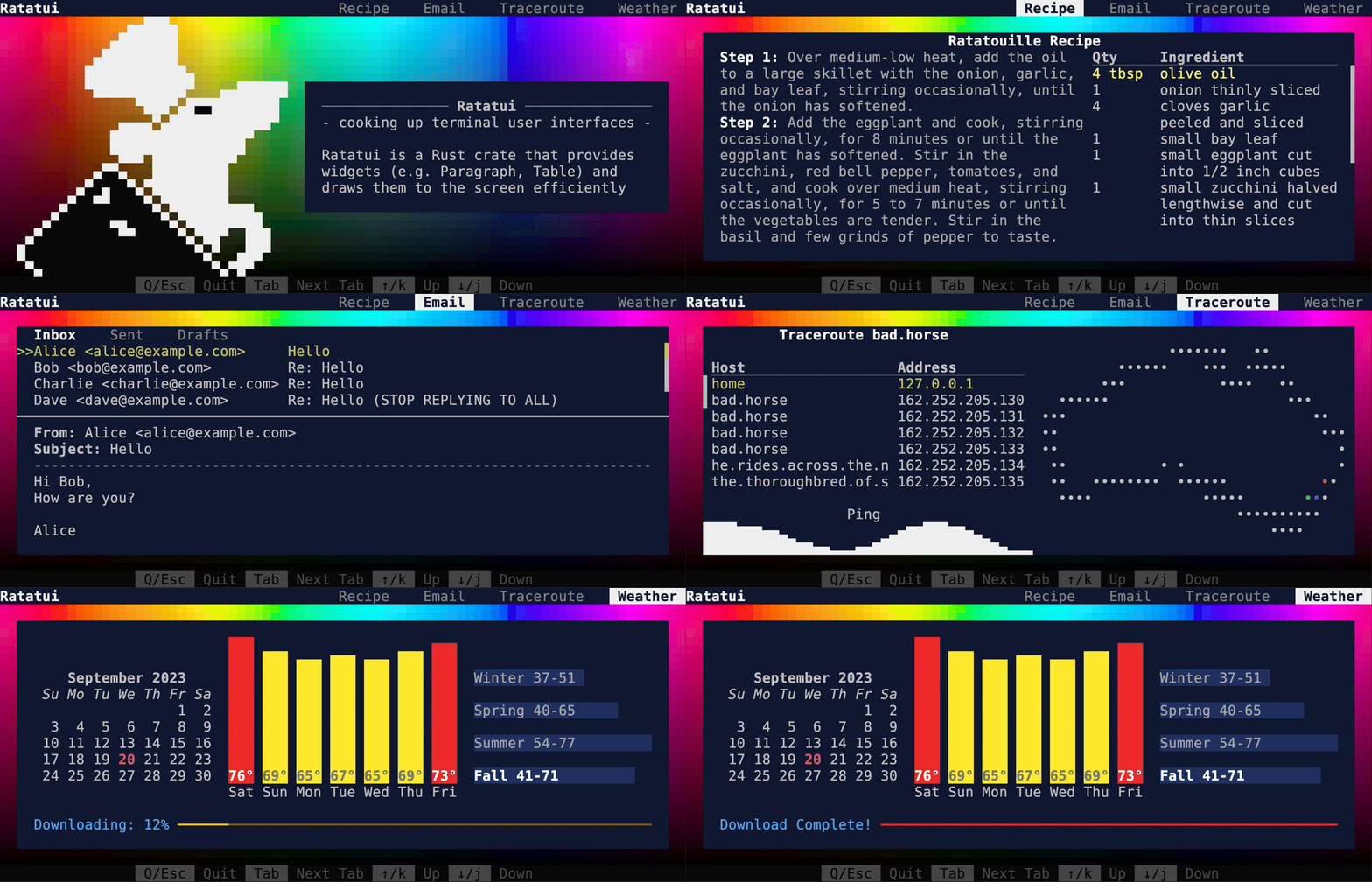
|
||||
<!--
|
||||
Permalink to https://github.com/ratatui-org/ratatui/blob/images/examples/demo2.gif
|
||||
See RELEASE.md for instructions on creating the demo gif
|
||||
--->
|
||||
|
||||
<img align="left" src="https://avatars.githubusercontent.com/u/125200832?s=128&v=4">
|
||||
|
||||
`ratatui` is a [Rust](https://www.rust-lang.org) library that is all about cooking up terminal user interfaces.
|
||||
It is a community fork of the original [tui-rs](https://github.com/fdehau/tui-rs)
|
||||
project.
|
||||
<div align="center">
|
||||
|
||||
[](https://crates.io/crates/ratatui)
|
||||
[](./LICENSE) [](https://github.com/ratatui-org/ratatui/actions?query=workflow%3ACI+)
|
||||
[](https://docs.rs/crate/ratatui/)
|
||||
[](https://docs.rs/crate/ratatui/)<br>
|
||||
[](https://deps.rs/repo/github/ratatui-org/ratatui)
|
||||
[](https://app.codecov.io/gh/ratatui-org/ratatui)
|
||||
[](https://discord.gg/pMCEU9hNEj)
|
||||
[](https://matrix.to/#/#ratatui:matrix.org)
|
||||
[](https://matrix.to/#/#ratatui:matrix.org)<br>
|
||||
[Documentation](https://docs.rs/ratatui)
|
||||
· [Examples](https://github.com/ratatui-org/ratatui/tree/main/examples)
|
||||
· [Report a bug](https://github.com/ratatui-org/ratatui/issues/new?labels=bug&projects=&template=bug_report.md)
|
||||
· [Request a Feature](https://github.com/ratatui-org/ratatui/issues/new?labels=enhancement&projects=&template=feature_request.md)
|
||||
· [Send a Pull Request](https://github.com/ratatui-org/ratatui/compare)
|
||||
|
||||
<!-- See RELEASE.md for instructions on creating the demo gif --->
|
||||
|
||||
</div>
|
||||
|
||||
<img align="left" src="https://avatars.githubusercontent.com/u/125200832?s=128&v=4">
|
||||
|
||||
# Ratatui
|
||||
|
||||
`ratatui` is a [Rust](https://www.rust-lang.org) library that is all about cooking up terminal user
|
||||
interfaces. It is a community fork of the original [tui-rs](https://github.com/fdehau/tui-rs)
|
||||
project.
|
||||
|
||||
<details>
|
||||
<summary>Table of Contents</summary>
|
||||
|
||||
10
RELEASE.md
10
RELEASE.md
@@ -7,12 +7,14 @@ actions](.github/workflows/cd.yml) and triggered by pushing a tag.
|
||||
[vhs](https://github.com/charmbracelet/vhs) (installation instructions in README).
|
||||
|
||||
```shell
|
||||
cargo build --example demo
|
||||
vhs examples/demo.tape --publish --quiet
|
||||
cargo build --example demo2
|
||||
vhs examples/demo2.tape
|
||||
```
|
||||
|
||||
Then update the link in the [examples README](./examples/README) and the main README. Avoid
|
||||
adding the gif to the git repo as binary files tend to bloat repositories.
|
||||
1. Switch branches to the images branch and copy demo2.gif to examples/, commit, and push.
|
||||
1. Grab the permalink from <https://github.com/ratatui-org/ratatui/blob/images/examples/demo2.gif> and
|
||||
append `?raw=true` to redirect to the actual image url. Then update the link in the main README.
|
||||
Avoid adding the gif to the git repo as binary files tend to bloat repositories.
|
||||
|
||||
1. Bump the version in [Cargo.toml](Cargo.toml).
|
||||
1. Bump versions in the doc comments of [lib.rs](src/lib.rs).
|
||||
|
||||
@@ -8,7 +8,7 @@ occur in a terminal.
|
||||
|
||||
## Demo
|
||||
|
||||
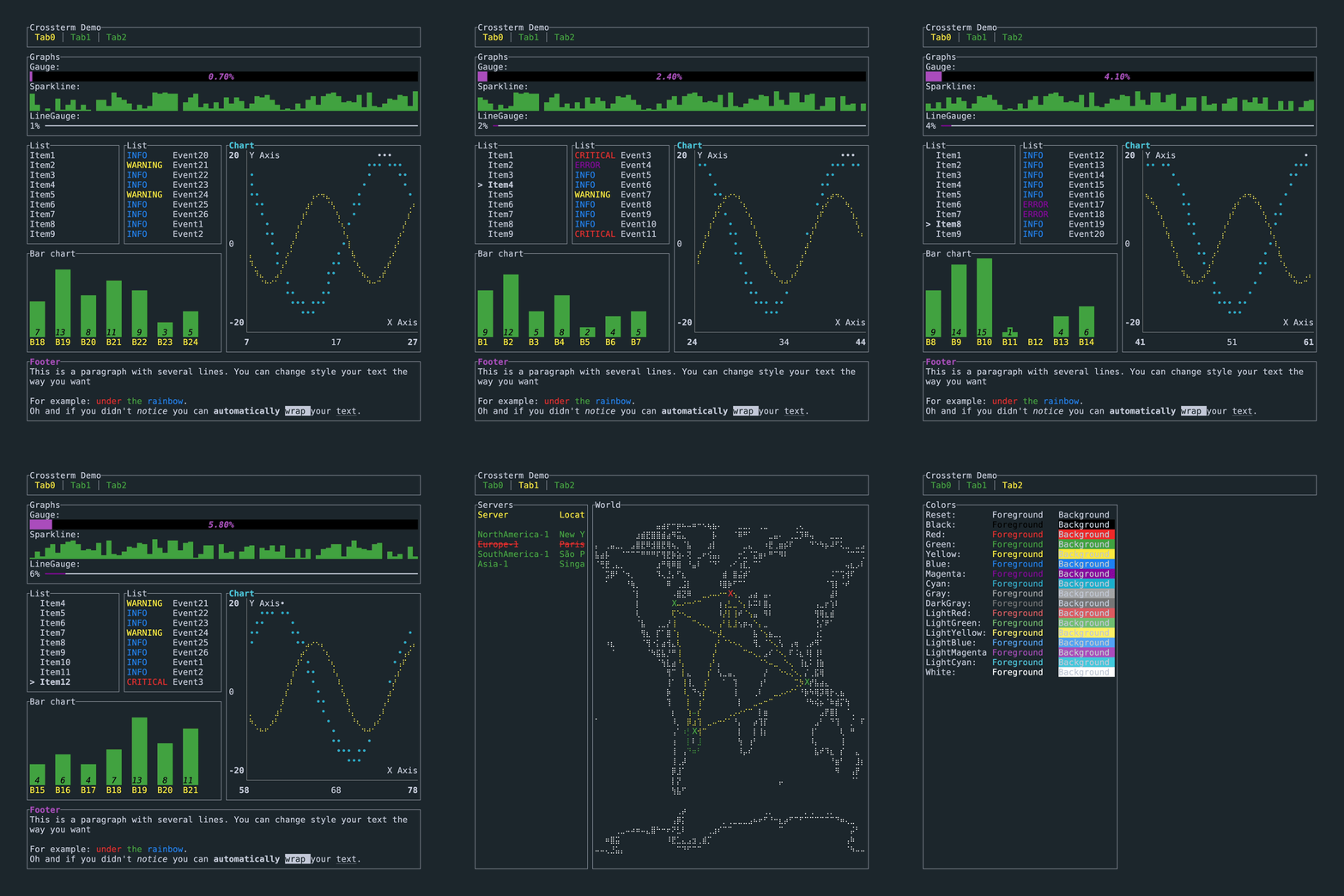
This is the demo example from the main README. It is available for each of the backends. Source:
|
||||
This is the previous demo example from the main README. It is available for each of the backends. Source:
|
||||
[demo.rs](./demo/).
|
||||
|
||||
```shell
|
||||
|
||||
@@ -13,7 +13,10 @@ use crossterm::{
|
||||
terminal::{disable_raw_mode, enable_raw_mode, EnterAlternateScreen, LeaveAlternateScreen},
|
||||
ExecutableCommand,
|
||||
};
|
||||
use itertools::Itertools;
|
||||
use palette::{
|
||||
convert::{FromColorUnclamped, IntoColorUnclamped},
|
||||
Okhsv, Srgb,
|
||||
};
|
||||
use ratatui::{prelude::*, widgets::*};
|
||||
|
||||
type Result<T> = std::result::Result<T, Box<dyn Error>>;
|
||||
@@ -77,9 +80,8 @@ struct RgbColors;
|
||||
impl Widget for RgbColors {
|
||||
fn render(self, area: Rect, buf: &mut Buffer) {
|
||||
let layout = Self::layout(area);
|
||||
let rgb_colors = Self::create_rgb_color_grid(area.width, area.height * 2);
|
||||
Self::render_title(layout[0], buf);
|
||||
Self::render_colors(layout[1], buf, rgb_colors);
|
||||
Self::render_colors(layout[1], buf);
|
||||
}
|
||||
}
|
||||
|
||||
@@ -99,41 +101,26 @@ impl RgbColors {
|
||||
}
|
||||
|
||||
/// Render a colored grid of half block characters (`"▀"`) each with a different RGB color.
|
||||
fn render_colors(area: Rect, buf: &mut Buffer, rgb_colors: Vec<Vec<Color>>) {
|
||||
for (x, column) in (area.left()..area.right()).zip(rgb_colors.iter()) {
|
||||
for (y, (fg, bg)) in (area.top()..area.bottom()).zip(column.iter().tuples()) {
|
||||
let cell = buf.get_mut(x, y);
|
||||
cell.fg = *fg;
|
||||
cell.bg = *bg;
|
||||
cell.symbol = "▀".into();
|
||||
}
|
||||
}
|
||||
}
|
||||
fn render_colors(area: Rect, buf: &mut Buffer) {
|
||||
for (xi, x) in (area.left()..area.right()).enumerate() {
|
||||
for (yi, y) in (area.top()..area.bottom()).enumerate() {
|
||||
let hue = xi as f32 * 360.0 / area.width as f32;
|
||||
|
||||
/// Generate a smooth grid of colors
|
||||
///
|
||||
/// Red ranges from 0 to 255 across the x axis. Green ranges from 0 to 255 across the y axis.
|
||||
/// Blue repeats every 32 pixels in both directions, but flipped every 16 pixels so that it
|
||||
/// doesn't transition sharply from light to dark.
|
||||
///
|
||||
/// The result stored in a 2d vector of colors with the x axis as the first dimension, and the
|
||||
/// y axis the second dimension.
|
||||
fn create_rgb_color_grid(width: u16, height: u16) -> Vec<Vec<Color>> {
|
||||
let mut result = vec![];
|
||||
for x in 0..width {
|
||||
let mut column = vec![];
|
||||
for y in 0..height {
|
||||
// flip both axes every 16 pixels. E.g. [0, 1, ... 15, 15, ... 1, 0]
|
||||
let yy = if (y % 32) < 16 { y % 32 } else { 31 - y % 32 };
|
||||
let xx = if (x % 32) < 16 { x % 32 } else { 31 - x % 32 };
|
||||
let r = (256 * x / width) as u8;
|
||||
let g = (256 * y / height) as u8;
|
||||
let b = (yy * 16 + xx) as u8;
|
||||
column.push(Color::Rgb(r, g, b))
|
||||
let value_fg = (yi as f32) / (area.height as f32 - 0.5);
|
||||
let fg = Okhsv::<f32>::new(hue, Okhsv::max_saturation(), value_fg);
|
||||
let fg: Srgb = fg.into_color_unclamped();
|
||||
let fg: Srgb<u8> = fg.into_format();
|
||||
let fg = Color::Rgb(fg.red, fg.green, fg.blue);
|
||||
|
||||
let value_bg = (yi as f32 + 0.5) / (area.height as f32 - 0.5);
|
||||
let bg = Okhsv::new(hue, Okhsv::max_saturation(), value_bg);
|
||||
let bg = Srgb::<f32>::from_color_unclamped(bg);
|
||||
let bg: Srgb<u8> = bg.into_format();
|
||||
let bg = Color::Rgb(bg.red, bg.green, bg.blue);
|
||||
|
||||
buf.get_mut(x, y).set_char('▀').set_fg(fg).set_bg(bg);
|
||||
}
|
||||
result.push(column);
|
||||
}
|
||||
result
|
||||
}
|
||||
}
|
||||
|
||||
|
||||
43
examples/demo2-social.tape
Normal file
43
examples/demo2-social.tape
Normal file
@@ -0,0 +1,43 @@
|
||||
# This is a vhs script. See https://github.com/charmbracelet/vhs for more info.
|
||||
# To run this script, install vhs and run `vhs ./examples/demo.tape`
|
||||
|
||||
Output "target/demo2-social.gif"
|
||||
Set Theme "OceanicMaterial"
|
||||
# Github social preview size (1280x640 with 80px padding) and must be < 1MB
|
||||
# This puts some constraints on the amount of interactivity we can do.
|
||||
Set Width 1280
|
||||
Set Height 640
|
||||
Set Padding 80
|
||||
Hide
|
||||
Type "cargo run --example demo2 --features crossterm,widget-calendar"
|
||||
Enter
|
||||
Sleep 2s
|
||||
Show
|
||||
# About screen
|
||||
Sleep 3.5s
|
||||
Down # Red eye
|
||||
Sleep 0.4s
|
||||
Down # black eye
|
||||
Sleep 1s
|
||||
Tab
|
||||
# Recipe
|
||||
Sleep 1s
|
||||
Set TypingSpeed 500ms
|
||||
Down 7
|
||||
Sleep 1s
|
||||
Tab
|
||||
# Email
|
||||
Sleep 2s
|
||||
Down 4
|
||||
Sleep 2s
|
||||
Tab
|
||||
# Trace route
|
||||
Sleep 1s
|
||||
Set TypingSpeed 200ms
|
||||
Down 10
|
||||
Sleep 2s
|
||||
Tab
|
||||
# Weather
|
||||
Set TypingSpeed 100ms
|
||||
Down 40
|
||||
Sleep 2s
|
||||
49
examples/demo2.tape
Normal file
49
examples/demo2.tape
Normal file
@@ -0,0 +1,49 @@
|
||||
# This is a vhs script. See https://github.com/charmbracelet/vhs for more info.
|
||||
# To run this script, install vhs and run `vhs ./examples/demo.tape`
|
||||
# NOTE: Requires VHS 0.6.1 or later for Screenshot support
|
||||
Output "target/demo2.gif"
|
||||
Set Theme "OceanicMaterial"
|
||||
# The reason for this strange size is that the social preview image for this
|
||||
# demo is 1280x64 with 80 pixels of padding on each side. We want a version
|
||||
# without the padding for README.md, etc.
|
||||
Set Width 1120
|
||||
Set Height 480
|
||||
Set Padding 0
|
||||
Hide
|
||||
Type "cargo run --example demo2 --features crossterm,widget-calendar"
|
||||
Enter
|
||||
Sleep 2s
|
||||
Show
|
||||
# About screen
|
||||
Screenshot "target/demo2-about.png"
|
||||
Sleep 3.5s
|
||||
Down # Red eye
|
||||
Sleep 0.4s
|
||||
Down # black eye
|
||||
Sleep 1s
|
||||
Tab
|
||||
# Recipe
|
||||
Screenshot "target/demo2-recipe.png"
|
||||
Sleep 1s
|
||||
Set TypingSpeed 500ms
|
||||
Down 7
|
||||
Sleep 1s
|
||||
Tab
|
||||
# Email
|
||||
Screenshot "target/demo2-email.png"
|
||||
Sleep 2s
|
||||
Down 4
|
||||
Sleep 2s
|
||||
Tab
|
||||
# Trace route
|
||||
Screenshot "target/demo2-trace.png"
|
||||
Sleep 1s
|
||||
Set TypingSpeed 200ms
|
||||
Down 10
|
||||
Sleep 2s
|
||||
Tab
|
||||
# Weather
|
||||
Screenshot "target/demo2-weather.png"
|
||||
Set TypingSpeed 100ms
|
||||
Down 40
|
||||
Sleep 2s
|
||||
99
examples/demo2/app.rs
Normal file
99
examples/demo2/app.rs
Normal file
@@ -0,0 +1,99 @@
|
||||
use std::time::Duration;
|
||||
|
||||
use anyhow::{Context, Result};
|
||||
use crossterm::event::{Event, KeyCode, KeyEvent, KeyEventKind, KeyModifiers};
|
||||
use ratatui::prelude::Rect;
|
||||
|
||||
use crate::{Root, Term};
|
||||
|
||||
#[derive(Debug)]
|
||||
pub struct App {
|
||||
term: Term,
|
||||
should_quit: bool,
|
||||
context: AppContext,
|
||||
}
|
||||
|
||||
#[derive(Debug, Default, Clone, Copy)]
|
||||
pub struct AppContext {
|
||||
pub tab_index: usize,
|
||||
pub row_index: usize,
|
||||
}
|
||||
|
||||
impl App {
|
||||
fn new() -> Result<Self> {
|
||||
Ok(Self {
|
||||
term: Term::start()?,
|
||||
should_quit: false,
|
||||
context: AppContext::default(),
|
||||
})
|
||||
}
|
||||
|
||||
pub fn run() -> Result<()> {
|
||||
install_panic_hook();
|
||||
let mut app = Self::new()?;
|
||||
while !app.should_quit {
|
||||
app.draw()?;
|
||||
app.handle_events()?;
|
||||
}
|
||||
Term::stop()?;
|
||||
Ok(())
|
||||
}
|
||||
|
||||
fn draw(&mut self) -> Result<()> {
|
||||
self.term
|
||||
.draw(|frame| frame.render_widget(Root::new(&self.context), frame.size()))
|
||||
.context("terminal.draw")?;
|
||||
Ok(())
|
||||
}
|
||||
|
||||
fn handle_events(&mut self) -> Result<()> {
|
||||
match Term::next_event(Duration::from_millis(16))? {
|
||||
Some(Event::Key(key)) => self.handle_key_event(key),
|
||||
Some(Event::Resize(width, height)) => {
|
||||
Ok(self.term.resize(Rect::new(0, 0, width, height))?)
|
||||
}
|
||||
_ => Ok(()),
|
||||
}
|
||||
}
|
||||
|
||||
fn handle_key_event(&mut self, key: KeyEvent) -> Result<()> {
|
||||
if key.kind != KeyEventKind::Press {
|
||||
return Ok(());
|
||||
}
|
||||
|
||||
let context = &mut self.context;
|
||||
const TAB_COUNT: usize = 5;
|
||||
match key.code {
|
||||
KeyCode::Char('q') | KeyCode::Esc => {
|
||||
self.should_quit = true;
|
||||
}
|
||||
KeyCode::Tab | KeyCode::BackTab if key.modifiers.contains(KeyModifiers::SHIFT) => {
|
||||
let tab_index = context.tab_index + TAB_COUNT; // to wrap around properly
|
||||
context.tab_index = tab_index.saturating_sub(1) % TAB_COUNT;
|
||||
context.row_index = 0;
|
||||
}
|
||||
KeyCode::Tab | KeyCode::BackTab => {
|
||||
context.tab_index = context.tab_index.saturating_add(1) % TAB_COUNT;
|
||||
context.row_index = 0;
|
||||
}
|
||||
KeyCode::Up | KeyCode::Char('k') => {
|
||||
context.row_index = context.row_index.saturating_sub(1);
|
||||
}
|
||||
KeyCode::Down | KeyCode::Char('j') => {
|
||||
context.row_index = context.row_index.saturating_add(1);
|
||||
}
|
||||
_ => {}
|
||||
};
|
||||
Ok(())
|
||||
}
|
||||
}
|
||||
|
||||
pub fn install_panic_hook() {
|
||||
better_panic::install();
|
||||
let hook = std::panic::take_hook();
|
||||
std::panic::set_hook(Box::new(move |info| {
|
||||
let _ = Term::stop();
|
||||
hook(info);
|
||||
std::process::exit(1);
|
||||
}));
|
||||
}
|
||||
34
examples/demo2/colors.rs
Normal file
34
examples/demo2/colors.rs
Normal file
@@ -0,0 +1,34 @@
|
||||
use palette::{IntoColor, Okhsv, Srgb};
|
||||
use ratatui::{prelude::*, widgets::*};
|
||||
|
||||
/// A widget that renders a color swatch of RGB colors.
|
||||
///
|
||||
/// The widget is rendered as a rectangle with the hue changing along the x-axis from 0.0 to 360.0
|
||||
/// and the value changing along the y-axis (from 1.0 to 0.0). Each pixel is rendered as a block
|
||||
/// character with the top half slightly lighter than the bottom half.
|
||||
pub struct RgbSwatch;
|
||||
|
||||
impl Widget for RgbSwatch {
|
||||
fn render(self, area: Rect, buf: &mut Buffer) {
|
||||
for (yi, y) in (area.top()..area.bottom()).enumerate() {
|
||||
let value = area.height as f32 - yi as f32;
|
||||
let value_fg = value / (area.height as f32);
|
||||
let value_bg = (value - 0.5) / (area.height as f32);
|
||||
for (xi, x) in (area.left()..area.right()).enumerate() {
|
||||
let hue = xi as f32 * 360.0 / area.width as f32;
|
||||
let fg = color_from_oklab(hue, Okhsv::max_saturation(), value_fg);
|
||||
let bg = color_from_oklab(hue, Okhsv::max_saturation(), value_bg);
|
||||
buf.get_mut(x, y).set_char('▀').set_fg(fg).set_bg(bg);
|
||||
}
|
||||
}
|
||||
}
|
||||
}
|
||||
|
||||
/// Convert a hue and value into an RGB color via the OkLab color space.
|
||||
///
|
||||
/// See <https://bottosson.github.io/posts/oklab/> for more details.
|
||||
pub fn color_from_oklab(hue: f32, saturation: f32, value: f32) -> Color {
|
||||
let color: Srgb = Okhsv::new(hue, saturation, value).into_color();
|
||||
let color = color.into_format();
|
||||
Color::Rgb(color.red, color.green, color.blue)
|
||||
}
|
||||
17
examples/demo2/main.rs
Normal file
17
examples/demo2/main.rs
Normal file
@@ -0,0 +1,17 @@
|
||||
use anyhow::Result;
|
||||
pub use app::*;
|
||||
pub use colors::*;
|
||||
pub use root::*;
|
||||
pub use term::*;
|
||||
pub use theme::*;
|
||||
|
||||
mod app;
|
||||
mod colors;
|
||||
mod root;
|
||||
mod tabs;
|
||||
mod term;
|
||||
mod theme;
|
||||
|
||||
fn main() -> Result<()> {
|
||||
App::run()
|
||||
}
|
||||
93
examples/demo2/root.rs
Normal file
93
examples/demo2/root.rs
Normal file
@@ -0,0 +1,93 @@
|
||||
use std::rc::Rc;
|
||||
|
||||
use itertools::Itertools;
|
||||
use ratatui::{prelude::*, widgets::*};
|
||||
|
||||
use crate::{tabs::*, AppContext, THEME};
|
||||
|
||||
pub struct Root<'a> {
|
||||
context: &'a AppContext,
|
||||
}
|
||||
|
||||
impl<'a> Root<'a> {
|
||||
pub fn new(context: &'a AppContext) -> Self {
|
||||
Root { context }
|
||||
}
|
||||
}
|
||||
|
||||
impl Widget for Root<'_> {
|
||||
fn render(self, area: Rect, buf: &mut Buffer) {
|
||||
Block::new().style(THEME.root).render(area, buf);
|
||||
let area = layout(area, Direction::Vertical, vec![1, 0, 1]);
|
||||
self.render_title_bar(area[0], buf);
|
||||
self.render_selected_tab(area[1], buf);
|
||||
self.render_bottom_bar(area[2], buf);
|
||||
}
|
||||
}
|
||||
|
||||
impl Root<'_> {
|
||||
fn render_title_bar(&self, area: Rect, buf: &mut Buffer) {
|
||||
let area = layout(area, Direction::Horizontal, vec![0, 45]);
|
||||
|
||||
Paragraph::new(Span::styled("Ratatui", THEME.app_title)).render(area[0], buf);
|
||||
let titles = vec!["", " Recipe ", " Email ", " Traceroute ", " Weather "];
|
||||
Tabs::new(titles)
|
||||
.style(THEME.tabs)
|
||||
.highlight_style(THEME.tabs_selected)
|
||||
.select(self.context.tab_index)
|
||||
.divider("")
|
||||
.render(area[1], buf);
|
||||
}
|
||||
|
||||
fn render_selected_tab(&self, area: Rect, buf: &mut Buffer) {
|
||||
let row_index = self.context.row_index;
|
||||
match self.context.tab_index {
|
||||
0 => AboutTab::new(row_index).render(area, buf),
|
||||
1 => RecipeTab::new(row_index).render(area, buf),
|
||||
2 => EmailTab::new(row_index).render(area, buf),
|
||||
3 => TracerouteTab::new(row_index).render(area, buf),
|
||||
4 => WeatherTab::new(row_index).render(area, buf),
|
||||
_ => unreachable!(),
|
||||
};
|
||||
}
|
||||
|
||||
fn render_bottom_bar(&self, area: Rect, buf: &mut Buffer) {
|
||||
let keys = [
|
||||
("Q/Esc", "Quit"),
|
||||
("Tab", "Next Tab"),
|
||||
("↑/k", "Up"),
|
||||
("↓/j", "Down"),
|
||||
];
|
||||
let spans = keys
|
||||
.iter()
|
||||
.flat_map(|(key, desc)| {
|
||||
let key = Span::styled(format!(" {} ", key), THEME.key_binding.key);
|
||||
let desc = Span::styled(format!(" {} ", desc), THEME.key_binding.description);
|
||||
[key, desc]
|
||||
})
|
||||
.collect_vec();
|
||||
Paragraph::new(Line::from(spans))
|
||||
.alignment(Alignment::Center)
|
||||
.fg(Color::Indexed(236))
|
||||
.bg(Color::Indexed(232))
|
||||
.render(area, buf);
|
||||
}
|
||||
}
|
||||
|
||||
/// simple helper method to split an area into multiple sub-areas
|
||||
pub fn layout(area: Rect, direction: Direction, heights: Vec<u16>) -> Rc<[Rect]> {
|
||||
let constraints = heights
|
||||
.iter()
|
||||
.map(|&h| {
|
||||
if h > 0 {
|
||||
Constraint::Length(h)
|
||||
} else {
|
||||
Constraint::Min(0)
|
||||
}
|
||||
})
|
||||
.collect_vec();
|
||||
Layout::default()
|
||||
.direction(direction)
|
||||
.constraints(constraints)
|
||||
.split(area)
|
||||
}
|
||||
11
examples/demo2/tabs.rs
Normal file
11
examples/demo2/tabs.rs
Normal file
@@ -0,0 +1,11 @@
|
||||
mod about;
|
||||
mod email;
|
||||
mod recipe;
|
||||
mod traceroute;
|
||||
mod weather;
|
||||
|
||||
pub use about::AboutTab;
|
||||
pub use email::EmailTab;
|
||||
pub use recipe::RecipeTab;
|
||||
pub use traceroute::TracerouteTab;
|
||||
pub use weather::WeatherTab;
|
||||
157
examples/demo2/tabs/about.rs
Normal file
157
examples/demo2/tabs/about.rs
Normal file
@@ -0,0 +1,157 @@
|
||||
use itertools::Itertools;
|
||||
use ratatui::{prelude::*, widgets::*};
|
||||
|
||||
use crate::{layout, RgbSwatch, THEME};
|
||||
|
||||
const RATATUI_LOGO: [&str; 32] = [
|
||||
" ███ ",
|
||||
" ██████ ",
|
||||
" ███████ ",
|
||||
" ████████ ",
|
||||
" █████████ ",
|
||||
" ██████████ ",
|
||||
" ████████████ ",
|
||||
" █████████████ ",
|
||||
" █████████████ ██████",
|
||||
" ███████████ ████████",
|
||||
" █████ ███████████ ",
|
||||
" ███ ██ee████████ ",
|
||||
" █ █████████████ ",
|
||||
" ████ █████████████ ",
|
||||
" █████████████████ ",
|
||||
" ████████████████ ",
|
||||
" ████████████████ ",
|
||||
" ███ ██████████ ",
|
||||
" ██ █████████ ",
|
||||
" █xx█ █████████ ",
|
||||
" █xxxx█ ██████████ ",
|
||||
" █xx█xxx█ █████████ ",
|
||||
" █xx██xxxx█ ████████ ",
|
||||
" █xxxxxxxxxx█ ██████████ ",
|
||||
" █xxxxxxxxxxxx█ ██████████ ",
|
||||
" █xxxxxxx██xxxxx█ █████████ ",
|
||||
" █xxxxxxxxx██xxxxx█ ████ ███ ",
|
||||
" █xxxxxxxxxxxxxxxxxx█ ██ ███ ",
|
||||
"█xxxxxxxxxxxxxxxxxxxx█ █ ███ ",
|
||||
"█xxxxxxxxxxxxxxxxxxxxx█ ███ ",
|
||||
" █xxxxxxxxxxxxxxxxxxxxx█ ███ ",
|
||||
" █xxxxxxxxxxxxxxxxxxxxx█ █ ",
|
||||
];
|
||||
|
||||
pub struct AboutTab {
|
||||
selected_row: usize,
|
||||
}
|
||||
|
||||
impl AboutTab {
|
||||
pub fn new(selected_row: usize) -> Self {
|
||||
Self { selected_row }
|
||||
}
|
||||
}
|
||||
|
||||
impl Widget for AboutTab {
|
||||
fn render(self, area: Rect, buf: &mut Buffer) {
|
||||
RgbSwatch.render(area, buf);
|
||||
let area = layout(area, Direction::Horizontal, vec![34, 0]);
|
||||
render_crate_description(area[1], buf);
|
||||
render_logo(self.selected_row, area[0], buf);
|
||||
}
|
||||
}
|
||||
|
||||
fn render_crate_description(area: Rect, buf: &mut Buffer) {
|
||||
let area = area.inner(
|
||||
&(Margin {
|
||||
vertical: 4,
|
||||
horizontal: 2,
|
||||
}),
|
||||
);
|
||||
Clear.render(area, buf); // clear out the color swatches
|
||||
Block::new().style(THEME.content).render(area, buf);
|
||||
let area = area.inner(
|
||||
&(Margin {
|
||||
vertical: 1,
|
||||
horizontal: 2,
|
||||
}),
|
||||
);
|
||||
let text = "- cooking up terminal user interfaces -
|
||||
|
||||
Ratatui is a Rust crate that provides widgets (e.g. Paragraph, Table) and draws them to the \
|
||||
screen efficiently every frame.";
|
||||
Paragraph::new(text)
|
||||
.style(THEME.description)
|
||||
.block(
|
||||
Block::new()
|
||||
.title(" Ratatui ")
|
||||
.title_alignment(Alignment::Center)
|
||||
.borders(Borders::TOP)
|
||||
.border_style(THEME.description_title)
|
||||
.padding(Padding::new(0, 0, 0, 0)),
|
||||
)
|
||||
.wrap(Wrap { trim: true })
|
||||
.scroll((0, 0))
|
||||
.render(area, buf);
|
||||
}
|
||||
|
||||
/// Use half block characters to render a logo based on the RATATUI_LOGO const.
|
||||
///
|
||||
/// The logo is rendered in three colors, one for the rat, one for the terminal, and one for the
|
||||
/// rat's eye. The eye color alternates between two colors based on the selected row.
|
||||
pub fn render_logo(selected_row: usize, area: Rect, buf: &mut Buffer) {
|
||||
let eye_color = if selected_row % 2 == 0 {
|
||||
THEME.logo.rat_eye
|
||||
} else {
|
||||
THEME.logo.rat_eye_alt
|
||||
};
|
||||
let area = area.inner(&Margin {
|
||||
vertical: 0,
|
||||
horizontal: 2,
|
||||
});
|
||||
for (y, (line1, line2)) in RATATUI_LOGO.iter().tuples().enumerate() {
|
||||
for (x, (ch1, ch2)) in line1.chars().zip(line2.chars()).enumerate() {
|
||||
let x = area.left() + x as u16;
|
||||
let y = area.top() + y as u16;
|
||||
let cell = buf.get_mut(x, y);
|
||||
let rat_color = THEME.logo.rat;
|
||||
let term_color = THEME.logo.term;
|
||||
match (ch1, ch2) {
|
||||
('█', '█') => {
|
||||
cell.set_char('█');
|
||||
cell.fg = rat_color;
|
||||
}
|
||||
('█', ' ') => {
|
||||
cell.set_char('▀');
|
||||
cell.fg = rat_color;
|
||||
}
|
||||
(' ', '█') => {
|
||||
cell.set_char('▄');
|
||||
cell.fg = rat_color;
|
||||
}
|
||||
('█', 'x') => {
|
||||
cell.set_char('▀');
|
||||
cell.fg = rat_color;
|
||||
cell.bg = term_color;
|
||||
}
|
||||
('x', '█') => {
|
||||
cell.set_char('▄');
|
||||
cell.fg = rat_color;
|
||||
cell.bg = term_color;
|
||||
}
|
||||
('x', 'x') => {
|
||||
cell.set_char(' ');
|
||||
cell.fg = term_color;
|
||||
cell.bg = term_color;
|
||||
}
|
||||
('█', 'e') => {
|
||||
cell.set_char('▀');
|
||||
cell.fg = rat_color;
|
||||
cell.bg = eye_color;
|
||||
}
|
||||
('e', '█') => {
|
||||
cell.set_char('▄');
|
||||
cell.fg = rat_color;
|
||||
cell.bg = eye_color;
|
||||
}
|
||||
(_, _) => {}
|
||||
};
|
||||
}
|
||||
}
|
||||
}
|
||||
143
examples/demo2/tabs/email.rs
Normal file
143
examples/demo2/tabs/email.rs
Normal file
@@ -0,0 +1,143 @@
|
||||
use itertools::Itertools;
|
||||
use ratatui::{prelude::*, widgets::*};
|
||||
use unicode_width::UnicodeWidthStr;
|
||||
|
||||
use crate::{layout, RgbSwatch, THEME};
|
||||
|
||||
#[derive(Debug, Default)]
|
||||
pub struct Email {
|
||||
from: &'static str,
|
||||
subject: &'static str,
|
||||
body: &'static str,
|
||||
}
|
||||
|
||||
const EMAILS: &[Email] = &[
|
||||
Email {
|
||||
from: "Alice <alice@example.com>",
|
||||
subject: "Hello",
|
||||
body: "Hi Bob,\nHow are you?\n\nAlice",
|
||||
},
|
||||
Email {
|
||||
from: "Bob <bob@example.com>",
|
||||
subject: "Re: Hello",
|
||||
body: "Hi Alice,\nI'm fine, thanks!\n\nBob",
|
||||
},
|
||||
Email {
|
||||
from: "Charlie <charlie@example.com>",
|
||||
subject: "Re: Hello",
|
||||
body: "Hi Alice,\nI'm fine, thanks!\n\nCharlie",
|
||||
},
|
||||
Email {
|
||||
from: "Dave <dave@example.com>",
|
||||
subject: "Re: Hello (STOP REPLYING TO ALL)",
|
||||
body: "Hi Everyone,\nPlease stop replying to all.\n\nDave",
|
||||
},
|
||||
Email {
|
||||
from: "Eve <eve@example.com>",
|
||||
subject: "Re: Hello (STOP REPLYING TO ALL)",
|
||||
body: "Hi Everyone,\nI'm reading all your emails.\n\nEve",
|
||||
},
|
||||
];
|
||||
|
||||
#[derive(Debug, Default)]
|
||||
pub struct EmailTab {
|
||||
selected_index: usize,
|
||||
}
|
||||
|
||||
impl EmailTab {
|
||||
pub fn new(selected_index: usize) -> Self {
|
||||
Self {
|
||||
selected_index: selected_index % EMAILS.len(),
|
||||
}
|
||||
}
|
||||
}
|
||||
|
||||
impl Widget for EmailTab {
|
||||
fn render(self, area: Rect, buf: &mut Buffer) {
|
||||
RgbSwatch.render(area, buf);
|
||||
let area = area.inner(&Margin {
|
||||
vertical: 1,
|
||||
horizontal: 2,
|
||||
});
|
||||
Clear.render(area, buf);
|
||||
let area = layout(area, Direction::Vertical, vec![5, 0]);
|
||||
render_inbox(self.selected_index, area[0], buf);
|
||||
render_email(self.selected_index, area[1], buf);
|
||||
}
|
||||
}
|
||||
fn render_inbox(selected_index: usize, area: Rect, buf: &mut Buffer) {
|
||||
let area = layout(area, Direction::Vertical, vec![1, 0]);
|
||||
let theme = THEME.email;
|
||||
Tabs::new(vec![" Inbox ", " Sent ", " Drafts "])
|
||||
.style(theme.tabs)
|
||||
.highlight_style(theme.tabs_selected)
|
||||
.select(0)
|
||||
.divider("")
|
||||
.render(area[0], buf);
|
||||
|
||||
let highlight_symbol = ">>";
|
||||
let from_width = EMAILS
|
||||
.iter()
|
||||
.map(|e| e.from.width())
|
||||
.max()
|
||||
.unwrap_or_default();
|
||||
let items = EMAILS
|
||||
.iter()
|
||||
.map(|e| {
|
||||
let from = format!("{:width$}", e.from, width = from_width).into();
|
||||
ListItem::new(Line::from(vec![from, " ".into(), e.subject.into()]))
|
||||
})
|
||||
.collect_vec();
|
||||
let mut state = ListState::default().with_selected(Some(selected_index));
|
||||
StatefulWidget::render(
|
||||
List::new(items)
|
||||
.style(theme.inbox)
|
||||
.highlight_style(theme.selected_item)
|
||||
.highlight_symbol(highlight_symbol),
|
||||
area[1],
|
||||
buf,
|
||||
&mut state,
|
||||
);
|
||||
let mut scrollbar_state = ScrollbarState::default()
|
||||
.content_length(EMAILS.len())
|
||||
.position(selected_index);
|
||||
Scrollbar::default()
|
||||
.begin_symbol(None)
|
||||
.end_symbol(None)
|
||||
.track_symbol(None)
|
||||
.thumb_symbol("▐")
|
||||
.render(area[1], buf, &mut scrollbar_state);
|
||||
}
|
||||
|
||||
fn render_email(selected_index: usize, area: Rect, buf: &mut Buffer) {
|
||||
let theme = THEME.email;
|
||||
let email = EMAILS.get(selected_index);
|
||||
let block = Block::new()
|
||||
.style(theme.body)
|
||||
.padding(Padding::new(2, 2, 0, 0))
|
||||
.borders(Borders::TOP)
|
||||
.border_type(BorderType::Thick);
|
||||
let inner = block.inner(area);
|
||||
block.render(area, buf);
|
||||
if let Some(email) = email {
|
||||
let area = layout(inner, Direction::Vertical, vec![3, 0]);
|
||||
let headers = vec![
|
||||
Line::from(vec![
|
||||
"From: ".set_style(theme.header),
|
||||
email.from.set_style(theme.header_value),
|
||||
]),
|
||||
Line::from(vec![
|
||||
"Subject: ".set_style(theme.header),
|
||||
email.subject.set_style(theme.header_value),
|
||||
]),
|
||||
"-".repeat(inner.width as usize).dim().into(),
|
||||
];
|
||||
Paragraph::new(headers)
|
||||
.style(theme.body)
|
||||
.render(area[0], buf);
|
||||
let body = email.body.lines().map(Line::from).collect_vec();
|
||||
Paragraph::new(body).style(theme.body).render(area[1], buf);
|
||||
} else {
|
||||
Paragraph::new("No email selected").render(inner, buf);
|
||||
}
|
||||
}
|
||||
171
examples/demo2/tabs/recipe.rs
Normal file
171
examples/demo2/tabs/recipe.rs
Normal file
@@ -0,0 +1,171 @@
|
||||
use itertools::Itertools;
|
||||
use ratatui::{prelude::*, widgets::*};
|
||||
|
||||
use crate::{layout, RgbSwatch, THEME};
|
||||
|
||||
#[derive(Debug, Default, Clone, Copy)]
|
||||
struct Ingredient {
|
||||
quantity: &'static str,
|
||||
name: &'static str,
|
||||
}
|
||||
|
||||
impl Ingredient {
|
||||
fn height(&self) -> u16 {
|
||||
self.name.lines().count() as u16
|
||||
}
|
||||
}
|
||||
|
||||
impl<'a> From<Ingredient> for Row<'a> {
|
||||
fn from(i: Ingredient) -> Self {
|
||||
Row::new(vec![i.quantity, i.name]).height(i.height())
|
||||
}
|
||||
}
|
||||
|
||||
// https://www.realsimple.com/food-recipes/browse-all-recipes/ratatouille
|
||||
const RECIPE: &[(&str, &str)] = &[
|
||||
(
|
||||
"Step 1: ",
|
||||
"Over medium-low heat, add the oil to a large skillet with the onion, garlic, and bay \
|
||||
leaf, stirring occasionally, until the onion has softened.",
|
||||
),
|
||||
(
|
||||
"Step 2: ",
|
||||
"Add the eggplant and cook, stirring occasionally, for 8 minutes or until the eggplant \
|
||||
has softened. Stir in the zucchini, red bell pepper, tomatoes, and salt, and cook over \
|
||||
medium heat, stirring occasionally, for 5 to 7 minutes or until the vegetables are \
|
||||
tender. Stir in the basil and few grinds of pepper to taste.",
|
||||
),
|
||||
];
|
||||
|
||||
const INGREDIENTS: &[Ingredient] = &[
|
||||
Ingredient {
|
||||
quantity: "4 tbsp",
|
||||
name: "olive oil",
|
||||
},
|
||||
Ingredient {
|
||||
quantity: "1",
|
||||
name: "onion thinly sliced",
|
||||
},
|
||||
Ingredient {
|
||||
quantity: "4",
|
||||
name: "cloves garlic\npeeled and sliced",
|
||||
},
|
||||
Ingredient {
|
||||
quantity: "1",
|
||||
name: "small bay leaf",
|
||||
},
|
||||
Ingredient {
|
||||
quantity: "1",
|
||||
name: "small eggplant cut\ninto 1/2 inch cubes",
|
||||
},
|
||||
Ingredient {
|
||||
quantity: "1",
|
||||
name: "small zucchini halved\nlengthwise and cut\ninto thin slices",
|
||||
},
|
||||
Ingredient {
|
||||
quantity: "1",
|
||||
name: "red bell pepper cut\ninto slivers",
|
||||
},
|
||||
Ingredient {
|
||||
quantity: "4",
|
||||
name: "plum tomatoes\ncoarsely chopped",
|
||||
},
|
||||
Ingredient {
|
||||
quantity: "1 tsp",
|
||||
name: "kosher salt",
|
||||
},
|
||||
Ingredient {
|
||||
quantity: "1/4 cup",
|
||||
name: "shredded fresh basil\nleaves",
|
||||
},
|
||||
Ingredient {
|
||||
quantity: "",
|
||||
name: "freshly ground black\npepper",
|
||||
},
|
||||
];
|
||||
|
||||
#[derive(Debug)]
|
||||
pub struct RecipeTab {
|
||||
selected_row: usize,
|
||||
}
|
||||
|
||||
impl RecipeTab {
|
||||
pub fn new(selected_row: usize) -> Self {
|
||||
Self {
|
||||
selected_row: selected_row % INGREDIENTS.len(),
|
||||
}
|
||||
}
|
||||
}
|
||||
|
||||
impl Widget for RecipeTab {
|
||||
fn render(self, area: Rect, buf: &mut Buffer) {
|
||||
RgbSwatch.render(area, buf);
|
||||
let area = area.inner(&Margin {
|
||||
vertical: 1,
|
||||
horizontal: 2,
|
||||
});
|
||||
Clear.render(area, buf);
|
||||
Block::new()
|
||||
.title("Ratatouille Recipe".bold().white())
|
||||
.title_alignment(Alignment::Center)
|
||||
.style(THEME.content)
|
||||
.padding(Padding::new(1, 1, 2, 1))
|
||||
.render(area, buf);
|
||||
|
||||
let scrollbar_area = Rect {
|
||||
y: area.y + 2,
|
||||
height: area.height - 3,
|
||||
..area
|
||||
};
|
||||
render_scrollbar(self.selected_row, scrollbar_area, buf);
|
||||
|
||||
let area = area.inner(&Margin {
|
||||
horizontal: 2,
|
||||
vertical: 1,
|
||||
});
|
||||
let area = layout(area, Direction::Horizontal, vec![44, 0]);
|
||||
|
||||
render_recipe(area[0], buf);
|
||||
render_ingredients(self.selected_row, area[1], buf);
|
||||
}
|
||||
}
|
||||
|
||||
fn render_recipe(area: Rect, buf: &mut Buffer) {
|
||||
let lines = RECIPE
|
||||
.iter()
|
||||
.map(|(step, text)| Line::from(vec![step.white().bold(), text.gray()]))
|
||||
.collect_vec();
|
||||
Paragraph::new(lines)
|
||||
.wrap(Wrap { trim: true })
|
||||
.block(Block::new().padding(Padding::new(0, 1, 0, 0)))
|
||||
.render(area, buf);
|
||||
}
|
||||
|
||||
fn render_ingredients(selected_row: usize, area: Rect, buf: &mut Buffer) {
|
||||
let mut state = TableState::default().with_selected(Some(selected_row));
|
||||
let rows = INGREDIENTS.iter().map(|&i| i.into()).collect_vec();
|
||||
let theme = THEME.recipe;
|
||||
StatefulWidget::render(
|
||||
Table::new(rows)
|
||||
.block(Block::new().style(theme.ingredients))
|
||||
.header(Row::new(vec!["Qty", "Ingredient"]).style(theme.ingredients_header))
|
||||
.widths(&[Constraint::Length(7), Constraint::Length(30)])
|
||||
.highlight_style(Style::new().light_yellow()),
|
||||
area,
|
||||
buf,
|
||||
&mut state,
|
||||
);
|
||||
}
|
||||
|
||||
fn render_scrollbar(position: usize, area: Rect, buf: &mut Buffer) {
|
||||
let mut state = ScrollbarState::default()
|
||||
.content_length(INGREDIENTS.len())
|
||||
.viewport_content_length(6)
|
||||
.position(position);
|
||||
Scrollbar::new(ScrollbarOrientation::VerticalRight)
|
||||
.begin_symbol(None)
|
||||
.end_symbol(None)
|
||||
.track_symbol(None)
|
||||
.thumb_symbol("▐")
|
||||
.render(area, buf, &mut state)
|
||||
}
|
||||
199
examples/demo2/tabs/traceroute.rs
Normal file
199
examples/demo2/tabs/traceroute.rs
Normal file
@@ -0,0 +1,199 @@
|
||||
use itertools::Itertools;
|
||||
use ratatui::{
|
||||
prelude::*,
|
||||
widgets::{canvas::*, *},
|
||||
};
|
||||
|
||||
use crate::{layout, RgbSwatch, THEME};
|
||||
|
||||
#[derive(Debug)]
|
||||
pub struct TracerouteTab {
|
||||
selected_row: usize,
|
||||
}
|
||||
|
||||
impl TracerouteTab {
|
||||
pub fn new(selected_row: usize) -> Self {
|
||||
Self {
|
||||
selected_row: selected_row % HOPS.len(),
|
||||
}
|
||||
}
|
||||
}
|
||||
|
||||
impl Widget for TracerouteTab {
|
||||
fn render(self, area: Rect, buf: &mut Buffer) {
|
||||
RgbSwatch.render(area, buf);
|
||||
let area = area.inner(&Margin {
|
||||
vertical: 1,
|
||||
horizontal: 2,
|
||||
});
|
||||
Clear.render(area, buf);
|
||||
Block::new().style(THEME.content).render(area, buf);
|
||||
let area = Layout::default()
|
||||
.direction(Direction::Horizontal)
|
||||
.constraints(vec![Constraint::Ratio(1, 2), Constraint::Ratio(1, 2)])
|
||||
.split(area);
|
||||
let left_area = layout(area[0], Direction::Vertical, vec![0, 3]);
|
||||
render_hops(self.selected_row, left_area[0], buf);
|
||||
render_ping(self.selected_row, left_area[1], buf);
|
||||
render_map(self.selected_row, area[1], buf);
|
||||
}
|
||||
}
|
||||
|
||||
fn render_hops(selected_row: usize, area: Rect, buf: &mut Buffer) {
|
||||
let mut state = TableState::default().with_selected(Some(selected_row));
|
||||
let rows = HOPS
|
||||
.iter()
|
||||
.map(|hop| Row::new(vec![hop.host, hop.address]))
|
||||
.collect_vec();
|
||||
let block = Block::default()
|
||||
.title("Traceroute bad.horse".bold().white())
|
||||
.title_alignment(Alignment::Center)
|
||||
.padding(Padding::new(1, 1, 1, 1));
|
||||
StatefulWidget::render(
|
||||
Table::new(rows)
|
||||
.header(Row::new(vec!["Host", "Address"]).set_style(THEME.traceroute.header))
|
||||
.widths(&[Constraint::Max(100), Constraint::Length(15)])
|
||||
.highlight_style(THEME.traceroute.selected)
|
||||
.block(block),
|
||||
area,
|
||||
buf,
|
||||
&mut state,
|
||||
);
|
||||
let mut scrollbar_state = ScrollbarState::default()
|
||||
.content_length(HOPS.len())
|
||||
.position(selected_row);
|
||||
let area = Rect {
|
||||
width: area.width + 1,
|
||||
y: area.y + 3,
|
||||
height: area.height - 4,
|
||||
..area
|
||||
};
|
||||
Scrollbar::default()
|
||||
.orientation(ScrollbarOrientation::VerticalLeft)
|
||||
.begin_symbol(None)
|
||||
.end_symbol(None)
|
||||
.track_symbol(None)
|
||||
.thumb_symbol("▌")
|
||||
.render(area, buf, &mut scrollbar_state);
|
||||
}
|
||||
|
||||
pub fn render_ping(progress: usize, area: Rect, buf: &mut Buffer) {
|
||||
let mut data = [
|
||||
8, 8, 8, 8, 7, 7, 7, 6, 6, 5, 4, 3, 3, 2, 2, 1, 1, 1, 2, 2, 3, 4, 5, 6, 7, 7, 8, 8, 8, 7,
|
||||
7, 6, 5, 4, 3, 2, 1, 1, 1, 1, 1, 2, 4, 6, 7, 8, 8, 8, 8, 6, 4, 2, 1, 1, 1, 1, 2, 2, 2, 3,
|
||||
3, 3, 3, 4, 4, 4, 4, 5, 5, 5, 5, 6, 6, 6, 6, 7, 7, 7,
|
||||
];
|
||||
let mid = progress % data.len();
|
||||
data.rotate_left(mid);
|
||||
Sparkline::default()
|
||||
.block(
|
||||
Block::new()
|
||||
.title("Ping")
|
||||
.title_alignment(Alignment::Center)
|
||||
.border_type(BorderType::Thick),
|
||||
)
|
||||
.data(&data)
|
||||
.style(THEME.traceroute.ping)
|
||||
.render(area, buf);
|
||||
}
|
||||
|
||||
fn render_map(selected_row: usize, area: Rect, buf: &mut Buffer) {
|
||||
let theme = THEME.traceroute.map;
|
||||
let path: Option<(&Hop, &Hop)> = HOPS.iter().tuple_windows().nth(selected_row);
|
||||
let map = Map {
|
||||
resolution: canvas::MapResolution::High,
|
||||
color: theme.color,
|
||||
};
|
||||
Canvas::default()
|
||||
.background_color(theme.background_color)
|
||||
.block(
|
||||
Block::new()
|
||||
.padding(Padding::new(1, 0, 1, 0))
|
||||
.style(theme.style),
|
||||
)
|
||||
.marker(Marker::Dot)
|
||||
// picked to show Australia for the demo as it's the most interesting part of the map
|
||||
// (and the only part with hops ;))
|
||||
.x_bounds([113.0, 154.0])
|
||||
.y_bounds([-42.0, -11.0])
|
||||
.paint(|context| {
|
||||
context.draw(&map);
|
||||
if let Some(path) = path {
|
||||
context.draw(&canvas::Line::new(
|
||||
path.0.location.0,
|
||||
path.0.location.1,
|
||||
path.1.location.0,
|
||||
path.1.location.1,
|
||||
theme.path,
|
||||
));
|
||||
context.draw(&Points {
|
||||
color: theme.source,
|
||||
coords: &[path.0.location], // sydney
|
||||
});
|
||||
context.draw(&Points {
|
||||
color: theme.destination,
|
||||
coords: &[path.1.location], // perth
|
||||
});
|
||||
}
|
||||
})
|
||||
.render(area, buf);
|
||||
}
|
||||
|
||||
#[derive(Debug)]
|
||||
struct Hop {
|
||||
host: &'static str,
|
||||
address: &'static str,
|
||||
location: (f64, f64),
|
||||
}
|
||||
|
||||
impl Hop {
|
||||
const fn new(name: &'static str, address: &'static str, location: (f64, f64)) -> Self {
|
||||
Self {
|
||||
host: name,
|
||||
address,
|
||||
location,
|
||||
}
|
||||
}
|
||||
}
|
||||
|
||||
const CANBERRA: (f64, f64) = (149.1, -35.3);
|
||||
const SYDNEY: (f64, f64) = (151.1, -33.9);
|
||||
const MELBOURNE: (f64, f64) = (144.9, -37.8);
|
||||
const PERTH: (f64, f64) = (115.9, -31.9);
|
||||
const DARWIN: (f64, f64) = (130.8, -12.4);
|
||||
const BRISBANE: (f64, f64) = (153.0, -27.5);
|
||||
const ADELAIDE: (f64, f64) = (138.6, -34.9);
|
||||
|
||||
// Go traceroute bad.horse some time, it's fun. these locations are made up and don't correspond
|
||||
// to the actual IP addresses (which are in Toronto, Canada).
|
||||
const HOPS: &[Hop] = &[
|
||||
Hop::new("home", "127.0.0.1", CANBERRA),
|
||||
Hop::new("bad.horse", "162.252.205.130", SYDNEY),
|
||||
Hop::new("bad.horse", "162.252.205.131", MELBOURNE),
|
||||
Hop::new("bad.horse", "162.252.205.132", BRISBANE),
|
||||
Hop::new("bad.horse", "162.252.205.133", SYDNEY),
|
||||
Hop::new("he.rides.across.the.nation", "162.252.205.134", PERTH),
|
||||
Hop::new("the.thoroughbred.of.sin", "162.252.205.135", DARWIN),
|
||||
Hop::new("he.got.the.application", "162.252.205.136", BRISBANE),
|
||||
Hop::new("that.you.just.sent.in", "162.252.205.137", ADELAIDE),
|
||||
Hop::new("it.needs.evaluation", "162.252.205.138", DARWIN),
|
||||
Hop::new("so.let.the.games.begin", "162.252.205.139", PERTH),
|
||||
Hop::new("a.heinous.crime", "162.252.205.140", BRISBANE),
|
||||
Hop::new("a.show.of.force", "162.252.205.141", CANBERRA),
|
||||
Hop::new("a.murder.would.be.nice.of.course", "162.252.205.142", PERTH),
|
||||
Hop::new("bad.horse", "162.252.205.143", MELBOURNE),
|
||||
Hop::new("bad.horse", "162.252.205.144", DARWIN),
|
||||
Hop::new("bad.horse", "162.252.205.145", MELBOURNE),
|
||||
Hop::new("he-s.bad", "162.252.205.146", PERTH),
|
||||
Hop::new("the.evil.league.of.evil", "162.252.205.147", BRISBANE),
|
||||
Hop::new("is.watching.so.beware", "162.252.205.148", DARWIN),
|
||||
Hop::new("the.grade.that.you.receive", "162.252.205.149", PERTH),
|
||||
Hop::new("will.be.your.last.we.swear", "162.252.205.150", ADELAIDE),
|
||||
Hop::new("so.make.the.bad.horse.gleeful", "162.252.205.151", SYDNEY),
|
||||
Hop::new("or.he-ll.make.you.his.mare", "162.252.205.152", MELBOURNE),
|
||||
Hop::new("o_o", "162.252.205.153", BRISBANE),
|
||||
Hop::new("you-re.saddled.up", "162.252.205.154", DARWIN),
|
||||
Hop::new("there-s.no.recourse", "162.252.205.155", PERTH),
|
||||
Hop::new("it-s.hi-ho.silver", "162.252.205.156", SYDNEY),
|
||||
Hop::new("signed.bad.horse", "162.252.205.157", CANBERRA),
|
||||
];
|
||||
141
examples/demo2/tabs/weather.rs
Normal file
141
examples/demo2/tabs/weather.rs
Normal file
@@ -0,0 +1,141 @@
|
||||
use itertools::Itertools;
|
||||
use palette::Okhsv;
|
||||
use ratatui::{
|
||||
prelude::*,
|
||||
widgets::{calendar::CalendarEventStore, *},
|
||||
};
|
||||
use time::OffsetDateTime;
|
||||
|
||||
use crate::{color_from_oklab, layout, RgbSwatch, THEME};
|
||||
|
||||
pub struct WeatherTab {
|
||||
pub selected_row: usize,
|
||||
}
|
||||
|
||||
impl WeatherTab {
|
||||
pub fn new(selected_row: usize) -> Self {
|
||||
Self { selected_row }
|
||||
}
|
||||
}
|
||||
|
||||
impl Widget for WeatherTab {
|
||||
fn render(self, area: Rect, buf: &mut Buffer) {
|
||||
RgbSwatch.render(area, buf);
|
||||
let area = area.inner(&Margin {
|
||||
vertical: 1,
|
||||
horizontal: 2,
|
||||
});
|
||||
Clear.render(area, buf);
|
||||
Block::new().style(THEME.content).render(area, buf);
|
||||
|
||||
let area = area.inner(&Margin {
|
||||
horizontal: 2,
|
||||
vertical: 1,
|
||||
});
|
||||
let area = layout(area, Direction::Vertical, vec![0, 1, 1]);
|
||||
render_gauges(self.selected_row, area[2], buf);
|
||||
|
||||
let area = layout(area[0], Direction::Horizontal, vec![23, 0]);
|
||||
render_calendar(area[0], buf);
|
||||
let area = layout(area[1], Direction::Horizontal, vec![29, 0]);
|
||||
render_simple_barchart(area[0], buf);
|
||||
render_horizontal_barchart(area[1], buf);
|
||||
}
|
||||
}
|
||||
|
||||
fn render_calendar(area: Rect, buf: &mut Buffer) {
|
||||
let date = OffsetDateTime::now_utc().date();
|
||||
calendar::Monthly::new(date, CalendarEventStore::today(Style::new().red().bold()))
|
||||
.block(Block::new().padding(Padding::new(0, 0, 2, 0)))
|
||||
.show_month_header(Style::new().bold())
|
||||
.show_weekdays_header(Style::new().italic())
|
||||
.render(area, buf);
|
||||
}
|
||||
|
||||
fn render_simple_barchart(area: Rect, buf: &mut Buffer) {
|
||||
let data = [
|
||||
("Sat", 76),
|
||||
("Sun", 69),
|
||||
("Mon", 65),
|
||||
("Tue", 67),
|
||||
("Wed", 65),
|
||||
("Thu", 69),
|
||||
("Fri", 73),
|
||||
];
|
||||
let data = data
|
||||
.into_iter()
|
||||
.map(|(label, value)| {
|
||||
Bar::default()
|
||||
.value(value)
|
||||
// This doesn't actually render correctly as the text is too wide for the bar
|
||||
// See https://github.com/ratatui-org/ratatui/issues/513 for more info
|
||||
// (the demo GIFs hack around this by hacking the calculation in bars.rs)
|
||||
.text_value(format!("{}°", value))
|
||||
.style(if value > 70 {
|
||||
Style::new().fg(Color::Red)
|
||||
} else {
|
||||
Style::new().fg(Color::Yellow)
|
||||
})
|
||||
.value_style(if value > 70 {
|
||||
Style::new().fg(Color::Gray).bg(Color::Red).bold()
|
||||
} else {
|
||||
Style::new().fg(Color::DarkGray).bg(Color::Yellow).bold()
|
||||
})
|
||||
.label(label.into())
|
||||
})
|
||||
.collect_vec();
|
||||
let group = BarGroup::default().bars(&data);
|
||||
BarChart::default()
|
||||
.data(group)
|
||||
.bar_width(3)
|
||||
.bar_gap(1)
|
||||
.render(area, buf);
|
||||
}
|
||||
|
||||
fn render_horizontal_barchart(area: Rect, buf: &mut Buffer) {
|
||||
let bg = Color::Rgb(32, 48, 96);
|
||||
let data = [
|
||||
Bar::default().text_value("Winter 37-51".into()).value(51),
|
||||
Bar::default().text_value("Spring 40-65".into()).value(65),
|
||||
Bar::default().text_value("Summer 54-77".into()).value(77),
|
||||
Bar::default()
|
||||
.text_value("Fall 41-71".into())
|
||||
.value(71)
|
||||
.value_style(Style::new().bold()), // current season
|
||||
];
|
||||
let group = BarGroup::default().label("GPU".into()).bars(&data);
|
||||
BarChart::default()
|
||||
.block(Block::new().padding(Padding::new(0, 0, 2, 0)))
|
||||
.direction(Direction::Horizontal)
|
||||
.data(group)
|
||||
.bar_gap(1)
|
||||
.bar_style(Style::new().fg(bg))
|
||||
.value_style(Style::new().bg(bg).fg(Color::Gray))
|
||||
.render(area, buf);
|
||||
}
|
||||
|
||||
pub fn render_gauges(progress: usize, area: Rect, buf: &mut Buffer) {
|
||||
let percent = (progress * 3).min(100) as f64;
|
||||
|
||||
render_line_gauge(percent, area, buf);
|
||||
}
|
||||
|
||||
fn render_line_gauge(percent: f64, area: Rect, buf: &mut Buffer) {
|
||||
// cycle color hue based on the percent for a neat effect yellow -> red
|
||||
let hue = 90.0 - (percent as f32 * 0.6);
|
||||
let value = Okhsv::max_value();
|
||||
let fg = color_from_oklab(hue, Okhsv::max_saturation(), value);
|
||||
let bg = color_from_oklab(hue, Okhsv::max_saturation(), value * 0.5);
|
||||
let label = if percent < 100.0 {
|
||||
format!("Downloading: {}%", percent)
|
||||
} else {
|
||||
"Download Complete!".into()
|
||||
};
|
||||
LineGauge::default()
|
||||
.ratio(percent / 100.0)
|
||||
.label(label)
|
||||
.style(Style::new().light_blue())
|
||||
.gauge_style(Style::new().fg(fg).bg(bg))
|
||||
.line_set(symbols::line::THICK)
|
||||
.render(area, buf);
|
||||
}
|
||||
71
examples/demo2/term.rs
Normal file
71
examples/demo2/term.rs
Normal file
@@ -0,0 +1,71 @@
|
||||
use std::{
|
||||
io::{self, stdout, Stdout},
|
||||
ops::{Deref, DerefMut},
|
||||
time::Duration,
|
||||
};
|
||||
|
||||
use anyhow::{Context, Result};
|
||||
use crossterm::{
|
||||
event::{self, Event},
|
||||
terminal::{disable_raw_mode, enable_raw_mode, EnterAlternateScreen, LeaveAlternateScreen},
|
||||
ExecutableCommand,
|
||||
};
|
||||
use ratatui::prelude::*;
|
||||
|
||||
/// A wrapper around the terminal that handles setting up and tearing down the terminal
|
||||
/// and provides a helper method to read events from the terminal.
|
||||
#[derive(Debug)]
|
||||
pub struct Term {
|
||||
terminal: Terminal<CrosstermBackend<Stdout>>,
|
||||
}
|
||||
|
||||
impl Term {
|
||||
pub fn start() -> Result<Self> {
|
||||
// this size is to match the size of the terminal when running the demo
|
||||
// using vhs in a 1280x640 sized window (github social preview size)
|
||||
let options = TerminalOptions {
|
||||
viewport: Viewport::Fixed(Rect::new(0, 0, 81, 18)),
|
||||
};
|
||||
let terminal = Terminal::with_options(CrosstermBackend::new(io::stdout()), options)?;
|
||||
enable_raw_mode().context("enable raw mode")?;
|
||||
stdout()
|
||||
.execute(EnterAlternateScreen)
|
||||
.context("enter alternate screen")?;
|
||||
Ok(Self { terminal })
|
||||
}
|
||||
|
||||
pub fn stop() -> Result<()> {
|
||||
disable_raw_mode().context("disable raw mode")?;
|
||||
stdout()
|
||||
.execute(LeaveAlternateScreen)
|
||||
.context("leave alternate screen")?;
|
||||
Ok(())
|
||||
}
|
||||
|
||||
pub fn next_event(timeout: Duration) -> io::Result<Option<Event>> {
|
||||
if !event::poll(timeout)? {
|
||||
return Ok(None);
|
||||
}
|
||||
let event = event::read()?;
|
||||
Ok(Some(event))
|
||||
}
|
||||
}
|
||||
|
||||
impl Deref for Term {
|
||||
type Target = Terminal<CrosstermBackend<Stdout>>;
|
||||
fn deref(&self) -> &Self::Target {
|
||||
&self.terminal
|
||||
}
|
||||
}
|
||||
|
||||
impl DerefMut for Term {
|
||||
fn deref_mut(&mut self) -> &mut Self::Target {
|
||||
&mut self.terminal
|
||||
}
|
||||
}
|
||||
|
||||
impl Drop for Term {
|
||||
fn drop(&mut self) {
|
||||
let _ = Term::stop();
|
||||
}
|
||||
}
|
||||
136
examples/demo2/theme.rs
Normal file
136
examples/demo2/theme.rs
Normal file
@@ -0,0 +1,136 @@
|
||||
use ratatui::prelude::*;
|
||||
|
||||
pub struct Theme {
|
||||
pub root: Style,
|
||||
pub content: Style,
|
||||
pub app_title: Style,
|
||||
pub tabs: Style,
|
||||
pub tabs_selected: Style,
|
||||
pub borders: Style,
|
||||
pub description: Style,
|
||||
pub description_title: Style,
|
||||
pub key_binding: KeyBinding,
|
||||
pub logo: Logo,
|
||||
pub email: Email,
|
||||
pub traceroute: Traceroute,
|
||||
pub recipe: Recipe,
|
||||
}
|
||||
|
||||
pub struct KeyBinding {
|
||||
pub key: Style,
|
||||
pub description: Style,
|
||||
}
|
||||
|
||||
pub struct Logo {
|
||||
pub rat: Color,
|
||||
pub rat_eye: Color,
|
||||
pub rat_eye_alt: Color,
|
||||
pub term: Color,
|
||||
}
|
||||
|
||||
pub struct Email {
|
||||
pub tabs: Style,
|
||||
pub tabs_selected: Style,
|
||||
pub inbox: Style,
|
||||
pub item: Style,
|
||||
pub selected_item: Style,
|
||||
pub header: Style,
|
||||
pub header_value: Style,
|
||||
pub body: Style,
|
||||
}
|
||||
|
||||
pub struct Traceroute {
|
||||
pub header: Style,
|
||||
pub selected: Style,
|
||||
pub ping: Style,
|
||||
pub map: Map,
|
||||
}
|
||||
|
||||
pub struct Map {
|
||||
pub style: Style,
|
||||
pub color: Color,
|
||||
pub path: Color,
|
||||
pub source: Color,
|
||||
pub destination: Color,
|
||||
pub background_color: Color,
|
||||
}
|
||||
|
||||
pub struct Recipe {
|
||||
pub ingredients: Style,
|
||||
pub ingredients_header: Style,
|
||||
}
|
||||
|
||||
pub const THEME: Theme = Theme {
|
||||
root: Style::new().bg(DARK_BLUE),
|
||||
content: Style::new().bg(DARK_BLUE).fg(LIGHT_GRAY),
|
||||
app_title: Style::new()
|
||||
.fg(WHITE)
|
||||
.bg(DARK_BLUE)
|
||||
.add_modifier(Modifier::BOLD),
|
||||
tabs: Style::new().fg(MID_GRAY).bg(DARK_BLUE),
|
||||
tabs_selected: Style::new()
|
||||
.fg(WHITE)
|
||||
.bg(DARK_BLUE)
|
||||
.add_modifier(Modifier::BOLD)
|
||||
.add_modifier(Modifier::REVERSED),
|
||||
borders: Style::new().fg(LIGHT_GRAY),
|
||||
description: Style::new().fg(LIGHT_GRAY).bg(DARK_BLUE),
|
||||
description_title: Style::new().fg(LIGHT_GRAY).add_modifier(Modifier::BOLD),
|
||||
logo: Logo {
|
||||
rat: WHITE,
|
||||
rat_eye: BLACK,
|
||||
rat_eye_alt: RED,
|
||||
term: BLACK,
|
||||
},
|
||||
key_binding: KeyBinding {
|
||||
key: Style::new().fg(BLACK).bg(DARK_GRAY),
|
||||
description: Style::new().fg(DARK_GRAY).bg(BLACK),
|
||||
},
|
||||
email: Email {
|
||||
tabs: Style::new().fg(MID_GRAY).bg(DARK_BLUE),
|
||||
tabs_selected: Style::new()
|
||||
.fg(WHITE)
|
||||
.bg(DARK_BLUE)
|
||||
.add_modifier(Modifier::BOLD),
|
||||
inbox: Style::new().bg(DARK_BLUE).fg(LIGHT_GRAY),
|
||||
item: Style::new().fg(LIGHT_GRAY),
|
||||
selected_item: Style::new().fg(LIGHT_YELLOW),
|
||||
header: Style::new().add_modifier(Modifier::BOLD),
|
||||
header_value: Style::new().fg(LIGHT_GRAY),
|
||||
body: Style::new().bg(DARK_BLUE).fg(LIGHT_GRAY),
|
||||
},
|
||||
traceroute: Traceroute {
|
||||
header: Style::new()
|
||||
.bg(DARK_BLUE)
|
||||
.add_modifier(Modifier::BOLD)
|
||||
.add_modifier(Modifier::UNDERLINED),
|
||||
selected: Style::new().fg(LIGHT_YELLOW),
|
||||
ping: Style::new().fg(WHITE),
|
||||
map: Map {
|
||||
style: Style::new().bg(DARK_BLUE),
|
||||
background_color: DARK_BLUE,
|
||||
color: LIGHT_GRAY,
|
||||
path: LIGHT_BLUE,
|
||||
source: LIGHT_GREEN,
|
||||
destination: LIGHT_RED,
|
||||
},
|
||||
},
|
||||
recipe: Recipe {
|
||||
ingredients: Style::new().bg(DARK_BLUE).fg(LIGHT_GRAY),
|
||||
ingredients_header: Style::new()
|
||||
.add_modifier(Modifier::BOLD)
|
||||
.add_modifier(Modifier::UNDERLINED),
|
||||
},
|
||||
};
|
||||
|
||||
const DARK_BLUE: Color = Color::Rgb(16, 24, 48);
|
||||
const LIGHT_BLUE: Color = Color::Rgb(64, 96, 192);
|
||||
const LIGHT_YELLOW: Color = Color::Rgb(192, 192, 96);
|
||||
const LIGHT_GREEN: Color = Color::Rgb(64, 192, 96);
|
||||
const LIGHT_RED: Color = Color::Rgb(192, 96, 96);
|
||||
const RED: Color = Color::Indexed(160);
|
||||
const BLACK: Color = Color::Indexed(232); // not really black, often #080808
|
||||
const DARK_GRAY: Color = Color::Indexed(238);
|
||||
const MID_GRAY: Color = Color::Indexed(244);
|
||||
const LIGHT_GRAY: Color = Color::Indexed(250);
|
||||
const WHITE: Color = Color::Indexed(255); // not really white, often #eeeeee
|
||||
@@ -91,6 +91,7 @@
|
||||
//!
|
||||
//! [`TermionBackend`]: termion/struct.TermionBackend.html
|
||||
//! [`Terminal`]: crate::terminal::Terminal
|
||||
//! [`TermionBackend`]: termion/struct.TermionBackend.html
|
||||
//! [Crossterm]: https://crates.io/crates/crossterm
|
||||
//! [Termion]: https://crates.io/crates/termion
|
||||
//! [Termwiz]: https://crates.io/crates/termwiz
|
||||
|
||||
@@ -6,11 +6,10 @@ use std::{
|
||||
use unicode_segmentation::UnicodeSegmentation;
|
||||
use unicode_width::UnicodeWidthStr;
|
||||
|
||||
#[allow(deprecated)]
|
||||
use crate::{
|
||||
layout::Rect,
|
||||
style::{Color, Modifier, Style},
|
||||
text::{Line, Span, Spans},
|
||||
text::{Line, Span},
|
||||
};
|
||||
|
||||
/// A buffer cell
|
||||
@@ -334,29 +333,6 @@ impl Buffer {
|
||||
(x_offset as u16, y)
|
||||
}
|
||||
|
||||
#[allow(deprecated)]
|
||||
#[deprecated(note = "Use `Buffer::set_line` instead")]
|
||||
pub fn set_spans(&mut self, x: u16, y: u16, spans: &Spans<'_>, width: u16) -> (u16, u16) {
|
||||
let mut remaining_width = width;
|
||||
let mut x = x;
|
||||
for span in &spans.0 {
|
||||
if remaining_width == 0 {
|
||||
break;
|
||||
}
|
||||
let pos = self.set_stringn(
|
||||
x,
|
||||
y,
|
||||
span.content.as_ref(),
|
||||
remaining_width as usize,
|
||||
span.style,
|
||||
);
|
||||
let w = pos.0.saturating_sub(x);
|
||||
x = pos.0;
|
||||
remaining_width = remaining_width.saturating_sub(w);
|
||||
}
|
||||
(x, y)
|
||||
}
|
||||
|
||||
pub fn set_line(&mut self, x: u16, y: u16, line: &Line<'_>, width: u16) -> (u16, u16) {
|
||||
let mut remaining_width = width;
|
||||
let mut x = x;
|
||||
|
||||
@@ -206,7 +206,7 @@ impl Rect {
|
||||
}
|
||||
|
||||
pub const fn area(self) -> u16 {
|
||||
self.width * self.height
|
||||
self.width.saturating_mul(self.height)
|
||||
}
|
||||
|
||||
pub const fn left(self) -> u16 {
|
||||
@@ -226,14 +226,17 @@ impl Rect {
|
||||
}
|
||||
|
||||
pub fn inner(self, margin: &Margin) -> Rect {
|
||||
if self.width < 2 * margin.horizontal || self.height < 2 * margin.vertical {
|
||||
let doubled_margin_horizontal = margin.horizontal.saturating_mul(2);
|
||||
let doubled_margin_vertical = margin.vertical.saturating_mul(2);
|
||||
|
||||
if self.width < doubled_margin_horizontal || self.height < doubled_margin_vertical {
|
||||
Rect::default()
|
||||
} else {
|
||||
Rect {
|
||||
x: self.x + margin.horizontal,
|
||||
y: self.y + margin.vertical,
|
||||
width: self.width - 2 * margin.horizontal,
|
||||
height: self.height - 2 * margin.vertical,
|
||||
x: self.x.saturating_add(margin.horizontal),
|
||||
y: self.y.saturating_add(margin.vertical),
|
||||
width: self.width.saturating_sub(doubled_margin_horizontal),
|
||||
height: self.height.saturating_sub(doubled_margin_vertical),
|
||||
}
|
||||
}
|
||||
}
|
||||
|
||||
@@ -3,7 +3,8 @@
|
||||
//! [ratatui](https://github.com/ratatui-org/ratatui) is a library that is all about cooking up terminal user
|
||||
//! interfaces (TUIs).
|
||||
//!
|
||||
//! 
|
||||
//! 
|
||||
// this is a permalink to https://github.com/ratatui-org/ratatui/blob/images/examples/demo2.gif
|
||||
//!
|
||||
//! # Get started
|
||||
//!
|
||||
|
||||
@@ -60,11 +60,6 @@ pub use masked::Masked;
|
||||
mod span;
|
||||
pub use span::Span;
|
||||
|
||||
/// We keep this for backward compatibility.
|
||||
mod spans;
|
||||
#[allow(deprecated)]
|
||||
pub use spans::Spans;
|
||||
|
||||
#[allow(clippy::module_inception)]
|
||||
mod text;
|
||||
pub use text::Text;
|
||||
|
||||
@@ -1,7 +1,6 @@
|
||||
#![allow(deprecated)]
|
||||
use std::borrow::Cow;
|
||||
|
||||
use super::{Span, Spans, Style, StyledGrapheme};
|
||||
use super::{Span, Style, StyledGrapheme};
|
||||
use crate::layout::Alignment;
|
||||
|
||||
#[derive(Debug, Default, Clone, Eq, PartialEq, Hash)]
|
||||
@@ -11,6 +10,29 @@ pub struct Line<'a> {
|
||||
}
|
||||
|
||||
impl<'a> Line<'a> {
|
||||
/// Create a line with the default style.
|
||||
///
|
||||
/// # Examples
|
||||
///
|
||||
/// ```rust
|
||||
/// # use ratatui::prelude::*;
|
||||
/// Line::raw("test content");
|
||||
/// Line::raw(String::from("test content"));
|
||||
/// ```
|
||||
pub fn raw<T>(content: T) -> Line<'a>
|
||||
where
|
||||
T: Into<Cow<'a, str>>,
|
||||
{
|
||||
Line {
|
||||
spans: content
|
||||
.into()
|
||||
.lines()
|
||||
.map(|v| Span::raw(v.to_string()))
|
||||
.collect(),
|
||||
alignment: None,
|
||||
}
|
||||
}
|
||||
|
||||
/// Create a line with a style.
|
||||
///
|
||||
/// # Examples
|
||||
@@ -180,18 +202,12 @@ impl<'a> From<Line<'a>> for String {
|
||||
}
|
||||
}
|
||||
|
||||
impl<'a> From<Spans<'a>> for Line<'a> {
|
||||
fn from(value: Spans<'a>) -> Self {
|
||||
Self::from(value.0)
|
||||
}
|
||||
}
|
||||
|
||||
#[cfg(test)]
|
||||
mod tests {
|
||||
use crate::{
|
||||
layout::Alignment,
|
||||
style::{Color, Modifier, Style},
|
||||
text::{Line, Span, Spans, StyledGrapheme},
|
||||
text::{Line, Span, StyledGrapheme},
|
||||
};
|
||||
|
||||
#[test]
|
||||
@@ -266,15 +282,6 @@ mod tests {
|
||||
assert_eq!(vec![span], line.spans);
|
||||
}
|
||||
|
||||
#[test]
|
||||
fn test_from_spans() {
|
||||
let spans = vec![
|
||||
Span::styled("Hello,", Style::default().fg(Color::Red)),
|
||||
Span::styled(" world!", Style::default().fg(Color::Green)),
|
||||
];
|
||||
assert_eq!(Line::from(Spans::from(spans.clone())), Line::from(spans));
|
||||
}
|
||||
|
||||
#[test]
|
||||
fn test_into_string() {
|
||||
let line = Line::from(vec![
|
||||
@@ -323,4 +330,15 @@ mod tests {
|
||||
],
|
||||
);
|
||||
}
|
||||
|
||||
#[test]
|
||||
fn raw_str() {
|
||||
let line = Line::raw("test content");
|
||||
assert_eq!(line.spans, vec![Span::raw("test content")]);
|
||||
assert_eq!(line.alignment, None);
|
||||
|
||||
let line = Line::raw("a\nb");
|
||||
assert_eq!(line.spans, vec![Span::raw("a"), Span::raw("b")]);
|
||||
assert_eq!(line.alignment, None);
|
||||
}
|
||||
}
|
||||
|
||||
@@ -1,223 +0,0 @@
|
||||
#![allow(deprecated)]
|
||||
|
||||
use super::{Span, Style};
|
||||
use crate::{layout::Alignment, text::Line};
|
||||
|
||||
/// A string composed of clusters of graphemes, each with their own style.
|
||||
///
|
||||
/// `Spans` has been deprecated in favor of `Line`, and will be removed in the
|
||||
/// future. All methods that accept Spans have been replaced with methods that
|
||||
/// accept Into<Line<'a>> (which is implemented on `Spans`) to allow users of
|
||||
/// this crate to gradually transition to Line.
|
||||
#[derive(Debug, Default, Clone, Eq, PartialEq, Hash)]
|
||||
#[deprecated(note = "Use `ratatui::text::Line` instead")]
|
||||
pub struct Spans<'a>(pub Vec<Span<'a>>);
|
||||
|
||||
impl<'a> Spans<'a> {
|
||||
/// Returns the width of the underlying string.
|
||||
///
|
||||
/// ## Examples
|
||||
///
|
||||
/// ```rust
|
||||
/// use ratatui::{prelude::*, text::Spans};
|
||||
///
|
||||
/// let spans = Spans::from(vec![
|
||||
/// Span::styled("My", Style::default().fg(Color::Yellow)),
|
||||
/// Span::raw(" text"),
|
||||
/// ]);
|
||||
/// assert_eq!(7, spans.width());
|
||||
/// ```
|
||||
pub fn width(&self) -> usize {
|
||||
self.0.iter().map(Span::width).sum()
|
||||
}
|
||||
|
||||
/// Patches the style of each Span in an existing Spans, adding modifiers from the given style.
|
||||
///
|
||||
/// ## Examples
|
||||
///
|
||||
/// ```rust
|
||||
/// use ratatui::{prelude::*, text::Spans};
|
||||
///
|
||||
/// let style = Style::default().fg(Color::Yellow).add_modifier(Modifier::ITALIC);
|
||||
/// let mut raw_spans = Spans::from(vec![
|
||||
/// Span::raw("My"),
|
||||
/// Span::raw(" text"),
|
||||
/// ]);
|
||||
/// let mut styled_spans = Spans::from(vec![
|
||||
/// Span::styled("My", style),
|
||||
/// Span::styled(" text", style),
|
||||
/// ]);
|
||||
///
|
||||
/// assert_ne!(raw_spans, styled_spans);
|
||||
///
|
||||
/// raw_spans.patch_style(style);
|
||||
/// assert_eq!(raw_spans, styled_spans);
|
||||
/// ```
|
||||
pub fn patch_style(&mut self, style: Style) {
|
||||
for span in &mut self.0 {
|
||||
span.patch_style(style);
|
||||
}
|
||||
}
|
||||
|
||||
/// Resets the style of each Span in the Spans.
|
||||
/// Equivalent to calling `patch_style(Style::reset())`.
|
||||
///
|
||||
/// ## Examples
|
||||
///
|
||||
/// ```rust
|
||||
/// use ratatui::{prelude::*, text::Spans};
|
||||
///
|
||||
/// let mut spans = Spans::from(vec![
|
||||
/// Span::styled("My", Style::default().fg(Color::Yellow)),
|
||||
/// Span::styled(" text", Style::default().add_modifier(Modifier::BOLD)),
|
||||
/// ]);
|
||||
///
|
||||
/// spans.reset_style();
|
||||
/// assert_eq!(Style::reset(), spans.0[0].style);
|
||||
/// assert_eq!(Style::reset(), spans.0[1].style);
|
||||
/// ```
|
||||
pub fn reset_style(&mut self) {
|
||||
for span in &mut self.0 {
|
||||
span.reset_style();
|
||||
}
|
||||
}
|
||||
|
||||
/// Sets the target alignment for this line of text.
|
||||
/// Defaults to: [`None`], meaning the alignment is determined by the rendering widget.
|
||||
///
|
||||
/// ## Examples
|
||||
///
|
||||
/// ```rust
|
||||
/// use ratatui::{prelude::*, text::Spans};
|
||||
///
|
||||
/// let mut line = Spans::from("Hi, what's up?").alignment(Alignment::Right);
|
||||
/// assert_eq!(Some(Alignment::Right), line.alignment)
|
||||
/// ```
|
||||
pub fn alignment(self, alignment: Alignment) -> Line<'a> {
|
||||
let line = Line::from(self);
|
||||
line.alignment(alignment)
|
||||
}
|
||||
}
|
||||
|
||||
impl<'a> From<String> for Spans<'a> {
|
||||
fn from(s: String) -> Spans<'a> {
|
||||
Spans(vec![Span::from(s)])
|
||||
}
|
||||
}
|
||||
|
||||
impl<'a> From<&'a str> for Spans<'a> {
|
||||
fn from(s: &'a str) -> Spans<'a> {
|
||||
Spans(vec![Span::from(s)])
|
||||
}
|
||||
}
|
||||
|
||||
impl<'a> From<Vec<Span<'a>>> for Spans<'a> {
|
||||
fn from(spans: Vec<Span<'a>>) -> Spans<'a> {
|
||||
Spans(spans)
|
||||
}
|
||||
}
|
||||
|
||||
impl<'a> From<Span<'a>> for Spans<'a> {
|
||||
fn from(span: Span<'a>) -> Spans<'a> {
|
||||
Spans(vec![span])
|
||||
}
|
||||
}
|
||||
|
||||
impl<'a> From<Spans<'a>> for String {
|
||||
fn from(line: Spans<'a>) -> String {
|
||||
line.0.iter().fold(String::new(), |mut acc, s| {
|
||||
acc.push_str(s.content.as_ref());
|
||||
acc
|
||||
})
|
||||
}
|
||||
}
|
||||
|
||||
#[cfg(test)]
|
||||
mod tests {
|
||||
use crate::{
|
||||
style::{Color, Modifier, Style},
|
||||
text::{Span, Spans},
|
||||
};
|
||||
|
||||
#[test]
|
||||
fn test_width() {
|
||||
let spans = Spans::from(vec![
|
||||
Span::styled("My", Style::default().fg(Color::Yellow)),
|
||||
Span::raw(" text"),
|
||||
]);
|
||||
assert_eq!(7, spans.width());
|
||||
|
||||
let empty_spans = Spans::default();
|
||||
assert_eq!(0, empty_spans.width());
|
||||
}
|
||||
|
||||
#[test]
|
||||
fn test_patch_style() {
|
||||
let style = Style::default()
|
||||
.fg(Color::Yellow)
|
||||
.add_modifier(Modifier::ITALIC);
|
||||
let mut raw_spans = Spans::from(vec![Span::raw("My"), Span::raw(" text")]);
|
||||
let styled_spans = Spans::from(vec![
|
||||
Span::styled("My", style),
|
||||
Span::styled(" text", style),
|
||||
]);
|
||||
|
||||
assert_ne!(raw_spans, styled_spans);
|
||||
|
||||
raw_spans.patch_style(style);
|
||||
assert_eq!(raw_spans, styled_spans);
|
||||
}
|
||||
|
||||
#[test]
|
||||
fn test_reset_style() {
|
||||
let mut spans = Spans::from(vec![
|
||||
Span::styled("My", Style::default().fg(Color::Yellow)),
|
||||
Span::styled(" text", Style::default().add_modifier(Modifier::BOLD)),
|
||||
]);
|
||||
|
||||
spans.reset_style();
|
||||
assert_eq!(Style::reset(), spans.0[0].style);
|
||||
assert_eq!(Style::reset(), spans.0[1].style);
|
||||
}
|
||||
|
||||
#[test]
|
||||
fn test_from_string() {
|
||||
let s = String::from("Hello, world!");
|
||||
let spans = Spans::from(s);
|
||||
assert_eq!(vec![Span::from("Hello, world!")], spans.0);
|
||||
}
|
||||
|
||||
#[test]
|
||||
fn test_from_str() {
|
||||
let s = "Hello, world!";
|
||||
let spans = Spans::from(s);
|
||||
assert_eq!(vec![Span::from("Hello, world!")], spans.0);
|
||||
}
|
||||
|
||||
#[test]
|
||||
fn test_from_vec() {
|
||||
let spans_vec = vec![
|
||||
Span::styled("Hello,", Style::default().fg(Color::Red)),
|
||||
Span::styled(" world!", Style::default().fg(Color::Green)),
|
||||
];
|
||||
let spans = Spans::from(spans_vec.clone());
|
||||
assert_eq!(spans_vec, spans.0);
|
||||
}
|
||||
|
||||
#[test]
|
||||
fn test_from_span() {
|
||||
let span = Span::styled("Hello, world!", Style::default().fg(Color::Yellow));
|
||||
let spans = Spans::from(span.clone());
|
||||
assert_eq!(vec![span], spans.0);
|
||||
}
|
||||
|
||||
#[test]
|
||||
fn test_into_string() {
|
||||
let spans = Spans::from(vec![
|
||||
Span::styled("Hello,", Style::default().fg(Color::Red)),
|
||||
Span::styled(" world!", Style::default().fg(Color::Green)),
|
||||
]);
|
||||
let s: String = spans.into();
|
||||
assert_eq!("Hello, world!", s);
|
||||
}
|
||||
}
|
||||
@@ -1,7 +1,6 @@
|
||||
use std::borrow::Cow;
|
||||
|
||||
#[allow(deprecated)]
|
||||
use super::{Line, Span, Spans};
|
||||
use super::{Line, Span};
|
||||
use crate::style::Style;
|
||||
|
||||
/// A string split over multiple lines where each line is composed of several clusters, each with
|
||||
@@ -172,30 +171,12 @@ impl<'a> From<Span<'a>> for Text<'a> {
|
||||
}
|
||||
}
|
||||
|
||||
#[allow(deprecated)]
|
||||
impl<'a> From<Spans<'a>> for Text<'a> {
|
||||
fn from(spans: Spans<'a>) -> Text<'a> {
|
||||
Text {
|
||||
lines: vec![spans.into()],
|
||||
}
|
||||
}
|
||||
}
|
||||
|
||||
impl<'a> From<Line<'a>> for Text<'a> {
|
||||
fn from(line: Line<'a>) -> Text<'a> {
|
||||
Text { lines: vec![line] }
|
||||
}
|
||||
}
|
||||
|
||||
#[allow(deprecated)]
|
||||
impl<'a> From<Vec<Spans<'a>>> for Text<'a> {
|
||||
fn from(lines: Vec<Spans<'a>>) -> Text<'a> {
|
||||
Text {
|
||||
lines: lines.into_iter().map(|l| l.0.into()).collect(),
|
||||
}
|
||||
}
|
||||
}
|
||||
|
||||
impl<'a> From<Vec<Line<'a>>> for Text<'a> {
|
||||
fn from(lines: Vec<Line<'a>>) -> Text<'a> {
|
||||
Text { lines }
|
||||
@@ -332,42 +313,12 @@ mod tests {
|
||||
);
|
||||
}
|
||||
|
||||
#[test]
|
||||
#[allow(deprecated)]
|
||||
fn from_spans() {
|
||||
let style = Style::new().yellow().italic();
|
||||
let text = Text::from(Spans::from(vec![
|
||||
Span::styled("The first line", style),
|
||||
Span::styled("The second line", style),
|
||||
]));
|
||||
assert_eq!(
|
||||
text.lines,
|
||||
vec![Line::from(Spans::from(vec![
|
||||
Span::styled("The first line", style),
|
||||
Span::styled("The second line", style),
|
||||
]))]
|
||||
);
|
||||
}
|
||||
|
||||
#[test]
|
||||
fn from_line() {
|
||||
let text = Text::from(Line::from("The first line"));
|
||||
assert_eq!(text.lines, vec![Line::from("The first line")]);
|
||||
}
|
||||
|
||||
#[test]
|
||||
#[allow(deprecated)]
|
||||
fn from_vec_spans() {
|
||||
let text = Text::from(vec![
|
||||
Spans::from("The first line"),
|
||||
Spans::from("The second line"),
|
||||
]);
|
||||
assert_eq!(
|
||||
text.lines,
|
||||
vec![Line::from("The first line"), Line::from("The second line"),]
|
||||
);
|
||||
}
|
||||
|
||||
#[test]
|
||||
fn from_vec_line() {
|
||||
let text = Text::from(vec![
|
||||
|
||||
@@ -335,6 +335,26 @@ impl<'a> BarChart<'a> {
|
||||
}
|
||||
|
||||
fn render_horizontal_bars(self, buf: &mut Buffer, bars_area: Rect, max: u64) {
|
||||
// get the longest label
|
||||
let label_size = self
|
||||
.data
|
||||
.iter()
|
||||
.flat_map(|group| group.bars.iter().map(|bar| &bar.label))
|
||||
.flatten() // bar.label is an Option<Line>
|
||||
.map(|label| label.width())
|
||||
.max()
|
||||
.unwrap_or(0) as u16;
|
||||
|
||||
let label_x = bars_area.x;
|
||||
let bars_area = {
|
||||
let margin = if label_size == 0 { 0 } else { 1 };
|
||||
Rect {
|
||||
x: bars_area.x + label_size + margin,
|
||||
width: bars_area.width - label_size - margin,
|
||||
..bars_area
|
||||
}
|
||||
};
|
||||
|
||||
// convert the bar values to ratatui::symbols::bar::Set
|
||||
let groups: Vec<Vec<u16>> = self
|
||||
.data
|
||||
@@ -348,7 +368,7 @@ impl<'a> BarChart<'a> {
|
||||
})
|
||||
.collect();
|
||||
|
||||
// print all visible bars
|
||||
// print all visible bars, label and values
|
||||
let mut bar_y = bars_area.top();
|
||||
for (group_data, mut group) in groups.into_iter().zip(self.data) {
|
||||
let bars = std::mem::take(&mut group.bars);
|
||||
@@ -374,6 +394,12 @@ impl<'a> BarChart<'a> {
|
||||
y: bar_y + (self.bar_width >> 1),
|
||||
..bars_area
|
||||
};
|
||||
|
||||
// label
|
||||
if let Some(label) = &bar.label {
|
||||
buf.set_line(label_x, bar_value_area.top(), label, label_size);
|
||||
}
|
||||
|
||||
bar.render_value_with_different_styles(
|
||||
buf,
|
||||
bar_value_area,
|
||||
@@ -506,10 +532,15 @@ impl<'a> Widget for BarChart<'a> {
|
||||
buf.set_style(area, self.style);
|
||||
|
||||
self.render_block(&mut area, buf);
|
||||
|
||||
if area.area() == 0 {
|
||||
return;
|
||||
}
|
||||
if self.data.is_empty() {
|
||||
return;
|
||||
}
|
||||
if self.bar_width == 0 {
|
||||
return;
|
||||
}
|
||||
|
||||
let label_height = self.label_height();
|
||||
if area.height <= label_height {
|
||||
@@ -1093,6 +1124,21 @@ mod tests {
|
||||
test_horizontal_bars_label_width_greater_than_bar(Some(Color::White))
|
||||
}
|
||||
|
||||
/// Tests horizontal bars label are presents
|
||||
#[test]
|
||||
fn test_horizontal_label() {
|
||||
let chart = BarChart::default()
|
||||
.direction(Direction::Horizontal)
|
||||
.bar_gap(0)
|
||||
.data(&[("Jan", 10), ("Feb", 20), ("Mar", 5)]);
|
||||
|
||||
let mut buffer = Buffer::empty(Rect::new(0, 0, 10, 3));
|
||||
chart.render(buffer.area, &mut buffer);
|
||||
let expected = Buffer::with_lines(vec!["Jan 10█ ", "Feb 20████", "Mar 5 "]);
|
||||
|
||||
assert_buffer_eq!(buffer, expected);
|
||||
}
|
||||
|
||||
#[test]
|
||||
fn test_group_label_style() {
|
||||
let chart: BarChart<'_> = BarChart::default()
|
||||
@@ -1149,4 +1195,47 @@ mod tests {
|
||||
let expected = Buffer::with_lines(vec![" █", "▆ █", " G"]);
|
||||
assert_buffer_eq!(buffer, expected);
|
||||
}
|
||||
|
||||
#[test]
|
||||
fn test_unicode_as_value() {
|
||||
let group = BarGroup::default().bars(&[
|
||||
Bar::default()
|
||||
.value(123)
|
||||
.label("B1".into())
|
||||
.text_value("写".into()),
|
||||
Bar::default()
|
||||
.value(321)
|
||||
.label("B2".into())
|
||||
.text_value("写".into()),
|
||||
Bar::default()
|
||||
.value(333)
|
||||
.label("B2".into())
|
||||
.text_value("写".into()),
|
||||
]);
|
||||
let chart = BarChart::default().data(group).bar_width(3).bar_gap(1);
|
||||
|
||||
let mut buffer = Buffer::empty(Rect::new(0, 0, 11, 5));
|
||||
chart.render(buffer.area, &mut buffer);
|
||||
|
||||
let expected = Buffer::with_lines(vec![
|
||||
" ▆▆▆ ███",
|
||||
" ███ ███",
|
||||
"▃▃▃ ███ ███",
|
||||
"写█ 写█ 写█",
|
||||
"B1 B2 B2 ",
|
||||
]);
|
||||
assert_buffer_eq!(buffer, expected);
|
||||
}
|
||||
|
||||
#[test]
|
||||
fn handles_zero_width() {
|
||||
// this test is to ensure that a BarChart with zero bar / gap width does not panic
|
||||
let chart = BarChart::default()
|
||||
.data(&[("A", 1)])
|
||||
.bar_width(0)
|
||||
.bar_gap(0);
|
||||
let mut buffer = Buffer::empty(Rect::new(0, 0, 0, 10));
|
||||
chart.render(buffer.area, &mut buffer);
|
||||
assert_buffer_eq!(buffer, Buffer::empty(Rect::new(0, 0, 0, 10)));
|
||||
}
|
||||
}
|
||||
|
||||
@@ -1,3 +1,5 @@
|
||||
use unicode_width::UnicodeWidthStr;
|
||||
|
||||
use crate::{buffer::Buffer, prelude::Rect, style::Style, text::Line};
|
||||
|
||||
/// A bar to be shown by the [`BarChart`](crate::widgets::BarChart) widget.
|
||||
@@ -154,7 +156,7 @@ impl<'a> Bar<'a> {
|
||||
self.value.to_string()
|
||||
};
|
||||
|
||||
let width = value_label.len() as u16;
|
||||
let width = value_label.width() as u16;
|
||||
if width < max_width {
|
||||
buf.set_string(
|
||||
x + (max_width.saturating_sub(value_label.len() as u16) >> 1),
|
||||
|
||||
@@ -1,3 +1,4 @@
|
||||
#![deny(missing_docs)]
|
||||
use crate::{
|
||||
buffer::Buffer,
|
||||
layout::Rect,
|
||||
@@ -7,18 +8,36 @@ use crate::{
|
||||
widgets::{Block, Widget},
|
||||
};
|
||||
|
||||
/// A widget to display a task progress.
|
||||
/// A widget to display a progress bar.
|
||||
///
|
||||
/// # Examples:
|
||||
/// A `Gauge` renders a bar filled according to the value given to [`Gauge::percent`] or
|
||||
/// [`Gauge::ratio`]. The bar width and height are defined by the [`Rect`] it is
|
||||
/// [rendered](Widget::render) in.
|
||||
/// The associated label is always centered horizontally and vertically. If not set with
|
||||
/// [`Gauge::label`], the label is the percentage of the bar filled.
|
||||
/// You might want to have a higher precision bar using [`Gauge::use_unicode`].
|
||||
///
|
||||
/// This can be useful to indicate the progression of a task, like a download.
|
||||
///
|
||||
/// # Example
|
||||
///
|
||||
/// ```
|
||||
/// use ratatui::{prelude::*, widgets::*};
|
||||
///
|
||||
/// Gauge::default()
|
||||
/// .block(Block::default().borders(Borders::ALL).title("Progress"))
|
||||
/// .gauge_style(Style::default().fg(Color::White).bg(Color::Black).add_modifier(Modifier::ITALIC))
|
||||
/// .gauge_style(
|
||||
/// Style::default()
|
||||
/// .fg(Color::White)
|
||||
/// .bg(Color::Black)
|
||||
/// .add_modifier(Modifier::ITALIC),
|
||||
/// )
|
||||
/// .percent(20);
|
||||
/// ```
|
||||
///
|
||||
/// # See also
|
||||
///
|
||||
/// - [`LineGauge`] for a thin progress bar
|
||||
#[derive(Debug, Clone, PartialEq)]
|
||||
pub struct Gauge<'a> {
|
||||
block: Option<Block<'a>>,
|
||||
@@ -43,11 +62,24 @@ impl<'a> Default for Gauge<'a> {
|
||||
}
|
||||
|
||||
impl<'a> Gauge<'a> {
|
||||
/// Surrounds the `Gauge` with a [`Block`].
|
||||
///
|
||||
/// The gauge is rendered in the inner portion of the block once space for borders and padding
|
||||
/// is reserved. Styles set on the block do **not** affect the bar itself.
|
||||
pub fn block(mut self, block: Block<'a>) -> Gauge<'a> {
|
||||
self.block = Some(block);
|
||||
self
|
||||
}
|
||||
|
||||
/// Sets the bar progression from a percentage.
|
||||
///
|
||||
/// # Panics
|
||||
///
|
||||
/// This method panics if `percent` is **not** between 0 and 100 inclusively.
|
||||
///
|
||||
/// # See also
|
||||
///
|
||||
/// See [`Gauge::ratio`] to set from a float.
|
||||
pub fn percent(mut self, percent: u16) -> Gauge<'a> {
|
||||
assert!(
|
||||
percent <= 100,
|
||||
@@ -57,7 +89,18 @@ impl<'a> Gauge<'a> {
|
||||
self
|
||||
}
|
||||
|
||||
/// Sets ratio ([0.0, 1.0]) directly.
|
||||
/// Sets the bar progression from a ratio (float).
|
||||
///
|
||||
/// `ratio` is the ratio between filled bar over empty bar (i.e. `3/4` completion is `0.75`).
|
||||
/// This is more easily seen as a floating point percentage (e.g. 42% = `0.42`).
|
||||
///
|
||||
/// # Panics
|
||||
///
|
||||
/// This method panics if `ratio` is **not** between 0 and 1 inclusively.
|
||||
///
|
||||
/// # See also
|
||||
///
|
||||
/// See [`Gauge::percent`] to set from a percentage.
|
||||
pub fn ratio(mut self, ratio: f64) -> Gauge<'a> {
|
||||
assert!(
|
||||
(0.0..=1.0).contains(&ratio),
|
||||
@@ -67,6 +110,10 @@ impl<'a> Gauge<'a> {
|
||||
self
|
||||
}
|
||||
|
||||
/// Sets the label to display in the center of the bar.
|
||||
///
|
||||
/// For a left-aligned label, see [`LineGauge`].
|
||||
/// If the label is not defined, it is the percentage filled.
|
||||
pub fn label<T>(mut self, label: T) -> Gauge<'a>
|
||||
where
|
||||
T: Into<Span<'a>>,
|
||||
@@ -75,16 +122,26 @@ impl<'a> Gauge<'a> {
|
||||
self
|
||||
}
|
||||
|
||||
/// Sets the widget style.
|
||||
///
|
||||
/// This will style the block (if any non-styled) and background of the widget (everything
|
||||
/// except the bar itself). [`Block`] style set with [`Gauge::block`] takes precedence.
|
||||
pub fn style(mut self, style: Style) -> Gauge<'a> {
|
||||
self.style = style;
|
||||
self
|
||||
}
|
||||
|
||||
/// Sets the style of the bar.
|
||||
pub fn gauge_style(mut self, style: Style) -> Gauge<'a> {
|
||||
self.gauge_style = style;
|
||||
self
|
||||
}
|
||||
|
||||
/// Sets whether to use unicode characters to display the progress bar.
|
||||
///
|
||||
/// This enables the use of
|
||||
/// [unicode block characters](https://en.wikipedia.org/wiki/Block_Elements).
|
||||
/// This is useful to display a higher precision bar (8 extra fractional parts per cell).
|
||||
pub fn use_unicode(mut self, unicode: bool) -> Gauge<'a> {
|
||||
self.use_unicode = unicode;
|
||||
self
|
||||
@@ -165,7 +222,16 @@ fn get_unicode_block<'a>(frac: f64) -> &'a str {
|
||||
}
|
||||
}
|
||||
|
||||
/// A compact widget to display a task progress over a single line.
|
||||
/// A compact widget to display a progress bar over a single thin line.
|
||||
///
|
||||
/// A `LineGauge` renders a thin line filled according to the value given to [`LineGauge::ratio`].
|
||||
/// Unlike [`Gauge`], only the width can be defined by the [rendering](Widget::render) [`Rect`].
|
||||
/// The height is always 1.
|
||||
/// The associated label is always left-aligned. If not set with [`LineGauge::label`], the label
|
||||
/// is the percentage of the bar filled.
|
||||
/// You can also set the symbols used to draw the bar with [`LineGauge::line_set`].
|
||||
///
|
||||
/// This can be useful to indicate the progression of a task, like a download.
|
||||
///
|
||||
/// # Examples:
|
||||
///
|
||||
@@ -174,10 +240,19 @@ fn get_unicode_block<'a>(frac: f64) -> &'a str {
|
||||
///
|
||||
/// LineGauge::default()
|
||||
/// .block(Block::default().borders(Borders::ALL).title("Progress"))
|
||||
/// .gauge_style(Style::default().fg(Color::White).bg(Color::Black).add_modifier(Modifier::BOLD))
|
||||
/// .gauge_style(
|
||||
/// Style::default()
|
||||
/// .fg(Color::White)
|
||||
/// .bg(Color::Black)
|
||||
/// .add_modifier(Modifier::BOLD),
|
||||
/// )
|
||||
/// .line_set(symbols::line::THICK)
|
||||
/// .ratio(0.4);
|
||||
/// ```
|
||||
///
|
||||
/// # See also
|
||||
///
|
||||
/// - [`Gauge`] for bigger, higher precision and more configurable progress bar
|
||||
#[derive(Debug, Default, Clone, PartialEq)]
|
||||
pub struct LineGauge<'a> {
|
||||
block: Option<Block<'a>>,
|
||||
@@ -189,11 +264,20 @@ pub struct LineGauge<'a> {
|
||||
}
|
||||
|
||||
impl<'a> LineGauge<'a> {
|
||||
/// Surrounds the `LineGauge` with a [`Block`].
|
||||
pub fn block(mut self, block: Block<'a>) -> Self {
|
||||
self.block = Some(block);
|
||||
self
|
||||
}
|
||||
|
||||
/// Sets the bar progression from a ratio (float).
|
||||
///
|
||||
/// `ratio` is the ratio between filled bar over empty bar (i.e. `3/4` completion is `0.75`).
|
||||
/// This is more easily seen as a floating point percentage (e.g. 42% = `0.42`).
|
||||
///
|
||||
/// # Panics
|
||||
///
|
||||
/// This method panics if `ratio` is **not** between 0 and 1 inclusively.
|
||||
pub fn ratio(mut self, ratio: f64) -> Self {
|
||||
assert!(
|
||||
(0.0..=1.0).contains(&ratio),
|
||||
@@ -203,11 +287,22 @@ impl<'a> LineGauge<'a> {
|
||||
self
|
||||
}
|
||||
|
||||
/// Sets the characters to use for the line.
|
||||
///
|
||||
/// # See also
|
||||
///
|
||||
/// See [`symbols::line::Set`] for more information. Predefined sets are also available, see
|
||||
/// [`NORMAL`](symbols::line::NORMAL), [`DOUBLE`](symbols::line::DOUBLE) and
|
||||
/// [`THICK`](symbols::line::THICK).
|
||||
pub fn line_set(mut self, set: symbols::line::Set) -> Self {
|
||||
self.line_set = set;
|
||||
self
|
||||
}
|
||||
|
||||
/// Sets the label to display.
|
||||
///
|
||||
/// With `LineGauge`, labels are only on the left, see [`Gauge`] for a centered label.
|
||||
/// If the label is not defined, it is the percentage filled.
|
||||
pub fn label<T>(mut self, label: T) -> Self
|
||||
where
|
||||
T: Into<Line<'a>>,
|
||||
@@ -216,11 +311,16 @@ impl<'a> LineGauge<'a> {
|
||||
self
|
||||
}
|
||||
|
||||
/// Sets the widget style.
|
||||
///
|
||||
/// This will style everything except the bar itself, so basically the block (if any) and
|
||||
/// background.
|
||||
pub fn style(mut self, style: Style) -> Self {
|
||||
self.style = style;
|
||||
self
|
||||
}
|
||||
|
||||
/// Sets the style of the bar.
|
||||
pub fn gauge_style(mut self, style: Style) -> Self {
|
||||
self.gauge_style = style;
|
||||
self
|
||||
|
||||
@@ -304,11 +304,52 @@ impl<'a> Table<'a> {
|
||||
}
|
||||
}
|
||||
|
||||
/// Creates a custom block around a [`Table`] widget.
|
||||
///
|
||||
/// The `block` parameter is of type [`Block`]. This holds the specified block to be
|
||||
/// created around the [`Table`]
|
||||
///
|
||||
/// # Examples
|
||||
///
|
||||
/// ```rust
|
||||
/// # use ratatui::{prelude::*, widgets::*};
|
||||
/// let table = Table::new(vec![
|
||||
/// Row::new(vec![
|
||||
/// Cell::from("Cell1"),
|
||||
/// Cell::from("Cell2")
|
||||
/// ]),
|
||||
/// Row::new(vec![
|
||||
/// Cell::from("Cell3"),
|
||||
/// Cell::from("Cell4")
|
||||
/// ]),
|
||||
/// ]).block(Block::default().title("Table"));
|
||||
/// ```
|
||||
pub fn block(mut self, block: Block<'a>) -> Self {
|
||||
self.block = Some(block);
|
||||
self
|
||||
}
|
||||
|
||||
/// Creates a header for a [`Table`] widget.
|
||||
///
|
||||
/// The `header` parameter is of type [`Row`] and this holds the cells to be displayed at the
|
||||
/// top of the [`Table`]
|
||||
///
|
||||
/// # Examples
|
||||
///
|
||||
/// ```rust
|
||||
/// # use ratatui::{prelude::*, widgets::*};
|
||||
/// let table = Table::new(vec![
|
||||
/// Row::new(vec![
|
||||
/// Cell::from("Cell1"),
|
||||
/// Cell::from("Cell2")
|
||||
/// ])
|
||||
/// ]).header(
|
||||
/// Row::new(vec![
|
||||
/// Cell::from("Header Cell 1"),
|
||||
/// Cell::from("Header Cell 2")
|
||||
/// ])
|
||||
/// );
|
||||
/// ```
|
||||
pub fn header(mut self, header: Row<'a>) -> Self {
|
||||
self.header = Some(header);
|
||||
self
|
||||
|
||||
@@ -1,5 +1,3 @@
|
||||
#![allow(deprecated)]
|
||||
|
||||
use ratatui::{
|
||||
backend::TestBackend,
|
||||
buffer::Buffer,
|
||||
|
||||
@@ -1,5 +1,3 @@
|
||||
#![allow(deprecated)]
|
||||
|
||||
use ratatui::{
|
||||
backend::TestBackend,
|
||||
buffer::Buffer,
|
||||
|
||||
@@ -1,5 +1,3 @@
|
||||
#![allow(deprecated)]
|
||||
|
||||
use ratatui::{
|
||||
backend::TestBackend, buffer::Buffer, layout::Rect, symbols, text::Line, widgets::Tabs,
|
||||
Terminal,
|
||||
|
||||
Reference in New Issue
Block a user