
1301 lines
53 KiB
Markdown
1301 lines
53 KiB
Markdown
<!-- Begin section: Overview -->
|
|
|
|
# Ruff
|
|
|
|
[](https://github.com/charliermarsh/ruff)
|
|
[](https://pypi.python.org/pypi/ruff)
|
|
[](https://pypi.python.org/pypi/ruff)
|
|
[](https://pypi.python.org/pypi/ruff)
|
|
[](https://github.com/charliermarsh/ruff/actions)
|
|
|
|
[**Discord**](https://discord.gg/c9MhzV8aU5) | [**Docs**](https://beta.ruff.rs/docs/) | [**Playground**](https://play.ruff.rs/)
|
|
|
|
An extremely fast Python linter, written in Rust.
|
|
|
|
<p align="center">
|
|
<picture align="center">
|
|
<source media="(prefers-color-scheme: dark)" srcset="https://user-images.githubusercontent.com/1309177/212613422-7faaf278-706b-4294-ad92-236ffcab3430.svg">
|
|
<source media="(prefers-color-scheme: light)" srcset="https://user-images.githubusercontent.com/1309177/212613257-5f4bca12-6d6b-4c79-9bac-51a4c6d08928.svg">
|
|
<img alt="Shows a bar chart with benchmark results." src="https://user-images.githubusercontent.com/1309177/212613257-5f4bca12-6d6b-4c79-9bac-51a4c6d08928.svg">
|
|
</picture>
|
|
</p>
|
|
|
|
<p align="center">
|
|
<i>Linting the CPython codebase from scratch.</i>
|
|
</p>
|
|
|
|
* ⚡️ 10-100x faster than existing linters
|
|
* 🐍 Installable via `pip`
|
|
* 🛠️ `pyproject.toml` support
|
|
* 📦 Built-in caching, to avoid re-analyzing unchanged files
|
|
* 🔧 Autofix support, for automatic error correction (e.g., automatically remove unused imports)
|
|
* ⚖️ [Near-parity](#how-does-ruff-compare-to-flake8) with the built-in Flake8 rule set
|
|
* 🔌 Native re-implementations of dozens of Flake8 plugins, like [flake8-bugbear](https://pypi.org/project/flake8-bugbear/)
|
|
* ⌨️ First-party editor integrations for [VS Code](https://github.com/charliermarsh/ruff-vscode) and [more](https://github.com/charliermarsh/ruff-lsp)
|
|
* 🌎 Monorepo-friendly, with [hierarchical and cascading configuration](#pyprojecttoml-discovery)
|
|
|
|
Ruff aims to be orders of magnitude faster than alternative tools while integrating more
|
|
functionality behind a single, common interface.
|
|
|
|
Ruff can be used to replace [Flake8](https://pypi.org/project/flake8/) (plus dozens of plugins),
|
|
[isort](https://pypi.org/project/isort/), [pydocstyle](https://pypi.org/project/pydocstyle/),
|
|
[yesqa](https://github.com/asottile/yesqa), [eradicate](https://pypi.org/project/eradicate/),
|
|
[pyupgrade](https://pypi.org/project/pyupgrade/), and [autoflake](https://pypi.org/project/autoflake/),
|
|
all while executing tens or hundreds of times faster than any individual tool.
|
|
|
|
Ruff is extremely actively developed and used in major open-source projects like:
|
|
|
|
* [pandas](https://github.com/pandas-dev/pandas)
|
|
* [FastAPI](https://github.com/tiangolo/fastapi)
|
|
* [Transformers (Hugging Face)](https://github.com/huggingface/transformers)
|
|
* [Apache Airflow](https://github.com/apache/airflow)
|
|
* [SciPy](https://github.com/scipy/scipy)
|
|
* [Zulip](https://github.com/zulip/zulip)
|
|
* [Bokeh](https://github.com/bokeh/bokeh)
|
|
* [Pydantic](https://github.com/pydantic/pydantic)
|
|
* [Dagster](https://github.com/dagster-io/dagster)
|
|
* [Dagger](https://github.com/dagger/dagger)
|
|
* [Sphinx](https://github.com/sphinx-doc/sphinx)
|
|
* [Hatch](https://github.com/pypa/hatch)
|
|
* [Jupyter](https://github.com/jupyter-server/jupyter_server)
|
|
* [Great Expectations](https://github.com/great-expectations/great_expectations)
|
|
* [Polars](https://github.com/pola-rs/polars)
|
|
* [Ibis](https://github.com/ibis-project/ibis)
|
|
* [Synapse (Matrix)](https://github.com/matrix-org/synapse)
|
|
* [SnowCLI (Snowflake)](https://github.com/Snowflake-Labs/snowcli)
|
|
* [Saleor](https://github.com/saleor/saleor)
|
|
* [OpenBB](https://github.com/OpenBB-finance/OpenBBTerminal)
|
|
* [Home Assistant](https://github.com/home-assistant/core)
|
|
* [Cryptography (PyCA)](https://github.com/pyca/cryptography)
|
|
* [cibuildwheel (PyPA)](https://github.com/pypa/cibuildwheel)
|
|
* [build (PyPA)](https://github.com/pypa/build)
|
|
* [Babel](https://github.com/python-babel/babel)
|
|
* [featuretools](https://github.com/alteryx/featuretools)
|
|
* [meson-python](https://github.com/mesonbuild/meson-python)
|
|
|
|
Read the [launch blog post](https://notes.crmarsh.com/python-tooling-could-be-much-much-faster) or
|
|
the most recent [project update](https://notes.crmarsh.com/ruff-the-first-200-releases).
|
|
|
|
## Testimonials
|
|
|
|
[**Sebastián Ramírez**](https://twitter.com/tiangolo/status/1591912354882764802), creator
|
|
of [FastAPI](https://github.com/tiangolo/fastapi):
|
|
|
|
> Ruff is so fast that sometimes I add an intentional bug in the code just to confirm it's actually
|
|
> running and checking the code.
|
|
|
|
[**Nick Schrock**](https://twitter.com/schrockn/status/1612615862904827904), founder of [Elementl](https://www.elementl.com/),
|
|
co-creator of [GraphQL](https://graphql.org/):
|
|
|
|
> Why is Ruff a gamechanger? Primarily because it is nearly 1000x faster. Literally. Not a typo. On
|
|
> our largest module (dagster itself, 250k LOC) pylint takes about 2.5 minutes, parallelized across 4
|
|
> cores on my M1. Running ruff against our _entire_ codebase takes .4 seconds.
|
|
|
|
[**Bryan Van de Ven**](https://github.com/bokeh/bokeh/pull/12605), co-creator
|
|
of [Bokeh](https://github.com/bokeh/bokeh/), original author
|
|
of [Conda](https://docs.conda.io/en/latest/):
|
|
|
|
> Ruff is ~150-200x faster than flake8 on my machine, scanning the whole repo takes ~0.2s instead of
|
|
> ~20s. This is an enormous quality of life improvement for local dev. It's fast enough that I added
|
|
> it as an actual commit hook, which is terrific.
|
|
|
|
[**Timothy Crosley**](https://twitter.com/timothycrosley/status/1606420868514877440),
|
|
creator of [isort](https://github.com/PyCQA/isort):
|
|
|
|
> Just switched my first project to Ruff. Only one downside so far: it's so fast I couldn't believe it was working till I intentionally introduced some errors.
|
|
|
|
[**Tim Abbott**](https://github.com/charliermarsh/ruff/issues/465#issuecomment-1317400028), lead
|
|
developer of [Zulip](https://github.com/zulip/zulip):
|
|
|
|
> This is just ridiculously fast... `ruff` is amazing.
|
|
|
|
<!-- End section: Overview -->
|
|
|
|
## Table of Contents
|
|
|
|
This README is also available as [documentation](https://beta.ruff.rs/docs/).
|
|
|
|
1. [Installation and Usage](#installation-and-usage)
|
|
1. [Configuration](#configuration)
|
|
1. [Supported Rules](#supported-rules)
|
|
1. [Editor Integrations](#editor-integrations)
|
|
1. [FAQ](#faq)
|
|
1. [Contributing](#contributing)
|
|
1. [Support](#support)
|
|
1. [Reference](#reference)
|
|
1. [Acknowledgements](#acknowledgements)
|
|
1. [License](#license)
|
|
|
|
## Installation and Usage
|
|
|
|
This README is also available as [documentation](https://beta.ruff.rs/docs/).
|
|
|
|
<!-- Begin section: Installation and Usage -->
|
|
|
|
### Installation
|
|
|
|
Ruff is available as [`ruff`](https://pypi.org/project/ruff/) on PyPI:
|
|
|
|
```shell
|
|
pip install ruff
|
|
```
|
|
|
|
For **macOS Homebrew** and **Linuxbrew** users, Ruff is also available as [`ruff`](https://formulae.brew.sh/formula/ruff) on Homebrew:
|
|
|
|
```shell
|
|
brew install ruff
|
|
```
|
|
|
|
For **Conda** users, Ruff is also available as [`ruff`](https://anaconda.org/conda-forge/ruff) on `conda-forge`:
|
|
|
|
```shell
|
|
conda install -c conda-forge ruff
|
|
```
|
|
|
|
For **Arch Linux** users, Ruff is also available as [`ruff`](https://archlinux.org/packages/community/x86_64/ruff/) on the official repositories:
|
|
|
|
```shell
|
|
pacman -S ruff
|
|
```
|
|
|
|
For **Alpine** users, Ruff is also available as [`ruff`](https://pkgs.alpinelinux.org/package/edge/testing/x86_64/ruff) on the testing repositories:
|
|
|
|
```shell
|
|
apk add ruff
|
|
```
|
|
|
|
[](https://repology.org/project/ruff-python-linter/versions)
|
|
|
|
### Usage
|
|
|
|
To run Ruff, try any of the following:
|
|
|
|
```shell
|
|
ruff check . # Lint all files in the current directory (and any subdirectories)
|
|
ruff check path/to/code/ # Lint all files in `/path/to/code` (and any subdirectories)
|
|
ruff check path/to/code/*.py # Lint all `.py` files in `/path/to/code`
|
|
ruff check path/to/code/to/file.py # Lint `file.py`
|
|
```
|
|
|
|
You can run Ruff in `--watch` mode to automatically re-run on-change:
|
|
|
|
```shell
|
|
ruff check path/to/code/ --watch
|
|
```
|
|
|
|
Ruff also works with [pre-commit](https://pre-commit.com):
|
|
|
|
```yaml
|
|
- repo: https://github.com/charliermarsh/ruff-pre-commit
|
|
# Ruff version.
|
|
rev: 'v0.0.247'
|
|
hooks:
|
|
- id: ruff
|
|
```
|
|
|
|
Or, to enable autofix:
|
|
|
|
```yaml
|
|
- repo: https://github.com/charliermarsh/ruff-pre-commit
|
|
# Ruff version.
|
|
rev: 'v0.0.247'
|
|
hooks:
|
|
- id: ruff
|
|
args: [--fix, --exit-non-zero-on-fix]
|
|
```
|
|
|
|
<!-- End section: Installation and Usage -->
|
|
|
|
## Configuration
|
|
|
|
<!-- Begin section: Configuration -->
|
|
|
|
Ruff is configurable both via `pyproject.toml`, `ruff.toml`, and the command line. For a full list of configurable
|
|
options, see the [API reference](#reference).
|
|
|
|
### Configure via `pyproject.toml`
|
|
|
|
If left unspecified, the default configuration is equivalent to:
|
|
|
|
```toml
|
|
[tool.ruff]
|
|
# Enable Pyflakes `E` and `F` codes by default.
|
|
select = ["E", "F"]
|
|
ignore = []
|
|
|
|
# Allow autofix for all enabled rules (when `--fix`) is provided.
|
|
fixable = ["A", "B", "C", "D", "E", "F", "..."]
|
|
unfixable = []
|
|
|
|
# Exclude a variety of commonly ignored directories.
|
|
exclude = [
|
|
".bzr",
|
|
".direnv",
|
|
".eggs",
|
|
".git",
|
|
".hg",
|
|
".mypy_cache",
|
|
".nox",
|
|
".pants.d",
|
|
".pytype",
|
|
".ruff_cache",
|
|
".svn",
|
|
".tox",
|
|
".venv",
|
|
"__pypackages__",
|
|
"_build",
|
|
"buck-out",
|
|
"build",
|
|
"dist",
|
|
"node_modules",
|
|
"venv",
|
|
]
|
|
per-file-ignores = {}
|
|
|
|
# Same as Black.
|
|
line-length = 88
|
|
|
|
# Allow unused variables when underscore-prefixed.
|
|
dummy-variable-rgx = "^(_+|(_+[a-zA-Z0-9_]*[a-zA-Z0-9]+?))$"
|
|
|
|
# Assume Python 3.10.
|
|
target-version = "py310"
|
|
|
|
[tool.ruff.mccabe]
|
|
# Unlike Flake8, default to a complexity level of 10.
|
|
max-complexity = 10
|
|
```
|
|
|
|
As an example, the following would configure Ruff to: (1) enforce flake8-bugbear rules, in addition
|
|
to the defaults; (2) avoid enforcing line-length violations (`E501`); (3) avoid attempting to fix
|
|
flake8-bugbear (`B`) violations; and (3) ignore import-at-top-of-file violations (`E402`) in
|
|
`__init__.py` files:
|
|
|
|
```toml
|
|
[tool.ruff]
|
|
# Enable flake8-bugbear (`B`) rules.
|
|
select = ["E", "F", "B"]
|
|
|
|
# Never enforce `E501` (line length violations).
|
|
ignore = ["E501"]
|
|
|
|
# Avoid trying to fix flake8-bugbear (`B`) violations.
|
|
unfixable = ["B"]
|
|
|
|
# Ignore `E402` (import violations) in all `__init__.py` files, and in `path/to/file.py`.
|
|
[tool.ruff.per-file-ignores]
|
|
"__init__.py" = ["E402"]
|
|
"path/to/file.py" = ["E402"]
|
|
```
|
|
|
|
Plugin configurations should be expressed as subsections, e.g.:
|
|
|
|
```toml
|
|
[tool.ruff]
|
|
# Add "Q" to the list of enabled codes.
|
|
select = ["E", "F", "Q"]
|
|
|
|
[tool.ruff.flake8-quotes]
|
|
docstring-quotes = "double"
|
|
```
|
|
|
|
Ruff mirrors Flake8's rule code system, in which each rule code consists of a one-to-three letter
|
|
prefix, followed by three digits (e.g., `F401`). The prefix indicates that "source" of the rule
|
|
(e.g., `F` for Pyflakes, `E` for pycodestyle, `ANN` for flake8-annotations). The set of enabled
|
|
rules is determined by the `select` and `ignore` options, which support both the full code (e.g.,
|
|
`F401`) and the prefix (e.g., `F`).
|
|
|
|
As a special-case, Ruff also supports the `ALL` code, which enables all rules. Note that some of the
|
|
pydocstyle rules conflict (e.g., `D203` and `D211`) as they represent alternative docstring
|
|
formats. Enabling `ALL` without further configuration may result in suboptimal behavior, especially
|
|
for the pydocstyle plugin.
|
|
|
|
If you're wondering how to configure Ruff, here are some **recommended guidelines**:
|
|
|
|
* Prefer `select` and `ignore` over `extend-select` and `extend-ignore`, to make your rule set
|
|
explicit.
|
|
* Use `ALL` with discretion. Enabling `ALL` will implicitly enable new rules whenever you upgrade.
|
|
* Start with a small set of rules (`select = ["E", "F"]`) and add a category at-a-time. For example,
|
|
you might consider expanding to `select = ["E", "F", "B"]` to enable the popular flake8-bugbear
|
|
extension.
|
|
* By default, Ruff's autofix is aggressive. If you find that it's too aggressive for your liking,
|
|
consider turning off autofix for specific rules or categories (see: [FAQ](#ruff-tried-to-fix-something-but-it-broke-my-code-what-should-i-do)).
|
|
|
|
### Configure via `ruff.toml`
|
|
|
|
As an alternative to `pyproject.toml`, Ruff will also respect a `ruff.toml` file, which implements
|
|
an equivalent schema (though the `[tool.ruff]` hierarchy can be omitted). For example, the
|
|
`pyproject.toml` described above would be represented via the following `ruff.toml`:
|
|
|
|
```toml
|
|
# Enable flake8-bugbear (`B`) rules.
|
|
select = ["E", "F", "B"]
|
|
|
|
# Never enforce `E501` (line length violations).
|
|
ignore = ["E501"]
|
|
|
|
# Avoid trying to fix flake8-bugbear (`B`) violations.
|
|
unfixable = ["B"]
|
|
|
|
# Ignore `E402` (import violations) in all `__init__.py` files, and in `path/to/file.py`.
|
|
[per-file-ignores]
|
|
"__init__.py" = ["E402"]
|
|
"path/to/file.py" = ["E402"]
|
|
```
|
|
|
|
For a full list of configurable options, see the [API reference](#reference).
|
|
|
|
### Command-line interface
|
|
|
|
Some configuration settings can be provided via the command-line, such as those related to
|
|
rule enablement and disablement, file discovery, logging level, and more:
|
|
|
|
```shell
|
|
ruff check path/to/code/ --select F401 --select F403 --quiet
|
|
```
|
|
|
|
See `ruff help` for more on Ruff's top-level commands:
|
|
|
|
<!-- Begin auto-generated command help. -->
|
|
|
|
```text
|
|
Ruff: An extremely fast Python linter.
|
|
|
|
Usage: ruff [OPTIONS] <COMMAND>
|
|
|
|
Commands:
|
|
check Run Ruff on the given files or directories (default)
|
|
rule Explain a rule
|
|
config List or describe the available configuration options
|
|
linter List all supported upstream linters
|
|
clean Clear any caches in the current directory and any subdirectories
|
|
help Print this message or the help of the given subcommand(s)
|
|
|
|
Options:
|
|
-h, --help Print help
|
|
-V, --version Print version
|
|
|
|
Log levels:
|
|
-v, --verbose Enable verbose logging
|
|
-q, --quiet Print lint violations, but nothing else
|
|
-s, --silent Disable all logging (but still exit with status code "1" upon detecting lint violations)
|
|
|
|
For help with a specific command, see: `ruff help <command>`.
|
|
```
|
|
|
|
<!-- End auto-generated command help. -->
|
|
|
|
Or `ruff help check` for more on the linting command:
|
|
|
|
<!-- Begin auto-generated subcommand help. -->
|
|
|
|
```text
|
|
Run Ruff on the given files or directories (default)
|
|
|
|
Usage: ruff check [OPTIONS] [FILES]...
|
|
|
|
Arguments:
|
|
[FILES]... List of files or directories to check
|
|
|
|
Options:
|
|
--fix
|
|
Attempt to automatically fix lint violations
|
|
--show-source
|
|
Show violations with source code
|
|
--show-fixes
|
|
Show an enumeration of all autofixed lint violations
|
|
--diff
|
|
Avoid writing any fixed files back; instead, output a diff for each changed file to stdout
|
|
-w, --watch
|
|
Run in watch mode by re-running whenever files change
|
|
--fix-only
|
|
Fix any fixable lint violations, but don't report on leftover violations. Implies `--fix`
|
|
--format <FORMAT>
|
|
Output serialization format for violations [env: RUFF_FORMAT=] [possible values: text, json, junit, grouped, github, gitlab, pylint]
|
|
--target-version <TARGET_VERSION>
|
|
The minimum Python version that should be supported
|
|
--config <CONFIG>
|
|
Path to the `pyproject.toml` or `ruff.toml` file to use for configuration
|
|
--statistics
|
|
Show counts for every rule with at least one violation
|
|
--add-noqa
|
|
Enable automatic additions of `noqa` directives to failing lines
|
|
--show-files
|
|
See the files Ruff will be run against with the current settings
|
|
--show-settings
|
|
See the settings Ruff will use to lint a given Python file
|
|
-h, --help
|
|
Print help
|
|
|
|
Rule selection:
|
|
--select <RULE_CODE>
|
|
Comma-separated list of rule codes to enable (or ALL, to enable all rules)
|
|
--ignore <RULE_CODE>
|
|
Comma-separated list of rule codes to disable
|
|
--extend-select <RULE_CODE>
|
|
Like --select, but adds additional rule codes on top of the selected ones
|
|
--per-file-ignores <PER_FILE_IGNORES>
|
|
List of mappings from file pattern to code to exclude
|
|
--fixable <RULE_CODE>
|
|
List of rule codes to treat as eligible for autofix. Only applicable when autofix itself is enabled (e.g., via `--fix`)
|
|
--unfixable <RULE_CODE>
|
|
List of rule codes to treat as ineligible for autofix. Only applicable when autofix itself is enabled (e.g., via `--fix`)
|
|
|
|
File selection:
|
|
--exclude <FILE_PATTERN> List of paths, used to omit files and/or directories from analysis
|
|
--extend-exclude <FILE_PATTERN> Like --exclude, but adds additional files and directories on top of those already excluded
|
|
--respect-gitignore Respect file exclusions via `.gitignore` and other standard ignore files
|
|
--force-exclude Enforce exclusions, even for paths passed to Ruff directly on the command-line
|
|
|
|
Miscellaneous:
|
|
-n, --no-cache
|
|
Disable cache reads
|
|
--isolated
|
|
Ignore all configuration files
|
|
--cache-dir <CACHE_DIR>
|
|
Path to the cache directory [env: RUFF_CACHE_DIR=]
|
|
--stdin-filename <STDIN_FILENAME>
|
|
The name of the file when passing it through stdin
|
|
-e, --exit-zero
|
|
Exit with status code "0", even upon detecting lint violations
|
|
--exit-non-zero-on-fix
|
|
Exit with a non-zero status code if any files were modified via autofix, even if no lint violations remain
|
|
|
|
Log levels:
|
|
-v, --verbose Enable verbose logging
|
|
-q, --quiet Print lint violations, but nothing else
|
|
-s, --silent Disable all logging (but still exit with status code "1" upon detecting lint violations)
|
|
```
|
|
|
|
<!-- End auto-generated subcommand help. -->
|
|
|
|
### `pyproject.toml` discovery
|
|
|
|
Similar to [ESLint](https://eslint.org/docs/latest/user-guide/configuring/configuration-files#cascading-and-hierarchy),
|
|
Ruff supports hierarchical configuration, such that the "closest" `pyproject.toml` file in the
|
|
directory hierarchy is used for every individual file, with all paths in the `pyproject.toml` file
|
|
(e.g., `exclude` globs, `src` paths) being resolved relative to the directory containing the
|
|
`pyproject.toml` file.
|
|
|
|
There are a few exceptions to these rules:
|
|
|
|
1. In locating the "closest" `pyproject.toml` file for a given path, Ruff ignores any
|
|
`pyproject.toml` files that lack a `[tool.ruff]` section.
|
|
2. If a configuration file is passed directly via `--config`, those settings are used for across
|
|
files. Any relative paths in that configuration file (like `exclude` globs or `src` paths) are
|
|
resolved relative to the _current working directory_.
|
|
3. If no `pyproject.toml` file is found in the filesystem hierarchy, Ruff will fall back to using
|
|
a default configuration. If a user-specific configuration file exists
|
|
at `${config_dir}/ruff/pyproject.toml`, that file will be used instead of the default
|
|
configuration, with `${config_dir}` being determined via the [`dirs`](https://docs.rs/dirs/4.0.0/dirs/fn.config_dir.html)
|
|
crate, and all relative paths being again resolved relative to the _current working directory_.
|
|
4. Any `pyproject.toml`-supported settings that are provided on the command-line (e.g., via
|
|
`--select`) will override the settings in _every_ resolved configuration file.
|
|
|
|
Unlike [ESLint](https://eslint.org/docs/latest/user-guide/configuring/configuration-files#cascading-and-hierarchy),
|
|
Ruff does not merge settings across configuration files; instead, the "closest" configuration file
|
|
is used, and any parent configuration files are ignored. In lieu of this implicit cascade, Ruff
|
|
supports an [`extend`](#extend) field, which allows you to inherit the settings from another
|
|
`pyproject.toml` file, like so:
|
|
|
|
```toml
|
|
# Extend the `pyproject.toml` file in the parent directory.
|
|
extend = "../pyproject.toml"
|
|
# But use a different line length.
|
|
line-length = 100
|
|
```
|
|
|
|
All of the above rules apply equivalently to `ruff.toml` files. If Ruff detects both a `ruff.toml`
|
|
and `pyproject.toml` file, it will defer to the `ruff.toml`.
|
|
|
|
### Python file discovery
|
|
|
|
When passed a path on the command-line, Ruff will automatically discover all Python files in that
|
|
path, taking into account the [`exclude`](#exclude) and [`extend-exclude`](#extend-exclude) settings
|
|
in each directory's `pyproject.toml` file.
|
|
|
|
By default, Ruff will also skip any files that are omitted via `.ignore`, `.gitignore`,
|
|
`.git/info/exclude`, and global `gitignore` files (see: [`respect-gitignore`](#respect-gitignore)).
|
|
|
|
Files that are passed to `ruff` directly are always linted, regardless of the above criteria.
|
|
For example, `ruff check /path/to/excluded/file.py` will always lint `file.py`.
|
|
|
|
### Rule resolution
|
|
|
|
The set of enabled rules is controlled via the [`select`](#select) and [`ignore`](#ignore) settings,
|
|
along with the [`extend-select`](#extend-select) and [`extend-ignore`](#extend-ignore) modifiers.
|
|
|
|
To resolve the enabled rule set, Ruff may need to reconcile `select` and `ignore` from a variety
|
|
of sources, including the current `pyproject.toml`, any inherited `pyproject.toml` files, and the
|
|
CLI (e.g., `--select`).
|
|
|
|
In those scenarios, Ruff uses the "highest-priority" `select` as the basis for the rule set, and
|
|
then applies any `extend-select`, `ignore`, and `extend-ignore` adjustments. CLI options are given
|
|
higher priority than `pyproject.toml` options, and the current `pyproject.toml` file is given higher
|
|
priority than any inherited `pyproject.toml` files.
|
|
|
|
For example, given the following `pyproject.toml` file:
|
|
|
|
```toml
|
|
[tool.ruff]
|
|
select = ["E", "F"]
|
|
ignore = ["F401"]
|
|
```
|
|
|
|
Running `ruff check --select F401` would result in Ruff enforcing `F401`, and no other rules.
|
|
|
|
Running `ruff check --extend-select B` would result in Ruff enforcing the `E`, `F`, and `B` rules, with
|
|
the exception of `F401`.
|
|
|
|
### Suppressing errors
|
|
|
|
To omit a lint rule entirely, add it to the "ignore" list via [`ignore`](#ignore) or
|
|
[`extend-ignore`](#extend-ignore), either on the command-line or in your `pyproject.toml` file.
|
|
|
|
To ignore a violation inline, Ruff uses a `noqa` system similar to [Flake8](https://flake8.pycqa.org/en/3.1.1/user/ignoring-errors.html).
|
|
To ignore an individual violation, add `# noqa: {code}` to the end of the line, like so:
|
|
|
|
```python
|
|
# Ignore F841.
|
|
x = 1 # noqa: F841
|
|
|
|
# Ignore E741 and F841.
|
|
i = 1 # noqa: E741, F841
|
|
|
|
# Ignore _all_ violations.
|
|
x = 1 # noqa
|
|
```
|
|
|
|
Note that, for multi-line strings, the `noqa` directive should come at the end of the string, and
|
|
will apply to the entire string, like so:
|
|
|
|
```python
|
|
"""Lorem ipsum dolor sit amet.
|
|
|
|
Lorem ipsum dolor sit amet, consectetur adipiscing elit, sed do eiusmod tempor.
|
|
""" # noqa: E501
|
|
```
|
|
|
|
To ignore all violations across an entire file, add `# ruff: noqa` to any line in the file, like so:
|
|
|
|
```python
|
|
# ruff: noqa
|
|
```
|
|
|
|
To ignore a specific rule across an entire file, add `# ruff: noqa: {code}` to any line in the file,
|
|
like so:
|
|
|
|
```python
|
|
# ruff: noqa: F841
|
|
```
|
|
|
|
Or see the [`per-file-ignores`](#per-file-ignores) configuration setting, which enables the same
|
|
functionality via a `pyproject.toml` file.
|
|
|
|
Note that Ruff will also respect Flake8's `# flake8: noqa` directive, and will treat it as
|
|
equivalent to `# ruff: noqa`.
|
|
|
|
#### Automatic error suppression
|
|
|
|
Ruff supports several workflows to aid in `noqa` management.
|
|
|
|
First, Ruff provides a special rule code, `RUF100`, to enforce that your `noqa` directives are
|
|
"valid", in that the violations they _say_ they ignore are actually being triggered on that line (and
|
|
thus suppressed). You can run `ruff check /path/to/file.py --extend-select RUF100` to flag unused `noqa`
|
|
directives.
|
|
|
|
Second, Ruff can _automatically remove_ unused `noqa` directives via its autofix functionality.
|
|
You can run `ruff check /path/to/file.py --extend-select RUF100 --fix` to automatically remove unused
|
|
`noqa` directives.
|
|
|
|
Third, Ruff can _automatically add_ `noqa` directives to all failing lines. This is useful when
|
|
migrating a new codebase to Ruff. You can run `ruff check /path/to/file.py --add-noqa` to automatically
|
|
add `noqa` directives to all failing lines, with the appropriate rule codes.
|
|
|
|
#### Action comments
|
|
|
|
Ruff respects `isort`'s [action comments](https://pycqa.github.io/isort/docs/configuration/action_comments.html)
|
|
(`# isort: skip_file`, `# isort: on`, `# isort: off`, `# isort: skip`, and `# isort: split`), which
|
|
enable selectively enabling and disabling import sorting for blocks of code and other inline
|
|
configuration.
|
|
|
|
See the [`isort` documentation](https://pycqa.github.io/isort/docs/configuration/action_comments.html)
|
|
for more.
|
|
|
|
### Exit codes
|
|
|
|
By default, Ruff exits with the following status codes:
|
|
|
|
* `0` if no violations were found, or if all present violations were fixed automatically.
|
|
* `1` if violations were found.
|
|
* `2` if Ruff terminates abnormally due to invalid configuration, invalid CLI options, or an internal error.
|
|
|
|
This convention mirrors that of tools like ESLint, Prettier, and RuboCop.
|
|
|
|
Ruff supports two command-line flags that alter its exit code behavior:
|
|
|
|
* `--exit-zero` will cause Ruff to exit with a status code of `0` even if violations were found.
|
|
Note that Ruff will still exit with a status code of `2` if it terminates abnormally.
|
|
* `--exit-non-zero-on-fix` will cause Ruff to exit with a status code of `1` if violations were
|
|
found, _even if_ all such violations were fixed automatically. Note that the use of
|
|
`--exit-non-zero-on-fix` can result in a non-zero exit code even if no violations remain after
|
|
autofixing.
|
|
|
|
### Autocompletion
|
|
|
|
Ruff supports autocompletion for most shells. A shell-specific completion script can be generated
|
|
by `ruff generate-shell-completion <SHELL>`, where `<SHELL>` is one of `bash`, `elvish`, `fig`, `fish`,
|
|
`powershell`, or `zsh`.
|
|
|
|
The exact steps required to enable autocompletion will vary by shell. For example instructions,
|
|
see the [Poetry](https://python-poetry.org/docs/#enable-tab-completion-for-bash-fish-or-zsh) or
|
|
[ripgrep](https://github.com/BurntSushi/ripgrep/blob/master/FAQ.md#complete) documentation.
|
|
|
|
As an example: to enable autocompletion for Zsh, run
|
|
`ruff generate-shell-completion zsh > ~/.zfunc/_ruff`. Then add the following line to your
|
|
`~/.zshrc` file, if they're not already present:
|
|
|
|
```zsh
|
|
fpath+=~/.zfunc
|
|
autoload -Uz compinit && compinit
|
|
```
|
|
|
|
<!-- End section: Configuration -->
|
|
|
|
## Supported Rules
|
|
|
|
<!-- Begin section: Rules -->
|
|
|
|
Regardless of the rule's origin, Ruff re-implements every rule in Rust as a first-party feature.
|
|
|
|
By default, Ruff enables Flake8's `E` and `F` rules. Ruff supports all rules from the `F` category,
|
|
and a [subset](#error-e) of the `E` category, omitting those stylistic rules made obsolete by the
|
|
use of an autoformatter, like [Black](https://github.com/psf/black).
|
|
|
|
<!-- End section: Rules -->
|
|
|
|
See the [list of all rules](https://beta.ruff.rs/docs/rules/).
|
|
|
|
## Editor Integrations
|
|
|
|
<!-- Begin section: Editor Integrations -->
|
|
|
|
### VS Code (Official)
|
|
|
|
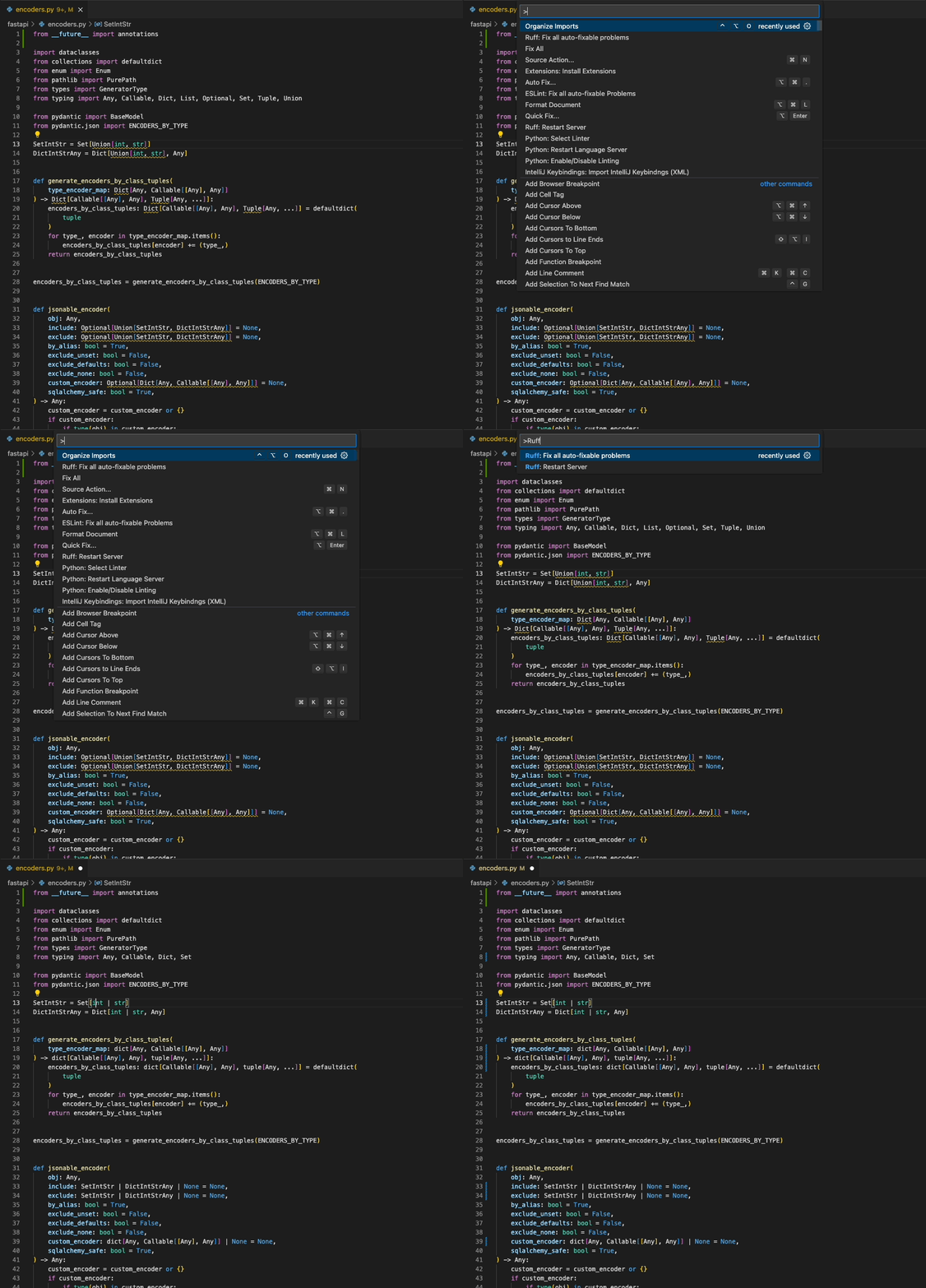
Download the [Ruff VS Code extension](https://marketplace.visualstudio.com/items?itemName=charliermarsh.ruff),
|
|
which supports autofix actions, import sorting, and more.
|
|
|
|
|
|
|
|
### Language Server Protocol (Official)
|
|
|
|
Ruff supports the [Language Server Protocol](https://microsoft.github.io/language-server-protocol/)
|
|
via the [`ruff-lsp`](https://github.com/charliermarsh/ruff-lsp) Python package, available on
|
|
[PyPI](https://pypi.org/project/ruff-lsp/).
|
|
|
|
[`ruff-lsp`](https://github.com/charliermarsh/ruff-lsp) enables Ruff to be used with any editor that
|
|
supports the Language Server Protocol, including [Neovim](https://github.com/charliermarsh/ruff-lsp#example-neovim),
|
|
[Sublime Text](https://github.com/charliermarsh/ruff-lsp#example-sublime-text), Emacs, and more.
|
|
|
|
For example, to use `ruff-lsp` with Neovim, install `ruff-lsp` from PyPI along with
|
|
[`nvim-lspconfig`](https://github.com/neovim/nvim-lspconfig). Then, add something like the following
|
|
to your `init.lua`:
|
|
|
|
```lua
|
|
-- See: https://github.com/neovim/nvim-lspconfig/tree/54eb2a070a4f389b1be0f98070f81d23e2b1a715#suggested-configuration
|
|
local opts = { noremap=true, silent=true }
|
|
vim.keymap.set('n', '<space>e', vim.diagnostic.open_float, opts)
|
|
vim.keymap.set('n', '[d', vim.diagnostic.goto_prev, opts)
|
|
vim.keymap.set('n', ']d', vim.diagnostic.goto_next, opts)
|
|
vim.keymap.set('n', '<space>q', vim.diagnostic.setloclist, opts)
|
|
|
|
-- Use an on_attach function to only map the following keys
|
|
-- after the language server attaches to the current buffer
|
|
local on_attach = function(client, bufnr)
|
|
-- Enable completion triggered by <c-x><c-o>
|
|
vim.api.nvim_buf_set_option(bufnr, 'omnifunc', 'v:lua.vim.lsp.omnifunc')
|
|
|
|
-- Mappings.
|
|
-- See `:help vim.lsp.*` for documentation on any of the below functions
|
|
local bufopts = { noremap=true, silent=true, buffer=bufnr }
|
|
vim.keymap.set('n', 'gD', vim.lsp.buf.declaration, bufopts)
|
|
vim.keymap.set('n', 'gd', vim.lsp.buf.definition, bufopts)
|
|
vim.keymap.set('n', 'K', vim.lsp.buf.hover, bufopts)
|
|
vim.keymap.set('n', 'gi', vim.lsp.buf.implementation, bufopts)
|
|
vim.keymap.set('n', '<C-k>', vim.lsp.buf.signature_help, bufopts)
|
|
vim.keymap.set('n', '<space>wa', vim.lsp.buf.add_workspace_folder, bufopts)
|
|
vim.keymap.set('n', '<space>wr', vim.lsp.buf.remove_workspace_folder, bufopts)
|
|
vim.keymap.set('n', '<space>wl', function()
|
|
print(vim.inspect(vim.lsp.buf.list_workspace_folders()))
|
|
end, bufopts)
|
|
vim.keymap.set('n', '<space>D', vim.lsp.buf.type_definition, bufopts)
|
|
vim.keymap.set('n', '<space>rn', vim.lsp.buf.rename, bufopts)
|
|
vim.keymap.set('n', '<space>ca', vim.lsp.buf.code_action, bufopts)
|
|
vim.keymap.set('n', 'gr', vim.lsp.buf.references, bufopts)
|
|
vim.keymap.set('n', '<space>f', function() vim.lsp.buf.format { async = true } end, bufopts)
|
|
end
|
|
|
|
-- Configure `ruff-lsp`.
|
|
local configs = require 'lspconfig.configs'
|
|
if not configs.ruff_lsp then
|
|
configs.ruff_lsp = {
|
|
default_config = {
|
|
cmd = { 'ruff-lsp' },
|
|
filetypes = { 'python' },
|
|
root_dir = require('lspconfig').util.find_git_ancestor,
|
|
init_options = {
|
|
settings = {
|
|
args = {}
|
|
}
|
|
}
|
|
}
|
|
}
|
|
end
|
|
require('lspconfig').ruff_lsp.setup {
|
|
on_attach = on_attach,
|
|
}
|
|
```
|
|
|
|
Upon successful installation, you should see Ruff's diagnostics surfaced directly in your editor:
|
|
|
|

|
|
|
|
To use `ruff-lsp` with other editors, including Sublime Text and Helix, see the [`ruff-lsp` documentation](https://github.com/charliermarsh/ruff-lsp#installation-and-usage).
|
|
|
|
### Language Server Protocol (Unofficial)
|
|
|
|
Ruff is also available as the [`python-lsp-ruff`](https://github.com/python-lsp/python-lsp-ruff)
|
|
plugin for [`python-lsp-server`](https://github.com/python-lsp/python-lsp-ruff), both of which are
|
|
installable from PyPI:
|
|
|
|
```shell
|
|
pip install python-lsp-server python-lsp-ruff
|
|
```
|
|
|
|
The LSP server can then be used with any editor that supports the Language Server Protocol.
|
|
|
|
For example, to use `python-lsp-ruff` with Neovim, add something like the following to your
|
|
`init.lua`:
|
|
|
|
```lua
|
|
require'lspconfig'.pylsp.setup {
|
|
settings = {
|
|
pylsp = {
|
|
plugins = {
|
|
ruff = {
|
|
enabled = true
|
|
},
|
|
pycodestyle = {
|
|
enabled = false
|
|
},
|
|
pyflakes = {
|
|
enabled = false
|
|
},
|
|
mccabe = {
|
|
enabled = false
|
|
}
|
|
}
|
|
}
|
|
},
|
|
}
|
|
```
|
|
|
|
### Vim & Neovim
|
|
|
|
Ruff can be integrated into any editor that supports the Language Server Protocol via [`ruff-lsp`](https://github.com/charliermarsh/ruff-lsp)
|
|
(see: [Language Server Protocol](#language-server-protocol-official)), including Vim and Neovim.
|
|
|
|
It's recommended that you use [`ruff-lsp`](https://github.com/charliermarsh/ruff-lsp), the
|
|
officially supported LSP server for Ruff.
|
|
|
|
However, Ruff is also available as part of the [coc-pyright](https://github.com/fannheyward/coc-pyright)
|
|
extension for `coc.nvim`.
|
|
|
|
<details>
|
|
<summary>With the <a href="https://github.com/dense-analysis/ale">ALE</a> plugin for (Neo)Vim.</summary>
|
|
|
|
```vim
|
|
let g:ale_linters = { "python": ["ruff"] }
|
|
let g:ale_fixers = {
|
|
\ "python": ["black", "ruff"],
|
|
\}
|
|
```
|
|
|
|
</details>
|
|
|
|
<details>
|
|
<summary>Ruff can also be integrated via <a href="https://github.com/neovim/nvim-lspconfig/blob/master/doc/server_configurations.md#efm"><code>efm</code></a> in just a <a href="https://github.com/JafarAbdi/myconfigs/blob/6f0b6b2450e92ec8fc50422928cd22005b919110/efm-langserver/config.yaml#L14-L20">few lines</a>.</summary>
|
|
<br>
|
|
|
|
```yaml
|
|
tools:
|
|
python-ruff: &python-ruff
|
|
lint-command: "ruff check --config ~/myconfigs/linters/ruff.toml --quiet ${INPUT}"
|
|
lint-stdin: true
|
|
lint-formats:
|
|
- "%f:%l:%c: %m"
|
|
format-command: "ruff check --stdin-filename ${INPUT} --config ~/myconfigs/linters/ruff.toml --fix --exit-zero --quiet -"
|
|
format-stdin: true
|
|
```
|
|
|
|
</details>
|
|
|
|
<details>
|
|
<summary>For neovim users using <a href="https://github.com/jose-elias-alvarez/null-ls.nvim"><code>null-ls</code></a>, Ruff is already <a href="https://github.com/jose-elias-alvarez/null-ls.nvim">integrated</a>.</summary>
|
|
<br>
|
|
|
|
```lua
|
|
local null_ls = require("null-ls")
|
|
|
|
null_ls.setup({
|
|
sources = {
|
|
null_ls.builtins.formatting.ruff,
|
|
null_ls.builtins.diagnostics.ruff,
|
|
}
|
|
})
|
|
```
|
|
|
|
</details>
|
|
|
|
### PyCharm (External Tool)
|
|
|
|
Ruff can be installed as an [External Tool](https://www.jetbrains.com/help/pycharm/configuring-third-party-tools.html)
|
|
in PyCharm. Open the Preferences pane, then navigate to "Tools", then "External Tools". From there,
|
|
add a new tool with the following configuration:
|
|
|
|

|
|
|
|
Ruff should then appear as a runnable action:
|
|
|
|

|
|
|
|
### PyCharm (Unofficial)
|
|
|
|
Ruff is also available as the [Ruff](https://plugins.jetbrains.com/plugin/20574-ruff) plugin on the
|
|
IntelliJ Marketplace (maintained by @koxudaxi).
|
|
|
|
### GitHub Actions
|
|
|
|
GitHub Actions has everything you need to run Ruff out-of-the-box:
|
|
|
|
```yaml
|
|
name: CI
|
|
on: push
|
|
jobs:
|
|
build:
|
|
runs-on: ubuntu-latest
|
|
steps:
|
|
- uses: actions/checkout@v3
|
|
- name: Install Python
|
|
uses: actions/setup-python@v4
|
|
with:
|
|
python-version: "3.11"
|
|
- name: Install dependencies
|
|
run: |
|
|
python -m pip install --upgrade pip
|
|
pip install ruff
|
|
# Include `--format=github` to enable automatic inline annotations.
|
|
- name: Run Ruff
|
|
run: ruff check --format=github .
|
|
```
|
|
|
|
<!-- End section: Editor Integrations -->
|
|
|
|
## FAQ
|
|
|
|
<!-- Begin section: FAQ -->
|
|
|
|
### Is Ruff compatible with Black?
|
|
|
|
Yes. Ruff is compatible with [Black](https://github.com/psf/black) out-of-the-box, as long as
|
|
the `line-length` setting is consistent between the two.
|
|
|
|
As a project, Ruff is designed to be used alongside Black and, as such, will defer implementing
|
|
stylistic lint rules that are obviated by autoformatting.
|
|
|
|
### How does Ruff compare to Flake8?
|
|
|
|
(Coming from Flake8? Try [`flake8-to-ruff`](https://pypi.org/project/flake8-to-ruff/) to
|
|
automatically convert your existing configuration.)
|
|
|
|
Ruff can be used as a drop-in replacement for Flake8 when used (1) without or with a small number of
|
|
plugins, (2) alongside Black, and (3) on Python 3 code.
|
|
|
|
Under those conditions, Ruff implements every rule in Flake8. In practice, that means Ruff
|
|
implements all of the `F` rules (which originate from Pyflakes), along with a subset of the `E` and
|
|
`W` rules (which originate from pycodestyle).
|
|
|
|
Ruff also re-implements some of the most popular Flake8 plugins and related code quality tools
|
|
natively, including:
|
|
|
|
* [autoflake](https://pypi.org/project/autoflake/) ([#1647](https://github.com/charliermarsh/ruff/issues/1647))
|
|
* [eradicate](https://pypi.org/project/eradicate/)
|
|
* [flake8-2020](https://pypi.org/project/flake8-2020/)
|
|
* [flake8-annotations](https://pypi.org/project/flake8-annotations/)
|
|
* [flake8-bandit](https://pypi.org/project/flake8-bandit/) ([#1646](https://github.com/charliermarsh/ruff/issues/1646))
|
|
* [flake8-blind-except](https://pypi.org/project/flake8-blind-except/)
|
|
* [flake8-boolean-trap](https://pypi.org/project/flake8-boolean-trap/)
|
|
* [flake8-bugbear](https://pypi.org/project/flake8-bugbear/)
|
|
* [flake8-builtins](https://pypi.org/project/flake8-builtins/)
|
|
* [flake8-commas](https://pypi.org/project/flake8-commas/)
|
|
* [flake8-comprehensions](https://pypi.org/project/flake8-comprehensions/)
|
|
* [flake8-datetimez](https://pypi.org/project/flake8-datetimez/)
|
|
* [flake8-debugger](https://pypi.org/project/flake8-debugger/)
|
|
* [flake8-django](https://pypi.org/project/flake8-django/) ([#2817](https://github.com/charliermarsh/ruff/issues/2817))
|
|
* [flake8-docstrings](https://pypi.org/project/flake8-docstrings/)
|
|
* [flake8-eradicate](https://pypi.org/project/flake8-eradicate/)
|
|
* [flake8-errmsg](https://pypi.org/project/flake8-errmsg/)
|
|
* [flake8-executable](https://pypi.org/project/flake8-executable/)
|
|
* [flake8-implicit-str-concat](https://pypi.org/project/flake8-implicit-str-concat/)
|
|
* [flake8-import-conventions](https://github.com/joaopalmeiro/flake8-import-conventions)
|
|
* [flake8-logging-format](https://pypi.org/project/flake8-logging-format/)
|
|
* [flake8-no-pep420](https://pypi.org/project/flake8-no-pep420)
|
|
* [flake8-pie](https://pypi.org/project/flake8-pie/)
|
|
* [flake8-print](https://pypi.org/project/flake8-print/)
|
|
* [flake8-pyi](https://pypi.org/project/flake8-pyi/)
|
|
* [flake8-pytest-style](https://pypi.org/project/flake8-pytest-style/)
|
|
* [flake8-quotes](https://pypi.org/project/flake8-quotes/)
|
|
* [flake8-raise](https://pypi.org/project/flake8-raise/)
|
|
* [flake8-return](https://pypi.org/project/flake8-return/)
|
|
* [flake8-self](https://pypi.org/project/flake8-self/)
|
|
* [flake8-simplify](https://pypi.org/project/flake8-simplify/) ([#998](https://github.com/charliermarsh/ruff/issues/998))
|
|
* [flake8-super](https://pypi.org/project/flake8-super/)
|
|
* [flake8-tidy-imports](https://pypi.org/project/flake8-tidy-imports/)
|
|
* [flake8-type-checking](https://pypi.org/project/flake8-type-checking/)
|
|
* [flake8-use-pathlib](https://pypi.org/project/flake8-use-pathlib/)
|
|
* [isort](https://pypi.org/project/isort/)
|
|
* [mccabe](https://pypi.org/project/mccabe/)
|
|
* [pandas-vet](https://pypi.org/project/pandas-vet/)
|
|
* [pep8-naming](https://pypi.org/project/pep8-naming/)
|
|
* [pydocstyle](https://pypi.org/project/pydocstyle/)
|
|
* [pygrep-hooks](https://github.com/pre-commit/pygrep-hooks) ([#980](https://github.com/charliermarsh/ruff/issues/980))
|
|
* [pyupgrade](https://pypi.org/project/pyupgrade/) ([#827](https://github.com/charliermarsh/ruff/issues/827))
|
|
* [yesqa](https://github.com/asottile/yesqa)
|
|
|
|
Note that, in some cases, Ruff uses different rule codes and prefixes than would be found in the
|
|
originating Flake8 plugins. For example, Ruff uses `TID252` to represent the `I252` rule from
|
|
flake8-tidy-imports. This helps minimize conflicts across plugins and allows any individual plugin
|
|
to be toggled on or off with a single (e.g.) `--select TID`, as opposed to `--select I2` (to avoid
|
|
conflicts with the isort rules, like `I001`).
|
|
|
|
Beyond the rule set, Ruff suffers from the following limitations vis-à-vis Flake8:
|
|
|
|
1. Ruff does not yet support structural pattern matching.
|
|
2. Flake8 has a plugin architecture and supports writing custom lint rules. (Instead, popular Flake8
|
|
plugins are re-implemented in Rust as part of Ruff itself.)
|
|
|
|
There are a few other minor incompatibilities between Ruff and the originating Flake8 plugins:
|
|
|
|
* Ruff doesn't implement all the "opinionated" lint rules from flake8-bugbear.
|
|
* Depending on your project structure, Ruff and isort can differ in their detection of first-party
|
|
code. (This is often solved by modifying the `src` property, e.g., to `src = ["src"]`, if your
|
|
code is nested in a `src` directory.)
|
|
|
|
### How does Ruff compare to Pylint?
|
|
|
|
At time of writing, Pylint implements ~409 total rules, while Ruff implements 440, of which at least
|
|
89 overlap with the Pylint rule set (you can find the mapping in [#970](https://github.com/charliermarsh/ruff/issues/970)).
|
|
|
|
Pylint implements many rules that Ruff does not, and vice versa. For example, Pylint does more type
|
|
inference than Ruff (e.g., Pylint can validate the number of arguments in a function call). As such,
|
|
Ruff is not a "pure" drop-in replacement for Pylint (and vice versa), as they enforce different sets
|
|
of rules.
|
|
|
|
Despite these differences, many users have successfully switched from Pylint to Ruff, especially
|
|
those using Ruff alongside a [type checker](https://github.com/charliermarsh/ruff#how-does-ruff-compare-to-mypy-or-pyright-or-pyre),
|
|
which can cover some of the functionality that Pylint provides.
|
|
|
|
Like Flake8, Pylint supports plugins (called "checkers"), while Ruff implements all rules natively.
|
|
Unlike Pylint, Ruff is capable of automatically fixing its own lint violations.
|
|
|
|
Pylint parity is being tracked in [#970](https://github.com/charliermarsh/ruff/issues/970).
|
|
|
|
### How does Ruff compare to Mypy, or Pyright, or Pyre?
|
|
|
|
Ruff is a linter, not a type checker. It can detect some of the same problems that a type checker
|
|
can, but a type checker will catch certain errors that Ruff would miss. The opposite is also true:
|
|
Ruff will catch certain errors that a type checker would typically ignore.
|
|
|
|
For example, unlike a type checker, Ruff will notify you if an import is unused, by looking for
|
|
references to that import in the source code; on the other hand, a type checker could flag that you
|
|
passed an integer argument to a function that expects a string, which Ruff would miss. The
|
|
tools are complementary.
|
|
|
|
It's recommended that you use Ruff in conjunction with a type checker, like Mypy, Pyright, or Pyre,
|
|
with Ruff providing faster feedback on lint violations and the type checker providing more detailed
|
|
feedback on type errors.
|
|
|
|
### Which tools does Ruff replace?
|
|
|
|
Today, Ruff can be used to replace Flake8 when used with any of the following plugins:
|
|
|
|
* [flake8-2020](https://pypi.org/project/flake8-2020/)
|
|
* [flake8-annotations](https://pypi.org/project/flake8-annotations/)
|
|
* [flake8-bandit](https://pypi.org/project/flake8-bandit/) ([#1646](https://github.com/charliermarsh/ruff/issues/1646))
|
|
* [flake8-blind-except](https://pypi.org/project/flake8-blind-except/)
|
|
* [flake8-boolean-trap](https://pypi.org/project/flake8-boolean-trap/)
|
|
* [flake8-bugbear](https://pypi.org/project/flake8-bugbear/)
|
|
* [flake8-builtins](https://pypi.org/project/flake8-builtins/)
|
|
* [flake8-commas](https://pypi.org/project/flake8-commas/)
|
|
* [flake8-comprehensions](https://pypi.org/project/flake8-comprehensions/)
|
|
* [flake8-datetimez](https://pypi.org/project/flake8-datetimez/)
|
|
* [flake8-debugger](https://pypi.org/project/flake8-debugger/)
|
|
* [flake8-django](https://pypi.org/project/flake8-django/) ([#2817](https://github.com/charliermarsh/ruff/issues/2817))
|
|
* [flake8-docstrings](https://pypi.org/project/flake8-docstrings/)
|
|
* [flake8-eradicate](https://pypi.org/project/flake8-eradicate/)
|
|
* [flake8-errmsg](https://pypi.org/project/flake8-errmsg/)
|
|
* [flake8-executable](https://pypi.org/project/flake8-executable/)
|
|
* [flake8-implicit-str-concat](https://pypi.org/project/flake8-implicit-str-concat/)
|
|
* [flake8-import-conventions](https://github.com/joaopalmeiro/flake8-import-conventions)
|
|
* [flake8-logging-format](https://pypi.org/project/flake8-logging-format/)
|
|
* [flake8-no-pep420](https://pypi.org/project/flake8-no-pep420)
|
|
* [flake8-pie](https://pypi.org/project/flake8-pie/)
|
|
* [flake8-print](https://pypi.org/project/flake8-print/)
|
|
* [flake8-pytest-style](https://pypi.org/project/flake8-pytest-style/)
|
|
* [flake8-quotes](https://pypi.org/project/flake8-quotes/)
|
|
* [flake8-raise](https://pypi.org/project/flake8-raise/)
|
|
* [flake8-return](https://pypi.org/project/flake8-return/)
|
|
* [flake8-self](https://pypi.org/project/flake8-self/)
|
|
* [flake8-simplify](https://pypi.org/project/flake8-simplify/) ([#998](https://github.com/charliermarsh/ruff/issues/998))
|
|
* [flake8-super](https://pypi.org/project/flake8-super/)
|
|
* [flake8-tidy-imports](https://pypi.org/project/flake8-tidy-imports/)
|
|
* [flake8-type-checking](https://pypi.org/project/flake8-type-checking/)
|
|
* [flake8-use-pathlib](https://pypi.org/project/flake8-use-pathlib/)
|
|
* [mccabe](https://pypi.org/project/mccabe/)
|
|
* [pandas-vet](https://pypi.org/project/pandas-vet/)
|
|
* [pep8-naming](https://pypi.org/project/pep8-naming/)
|
|
* [pydocstyle](https://pypi.org/project/pydocstyle/)
|
|
|
|
Ruff can also replace [isort](https://pypi.org/project/isort/),
|
|
[yesqa](https://github.com/asottile/yesqa), [eradicate](https://pypi.org/project/eradicate/),
|
|
[pygrep-hooks](https://github.com/pre-commit/pygrep-hooks) ([#980](https://github.com/charliermarsh/ruff/issues/980)), and a subset of the rules
|
|
implemented in [pyupgrade](https://pypi.org/project/pyupgrade/) ([#827](https://github.com/charliermarsh/ruff/issues/827)).
|
|
|
|
If you're looking to use Ruff, but rely on an unsupported Flake8 plugin, feel free to file an Issue.
|
|
|
|
### What versions of Python does Ruff support?
|
|
|
|
Ruff can lint code for any Python version from 3.7 onwards. However, Ruff lacks support for a few
|
|
language features that were introduced in Python 3.10 and later. Specifically, Ruff does not
|
|
support:
|
|
|
|
- "Structural Pattern Matching" ([PEP 622](https://peps.python.org/pep-0622/)), introduced in Python 3.10.
|
|
- "Exception Groups and except* ([PEP 654](https://www.python.org/dev/peps/pep-0654/)), introduced in Python 3.11.
|
|
|
|
Support for these features is planned.
|
|
|
|
Ruff does not support Python 2. Ruff _may_ run on pre-Python 3.7 code, although such versions
|
|
are not officially supported (e.g., Ruff does _not_ respect type comments).
|
|
|
|
Ruff is installable under any Python version from 3.7 onwards.
|
|
|
|
### Do I need to install Rust to use Ruff?
|
|
|
|
Nope! Ruff is available as [`ruff`](https://pypi.org/project/ruff/) on PyPI:
|
|
|
|
```shell
|
|
pip install ruff
|
|
```
|
|
|
|
Ruff ships with wheels for all major platforms, which enables `pip` to install Ruff without relying
|
|
on Rust at all.
|
|
|
|
### Can I write my own plugins for Ruff?
|
|
|
|
Ruff does not yet support third-party plugins, though a plugin system is within-scope for the
|
|
project. See [#283](https://github.com/charliermarsh/ruff/issues/283) for more.
|
|
|
|
### How does Ruff's import sorting compare to [isort](https://pypi.org/project/isort/)?
|
|
|
|
Ruff's import sorting is intended to be nearly equivalent to isort when used `profile = "black"`.
|
|
There are a few known, minor differences in how Ruff and isort break ties between similar imports,
|
|
and in how Ruff and isort treat inline comments in some cases (see: [#1381](https://github.com/charliermarsh/ruff/issues/1381),
|
|
[#2104](https://github.com/charliermarsh/ruff/issues/2104)).
|
|
|
|
Like isort, Ruff's import sorting is compatible with Black.
|
|
|
|
Ruff does not yet support all of isort's configuration options, though it does support many of
|
|
them. You can find the supported settings in the [API reference](#isort). For example, you can set
|
|
`known-first-party` like so:
|
|
|
|
```toml
|
|
[tool.ruff]
|
|
select = [
|
|
# Pyflakes
|
|
"F",
|
|
# Pycodestyle
|
|
"E",
|
|
"W",
|
|
# isort
|
|
"I001"
|
|
]
|
|
src = ["src", "tests"]
|
|
|
|
[tool.ruff.isort]
|
|
known-first-party = ["my_module1", "my_module2"]
|
|
```
|
|
|
|
### Does Ruff support Jupyter Notebooks?
|
|
|
|
Ruff is integrated into [nbQA](https://github.com/nbQA-dev/nbQA), a tool for running linters and
|
|
code formatters over Jupyter Notebooks.
|
|
|
|
After installing `ruff` and `nbqa`, you can run Ruff over a notebook like so:
|
|
|
|
```shell
|
|
> nbqa ruff Untitled.ipynb
|
|
Untitled.ipynb:cell_1:2:5: F841 Local variable `x` is assigned to but never used
|
|
Untitled.ipynb:cell_2:1:1: E402 Module level import not at top of file
|
|
Untitled.ipynb:cell_2:1:8: F401 `os` imported but unused
|
|
Found 3 errors.
|
|
1 potentially fixable with the --fix option.
|
|
```
|
|
|
|
### Does Ruff support NumPy- or Google-style docstrings?
|
|
|
|
Yes! To enable specific docstring convention, add the following to your `pyproject.toml`:
|
|
|
|
```toml
|
|
[tool.ruff.pydocstyle]
|
|
convention = "google" # Accepts: "google", "numpy", or "pep257".
|
|
```
|
|
|
|
For example, if you're coming from flake8-docstrings, and your originating configuration uses
|
|
`--docstring-convention=numpy`, you'd instead set `convention = "numpy"` in your `pyproject.toml`,
|
|
as above.
|
|
|
|
Alongside `convention`, you'll want to explicitly enable the `D` rule code prefix, like so:
|
|
|
|
```toml
|
|
[tool.ruff]
|
|
select = [
|
|
"D",
|
|
]
|
|
|
|
[tool.ruff.pydocstyle]
|
|
convention = "google"
|
|
```
|
|
|
|
Setting a `convention` force-disables any rules that are incompatible with that convention, no
|
|
matter how they're provided, which avoids accidental incompatibilities and simplifies configuration.
|
|
|
|
### How can I tell what settings Ruff is using to check my code?
|
|
|
|
Run `ruff check /path/to/code.py --show-settings` to view the resolved settings for a given file.
|
|
|
|
### I want to use Ruff, but I don't want to use `pyproject.toml`. Is that possible?
|
|
|
|
Yes! In lieu of a `pyproject.toml` file, you can use a `ruff.toml` file for configuration. The two
|
|
files are functionally equivalent and have an identical schema, with the exception that a `ruff.toml`
|
|
file can omit the `[tool.ruff]` section header.
|
|
|
|
For example, given this `pyproject.toml`:
|
|
|
|
```toml
|
|
[tool.ruff]
|
|
line-length = 88
|
|
|
|
[tool.ruff.pydocstyle]
|
|
convention = "google"
|
|
```
|
|
|
|
You could instead use a `ruff.toml` file like so:
|
|
|
|
```toml
|
|
line-length = 88
|
|
|
|
[pydocstyle]
|
|
convention = "google"
|
|
```
|
|
|
|
Ruff doesn't currently support INI files, like `setup.cfg` or `tox.ini`.
|
|
|
|
### How can I change Ruff's default configuration?
|
|
|
|
When no configuration file is found, Ruff will look for a user-specific `pyproject.toml` or
|
|
`ruff.toml` file as a last resort. This behavior is similar to Flake8's `~/.config/flake8`.
|
|
|
|
On macOS, Ruff expects that file to be located at `/Users/Alice/Library/Application Support/ruff/ruff.toml`.
|
|
|
|
On Linux, Ruff expects that file to be located at `/home/alice/.config/ruff/ruff.toml`.
|
|
|
|
On Windows, Ruff expects that file to be located at `C:\Users\Alice\AppData\Roaming\ruff\ruff.toml`.
|
|
|
|
For more, see the [`dirs`](https://docs.rs/dirs/4.0.0/dirs/fn.config_dir.html) crate.
|
|
|
|
### Ruff tried to fix something, but it broke my code. What should I do?
|
|
|
|
Ruff's autofix is a best-effort mechanism. Given the dynamic nature of Python, it's difficult to
|
|
have _complete_ certainty when making changes to code, even for the seemingly trivial fixes.
|
|
|
|
In the future, Ruff will support enabling autofix behavior based on the safety of the patch.
|
|
|
|
In the meantime, if you find that the autofix is too aggressive, you can disable it on a per-rule or
|
|
per-category basis using the [`unfixable`](#unfixable) mechanic. For example, to disable autofix
|
|
for some possibly-unsafe rules, you could add the following to your `pyproject.toml`:
|
|
|
|
```toml
|
|
[tool.ruff]
|
|
unfixable = ["B", "SIM", "TRY", "RUF"]
|
|
```
|
|
|
|
If you find a case where Ruff's autofix breaks your code, please file an Issue!
|
|
|
|
### How can I disable Ruff's color output?
|
|
|
|
Ruff's color output is powered by the [`colored`](https://crates.io/crates/colored) crate, which
|
|
attempts to automatically detect whether the output stream supports color. However, you can force
|
|
colors off by setting the `NO_COLOR` environment variable to any value (e.g., `NO_COLOR=1`).
|
|
|
|
[`colored`](https://crates.io/crates/colored) also supports the the `CLICOLOR` and `CLICOLOR_FORCE`
|
|
environment variables (see the [spec](https://bixense.com/clicolors/)).
|
|
|
|
<!-- End section: FAQ -->
|
|
|
|
## Contributing
|
|
|
|
Contributions are welcome and highly appreciated. To get started, check out the
|
|
[**contributing guidelines**](https://github.com/charliermarsh/ruff/blob/main/CONTRIBUTING.md). You
|
|
can also join us on [**Discord**](https://discord.gg/c9MhzV8aU5).
|
|
|
|
## Support
|
|
|
|
Having trouble? Check out the existing issues on [**GitHub**](https://github.com/charliermarsh/ruff/issues),
|
|
or feel free to [**open a new one**](https://github.com/charliermarsh/ruff/issues/new).
|
|
|
|
You can also ask for help on [**Discord**](https://discord.gg/c9MhzV8aU5).
|
|
|
|
## Reference
|
|
|
|
See the [list of all options](https://beta.ruff.rs/docs/settings/).
|
|
|
|
<!-- Begin section: Acknowledgements -->
|
|
|
|
## Acknowledgements
|
|
|
|
Ruff's linter draws on both the APIs and implementation details of many other
|
|
tools in the Python ecosystem, especially [Flake8](https://github.com/PyCQA/flake8), [Pyflakes](https://github.com/PyCQA/pyflakes),
|
|
[pycodestyle](https://github.com/PyCQA/pycodestyle), [pydocstyle](https://github.com/PyCQA/pydocstyle),
|
|
[pyupgrade](https://github.com/asottile/pyupgrade), and [isort](https://github.com/PyCQA/isort).
|
|
|
|
In some cases, Ruff includes a "direct" Rust port of the corresponding tool.
|
|
We're grateful to the maintainers of these tools for their work, and for all
|
|
the value they've provided to the Python community.
|
|
|
|
Ruff's autoformatter is built on a fork of Rome's [`rome_formatter`](https://github.com/rome/tools/tree/main/crates/rome_formatter),
|
|
and again draws on both the APIs and implementation details of [Rome](https://github.com/rome/tools),
|
|
[Prettier](https://github.com/prettier/prettier), and [Black](https://github.com/psf/black).
|
|
|
|
Ruff is also influenced by a number of tools outside the Python ecosystem, like
|
|
[Clippy](https://github.com/rust-lang/rust-clippy) and [ESLint](https://github.com/eslint/eslint).
|
|
|
|
Ruff is the beneficiary of a large number of [contributors](https://github.com/charliermarsh/ruff/graphs/contributors).
|
|
|
|
Ruff is released under the MIT license.
|
|
|
|
<!-- End section: Acknowledgements -->
|
|
|
|
## License
|
|
|
|
MIT
|