Compare commits
15 Commits
docs/updat
...
ratatui-v0
| Author | SHA1 | Date | |
|---|---|---|---|

|
c10d0f12e8 | ||
|
|
ddeac29411 | ||
|
|
3c3b5fe1fa | ||
|
|
9398a2550a | ||
|
|
9f3019b4fe | ||
|
|
474abe4a9d | ||
|
|
a6c61f0d12 | ||
|
|
912616af48 | ||
|
|
22e3e84de8 | ||
|
|
0fd4753e6b | ||
|
|
e0b1b41c75 | ||
|
|
03032920ee | ||
|
|
35a86427ab | ||
|
|
882cc3c6c6 | ||
|
|
39479e298c |
1
.github/workflows/release-plz.yml
vendored
1
.github/workflows/release-plz.yml
vendored
@@ -8,6 +8,7 @@ on:
|
||||
push:
|
||||
branches:
|
||||
- main
|
||||
workflow_dispatch:
|
||||
|
||||
jobs:
|
||||
# Release unpublished packages.
|
||||
|
||||
@@ -178,6 +178,15 @@ for `Bar::text_value()`:
|
||||
+ Bar::default().text_value("foobar");
|
||||
```
|
||||
|
||||
### `termwiz` is upgraded to 0.23.0 ([#1682])
|
||||
|
||||
[#1682]: https://github.com/ratatui/ratatui/pull/1682
|
||||
|
||||
The `termwiz` backend is upgraded from 0.22.0 to 0.23.0.
|
||||
|
||||
This release has a few fixes for hyperlinks and input handling, plus some dependency updates.
|
||||
See the [commits](https://github.com/wezterm/wezterm/commits/main/termwiz) for more details.
|
||||
|
||||
## [v0.29.0](https://github.com/ratatui/ratatui/releases/tag/v0.29.0)
|
||||
|
||||
### `Sparkline::data` takes `IntoIterator<Item = SparklineBar>` instead of `&[u64]` and is no longer const ([#1326])
|
||||
|
||||
233
CHANGELOG.md
233
CHANGELOG.md
@@ -4,6 +4,239 @@ All notable changes to this project will be documented in this file.
|
||||
<!-- ignore lint rules that are often triggered by content generated from commits / git-cliff -->
|
||||
<!-- markdownlint-disable line-length no-bare-urls ul-style emphasis-style -->
|
||||
|
||||
## ratatui - [0.30.0-alpha.2](https://github.com/ratatui/ratatui/compare/ratatui-v0.30.0-alpha.1...ratatui-v0.30.0-alpha.2) - 2025-03-01
|
||||
|
||||
### Features
|
||||
|
||||
- [be8def9](https://github.com/ratatui/ratatui/commit/be8def963956c605bca28bcd8df673bd7ec3740b) *(layout)* Use *= instead of =* (#45) by @kdheepak in [#1652](https://github.com/ratatui/ratatui/pull/1652) [**breaking**]
|
||||
|
||||
- [f33d51e](https://github.com/ratatui/ratatui/commit/f33d51e7d9ccf9fe52ec3289d04d97c722d9ee17) *(text)* Add raw! and styled! macros (#4) by @joshka in [#1652](https://github.com/ratatui/ratatui/pull/1652)
|
||||
|
||||
- [d441520](https://github.com/ratatui/ratatui/commit/d4415204e1eb3aed2a74a722aeaaa274975dd2d7) *(uncategorized)* Add ratatui-macros crate by @joshka in [#1652](https://github.com/ratatui/ratatui/pull/1652)
|
||||
|
||||
- [3855c3a](https://github.com/ratatui/ratatui/commit/3855c3a84a77037aeee40dbe9e52454fb1f9afee) *(uncategorized)* Add text! macro (#36) by @kdheepak in [#1652](https://github.com/ratatui/ratatui/pull/1652)
|
||||
|
||||
- [8ecdd89](https://github.com/ratatui/ratatui/commit/8ecdd892f53d7db95bbb53a61700d36e3fcefdd4) *(uncategorized)* Add fill constraint (#34) by @kdheepak in [#1652](https://github.com/ratatui/ratatui/pull/1652)
|
||||
|
||||
- [a0c35f1](https://github.com/ratatui/ratatui/commit/a0c35f1d7bcce10e092582b95f5b0a3f20ad7bf3) *(uncategorized)* Replace raw! and styled! with span! macro (#30) by @kdheepak in [#1652](https://github.com/ratatui/ratatui/pull/1652)
|
||||
|
||||
- [9a7467b](https://github.com/ratatui/ratatui/commit/9a7467b30576d5cb7491ea6e09efcae97eadf9bb) *(uncategorized)* Add `line!` attribute macro (#29) by @kdheepak in [#1652](https://github.com/ratatui/ratatui/pull/1652)
|
||||
|
||||
- [39bd72b](https://github.com/ratatui/ratatui/commit/39bd72b1f702dadb1ebbaf4e77ad2fada166ac49) *(uncategorized)* Add pub visibility to color ✨ by @kdheepak in [#1652](https://github.com/ratatui/ratatui/pull/1652)
|
||||
|
||||
- [29edc3a](https://github.com/ratatui/ratatui/commit/29edc3a7a38c512611a80cf5d8d42027558419b2) *(uncategorized)* Add color palette based on tailwindcss ✨ by @kdheepak in [#1652](https://github.com/ratatui/ratatui/pull/1652)
|
||||
|
||||
### Documentation
|
||||
|
||||
- [4393fae](https://github.com/ratatui/ratatui/commit/4393fae54c18c148e7c24206350f0b9e235e5d69) *(examples)* Move scrollbar example to examples folder (#1665) by @orhun in [#1665](https://github.com/ratatui/ratatui/pull/1665)
|
||||
|
||||
- [9ea70e2](https://github.com/ratatui/ratatui/commit/9ea70e28c639d967f361a35e851fc450d0b797d7) *(examples)* Move widget-impl example to examples folder (#1663) by @orhun in [#1663](https://github.com/ratatui/ratatui/pull/1663)
|
||||
|
||||
- [774ab78](https://github.com/ratatui/ratatui/commit/774ab788d4fcdf4862710573dd519b3999044a4b) *(examples)* Move widget-ref-container example to examples folder (#1664) by @orhun in [#1664](https://github.com/ratatui/ratatui/pull/1664)
|
||||
|
||||
- [910d16e](https://github.com/ratatui/ratatui/commit/910d16e63af92844ad4d2bed061fb2eec5ac75e3) *(examples)* Move user-input example to examples folder (#1659) by @orhun in [#1659](https://github.com/ratatui/ratatui/pull/1659)
|
||||
|
||||
- [dbfb7da](https://github.com/ratatui/ratatui/commit/dbfb7da9e36ccf9f89da40e98519e1056f8ab882) *(examples)* Move table example to examples folder (#1657) by @orhun in [#1657](https://github.com/ratatui/ratatui/pull/1657)
|
||||
|
||||
- [cb2a58a](https://github.com/ratatui/ratatui/commit/cb2a58aaa01d6829f24f7766ad064d7f3c5242ab) *(examples)* Move tracing example to examples folder (#1658) by @orhun in [#1658](https://github.com/ratatui/ratatui/pull/1658)
|
||||
|
||||
- [7e00b64](https://github.com/ratatui/ratatui/commit/7e00b646fcca58d00ec5b142f71d2b46acb43819) *(examples)* Move panic example to examples folder (#1655) by @orhun in [#1655](https://github.com/ratatui/ratatui/pull/1655)
|
||||
|
||||
- [8127590](https://github.com/ratatui/ratatui/commit/8127590812ee46231a13ad4279af773bca4daefe) *(examples)* Move modifiers example to examples folder (#1654) by @orhun in [#1654](https://github.com/ratatui/ratatui/pull/1654)
|
||||
|
||||
- [7c40c0b](https://github.com/ratatui/ratatui/commit/7c40c0bbddca0276523ac717d9df3d2b49594bb6) *(examples)* Move popup example to examples folder (#1656) by @orhun in [#1656](https://github.com/ratatui/ratatui/pull/1656)
|
||||
|
||||
- [d87354f](https://github.com/ratatui/ratatui/commit/d87354f4001f501ed9693073a7afcf10d8c6c7a4) *(examples)* Move list example to examples folder (#1653) by @orhun in [#1653](https://github.com/ratatui/ratatui/pull/1653)
|
||||
|
||||
- [89d7dd4](https://github.com/ratatui/ratatui/commit/89d7dd46031511f0556b2d29ab34035f42e3a24c) *(uncategorized)* Update README with row! documentation (#56) by @kdheepak in [#1652](https://github.com/ratatui/ratatui/pull/1652)
|
||||
|
||||
- [570c358](https://github.com/ratatui/ratatui/commit/570c35868147a2400a13331e85d562d1ef96a011) *(uncategorized)* Use `.areas(area)` instead of `.split(area).to_vec().try_into().unwrap()` (#37) by @kdheepak in [#1652](https://github.com/ratatui/ratatui/pull/1652)
|
||||
|
||||
- [8060f7b](https://github.com/ratatui/ratatui/commit/8060f7bc578b29dde6ca0c4c64569f9c73218f46) *(uncategorized)* Update README.md with short description of span and line macros (#33) by @kdheepak in [#1652](https://github.com/ratatui/ratatui/pull/1652)
|
||||
|
||||
- [2c02a56](https://github.com/ratatui/ratatui/commit/2c02a56bce31519386303571e0b66b7d4beb378e) *(uncategorized)* Readme tweaks (#5) by @joshka in [#1652](https://github.com/ratatui/ratatui/pull/1652)
|
||||
|
||||
- [7d23bd2](https://github.com/ratatui/ratatui/commit/7d23bd2ceaf96e81972b5f746fdcba0d17f6391f) *(uncategorized)* Update README.md by @kdheepak in [#1652](https://github.com/ratatui/ratatui/pull/1652)
|
||||
|
||||
- [778f2f5](https://github.com/ratatui/ratatui/commit/778f2f5ec511bef431b54157242b91d083ea9840) *(uncategorized)* Update README.md by @kdheepak in [#1652](https://github.com/ratatui/ratatui/pull/1652)
|
||||
|
||||
- [0a09977](https://github.com/ratatui/ratatui/commit/0a0997702dd4cf2217160f5652f5c39cbd4a1010) *(uncategorized)* Update README.md by @kdheepak in [#1652](https://github.com/ratatui/ratatui/pull/1652)
|
||||
|
||||
- [5cee13a](https://github.com/ratatui/ratatui/commit/5cee13ab6d9c49751cf9283d9099e37f0cc3632c) *(uncategorized)* Update README.md by @kdheepak in [#1652](https://github.com/ratatui/ratatui/pull/1652)
|
||||
|
||||
- [903bb0a](https://github.com/ratatui/ratatui/commit/903bb0ae32d22393783edfda96db900739864f0a) *(uncategorized)* Add link to ratatui by @kdheepak in [#1652](https://github.com/ratatui/ratatui/pull/1652)
|
||||
|
||||
- [38b2f27](https://github.com/ratatui/ratatui/commit/38b2f27efe0e1829bc503df7fd64b94b7bb80d97) *(uncategorized)* Update README.md 📚 by @kdheepak in [#1652](https://github.com/ratatui/ratatui/pull/1652)
|
||||
|
||||
- [7419475](https://github.com/ratatui/ratatui/commit/74194759756bb111b4da3e9a5cdb968275a2fab0) *(uncategorized)* Update README.md 📚 by @kdheepak in [#1652](https://github.com/ratatui/ratatui/pull/1652)
|
||||
|
||||
- [b820c0c](https://github.com/ratatui/ratatui/commit/b820c0c7e4c576c1e39b5e482a8aac08076a039c) *(uncategorized)* Update README.md 📚 by @kdheepak in [#1652](https://github.com/ratatui/ratatui/pull/1652)
|
||||
|
||||
- [92540b2](https://github.com/ratatui/ratatui/commit/92540b2f6ab25f3a5400aebb28af3c498ac793a4) *(uncategorized)* Improved documentation 📚 by @kdheepak in [#1652](https://github.com/ratatui/ratatui/pull/1652)
|
||||
|
||||
- [20e41f1](https://github.com/ratatui/ratatui/commit/20e41f1d1da6db8abbc2504814531d4d97bdf94b) *(uncategorized)* Update README 📚 by @kdheepak in [#1652](https://github.com/ratatui/ratatui/pull/1652)
|
||||
|
||||
- [2dc8183](https://github.com/ratatui/ratatui/commit/2dc81833c60951d16f9bd60f3da003edfc9a11f5) *(uncategorized)* Improve README examples 📚 by @kdheepak in [#1652](https://github.com/ratatui/ratatui/pull/1652)
|
||||
|
||||
- [12aa586](https://github.com/ratatui/ratatui/commit/12aa58601ddd0704256c56019bd2c7139d41f7a2) *(uncategorized)* Improve README examples 📚 by @kdheepak in [#1652](https://github.com/ratatui/ratatui/pull/1652)
|
||||
|
||||
- [57a0a34](https://github.com/ratatui/ratatui/commit/57a0a34f924e0d488c9e9f917900e677c3488dc4) *(uncategorized)* Improve README examples 📚 by @kdheepak in [#1652](https://github.com/ratatui/ratatui/pull/1652)
|
||||
|
||||
- [76d1e5b](https://github.com/ratatui/ratatui/commit/76d1e5b1733d47a7f05acf563db26cb1a66b540d) *(uncategorized)* Improve README examples 📚 by @kdheepak in [#1652](https://github.com/ratatui/ratatui/pull/1652)
|
||||
|
||||
- [8b32f82](https://github.com/ratatui/ratatui/commit/8b32f82b4dd526580d00fa13f053bf507e8ea933) *(uncategorized)* Update README with better tests 📚 by @kdheepak in [#1652](https://github.com/ratatui/ratatui/pull/1652)
|
||||
|
||||
- [131b9ec](https://github.com/ratatui/ratatui/commit/131b9ec41751163d43d94564363247b60f031486) *(uncategorized)* Update README with better tests 📚 by @kdheepak in [#1652](https://github.com/ratatui/ratatui/pull/1652)
|
||||
|
||||
- [57b681b](https://github.com/ratatui/ratatui/commit/57b681b053c019b66e0ed92959638997fea731b1) *(uncategorized)* Update README with better tests 📚 by @kdheepak in [#1652](https://github.com/ratatui/ratatui/pull/1652)
|
||||
|
||||
- [31a2c45](https://github.com/ratatui/ratatui/commit/31a2c4548c304270a8c852f19baa7a4eaac5e75c) *(uncategorized)* Update README with better examples 📚 by @kdheepak in [#1652](https://github.com/ratatui/ratatui/pull/1652)
|
||||
|
||||
- [7148024](https://github.com/ratatui/ratatui/commit/71480242a926f98e9081ed6e2dc8c381757b3a42) *(uncategorized)* Better README.md 📚 by @kdheepak in [#1652](https://github.com/ratatui/ratatui/pull/1652)
|
||||
|
||||
- [8339cce](https://github.com/ratatui/ratatui/commit/8339cce10a51c9c951b3c9750d527d80168626eb) *(uncategorized)* Update README.md 📚 by @kdheepak in [#1652](https://github.com/ratatui/ratatui/pull/1652)
|
||||
|
||||
- [250c222](https://github.com/ratatui/ratatui/commit/250c222cc4aaab09184a28efc68f75ca03133794) *(uncategorized)* README.md update 📚 by @kdheepak in [#1652](https://github.com/ratatui/ratatui/pull/1652)
|
||||
|
||||
- [adc8fdc](https://github.com/ratatui/ratatui/commit/adc8fdc35aa57d6dad2ae8dd30ec2e9256576c09) *(uncategorized)* Add README.md 📚 by @kdheepak in [#1652](https://github.com/ratatui/ratatui/pull/1652)
|
||||
|
||||
### Miscellaneous Tasks
|
||||
|
||||
- [7eab88f](https://github.com/ratatui/ratatui/commit/7eab88fe9ab207f6df02581a873b6cb2c2b0a9d5) *(uncategorized)* Remove unused deps (#1661) by @joshka in [#1661](https://github.com/ratatui/ratatui/pull/1661)
|
||||
|
||||
- [92c4078](https://github.com/ratatui/ratatui/commit/92c4078413fc79fcc83f5d3d8708abb58696ff1a) *(uncategorized)* Prep for merge with ratatui by @joshka in [#1652](https://github.com/ratatui/ratatui/pull/1652)
|
||||
|
||||
- [16ba867](https://github.com/ratatui/ratatui/commit/16ba867c5877d8c97968987ecb5f8bff966d0a82) *(uncategorized)* Use modularized ratatui crates (#75) by @joshka in [#1652](https://github.com/ratatui/ratatui/pull/1652)
|
||||
|
||||
|
||||
|
||||
|
||||
**Full Changelog**: https://github.com/ratatui/ratatui/compare/ratatui-v0.30.0-alpha.1...ratatui-v0.30.0-alpha.2
|
||||
|
||||
|
||||
<!-- generated by git-cliff -->
|
||||
|
||||
|
||||
## ratatui-termion - [0.1.0-alpha.2](https://github.com/ratatui/ratatui/compare/ratatui-termion-v0.1.0-alpha.1...ratatui-termion-v0.1.0-alpha.2) - 2025-03-01
|
||||
|
||||
### Miscellaneous Tasks
|
||||
|
||||
- [0000000](https://github.com/ratatui/ratatui/commit/0000000) *(uncategorized)* Update Cargo.toml dependencies
|
||||
|
||||
|
||||
|
||||
|
||||
**Full Changelog**: https://github.com/ratatui/ratatui/compare/ratatui-termion-v0.1.0-alpha.1...ratatui-termion-v0.1.0-alpha.2
|
||||
|
||||
|
||||
<!-- generated by git-cliff -->
|
||||
|
||||
|
||||
## ratatui-termwiz - [0.1.0-alpha.2](https://github.com/ratatui/ratatui/compare/ratatui-termwiz-v0.1.0-alpha.1...ratatui-termwiz-v0.1.0-alpha.2) - 2025-03-01
|
||||
|
||||
### Miscellaneous Tasks
|
||||
|
||||
- [0000000](https://github.com/ratatui/ratatui/commit/0000000) *(uncategorized)* Update Cargo.toml dependencies
|
||||
|
||||
|
||||
|
||||
|
||||
**Full Changelog**: https://github.com/ratatui/ratatui/compare/ratatui-termwiz-v0.1.0-alpha.1...ratatui-termwiz-v0.1.0-alpha.2
|
||||
|
||||
|
||||
<!-- generated by git-cliff -->
|
||||
|
||||
|
||||
## ratatui-macros - [0.7.0-alpha.1](https://github.com/ratatui/ratatui/compare/ratatui-macros-v0.7.0-alpha.0...ratatui-macros-v0.7.0-alpha.1) - 2025-03-01
|
||||
|
||||
### Features
|
||||
|
||||
- [d441520](https://github.com/ratatui/ratatui/commit/d4415204e1eb3aed2a74a722aeaaa274975dd2d7) *(uncategorized)* Add ratatui-macros crate by @joshka in [#1652](https://github.com/ratatui/ratatui/pull/1652)
|
||||
|
||||
### Bug Fixes
|
||||
|
||||
- [e48bcf5](https://github.com/ratatui/ratatui/commit/e48bcf5f21f14acb27996fdc02231c140f5b817c) *(uncategorized)* Ratatui-macros readme and doc links by @joshka in [#1652](https://github.com/ratatui/ratatui/pull/1652)
|
||||
|
||||
### Miscellaneous Tasks
|
||||
|
||||
- [92c4078](https://github.com/ratatui/ratatui/commit/92c4078413fc79fcc83f5d3d8708abb58696ff1a) *(uncategorized)* Prep for merge with ratatui by @joshka in [#1652](https://github.com/ratatui/ratatui/pull/1652)
|
||||
|
||||
|
||||
|
||||
|
||||
**Full Changelog**: https://github.com/ratatui/ratatui/compare/ratatui-macros-v0.7.0-alpha.0...ratatui-macros-v0.7.0-alpha.1
|
||||
|
||||
|
||||
<!-- generated by git-cliff -->
|
||||
|
||||
|
||||
## ratatui-widgets - [0.3.0-alpha.2](https://github.com/ratatui/ratatui/compare/ratatui-widgets-v0.3.0-alpha.1...ratatui-widgets-v0.3.0-alpha.2) - 2025-03-01
|
||||
|
||||
### Features
|
||||
|
||||
- [7ad9c29](https://github.com/ratatui/ratatui/commit/7ad9c29eac6f70cab270dfbd84dc66c05f1e1307) *(linegauge)* Customized symbols (#1601) by @sectore in [#1601](https://github.com/ratatui/ratatui/pull/1601)
|
||||
|
||||
- [985cd05](https://github.com/ratatui/ratatui/commit/985cd05573b71cf0caed0537714fb005ad219894) *(symbols)* Add dashed borders (#1573) by @theotchlx in [#1573](https://github.com/ratatui/ratatui/pull/1573)
|
||||
|
||||
### Bug Fixes
|
||||
|
||||
- [f5fc819](https://github.com/ratatui/ratatui/commit/f5fc8197ffd0cdc17432e4f8c0cc9368ccef692b) *(uncategorized)* Avoid extra line break on whitespace only lines when wrapping paragraphs (#1636) by @dotdash in [#1636](https://github.com/ratatui/ratatui/pull/1636)
|
||||
|
||||
### Documentation
|
||||
|
||||
- [bb94d1c](https://github.com/ratatui/ratatui/commit/bb94d1c0fad69606d3d7a8323d4a7dff76a00123) *(examples)* Move minimal example to examples folder (#1649) by @orhun in [#1649](https://github.com/ratatui/ratatui/pull/1649)
|
||||
|
||||
### Performance
|
||||
|
||||
- [1f41a61](https://github.com/ratatui/ratatui/commit/1f41a610083bb941024bd0116df1f0ac37e9cf33) *(paragraph)* Avoid unnecessary work when rendering (#1622) by @alexpasmantier in [#1622](https://github.com/ratatui/ratatui/pull/1622)
|
||||
|
||||
|
||||
|
||||
|
||||
**Full Changelog**: https://github.com/ratatui/ratatui/compare/ratatui-widgets-v0.3.0-alpha.1...ratatui-widgets-v0.3.0-alpha.2
|
||||
|
||||
|
||||
<!-- generated by git-cliff -->
|
||||
|
||||
|
||||
## ratatui-crossterm - [0.1.0-alpha.2](https://github.com/ratatui/ratatui/compare/ratatui-crossterm-v0.1.0-alpha.1...ratatui-crossterm-v0.1.0-alpha.2) - 2025-03-01
|
||||
|
||||
### Miscellaneous Tasks
|
||||
|
||||
- [0000000](https://github.com/ratatui/ratatui/commit/0000000) *(uncategorized)* Update Cargo.toml dependencies
|
||||
|
||||
|
||||
|
||||
|
||||
**Full Changelog**: https://github.com/ratatui/ratatui/compare/ratatui-crossterm-v0.1.0-alpha.1...ratatui-crossterm-v0.1.0-alpha.2
|
||||
|
||||
|
||||
<!-- generated by git-cliff -->
|
||||
|
||||
|
||||
## ratatui-core - [0.1.0-alpha.3](https://github.com/ratatui/ratatui/compare/ratatui-core-v0.1.0-alpha.2...ratatui-core-v0.1.0-alpha.3) - 2025-03-01
|
||||
|
||||
### Features
|
||||
|
||||
- [985cd05](https://github.com/ratatui/ratatui/commit/985cd05573b71cf0caed0537714fb005ad219894) *(symbols)* Add dashed borders (#1573) by @theotchlx in [#1573](https://github.com/ratatui/ratatui/pull/1573)
|
||||
|
||||
### Bug Fixes
|
||||
|
||||
- [35a8642](https://github.com/ratatui/ratatui/commit/35a86427abd30393fc4759c8b164cf422333feee) *(uncategorized)* `Rect::positions()` should be empty when width is 0 and height is nonzero (#1669) by @jwodder in [#1669](https://github.com/ratatui/ratatui/pull/1669)
|
||||
|
||||
### Documentation
|
||||
|
||||
- [22e3e84](https://github.com/ratatui/ratatui/commit/22e3e84de8d26fd938220bdf3d00f8ec3ca7e597) *(core)* Remove link to Paragraph widget (#1683) by @orhun in [#1683](https://github.com/ratatui/ratatui/pull/1683)
|
||||
|
||||
|
||||
|
||||
|
||||
**Full Changelog**: https://github.com/ratatui/ratatui/compare/ratatui-core-v0.1.0-alpha.2...ratatui-core-v0.1.0-alpha.3
|
||||
|
||||
|
||||
<!-- generated by git-cliff -->
|
||||
|
||||
|
||||
## [0.30.0-alpha.1](https://github.com/ratatui/ratatui/releases/tag/0.30.0-alpha.1) - 2025-01-14
|
||||
|
||||
0.30.0-alpha.1 is a pre-release of the upcoming 0.30.0 release. It is intended for testing and
|
||||
|
||||
203
Cargo.lock
generated
203
Cargo.lock
generated
@@ -167,7 +167,7 @@ dependencies = [
|
||||
|
||||
[[package]]
|
||||
name = "async-github"
|
||||
version = "0.1.0"
|
||||
version = "0.0.0"
|
||||
dependencies = [
|
||||
"color-eyre",
|
||||
"crossterm",
|
||||
@@ -354,7 +354,7 @@ checksum = "8769706aad5d996120af43197bf46ef6ad0fda35216b4505f926a365a232d924"
|
||||
dependencies = [
|
||||
"camino",
|
||||
"cargo-platform",
|
||||
"semver 1.0.25",
|
||||
"semver",
|
||||
"serde",
|
||||
"serde_json",
|
||||
"thiserror 2.0.11",
|
||||
@@ -455,9 +455,9 @@ dependencies = [
|
||||
|
||||
[[package]]
|
||||
name = "clap"
|
||||
version = "4.5.28"
|
||||
version = "4.5.31"
|
||||
source = "registry+https://github.com/rust-lang/crates.io-index"
|
||||
checksum = "3e77c3243bd94243c03672cb5154667347c457ca271254724f9f393aee1c05ff"
|
||||
checksum = "027bb0d98429ae334a8698531da7077bdf906419543a35a55c2cb1b66437d767"
|
||||
dependencies = [
|
||||
"clap_builder",
|
||||
"clap_derive",
|
||||
@@ -488,14 +488,14 @@ dependencies = [
|
||||
|
||||
[[package]]
|
||||
name = "clap_builder"
|
||||
version = "4.5.27"
|
||||
version = "4.5.31"
|
||||
source = "registry+https://github.com/rust-lang/crates.io-index"
|
||||
checksum = "1b26884eb4b57140e4d2d93652abfa49498b938b3c9179f9fc487b0acc3edad7"
|
||||
checksum = "5589e0cba072e0f3d23791efac0fd8627b49c829c196a492e88168e6a669d863"
|
||||
dependencies = [
|
||||
"anstream",
|
||||
"anstyle",
|
||||
"clap_lex",
|
||||
"strsim 0.11.1",
|
||||
"strsim",
|
||||
]
|
||||
|
||||
[[package]]
|
||||
@@ -570,7 +570,7 @@ checksum = "5b63caa9aa9397e2d9480a9b13673856c78d8ac123288526c37d7839f2a86990"
|
||||
|
||||
[[package]]
|
||||
name = "colors-rgb"
|
||||
version = "0.1.0"
|
||||
version = "0.0.0"
|
||||
dependencies = [
|
||||
"color-eyre",
|
||||
"palette",
|
||||
@@ -789,7 +789,7 @@ dependencies = [
|
||||
"ident_case",
|
||||
"proc-macro2",
|
||||
"quote",
|
||||
"strsim 0.11.1",
|
||||
"strsim",
|
||||
"syn 2.0.98",
|
||||
]
|
||||
|
||||
@@ -861,26 +861,6 @@ dependencies = [
|
||||
"crypto-common",
|
||||
]
|
||||
|
||||
[[package]]
|
||||
name = "dirs"
|
||||
version = "4.0.0"
|
||||
source = "registry+https://github.com/rust-lang/crates.io-index"
|
||||
checksum = "ca3aa72a6f96ea37bbc5aa912f6788242832f75369bdfdadcb0e38423f100059"
|
||||
dependencies = [
|
||||
"dirs-sys",
|
||||
]
|
||||
|
||||
[[package]]
|
||||
name = "dirs-sys"
|
||||
version = "0.3.7"
|
||||
source = "registry+https://github.com/rust-lang/crates.io-index"
|
||||
checksum = "1b1d1d91c932ef41c0f2663aa8b0ca0342d444d842c06914aa0a7e352d0bada6"
|
||||
dependencies = [
|
||||
"libc",
|
||||
"redox_users",
|
||||
"winapi",
|
||||
]
|
||||
|
||||
[[package]]
|
||||
name = "displaydoc"
|
||||
version = "0.2.5"
|
||||
@@ -900,9 +880,9 @@ checksum = "59f8e79d1fbf76bdfbde321e902714bf6c49df88a7dda6fc682fc2979226962d"
|
||||
|
||||
[[package]]
|
||||
name = "document-features"
|
||||
version = "0.2.10"
|
||||
version = "0.2.11"
|
||||
source = "registry+https://github.com/rust-lang/crates.io-index"
|
||||
checksum = "cb6969eaabd2421f8a2775cfd2471a2b634372b4a25d41e3bd647b79912850a0"
|
||||
checksum = "95249b50c6c185bee49034bcb378a49dc2b5dff0be90ff6616d31d64febab05d"
|
||||
dependencies = [
|
||||
"litrs",
|
||||
]
|
||||
@@ -988,12 +968,6 @@ version = "1.0.0"
|
||||
source = "registry+https://github.com/rust-lang/crates.io-index"
|
||||
checksum = "dd2e7510819d6fbf51a5545c8f922716ecfb14df168a3242f7d33e0239efe6a1"
|
||||
|
||||
[[package]]
|
||||
name = "fastrand"
|
||||
version = "2.3.0"
|
||||
source = "registry+https://github.com/rust-lang/crates.io-index"
|
||||
checksum = "37909eebbb50d72f9059c3b6d82c0463f2ff062c9e95845c43a6c9c0355411be"
|
||||
|
||||
[[package]]
|
||||
name = "filedescriptor"
|
||||
version = "0.8.2"
|
||||
@@ -1693,9 +1667,15 @@ checksum = "bbd2bcb4c963f2ddae06a2efc7e9f3591312473c50c6685e1f298068316e66fe"
|
||||
|
||||
[[package]]
|
||||
name = "libc"
|
||||
version = "0.2.169"
|
||||
version = "0.2.170"
|
||||
source = "registry+https://github.com/rust-lang/crates.io-index"
|
||||
checksum = "b5aba8db14291edd000dfcc4d620c7ebfb122c613afb886ca8803fa4e128a20a"
|
||||
checksum = "875b3680cb2f8f71bdcf9a30f38d48282f5d3c95cbf9b3fa57269bb5d5c06828"
|
||||
|
||||
[[package]]
|
||||
name = "libm"
|
||||
version = "0.2.11"
|
||||
source = "registry+https://github.com/rust-lang/crates.io-index"
|
||||
checksum = "8355be11b20d696c8f18f6cc018c4e372165b1fa8126cef092399c9951984ffa"
|
||||
|
||||
[[package]]
|
||||
name = "libmath"
|
||||
@@ -1728,9 +1708,9 @@ dependencies = [
|
||||
|
||||
[[package]]
|
||||
name = "line_drawing"
|
||||
version = "1.0.0"
|
||||
version = "1.0.1"
|
||||
source = "registry+https://github.com/rust-lang/crates.io-index"
|
||||
checksum = "3d1478a313008a3e6c8149995e90a99ee9094034b5c5c3da1eeb81183cb61d1d"
|
||||
checksum = "b5f309016f7f96b0147c6f223d5a8c4e678bf13ae8fb4f85f60c3bb5e0598ea8"
|
||||
dependencies = [
|
||||
"num-traits",
|
||||
]
|
||||
@@ -1784,7 +1764,7 @@ version = "1.1.7"
|
||||
source = "registry+https://github.com/rust-lang/crates.io-index"
|
||||
checksum = "8836fae9d0d4be2c8b4efcdd79e828a2faa058a90d005abf42f91cac5493a08e"
|
||||
dependencies = [
|
||||
"nix 0.28.0",
|
||||
"nix",
|
||||
"winapi",
|
||||
]
|
||||
|
||||
@@ -1809,15 +1789,6 @@ version = "0.1.1"
|
||||
source = "registry+https://github.com/rust-lang/crates.io-index"
|
||||
checksum = "a64a92489e2744ce060c349162be1c5f33c6969234104dbd99ddb5feb08b8c15"
|
||||
|
||||
[[package]]
|
||||
name = "memoffset"
|
||||
version = "0.7.1"
|
||||
source = "registry+https://github.com/rust-lang/crates.io-index"
|
||||
checksum = "5de893c32cde5f383baa4c04c5d6dbdd735cfd4a794b0debdb2bb1b421da5ff4"
|
||||
dependencies = [
|
||||
"autocfg 1.4.0",
|
||||
]
|
||||
|
||||
[[package]]
|
||||
name = "memoffset"
|
||||
version = "0.9.1"
|
||||
@@ -1883,19 +1854,6 @@ dependencies = [
|
||||
"ratatui",
|
||||
]
|
||||
|
||||
[[package]]
|
||||
name = "nix"
|
||||
version = "0.26.4"
|
||||
source = "registry+https://github.com/rust-lang/crates.io-index"
|
||||
checksum = "598beaf3cc6fdd9a5dfb1630c2800c7acd31df7aaf0f565796fba2b53ca1af1b"
|
||||
dependencies = [
|
||||
"bitflags 1.3.2",
|
||||
"cfg-if",
|
||||
"libc",
|
||||
"memoffset 0.7.1",
|
||||
"pin-utils",
|
||||
]
|
||||
|
||||
[[package]]
|
||||
name = "nix"
|
||||
version = "0.28.0"
|
||||
@@ -1906,7 +1864,7 @@ dependencies = [
|
||||
"cfg-if",
|
||||
"cfg_aliases",
|
||||
"libc",
|
||||
"memoffset 0.9.1",
|
||||
"memoffset",
|
||||
]
|
||||
|
||||
[[package]]
|
||||
@@ -1947,13 +1905,13 @@ checksum = "51d515d32fb182ee37cda2ccdcb92950d6a3c2893aa280e540671c2cd0f3b1d9"
|
||||
|
||||
[[package]]
|
||||
name = "num-derive"
|
||||
version = "0.3.3"
|
||||
version = "0.4.2"
|
||||
source = "registry+https://github.com/rust-lang/crates.io-index"
|
||||
checksum = "876a53fff98e03a936a674b29568b0e605f06b29372c2489ff4de23f1949743d"
|
||||
checksum = "ed3955f1a9c7c0c15e092f9c887db08b1fc683305fdf6eb6684f22555355e202"
|
||||
dependencies = [
|
||||
"proc-macro2",
|
||||
"quote",
|
||||
"syn 1.0.109",
|
||||
"syn 2.0.98",
|
||||
]
|
||||
|
||||
[[package]]
|
||||
@@ -1972,6 +1930,7 @@ source = "registry+https://github.com/rust-lang/crates.io-index"
|
||||
checksum = "071dfc062690e90b734c0b2273ce72ad0ffa95f0c74596bc250dcfd960262841"
|
||||
dependencies = [
|
||||
"autocfg 1.4.0",
|
||||
"libm",
|
||||
]
|
||||
|
||||
[[package]]
|
||||
@@ -2560,7 +2519,7 @@ dependencies = [
|
||||
|
||||
[[package]]
|
||||
name = "ratatui"
|
||||
version = "0.30.0-alpha.1"
|
||||
version = "0.30.0-alpha.2"
|
||||
dependencies = [
|
||||
"argh",
|
||||
"color-eyre",
|
||||
@@ -2594,7 +2553,7 @@ dependencies = [
|
||||
|
||||
[[package]]
|
||||
name = "ratatui-core"
|
||||
version = "0.1.0-alpha.2"
|
||||
version = "0.1.0-alpha.3"
|
||||
dependencies = [
|
||||
"anstyle",
|
||||
"bitflags 2.8.0",
|
||||
@@ -2619,7 +2578,7 @@ dependencies = [
|
||||
|
||||
[[package]]
|
||||
name = "ratatui-crossterm"
|
||||
version = "0.1.0-alpha.1"
|
||||
version = "0.1.0-alpha.2"
|
||||
dependencies = [
|
||||
"crossterm",
|
||||
"document-features",
|
||||
@@ -2631,7 +2590,7 @@ dependencies = [
|
||||
|
||||
[[package]]
|
||||
name = "ratatui-macros"
|
||||
version = "0.7.0-alpha.0"
|
||||
version = "0.7.0-alpha.1"
|
||||
dependencies = [
|
||||
"ratatui-core",
|
||||
"ratatui-widgets",
|
||||
@@ -2640,7 +2599,7 @@ dependencies = [
|
||||
|
||||
[[package]]
|
||||
name = "ratatui-termion"
|
||||
version = "0.1.0-alpha.1"
|
||||
version = "0.1.0-alpha.2"
|
||||
dependencies = [
|
||||
"document-features",
|
||||
"instability",
|
||||
@@ -2651,7 +2610,7 @@ dependencies = [
|
||||
|
||||
[[package]]
|
||||
name = "ratatui-termwiz"
|
||||
version = "0.1.0-alpha.1"
|
||||
version = "0.1.0-alpha.2"
|
||||
dependencies = [
|
||||
"document-features",
|
||||
"ratatui",
|
||||
@@ -2662,7 +2621,7 @@ dependencies = [
|
||||
|
||||
[[package]]
|
||||
name = "ratatui-widgets"
|
||||
version = "0.3.0-alpha.1"
|
||||
version = "0.3.0-alpha.2"
|
||||
dependencies = [
|
||||
"bitflags 2.8.0",
|
||||
"color-eyre",
|
||||
@@ -2726,17 +2685,6 @@ version = "0.1.3"
|
||||
source = "registry+https://github.com/rust-lang/crates.io-index"
|
||||
checksum = "20145670ba436b55d91fc92d25e71160fbfbdd57831631c8d7d36377a476f1cb"
|
||||
|
||||
[[package]]
|
||||
name = "redox_users"
|
||||
version = "0.4.6"
|
||||
source = "registry+https://github.com/rust-lang/crates.io-index"
|
||||
checksum = "ba009ff324d1fc1b900bd1fdb31564febe58a8ccc8a6fdbb93b543d33b13ca43"
|
||||
dependencies = [
|
||||
"getrandom 0.2.15",
|
||||
"libredox",
|
||||
"thiserror 1.0.69",
|
||||
]
|
||||
|
||||
[[package]]
|
||||
name = "regex"
|
||||
version = "1.11.1"
|
||||
@@ -2850,7 +2798,7 @@ version = "0.4.1"
|
||||
source = "registry+https://github.com/rust-lang/crates.io-index"
|
||||
checksum = "cfcb3a22ef46e85b45de6ee7e79d063319ebb6594faafcf1c225ea92ab6e9b92"
|
||||
dependencies = [
|
||||
"semver 1.0.25",
|
||||
"semver",
|
||||
]
|
||||
|
||||
[[package]]
|
||||
@@ -2987,15 +2935,6 @@ dependencies = [
|
||||
"libc",
|
||||
]
|
||||
|
||||
[[package]]
|
||||
name = "semver"
|
||||
version = "0.11.0"
|
||||
source = "registry+https://github.com/rust-lang/crates.io-index"
|
||||
checksum = "f301af10236f6df4160f7c3f04eec6dbc70ace82d23326abad5edee88801c6b6"
|
||||
dependencies = [
|
||||
"semver-parser",
|
||||
]
|
||||
|
||||
[[package]]
|
||||
name = "semver"
|
||||
version = "1.0.25"
|
||||
@@ -3005,29 +2944,20 @@ dependencies = [
|
||||
"serde",
|
||||
]
|
||||
|
||||
[[package]]
|
||||
name = "semver-parser"
|
||||
version = "0.10.3"
|
||||
source = "registry+https://github.com/rust-lang/crates.io-index"
|
||||
checksum = "9900206b54a3527fdc7b8a938bffd94a568bac4f4aa8113b209df75a09c0dec2"
|
||||
dependencies = [
|
||||
"pest",
|
||||
]
|
||||
|
||||
[[package]]
|
||||
name = "serde"
|
||||
version = "1.0.217"
|
||||
version = "1.0.218"
|
||||
source = "registry+https://github.com/rust-lang/crates.io-index"
|
||||
checksum = "02fc4265df13d6fa1d00ecff087228cc0a2b5f3c0e87e258d8b94a156e984c70"
|
||||
checksum = "e8dfc9d19bdbf6d17e22319da49161d5d0108e4188e8b680aef6299eed22df60"
|
||||
dependencies = [
|
||||
"serde_derive",
|
||||
]
|
||||
|
||||
[[package]]
|
||||
name = "serde_derive"
|
||||
version = "1.0.217"
|
||||
version = "1.0.218"
|
||||
source = "registry+https://github.com/rust-lang/crates.io-index"
|
||||
checksum = "5a9bf7cf98d04a2b28aead066b7496853d4779c9cc183c440dbac457641e19a0"
|
||||
checksum = "f09503e191f4e797cb8aac08e9a4a4695c5edf6a2e70e376d961ddd5c969f82b"
|
||||
dependencies = [
|
||||
"proc-macro2",
|
||||
"quote",
|
||||
@@ -3036,9 +2966,9 @@ dependencies = [
|
||||
|
||||
[[package]]
|
||||
name = "serde_json"
|
||||
version = "1.0.138"
|
||||
version = "1.0.139"
|
||||
source = "registry+https://github.com/rust-lang/crates.io-index"
|
||||
checksum = "d434192e7da787e94a6ea7e9670b26a036d0ca41e0b7efb2676dd32bae872949"
|
||||
checksum = "44f86c3acccc9c65b153fe1b85a3be07fe5515274ec9f0653b4a0875731c72a6"
|
||||
dependencies = [
|
||||
"itoa",
|
||||
"memchr",
|
||||
@@ -3240,12 +3170,6 @@ version = "1.1.0"
|
||||
source = "registry+https://github.com/rust-lang/crates.io-index"
|
||||
checksum = "a2eb9349b6444b326872e140eb1cf5e7c522154d69e7a0ffb0fb81c06b37543f"
|
||||
|
||||
[[package]]
|
||||
name = "strsim"
|
||||
version = "0.10.0"
|
||||
source = "registry+https://github.com/rust-lang/crates.io-index"
|
||||
checksum = "73473c0e59e6d5812c5dfe2a064a6444949f089e20eec9a2e5506596494e4623"
|
||||
|
||||
[[package]]
|
||||
name = "strsim"
|
||||
version = "0.11.1"
|
||||
@@ -3337,20 +3261,6 @@ version = "0.1.3"
|
||||
source = "registry+https://github.com/rust-lang/crates.io-index"
|
||||
checksum = "42a4d50cdb458045afc8131fd91b64904da29548bcb63c7236e0844936c13078"
|
||||
|
||||
[[package]]
|
||||
name = "tempfile"
|
||||
version = "3.16.0"
|
||||
source = "registry+https://github.com/rust-lang/crates.io-index"
|
||||
checksum = "38c246215d7d24f48ae091a2902398798e05d978b24315d6efbc00ede9a8bb91"
|
||||
dependencies = [
|
||||
"cfg-if",
|
||||
"fastrand",
|
||||
"getrandom 0.3.1",
|
||||
"once_cell",
|
||||
"rustix",
|
||||
"windows-sys 0.59.0",
|
||||
]
|
||||
|
||||
[[package]]
|
||||
name = "termcolor"
|
||||
version = "1.4.1"
|
||||
@@ -3362,11 +3272,10 @@ dependencies = [
|
||||
|
||||
[[package]]
|
||||
name = "terminfo"
|
||||
version = "0.8.0"
|
||||
version = "0.9.0"
|
||||
source = "registry+https://github.com/rust-lang/crates.io-index"
|
||||
checksum = "666cd3a6681775d22b200409aad3b089c5b99fb11ecdd8a204d9d62f8148498f"
|
||||
checksum = "d4ea810f0692f9f51b382fff5893887bb4580f5fa246fde546e0b13e7fcee662"
|
||||
dependencies = [
|
||||
"dirs",
|
||||
"fnv",
|
||||
"nom",
|
||||
"phf",
|
||||
@@ -3375,9 +3284,9 @@ dependencies = [
|
||||
|
||||
[[package]]
|
||||
name = "termion"
|
||||
version = "4.0.3"
|
||||
version = "4.0.4"
|
||||
source = "registry+https://github.com/rust-lang/crates.io-index"
|
||||
checksum = "7eaa98560e51a2cf4f0bb884d8b2098a9ea11ecf3b7078e9c68242c74cc923a7"
|
||||
checksum = "6f359c854fbecc1ea65bc3683f1dcb2dce78b174a1ca7fda37acd1fff81df6ff"
|
||||
dependencies = [
|
||||
"libc",
|
||||
"libredox",
|
||||
@@ -3396,9 +3305,9 @@ dependencies = [
|
||||
|
||||
[[package]]
|
||||
name = "termwiz"
|
||||
version = "0.22.0"
|
||||
version = "0.23.0"
|
||||
source = "registry+https://github.com/rust-lang/crates.io-index"
|
||||
checksum = "5a75313e21da5d4406ea31402035b3b97aa74c04356bdfafa5d1043ab4e551d1"
|
||||
checksum = "ed32af792ae81937cb8640b03eaef737408e5c8feee47b35e8b80c49bcb64524"
|
||||
dependencies = [
|
||||
"anyhow",
|
||||
"base64 0.21.7",
|
||||
@@ -3412,18 +3321,16 @@ dependencies = [
|
||||
"libc",
|
||||
"log",
|
||||
"memmem",
|
||||
"nix 0.26.4",
|
||||
"nix",
|
||||
"num-derive",
|
||||
"num-traits",
|
||||
"ordered-float",
|
||||
"pest",
|
||||
"pest_derive",
|
||||
"phf",
|
||||
"semver 0.11.0",
|
||||
"sha2",
|
||||
"signal-hook",
|
||||
"siphasher 0.3.11",
|
||||
"tempfile",
|
||||
"terminfo",
|
||||
"termios",
|
||||
"thiserror 1.0.69",
|
||||
@@ -3824,9 +3731,9 @@ checksum = "2896d95c02a80c6d6a5d6e953d479f5ddf2dfdb6a244441010e373ac0fb88971"
|
||||
|
||||
[[package]]
|
||||
name = "unicode-ident"
|
||||
version = "1.0.16"
|
||||
version = "1.0.17"
|
||||
source = "registry+https://github.com/rust-lang/crates.io-index"
|
||||
checksum = "a210d160f08b701c8721ba1c726c11662f877ea6b7094007e1ca9a1041945034"
|
||||
checksum = "00e2473a93778eb0bad35909dff6a10d28e63f792f16ed15e404fca9d5eeedbe"
|
||||
|
||||
[[package]]
|
||||
name = "unicode-segmentation"
|
||||
@@ -4097,22 +4004,22 @@ dependencies = [
|
||||
|
||||
[[package]]
|
||||
name = "wezterm-dynamic"
|
||||
version = "0.2.0"
|
||||
version = "0.2.1"
|
||||
source = "registry+https://github.com/rust-lang/crates.io-index"
|
||||
checksum = "dfb128bacfa86734e07681fb6068e34c144698e84ee022d6e009145d1abb77b5"
|
||||
checksum = "5f2ab60e120fd6eaa68d9567f3226e876684639d22a4219b313ff69ec0ccd5ac"
|
||||
dependencies = [
|
||||
"log",
|
||||
"ordered-float",
|
||||
"strsim 0.10.0",
|
||||
"strsim",
|
||||
"thiserror 1.0.69",
|
||||
"wezterm-dynamic-derive",
|
||||
]
|
||||
|
||||
[[package]]
|
||||
name = "wezterm-dynamic-derive"
|
||||
version = "0.1.0"
|
||||
version = "0.1.1"
|
||||
source = "registry+https://github.com/rust-lang/crates.io-index"
|
||||
checksum = "0c9f5ef318442d07b3d071f9f43ea40b80992f87faee14bb4d017b6991c307f0"
|
||||
checksum = "46c0cf2d539c645b448eaffec9ec494b8b19bd5077d9e58cb1ae7efece8d575b"
|
||||
dependencies = [
|
||||
"proc-macro2",
|
||||
"quote",
|
||||
|
||||
24
Cargo.toml
24
Cargo.toml
@@ -30,24 +30,24 @@ rust-version = "1.74.0"
|
||||
bitflags = "2.7.0"
|
||||
color-eyre = "0.6.3"
|
||||
crossterm = "0.28.1"
|
||||
document-features = "0.2.7"
|
||||
document-features = "0.2.11"
|
||||
indoc = "2.0.5"
|
||||
instability = "0.3.7"
|
||||
itertools = "0.13.0"
|
||||
pretty_assertions = "1.4.1"
|
||||
ratatui = { path = "ratatui", version = "0.30.0-alpha.1" }
|
||||
ratatui-core = { path = "ratatui-core", version = "0.1.0-alpha.2" }
|
||||
ratatui-crossterm = { path = "ratatui-crossterm", version = "0.1.0-alpha.1" }
|
||||
ratatui-macros = { path = "ratatui-macros", version = "0.7.0-alpha.0" }
|
||||
ratatui-termion = { path = "ratatui-termion", version = "0.1.0-alpha.1" }
|
||||
ratatui-termwiz = { path = "ratatui-termwiz", version = "0.1.0-alpha.1" }
|
||||
ratatui-widgets = { path = "ratatui-widgets", version = "0.3.0-alpha.1" }
|
||||
ratatui = { path = "ratatui", version = "0.30.0-alpha.2" }
|
||||
ratatui-core = { path = "ratatui-core", version = "0.1.0-alpha.3" }
|
||||
ratatui-crossterm = { path = "ratatui-crossterm", version = "0.1.0-alpha.2" }
|
||||
ratatui-macros = { path = "ratatui-macros", version = "0.7.0-alpha.1" }
|
||||
ratatui-termion = { path = "ratatui-termion", version = "0.1.0-alpha.2" }
|
||||
ratatui-termwiz = { path = "ratatui-termwiz", version = "0.1.0-alpha.2" }
|
||||
ratatui-widgets = { path = "ratatui-widgets", version = "0.3.0-alpha.2" }
|
||||
rstest = "0.24.0"
|
||||
serde = { version = "1.0.217", features = ["derive"] }
|
||||
serde_json = "1.0.138"
|
||||
serde = { version = "1.0.218", features = ["derive"] }
|
||||
serde_json = "1.0.139"
|
||||
strum = { version = "0.26.3", features = ["derive"] }
|
||||
termion = "4.0.0"
|
||||
termwiz = { version = "0.22.0" }
|
||||
termion = "4.0.4"
|
||||
termwiz = { version = "0.23.0" }
|
||||
unicode-segmentation = "1.12.0"
|
||||
# See <https://github.com/ratatui/ratatui/issues/1271> for information about why we pin unicode-width
|
||||
unicode-width = "=0.2.0"
|
||||
|
||||
@@ -1,10 +1,9 @@
|
||||
# Examples
|
||||
|
||||
This folder contains examples that are more app focused. There are also other examples in example
|
||||
folders under each crate folder e.g. [ratatui examples], [ratatui-widgets examples].
|
||||
This folder contains examples that are more application focused.
|
||||
There are also [widget examples] in `ratatui-widgets`.
|
||||
|
||||
[ratatui examples]: ../ratatui/examples
|
||||
[ratatui-widgets examples]: ../ratatui-widgets/examples
|
||||
[widget examples]: ../ratatui-widgets/examples
|
||||
|
||||
You can run these examples using:
|
||||
|
||||
@@ -36,100 +35,238 @@ of the `main` branch for code which is guaranteed to work with the released rata
|
||||
> We don't keep the CHANGELOG updated with unreleased changes, check the git commit history or run
|
||||
> `git-cliff -u` against a cloned version of this repository.
|
||||
|
||||
## Design choices
|
||||
|
||||
The examples contain some opinionated choices in order to make it easier for newer rustaceans to
|
||||
easily be productive in creating applications:
|
||||
|
||||
- Each example has an `App` struct, with methods that implement a main loop, handle events and drawing
|
||||
the UI.
|
||||
- We use `color_eyre` for handling errors and panics. See [How to use color-eyre with Ratatui] on the
|
||||
website for more information about this.
|
||||
- Common code is not extracted into a separate file. This makes each example self-contained and easy
|
||||
to read as a whole.
|
||||
|
||||
[How to use color-eyre with Ratatui]: https://ratatui.rs/recipes/apps/color-eyre/
|
||||
|
||||
## Demo
|
||||
|
||||
This is the original demo example from the main README. It is available for each of the backends.
|
||||
[Source](./apps/demo/).
|
||||
|
||||

|
||||

|
||||
|
||||
## Demo2
|
||||
|
||||
This is the demo example from the main README and crate page. [Source](./apps/demo2/).
|
||||
|
||||
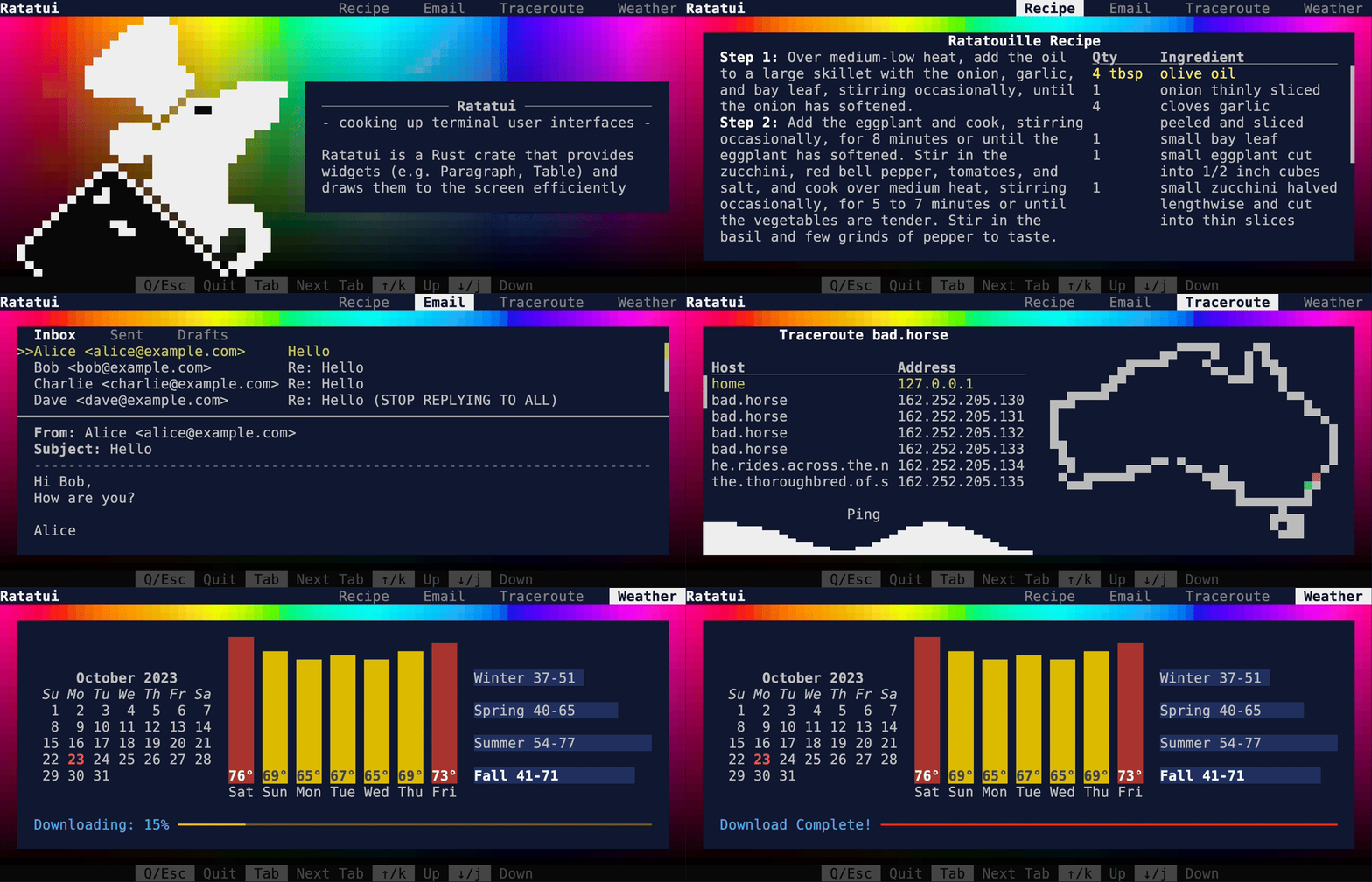
|
||||

|
||||
|
||||
## Async GitHub demo
|
||||
## Async GitHub
|
||||
|
||||
Shows how to fetch data from GitHub API asynchronously. [Source](./apps/async-github/).
|
||||
|
||||
## Calendar explorer demo
|
||||
![Async GitHub demo][async-github.gif]
|
||||
|
||||
## Calendar Explorer
|
||||
|
||||
Shows how to render a calendar with different styles. [Source](./apps/calendar-explorer/).
|
||||
|
||||
## Canvas demo
|
||||
![Calendar explorer demo][calendar-explorer.gif]
|
||||
|
||||
## Canvas
|
||||
|
||||
Shows how to render a canvas with different shapes. [Source](./apps/canvas/).
|
||||
|
||||
![Canvas demo][canvas.gif]
|
||||
|
||||
## Chart
|
||||
|
||||
Shows how to render line, bar, and scatter charts. [Source](./apps/chart/).
|
||||
|
||||
![Chart demo][chart.gif]
|
||||
|
||||
## Color Explorer
|
||||
|
||||
Shows how to handle the supported colors. [Source](./apps/color-explorer/).
|
||||
|
||||
![Color explorer demo][color-explorer.gif]
|
||||
|
||||
## Colors-RGB demo
|
||||
|
||||
This example shows the full range of RGB colors in an animation. [Source](./apps/colors-rgb/).
|
||||
Shows the full range of RGB colors in an animation. [Source](./apps/colors-rgb/).
|
||||
|
||||
## Constraint Explorer demo
|
||||
![Colors-RGB demo][colors-rgb.gif]
|
||||
|
||||
This interactive example shows how different constraints can be used to layout widgets. [Source](./apps/constraint-explorer/).
|
||||
## Constraint Explorer
|
||||
|
||||
## Constraints demo
|
||||
Shows how different constraints can be used to layout widgets. [Source](./apps/constraint-explorer/).
|
||||
|
||||
This example shows different types of constraints. [Source](./apps/constraints/).
|
||||
![Constraint Explorer demo][constraint-explorer.gif]
|
||||
|
||||
## Custom widget demo
|
||||
## Constraints
|
||||
|
||||
This example shows how to create a custom widget that can be interacted with the mouse. [Source](./apps/custom-widget/).
|
||||
Shows different types of constraints. [Source](./apps/constraints/).
|
||||
|
||||
## Hyperlink demo
|
||||
![Constraints demo][constraints.gif]
|
||||
|
||||
## Custom Widget
|
||||
|
||||
Shows how to create a custom widget that can be interacted with the mouse. [Source](./apps/custom-widget/).
|
||||
|
||||
![Custom widget demo][custom-widget.gif]
|
||||
|
||||
## Hyperlink
|
||||
|
||||
Shows how to render hyperlinks in a terminal using [OSC
|
||||
8](https://gist.github.com/egmontkob/eb114294efbcd5adb1944c9f3cb5feda). [Source](./apps/hyperlink/).
|
||||
|
||||
## Flex demo
|
||||
![Hyperlink demo][hyperlink.gif]
|
||||
|
||||
This interactive example shows how to use the flex layouts. [Source](./apps/flex/).
|
||||
## Flex
|
||||
|
||||
## Hello World demo
|
||||
Shows how to use the flex layouts. [Source](./apps/flex/).
|
||||
|
||||
This example shows how to create a simple TUI with a text. [Source](./apps/hello-world/).
|
||||
![Flex demo][flex.gif]
|
||||
|
||||
## Gauge demo
|
||||
## Hello World
|
||||
|
||||
This example shows different types of gauges. [Source](./apps/gauge/).
|
||||
Shows how to create a simple TUI with a text. [Source](./apps/hello-world/).
|
||||
|
||||
## Inline demo
|
||||
![Hello World demo][hello-world.gif]
|
||||
|
||||
## Gauge
|
||||
|
||||
Shows different types of gauges. [Source](./apps/gauge/).
|
||||
|
||||
## Inline
|
||||
|
||||
Shows how to use the inlined viewport to render in a specific area of the screen. [Source](./apps/inline/).
|
||||
|
||||
## Input form
|
||||
![Inline demo][inline.gif]
|
||||
|
||||
## Input Form
|
||||
|
||||
Shows how to render a form with input fields. [Source](./apps/input-form/).
|
||||
|
||||
## Todo List demo
|
||||
|
||||
Shows how to create a simple todo list application. [Source](./apps/todo-list/).
|
||||
|
||||
## Modifiers demo
|
||||
## Modifiers
|
||||
|
||||
Shows different types of modifiers. [Source](./apps/modifiers/).
|
||||
|
||||
## Mouse Drawing demo
|
||||
![Modifiers demo][modifiers.gif]
|
||||
|
||||
## Mouse Drawing
|
||||
|
||||
Shows how to handle mouse events. [Source](./apps/mouse-drawing/).
|
||||
|
||||
## Minimal demo
|
||||
## Minimal
|
||||
|
||||
Shows how to create a minimal application. [Source](./apps/minimal/).
|
||||
|
||||
## Scrollbar demo
|
||||
![Minimal demo][minimal.gif]
|
||||
|
||||
## Panic
|
||||
|
||||
Shows how to handle panics. [Source](./apps/panic/).
|
||||
|
||||
![Panic demo][panic.gif]
|
||||
|
||||
## Popup
|
||||
|
||||
Shows how to handle popups. [Source](./apps/popup/).
|
||||
|
||||
![Popup demo][popup.gif]
|
||||
|
||||
## Scrollbar
|
||||
|
||||
Shows how to render different types of scrollbars. [Source](./apps/scrollbar/).
|
||||
|
||||
## User input demo
|
||||
![Scrollbar demo][scrollbar.gif]
|
||||
|
||||
Shows how to handle user input. [Source](./apps/user-input/).
|
||||
## Table
|
||||
|
||||
## Weather demo
|
||||
Shows how to create an interactive table. [Source](./apps/table/).
|
||||
|
||||
![Table demo][table.gif]
|
||||
|
||||
## Todo List
|
||||
|
||||
Shows how to create a simple todo list application. [Source](./apps/todo-list/).
|
||||
|
||||
![Todo List demo][todo-list.gif]
|
||||
|
||||
## Tracing
|
||||
|
||||
Shows how to use the [tracing](https://crates.io/crates/tracing) crate to log to a file. [Source](./apps/tracing/).
|
||||
|
||||
![Tracing demo][tracing.gif]
|
||||
|
||||
## User Input
|
||||
|
||||
Shows how to handle user input. [Source](./apps/user-input/). [Source](./apps/user-input/).
|
||||
|
||||
![User input demo][user-input.gif]
|
||||
|
||||
## Weather
|
||||
|
||||
Shows how to render weather data using barchart widget. [Source](./apps/weather/).
|
||||
|
||||
## WidgetRef Container demo
|
||||
## WidgetRef Container
|
||||
|
||||
Shows how to use [`WidgetRef`](https://docs.rs/ratatui/latest/ratatui/widgets/trait.WidgetRef.html) to store widgets in a container. [Source](./apps/widget-ref-container/).
|
||||
|
||||
## Advanced Widget Implementation
|
||||
|
||||
Shows how to render the `Widget` trait in different ways.
|
||||
|
||||
![Advanced widget impl demo][advanced-widget-impl.gif]
|
||||
|
||||
---
|
||||
|
||||
<details>
|
||||
<summary>How to update these examples?</summary>
|
||||
|
||||
These gifs were created using [VHS](https://github.com/charmbracelet/vhs). Each example has a
|
||||
corresponding `.tape` file that holds instructions for how to generate the images. Note that the
|
||||
images themselves are stored in a separate `images` git branch to avoid bloating the `main`
|
||||
branch.
|
||||
|
||||
<!--
|
||||
|
||||
Links to images to make them easier to update in bulk. Use the following script to update and upload
|
||||
the examples to the images branch. (Requires push access to the branch).
|
||||
|
||||
```shell
|
||||
vhs/generate.bash
|
||||
```
|
||||
-->
|
||||
|
||||
</details>
|
||||
|
||||
[advanced-widget-impl.gif]: https://github.com/ratatui/ratatui/blob/images/examples/advanced-widget-impl.gif?raw=true
|
||||
[async-github.gif]: https://github.com/ratatui/ratatui/blob/images/examples/async-github.gif?raw=true
|
||||
[calendar-explorer.gif]: https://github.com/ratatui/ratatui/blob/images/examples/calendar-explorer.gif?raw=true
|
||||
[canvas.gif]: https://github.com/ratatui/ratatui/blob/images/examples/canvas.gif?raw=true
|
||||
[chart.gif]: https://github.com/ratatui/ratatui/blob/images/examples/chart.gif?raw=true
|
||||
[color-explorer.gif]: https://github.com/ratatui/ratatui/blob/images/examples/color-explorer.gif?raw=true
|
||||
[colors-rgb.gif]: https://github.com/ratatui/ratatui/blob/images/examples/colors-rgb.gif?raw=true
|
||||
[constraint-explorer.gif]: https://github.com/ratatui/ratatui/blob/images/examples/constraint-explorer.gif?raw=true
|
||||
[constraints.gif]: https://github.com/ratatui/ratatui/blob/images/examples/constraints.gif?raw=true
|
||||
[custom-widget.gif]: https://github.com/ratatui/ratatui/blob/images/examples/custom-widget.gif?raw=true
|
||||
[demo2-destroy.gif]: https://github.com/ratatui/ratatui/blob/images/examples/demo2-destroy.gif?raw=true
|
||||
[demo2-social.gif]: https://github.com/ratatui/ratatui/blob/images/examples/demo2-social.gif?raw=true
|
||||
[demo2.gif]: https://github.com/ratatui/ratatui/blob/images/examples/demo2.gif?raw=true
|
||||
[demo.gif]: https://github.com/ratatui/ratatui/blob/images/examples/demo.gif?raw=true
|
||||
[flex.gif]: https://github.com/ratatui/ratatui/blob/images/examples/flex.gif?raw=true
|
||||
[hello-world.gif]: https://github.com/ratatui/ratatui/blob/images/examples/hello-world.gif?raw=true
|
||||
[hyperlink.gif]: https://github.com/ratatui/ratatui/blob/images/examples/hyperlink.gif?raw=true
|
||||
[inline.gif]: https://github.com/ratatui/ratatui/blob/images/examples/inline.gif?raw=true
|
||||
[minimal.gif]: https://github.com/ratatui/ratatui/blob/images/examples/minimal.gif?raw=true
|
||||
[modifiers.gif]: https://github.com/ratatui/ratatui/blob/images/examples/modifiers.gif?raw=true
|
||||
[panic.gif]: https://github.com/ratatui/ratatui/blob/images/examples/panic.gif?raw=true
|
||||
[popup.gif]: https://github.com/ratatui/ratatui/blob/images/examples/popup.gif?raw=true
|
||||
[scrollbar.gif]: https://github.com/ratatui/ratatui/blob/images/examples/scrollbar.gif?raw=true
|
||||
[table.gif]: https://github.com/ratatui/ratatui/blob/images/examples/table.gif?raw=true
|
||||
[todo-list.gif]: https://github.com/ratatui/ratatui/blob/images/examples/todo-list.gif?raw=true
|
||||
[tracing.gif]: https://github.com/ratatui/ratatui/blob/images/examples/tracing.gif?raw=true
|
||||
[user-input.gif]: https://github.com/ratatui/ratatui/blob/images/examples/user-input.gif?raw=true
|
||||
|
||||
@@ -1,6 +1,6 @@
|
||||
[package]
|
||||
name = "async-github"
|
||||
version = "0.1.0"
|
||||
publish = false
|
||||
authors.workspace = true
|
||||
documentation.workspace = true
|
||||
repository.workspace = true
|
||||
|
||||
@@ -1,6 +1,5 @@
|
||||
[package]
|
||||
name = "colors-rgb"
|
||||
version = "0.1.0"
|
||||
publish = false
|
||||
license.workspace = true
|
||||
edition.workspace = true
|
||||
|
||||
@@ -12,6 +12,6 @@ termion = ["ratatui/termion"]
|
||||
termwiz = ["ratatui/termwiz"]
|
||||
|
||||
[dependencies]
|
||||
clap = { version = "4.5.27", features = ["derive"] }
|
||||
clap = { version = "4.5.31", features = ["derive"] }
|
||||
rand = "0.9.0"
|
||||
ratatui.workspace = true
|
||||
|
||||
@@ -9,7 +9,7 @@ rust-version.workspace = true
|
||||
color-eyre.workspace = true
|
||||
crossterm.workspace = true
|
||||
## a collection of line drawing algorithms (e.g. Bresenham's line algorithm)
|
||||
line_drawing = "1.0.0"
|
||||
line_drawing = "1.0.1"
|
||||
rand = "0.9.0"
|
||||
ratatui.workspace = true
|
||||
|
||||
|
||||
@@ -1,6 +1,6 @@
|
||||
# Popup demo
|
||||
|
||||
This example shows how to render line, bar, and scatter charts.
|
||||
This example shows how to handle popups.
|
||||
|
||||
To run this demo:
|
||||
|
||||
|
||||
12
examples/vhs/advanced-widget-impl.tape
Normal file
12
examples/vhs/advanced-widget-impl.tape
Normal file
@@ -0,0 +1,12 @@
|
||||
# This is a vhs script. See https://github.com/charmbracelet/vhs for more info.
|
||||
# To run this script, install vhs and run `vhs ./examples/vhs/advanced-widget-impl.tape`
|
||||
Output "target/advanced-widget-impl.gif"
|
||||
Set Theme "Aardvark Blue"
|
||||
Set Width 760
|
||||
Set Height 260
|
||||
Hide
|
||||
Type "cargo run -p advanced-widget-impl"
|
||||
Enter
|
||||
Sleep 2s
|
||||
Show
|
||||
Sleep 5s
|
||||
16
examples/vhs/async-github.tape
Normal file
16
examples/vhs/async-github.tape
Normal file
@@ -0,0 +1,16 @@
|
||||
# This is a vhs script. See https://github.com/charmbracelet/vhs for more info.
|
||||
# To run this script, install vhs and run `vhs ./examples/vhs/async-github.tape`
|
||||
Output "target/async-github.gif"
|
||||
Set Theme "Aardvark Blue"
|
||||
Set Width 1200
|
||||
Set Height 600
|
||||
Hide
|
||||
Type "cargo run -p async-github"
|
||||
Enter
|
||||
Sleep 1s
|
||||
Show
|
||||
Sleep 1s
|
||||
Set TypingSpeed 0.5s
|
||||
Down 3
|
||||
Up
|
||||
Sleep 1s
|
||||
19
examples/vhs/calendar-explorer.tape
Normal file
19
examples/vhs/calendar-explorer.tape
Normal file
@@ -0,0 +1,19 @@
|
||||
# This is a vhs script. See https://github.com/charmbracelet/vhs for more info.
|
||||
# To run this script, install vhs and run `vhs ./examples/vhs/calendar-explorer.tape`
|
||||
Output "target/calendar-explorer.gif"
|
||||
Set Theme "Aardvark Blue"
|
||||
Set Width 1200
|
||||
Set Height 800
|
||||
Hide
|
||||
Type "cargo run -p calendar-explorer"
|
||||
Enter
|
||||
Sleep 3s
|
||||
Show
|
||||
Set TypingSpeed 1s
|
||||
Type "s"
|
||||
Type "s"
|
||||
Type "s"
|
||||
Type 'n'
|
||||
Type 'p'
|
||||
Down 5
|
||||
Right 5
|
||||
@@ -1,12 +1,12 @@
|
||||
# This is a vhs script. See https://github.com/charmbracelet/vhs for more info.
|
||||
# To run this script, install vhs and run `vhs ./examples/canvas.tape`
|
||||
# To run this script, install vhs and run `vhs ./examples/vhs/canvas.tape`
|
||||
Output "target/canvas.gif"
|
||||
Set Theme "Aardvark Blue"
|
||||
Set FontSize 12
|
||||
Set Width 1200
|
||||
Set Height 800
|
||||
Hide
|
||||
Type "cargo run --example=canvas --features=crossterm"
|
||||
Type "cargo run -p canvas"
|
||||
Enter
|
||||
Sleep 2s
|
||||
Show
|
||||
@@ -1,11 +1,11 @@
|
||||
# This is a vhs script. See https://github.com/charmbracelet/vhs for more info.
|
||||
# To run this script, install vhs and run `vhs ./examples/chart.tape`
|
||||
# To run this script, install vhs and run `vhs ./examples/vhs/chart.tape`
|
||||
Output "target/chart.gif"
|
||||
Set Theme "Aardvark Blue"
|
||||
Set Width 1200
|
||||
Set Height 800
|
||||
Hide
|
||||
Type "cargo run --example=chart --features=crossterm"
|
||||
Type "cargo run -p chart"
|
||||
Enter
|
||||
Sleep 1s
|
||||
Show
|
||||
@@ -1,12 +1,12 @@
|
||||
# This is a vhs script. See https://github.com/charmbracelet/vhs for more info.
|
||||
# To run this script, install vhs and run `vhs ./examples/layout.tape`
|
||||
Output "target/layout.gif"
|
||||
# To run this script, install vhs and run `vhs ./examples/vhs/color-explorer.tape`
|
||||
Output "target/color-explorer.gif"
|
||||
Set Theme "Aardvark Blue"
|
||||
Set Width 1200
|
||||
Set Height 1410
|
||||
Hide
|
||||
Type "cargo run --example=layout --features=crossterm"
|
||||
Type "cargo run -p color-explorer"
|
||||
Enter
|
||||
Sleep 1s
|
||||
Show
|
||||
Sleep 2s
|
||||
Show
|
||||
Sleep 1s
|
||||
@@ -1,9 +1,9 @@
|
||||
# This is a vhs script. See https://github.com/charmbracelet/vhs for more info.
|
||||
# To run this script, install vhs and run `vhs ./examples/colors_rgb.tape`
|
||||
# To run this script, install vhs and run `vhs ./examples/vhs/colors-rgb.tape`
|
||||
|
||||
# note that this script sometimes results in the gif having screen tearing
|
||||
# issues. I'm not sure why, but it's not a problem with the library.
|
||||
Output "target/colors_rgb.gif"
|
||||
Output "target/colors-rgb.gif"
|
||||
Set Theme "Aardvark Blue"
|
||||
Set Width 1200
|
||||
Set Height 1200
|
||||
@@ -13,9 +13,9 @@ Set Framerate 60
|
||||
Set CursorBlink false
|
||||
|
||||
Hide
|
||||
Type "cargo run --example=colors_rgb --features=crossterm --release"
|
||||
Type "cargo run -p colors-rgb"
|
||||
Enter
|
||||
Sleep 2s
|
||||
# Screenshot "target/colors_rgb.png"
|
||||
# Screenshot "target/colors-rgb.png"
|
||||
Show
|
||||
Sleep 10s
|
||||
@@ -1,12 +1,12 @@
|
||||
# This is a vhs script. See https://github.com/charmbracelet/vhs for more info.
|
||||
# To run this script, install vhs and run `vhs ./examples/constraint-explorer.tape`
|
||||
# To run this script, install vhs and run `vhs ./examples/vhs/constraint-explorer.tape`
|
||||
Output "target/constraint-explorer.gif"
|
||||
Set Theme "Aardvark Blue"
|
||||
Set FontSize 18
|
||||
Set Width 1200
|
||||
Set Height 950
|
||||
Hide
|
||||
Type "cargo run --example=constraint-explorer --features=crossterm"
|
||||
Type "cargo run -p constraint-explorer"
|
||||
Enter
|
||||
Sleep 2s
|
||||
Show
|
||||
@@ -1,12 +1,12 @@
|
||||
# This is a vhs script. See https://github.com/charmbracelet/vhs for more info.
|
||||
# To run this script, install vhs and run `vhs ./examples/constraints.tape`
|
||||
# To run this script, install vhs and run `vhs ./examples/vhs/constraints.tape`
|
||||
Output "target/constraints.gif"
|
||||
Set Theme "Aardvark Blue"
|
||||
Set FontSize 18
|
||||
Set Width 1200
|
||||
Set Height 700
|
||||
Hide
|
||||
Type "cargo run --example=constraints --features=crossterm"
|
||||
Type "cargo run -p constraints"
|
||||
Enter
|
||||
Sleep 2s
|
||||
Show
|
||||
@@ -1,11 +1,11 @@
|
||||
# This is a vhs script. See https://github.com/charmbracelet/vhs for more info.
|
||||
# To run this script, install vhs and run `vhs ./examples/custom_widget.tape`
|
||||
Output "target/custom_widget.gif"
|
||||
# To run this script, install vhs and run `vhs ./examples/vhs/custom-widget.tape`
|
||||
Output "target/custom-widget.gif"
|
||||
Set Theme "Aardvark Blue"
|
||||
Set Width 760
|
||||
Set Height 260
|
||||
Hide
|
||||
Type "cargo run --example=custom_widget --features=crossterm"
|
||||
Type "cargo run -p custom-widget"
|
||||
Enter
|
||||
Sleep 2s
|
||||
Show
|
||||
@@ -1,12 +1,12 @@
|
||||
# This is a vhs script. See https://github.com/charmbracelet/vhs for more info.
|
||||
# To run this script, install vhs and run `vhs ./examples/demo.tape`
|
||||
# To run this script, install vhs and run `vhs ./examples/vhs/demo.tape`
|
||||
Output "target/demo.gif"
|
||||
Set Theme "Aardvark Blue"
|
||||
Set Width 1200
|
||||
Set Height 1200
|
||||
Set PlaybackSpeed 0.5
|
||||
Hide
|
||||
Type "cargo run --example demo"
|
||||
Type "cargo run -p demo"
|
||||
Enter
|
||||
Sleep 2s
|
||||
Show
|
||||
@@ -1,5 +1,5 @@
|
||||
# This is a vhs script. See https://github.com/charmbracelet/vhs for more info.
|
||||
# To run this script, install vhs and run `vhs ./examples/demo2-destroy.tape`
|
||||
# To run this script, install vhs and run `vhs ./examples/vhs/demo2-destroy.tape`
|
||||
# NOTE: Requires VHS 0.6.1 or later for Screenshot support
|
||||
Output "target/demo2-destroy.gif"
|
||||
Set Theme "Aardvark Blue"
|
||||
@@ -10,7 +10,7 @@ Set Width 1120
|
||||
Set Height 480
|
||||
Set Padding 0
|
||||
Hide
|
||||
Type "cargo run --example demo2 --features crossterm,palette,widget-calendar"
|
||||
Type "cargo run -p demo2"
|
||||
Enter
|
||||
Sleep 2s
|
||||
Show
|
||||
@@ -1,5 +1,5 @@
|
||||
# This is a vhs script. See https://github.com/charmbracelet/vhs for more info.
|
||||
# To run this script, install vhs and run `vhs ./examples/demo2-social.tape`
|
||||
# To run this script, install vhs and run `vhs ./examples/vhs/demo2-social.tape`
|
||||
|
||||
Output "target/demo2-social.gif"
|
||||
Set Theme "Aardvark Blue"
|
||||
@@ -9,7 +9,7 @@ Set Width 1280
|
||||
Set Height 640
|
||||
Set Padding 80
|
||||
Hide
|
||||
Type "cargo run --example demo2 --features crossterm,widget-calendar"
|
||||
Type "cargo run -p demo2"
|
||||
Enter
|
||||
Sleep 2s
|
||||
Show
|
||||
@@ -1,5 +1,5 @@
|
||||
# This is a vhs script. See https://github.com/charmbracelet/vhs for more info.
|
||||
# To run this script, install vhs and run `vhs ./examples/demo2.tape`
|
||||
# To run this script, install vhs and run `vhs ./examples/vhs/demo2.tape`
|
||||
# NOTE: Requires VHS 0.6.1 or later for Screenshot support
|
||||
Output "target/demo2.gif"
|
||||
Set Theme "Aardvark Blue"
|
||||
@@ -10,7 +10,7 @@ Set Width 1120
|
||||
Set Height 480
|
||||
Set Padding 0
|
||||
Hide
|
||||
Type "cargo run --example demo2 --features crossterm,widget-calendar"
|
||||
Type "cargo run -p demo2"
|
||||
Enter
|
||||
Sleep 2s
|
||||
Show
|
||||
@@ -1,11 +1,11 @@
|
||||
# This is a vhs script. See https://github.com/charmbracelet/vhs for more info.
|
||||
# To run this script, install vhs and run `vhs ./examples/flex.tape`
|
||||
# To run this script, install vhs and run `vhs ./examples/vhs/flex.tape`
|
||||
Output "target/flex.gif"
|
||||
Set Theme "Aardvark Blue"
|
||||
Set Width 1200
|
||||
Set Height 1410
|
||||
Hide
|
||||
Type "cargo run --example=flex --features=crossterm"
|
||||
Type "cargo run -p flex"
|
||||
Enter
|
||||
Sleep 2s
|
||||
Show
|
||||
@@ -1,11 +1,11 @@
|
||||
# This is a vhs script. See https://github.com/charmbracelet/vhs for more info.
|
||||
# To run this script, install vhs and run `vhs ./examples/gauge.tape`
|
||||
# To run this script, install vhs and run `vhs ./examples/vhs/gauge.tape`
|
||||
Output "target/gauge.gif"
|
||||
Set Theme "Aardvark Blue"
|
||||
Set Width 1200
|
||||
Set Height 850
|
||||
Hide
|
||||
Type "cargo run --example=gauge --features=crossterm"
|
||||
Type "cargo run -p gauge"
|
||||
Enter
|
||||
Sleep 2s
|
||||
Show
|
||||
@@ -7,7 +7,7 @@
|
||||
# - git: https://git-scm.com/
|
||||
# - vhs: https://github.com/charmbracelet/vhs - currently this needs to be installed from the
|
||||
# main branch, as the latest release doesn't support the theme we use or the Screenshot
|
||||
# command. Install using `go install github.com/charmbracelet/vhs@main``
|
||||
# command. Install using `go install github.com/charmbracelet/vhs@main`
|
||||
# - go: https://golang.org/doc/install
|
||||
# - ttyd: https://github.com/tsl0922/ttyd
|
||||
|
||||
@@ -23,15 +23,18 @@ set -o pipefail
|
||||
# set -o xtrace
|
||||
|
||||
# ensure that running each example doesn't have to wait for the build
|
||||
cargo build --examples --features=crossterm,all-widgets
|
||||
for app in *; do
|
||||
cargo build -p "$app"
|
||||
done
|
||||
|
||||
for tape_path in examples/vhs/*.tape; do
|
||||
tape_file=${tape_path/examples\/vhs\//} # strip the examples/vhs/ prefix
|
||||
gif_file=${tape_file/.tape/.gif} # replace the .tape suffix with .gif
|
||||
~/go/bin/vhs $tape_path --quiet
|
||||
~/go/bin/vhs "$tape_path" --quiet
|
||||
# this can be pasted into the examples README.md
|
||||
echo "[${gif_file}]: https://github.com/ratatui/ratatui/blob/images/examples/${gif_file}?raw=true"
|
||||
done
|
||||
|
||||
git switch images
|
||||
git pull --rebase upstream images
|
||||
cp target/*.gif examples/
|
||||
@@ -1,11 +1,11 @@
|
||||
# This is a vhs script. See https://github.com/charmbracelet/vhs for more info.
|
||||
# To run this script, install vhs and run `vhs ./examples/hello_world.tape`
|
||||
Output "target/hello_world.gif"
|
||||
# To run this script, install vhs and run `vhs ./examples/vhs/hello-world.tape`
|
||||
Output "target/hello-world.gif"
|
||||
Set Theme "Aardvark Blue"
|
||||
Set Width 1200
|
||||
Set Height 200
|
||||
Hide
|
||||
Type "cargo run --example=hello_world --features=crossterm"
|
||||
Type "cargo run -p hello-world"
|
||||
Enter
|
||||
Sleep 1s
|
||||
Show
|
||||
@@ -1,11 +1,11 @@
|
||||
# This is a vhs script. See https://github.com/charmbracelet/vhs for more info.
|
||||
# To run this script, install vhs and run `vhs ./examples/hyperlink.tape`
|
||||
# To run this script, install vhs and run `vhs ./examples/vhs/hyperlink.tape`
|
||||
Output "target/hyperlink.gif"
|
||||
Set Theme "Aardvark Blue"
|
||||
Set Width 1200
|
||||
Set Height 200
|
||||
Hide
|
||||
Type "cargo run --example=hyperlink --features=crossterm,unstable-widget-ref"
|
||||
Type "cargo run -p hyperlink"
|
||||
Enter
|
||||
Sleep 3s
|
||||
Show
|
||||
@@ -1,9 +1,9 @@
|
||||
# This is a vhs script. See https://github.com/charmbracelet/vhs for more info.
|
||||
# To run this script, install vhs and run `vhs ./examples/inline.tape`
|
||||
# To run this script, install vhs and run `vhs ./examples/vhs/inline.tape`
|
||||
Output "target/inline.gif"
|
||||
Set Theme "Aardvark Blue"
|
||||
Set Width 1200
|
||||
Set Height 600
|
||||
Type "cargo run --example=inline --features=crossterm"
|
||||
Type "cargo run -p inline"
|
||||
Enter
|
||||
Sleep 20s
|
||||
@@ -1,11 +1,11 @@
|
||||
# This is a vhs script. See https://github.com/charmbracelet/vhs for more info.
|
||||
# To run this script, install vhs and run `vhs ./examples/minimal.tape`
|
||||
# To run this script, install vhs and run `vhs ./examples/vhs/minimal.tape`
|
||||
Output "target/minimal.gif"
|
||||
Set Theme "Aardvark Blue"
|
||||
Set Width 1200
|
||||
Set Height 200
|
||||
Hide
|
||||
Type "cargo run --example=minimal --features=crossterm"
|
||||
Type "cargo run -p minimal"
|
||||
Enter
|
||||
Sleep 1s
|
||||
Show
|
||||
@@ -1,11 +1,11 @@
|
||||
# This is a vhs script. See https://github.com/charmbracelet/vhs for more info.
|
||||
# To run this script, install vhs and run `vhs ./examples/modifiers.tape`
|
||||
# To run this script, install vhs and run `vhs ./examples/vhs/modifiers.tape`
|
||||
Output "target/modifiers.gif"
|
||||
Set Theme "Aardvark Blue"
|
||||
Set Width 1200
|
||||
Set Height 1460
|
||||
Hide
|
||||
Type "cargo run --example=modifiers --features=crossterm"
|
||||
Type "cargo run -p modifiers"
|
||||
Enter
|
||||
Sleep 2s
|
||||
Show
|
||||
@@ -1,17 +1,17 @@
|
||||
# This is a vhs script. See https://github.com/charmbracelet/vhs for more info.
|
||||
# To run this script, install vhs and run `vhs ./examples/panic.tape`
|
||||
# To run this script, install vhs and run `vhs ./examples/vhs/panic.tape`
|
||||
Output "target/panic.gif"
|
||||
Set Theme "Aardvark Blue"
|
||||
Set Width 1200
|
||||
Set Height 600
|
||||
Type "cargo run --example=panic --features=crossterm"
|
||||
Type "cargo run -p panic"
|
||||
Enter
|
||||
Sleep 5s
|
||||
Type p
|
||||
Sleep 2s
|
||||
Type reset
|
||||
Enter
|
||||
Type "cargo run --example=panic --features=crossterm"
|
||||
Type "cargo run -p panic"
|
||||
Enter
|
||||
Sleep 2s
|
||||
Type e
|
||||
@@ -1,11 +1,11 @@
|
||||
# This is a vhs script. See https://github.com/charmbracelet/vhs for more info.
|
||||
# To run this script, install vhs and run `vhs ./examples/popup.tape`
|
||||
# To run this script, install vhs and run `vhs ./examples/vhs/popup.tape`
|
||||
Output "target/popup.gif"
|
||||
Set Theme "Aardvark Blue"
|
||||
Set Width 1200
|
||||
Set Height 600
|
||||
Hide
|
||||
Type "cargo run --example=popup --features=crossterm"
|
||||
Type "cargo run -p popup"
|
||||
Enter
|
||||
Sleep 1s
|
||||
Show
|
||||
@@ -1,11 +1,11 @@
|
||||
# This is a vhs script. See https://github.com/charmbracelet/vhs for more info.
|
||||
# To run this script, install vhs and run `vhs ./examples/scrollbar.tape`
|
||||
# To run this script, install vhs and run `vhs ./examples/vhs/scrollbar.tape`
|
||||
Output "target/scrollbar.gif"
|
||||
Set Theme "Aardvark Blue"
|
||||
Set Width 1200
|
||||
Set Height 1200
|
||||
Hide
|
||||
Type "cargo run --example=scrollbar --features=crossterm"
|
||||
Type "cargo run -p scrollbar"
|
||||
Enter
|
||||
Sleep 1s
|
||||
Show
|
||||
@@ -1,11 +1,11 @@
|
||||
# This is a vhs script. See https://github.com/charmbracelet/vhs for more info.
|
||||
# To run this script, install vhs and run `vhs ./examples/table.tape`
|
||||
# To run this script, install vhs and run `vhs ./examples/vhs/table.tape`
|
||||
Output "target/table.gif"
|
||||
Set Theme "Aardvark Blue"
|
||||
Set Width 1400
|
||||
Set Height 768
|
||||
Hide
|
||||
Type "cargo run --example=table --features=crossterm"
|
||||
Type "cargo run -p table"
|
||||
Enter
|
||||
Sleep 1s
|
||||
Show
|
||||
@@ -1,11 +1,11 @@
|
||||
# This is a vhs script. See https://github.com/charmbracelet/vhs for more info.
|
||||
# To run this script, install vhs and run `vhs ./examples/list.tape`
|
||||
Output "target/list.gif"
|
||||
# To run this script, install vhs and run `vhs ./examples/vhs/todo-list.tape`
|
||||
Output "target/todo-list.gif"
|
||||
Set Theme "Aardvark Blue"
|
||||
Set Width 1200
|
||||
Set Height 612
|
||||
Hide
|
||||
Type "cargo run --example=list --features=crossterm"
|
||||
Type "cargo run -p todo-list"
|
||||
Enter
|
||||
Sleep 10s
|
||||
Show
|
||||
@@ -1,10 +1,10 @@
|
||||
# This is a vhs script. See https://github.com/charmbracelet/vhs for more info.
|
||||
# To run this script, install vhs and run `vhs ./examples/tracing.tape`
|
||||
# To run this script, install vhs and run `vhs ./examples/vhs/tracing.tape`
|
||||
Output "target/tracing.gif"
|
||||
Set Theme "Aardvark Blue"
|
||||
Set Width 1200
|
||||
Set Height 800
|
||||
Type "RUST_LOG=trace cargo run --example=tracing" Enter
|
||||
Type"RUST_LOG=trace cargo run -p tracing" Enter
|
||||
Sleep 1s
|
||||
Type @100ms "jjjjq"
|
||||
Sleep 1s
|
||||
@@ -1,11 +1,11 @@
|
||||
# This is a vhs script. See https://github.com/charmbracelet/vhs for more info.
|
||||
# To run this script, install vhs and run `vhs ./examples/user_input.tape`
|
||||
Output "target/user_input.gif"
|
||||
# To run this script, install vhs and run `vhs ./examples/vhs/user-input.tape`
|
||||
Output "target/user-input.gif"
|
||||
Set Theme "Aardvark Blue"
|
||||
Set Width 1200
|
||||
Set Height 600
|
||||
Hide
|
||||
Type "cargo run --example=user_input --features=crossterm"
|
||||
Type "cargo run -p user-input"
|
||||
Enter
|
||||
Sleep 1s
|
||||
Show
|
||||
@@ -4,7 +4,7 @@ description = """
|
||||
Core types and traits for the Ratatui Terminal UI library.
|
||||
Widget libraries should use this crate. Applications should use the main Ratatui crate.
|
||||
"""
|
||||
version = "0.1.0-alpha.2"
|
||||
version = "0.1.0-alpha.3"
|
||||
readme = "README.md"
|
||||
authors.workspace = true
|
||||
documentation.workspace = true
|
||||
|
||||
@@ -151,7 +151,7 @@ impl Iterator for Positions {
|
||||
///
|
||||
/// Returns `None` when there are no more positions to iterate through.
|
||||
fn next(&mut self) -> Option<Self::Item> {
|
||||
if self.current_position.y >= self.rect.bottom() {
|
||||
if !self.rect.contains(self.current_position) {
|
||||
return None;
|
||||
}
|
||||
let position = self.current_position;
|
||||
@@ -326,4 +326,31 @@ mod tests {
|
||||
assert_eq!(positions.next(), None);
|
||||
assert_eq!(positions.size_hint(), (0, Some(0)));
|
||||
}
|
||||
|
||||
#[test]
|
||||
fn positions_zero_width() {
|
||||
let rect = Rect::new(0, 0, 0, 1);
|
||||
let mut positions = Positions::new(rect);
|
||||
assert_eq!(positions.size_hint(), (0, Some(0)));
|
||||
assert_eq!(positions.next(), None);
|
||||
assert_eq!(positions.size_hint(), (0, Some(0)));
|
||||
}
|
||||
|
||||
#[test]
|
||||
fn positions_zero_height() {
|
||||
let rect = Rect::new(0, 0, 1, 0);
|
||||
let mut positions = Positions::new(rect);
|
||||
assert_eq!(positions.size_hint(), (0, Some(0)));
|
||||
assert_eq!(positions.next(), None);
|
||||
assert_eq!(positions.size_hint(), (0, Some(0)));
|
||||
}
|
||||
|
||||
#[test]
|
||||
fn positions_zero_by_zero() {
|
||||
let rect = Rect::new(0, 0, 0, 0);
|
||||
let mut positions = Positions::new(rect);
|
||||
assert_eq!(positions.size_hint(), (0, Some(0)));
|
||||
assert_eq!(positions.next(), None);
|
||||
assert_eq!(positions.size_hint(), (0, Some(0)));
|
||||
}
|
||||
}
|
||||
|
||||
@@ -191,7 +191,6 @@ use crate::{
|
||||
/// # }
|
||||
/// ```
|
||||
///
|
||||
/// [`Paragraph`]: crate::widgets::Paragraph
|
||||
/// [`Stylize`]: crate::style::Stylize
|
||||
#[derive(Default, Clone, Eq, PartialEq, Hash)]
|
||||
pub struct Text<'a> {
|
||||
|
||||
@@ -1,6 +1,6 @@
|
||||
[package]
|
||||
name = "ratatui-crossterm"
|
||||
version = "0.1.0-alpha.1"
|
||||
version = "0.1.0-alpha.2"
|
||||
description = "Crossterm backend for the Ratatui Terminal UI library."
|
||||
documentation = "https://docs.rs/ratatui-crossterm/"
|
||||
readme = "README.md"
|
||||
|
||||
@@ -1,6 +1,6 @@
|
||||
[package]
|
||||
name = "ratatui-macros"
|
||||
version = "0.7.0-alpha.0"
|
||||
version = "0.7.0-alpha.1"
|
||||
edition = "2021"
|
||||
authors = ["The Ratatui Developers"]
|
||||
description = "Macros for Ratatui"
|
||||
|
||||
@@ -1,6 +1,6 @@
|
||||
[package]
|
||||
name = "ratatui-termion"
|
||||
version = "0.1.0-alpha.1"
|
||||
version = "0.1.0-alpha.2"
|
||||
description = "Termion backend for the Ratatui Terminal UI library."
|
||||
documentation = "https://docs.rs/ratatui-termion/"
|
||||
readme = "README.md"
|
||||
|
||||
@@ -1,6 +1,6 @@
|
||||
[package]
|
||||
name = "ratatui-termwiz"
|
||||
version = "0.1.0-alpha.1"
|
||||
version = "0.1.0-alpha.2"
|
||||
description = "Termwiz backend for the Ratatui Terminal UI library."
|
||||
documentation = "https://docs.rs/ratatui-termwiz/"
|
||||
readme = "README.md"
|
||||
|
||||
@@ -3,7 +3,7 @@ name = "ratatui-widgets"
|
||||
description = "A collection of Ratatui widgets for building terminal user interfaces using Ratatui."
|
||||
# Note that this started at 0.3.0 as there was a previous crate using the name `ratatui-widgets`.
|
||||
# <https://github.com/joshka/ratatui-widgets/issues/46>
|
||||
version = "0.3.0-alpha.1"
|
||||
version = "0.3.0-alpha.2"
|
||||
readme = "README.md"
|
||||
authors.workspace = true
|
||||
documentation.workspace = true
|
||||
|
||||
@@ -1,7 +1,7 @@
|
||||
[package]
|
||||
name = "ratatui"
|
||||
description = "A library that's all about cooking up terminal user interfaces"
|
||||
version = "0.30.0-alpha.1"
|
||||
version = "0.30.0-alpha.2"
|
||||
authors.workspace = true
|
||||
documentation.workspace = true
|
||||
repository.workspace = true
|
||||
|
||||
@@ -1,467 +0,0 @@
|
||||
# Examples
|
||||
|
||||
This folder might use unreleased code. View the examples for the latest release instead.
|
||||
|
||||
> [!WARNING]
|
||||
>
|
||||
> There may be backwards incompatible changes in these examples, as they are designed to compile
|
||||
> against the `main` branch.
|
||||
>
|
||||
> There are a few workaround for this problem:
|
||||
>
|
||||
> - View the examples as they were when the latest version was release by selecting the tag that
|
||||
> matches that version. E.g. <https://github.com/ratatui/ratatui/tree/v0.26.1/examples>.
|
||||
> - If you're viewing this file on GitHub, there is a combo box at the top of this page which
|
||||
> allows you to select any previous tagged version.
|
||||
> - To view the code locally, checkout the tag. E.g. `git switch --detach v0.26.1`.
|
||||
> - Use the latest [alpha version of Ratatui] in your app. These are released weekly on Saturdays.
|
||||
> - Compile your code against the main branch either locally by adding e.g. `path = "../ratatui"` to
|
||||
> the dependency, or remotely by adding `git = "https://github.com/ratatui/ratatui"`
|
||||
>
|
||||
> For a list of unreleased breaking changes, see [BREAKING-CHANGES.md].
|
||||
>
|
||||
> We don't keep the CHANGELOG updated with unreleased changes, check the git commit history or run
|
||||
> `git-cliff -u` against a cloned version of this repository.
|
||||
|
||||
## Design choices
|
||||
|
||||
The examples contain some opinionated choices in order to make it easier for newer rustaceans to
|
||||
easily be productive in creating applications:
|
||||
|
||||
- Each example has an App struct, with methods that implement a main loop, handle events and drawing
|
||||
the UI.
|
||||
- We use color_eyre for handling errors and panics. See [How to use color-eyre with Ratatui] on the
|
||||
website for more information about this.
|
||||
- Common code is not extracted into a separate file. This makes each example self-contained and easy
|
||||
to read as a whole.
|
||||
|
||||
Not every example has been updated with all these points in mind yet, however over time they will
|
||||
be. None of the above choices are strictly necessary for Ratatui apps, but these choices make
|
||||
examples easier to run, maintain and explain. These choices are designed to help newer users fall
|
||||
into the pit of success when incorporating example code into their own apps. We may also eventually
|
||||
move some of these design choices into the core of Ratatui to simplify apps.
|
||||
|
||||
[How to use color-eyre with Ratatui]: https://ratatui.rs/how-to/develop-apps/color_eyre/
|
||||
|
||||
## Demo
|
||||
|
||||
This is the previous demo example from the main README. It is available for each of the backends. Source:
|
||||
[demo.rs](./demo/).
|
||||
|
||||
```shell
|
||||
cargo run --example=demo --features=crossterm
|
||||
cargo run --example=demo --no-default-features --features=termion
|
||||
cargo run --example=demo --no-default-features --features=termwiz
|
||||
```
|
||||
|
||||
![Demo][demo.gif]
|
||||
|
||||
## Hello World
|
||||
|
||||
This is a pretty boring example, but it contains some good documentation
|
||||
on writing tui apps. Source: [hello_world.rs](./hello_world.rs).
|
||||
|
||||
```shell
|
||||
cargo run --example=hello_world --features=crossterm
|
||||
```
|
||||
|
||||
![Hello World][hello_world.gif]
|
||||
|
||||
## Barchart
|
||||
|
||||
Demonstrates the [`BarChart`](https://docs.rs/ratatui/latest/ratatui/widgets/struct.BarChart.html)
|
||||
widget. Source: [barchart.rs](./barchart.rs).
|
||||
|
||||
```shell
|
||||
cargo run --example=barchart --features=crossterm
|
||||
```
|
||||
|
||||
![Barchart][barchart.gif]
|
||||
|
||||
## Barchart (Grouped)
|
||||
|
||||
Demonstrates the [`BarChart`](https://docs.rs/ratatui/latest/ratatui/widgets/struct.BarChart.html)
|
||||
widget with groups. Source: [barchart-grouped.rs](./barchart-grouped.rs).
|
||||
|
||||
```shell
|
||||
cargo run --example=barchart-grouped --features=crossterm
|
||||
```
|
||||
|
||||
![Barchart Grouped][barchart-grouped.gif]
|
||||
|
||||
## Block
|
||||
|
||||
Demonstrates the [`Block`](https://docs.rs/ratatui/latest/ratatui/widgets/block/struct.Block.html)
|
||||
widget. Source: [block.rs](./block.rs).
|
||||
|
||||
```shell
|
||||
cargo run --example=block --features=crossterm
|
||||
```
|
||||
|
||||
![Block][block.gif]
|
||||
|
||||
## Calendar
|
||||
|
||||
Demonstrates the [`Calendar`](https://docs.rs/ratatui/latest/ratatui/widgets/calendar/index.html)
|
||||
widget. Source: [calendar.rs](./calendar.rs).
|
||||
|
||||
```shell
|
||||
cargo run --example=calendar --features="crossterm widget-calendar"
|
||||
```
|
||||
|
||||
![Calendar][calendar.gif]
|
||||
|
||||
## Canvas
|
||||
|
||||
Demonstrates the [`Canvas`](https://docs.rs/ratatui/latest/ratatui/widgets/canvas/index.html) widget
|
||||
and related shapes in the
|
||||
[`canvas`](https://docs.rs/ratatui/latest/ratatui/widgets/canvas/index.html) module. Source:
|
||||
[canvas.rs](./canvas.rs).
|
||||
|
||||
```shell
|
||||
cargo run --example=canvas --features=crossterm
|
||||
```
|
||||
|
||||
![Canvas][canvas.gif]
|
||||
|
||||
## Chart
|
||||
|
||||
Demonstrates the [`Chart`](https://docs.rs/ratatui/latest/ratatui/widgets/struct.Chart.html) widget.
|
||||
Source: [chart.rs](./chart.rs).
|
||||
|
||||
```shell
|
||||
cargo run --example=chart --features=crossterm
|
||||
```
|
||||
|
||||
![Chart][chart.gif]
|
||||
|
||||
## Colors
|
||||
|
||||
Demonstrates the available [`Color`](https://docs.rs/ratatui/latest/ratatui/style/enum.Color.html)
|
||||
options. These can be used in any style field. Source: [colors.rs](./colors.rs).
|
||||
|
||||
```shell
|
||||
cargo run --example=colors --features=crossterm
|
||||
```
|
||||
|
||||
![Colors][colors.gif]
|
||||
|
||||
## Colors (RGB)
|
||||
|
||||
Demonstrates the available RGB
|
||||
[`Color`](https://docs.rs/ratatui/latest/ratatui/style/enum.Color.html) options. These can be used
|
||||
in any style field. Source: [colors_rgb.rs](./colors_rgb.rs). Uses a half block technique to render
|
||||
two square-ish pixels in the space of a single rectangular terminal cell.
|
||||
|
||||
```shell
|
||||
cargo run --example=colors_rgb --features=crossterm
|
||||
```
|
||||
|
||||
Note: VHs renders full screen animations poorly, so this is a screen capture rather than the output
|
||||
of the VHS tape.
|
||||
|
||||
<https://github.com/ratatui/ratatui/assets/381361/485e775a-e0b5-4133-899b-1e8aeb56e774>
|
||||
|
||||
## Constraint Explorer
|
||||
|
||||
Demonstrates the behaviour of each
|
||||
[`Constraint`](https://docs.rs/ratatui/latest/ratatui/layout/enum.Constraint.html) option with
|
||||
respect to each other across different `Flex` modes.
|
||||
|
||||
```shell
|
||||
cargo run --example=constraint-explorer --features=crossterm
|
||||
```
|
||||
|
||||
![Constraint Explorer][constraint-explorer.gif]
|
||||
|
||||
## Constraints
|
||||
|
||||
Demonstrates how to use
|
||||
[`Constraint`](https://docs.rs/ratatui/latest/ratatui/layout/enum.Constraint.html) options for
|
||||
defining layout element sizes.
|
||||
|
||||
![Constraints][constraints.gif]
|
||||
|
||||
```shell
|
||||
cargo run --example=constraints --features=crossterm
|
||||
```
|
||||
|
||||
## Custom Widget
|
||||
|
||||
Demonstrates how to implement the
|
||||
[`Widget`](https://docs.rs/ratatui/latest/ratatui/widgets/trait.Widget.html) trait. Also shows mouse
|
||||
interaction. Source: [custom_widget.rs](./custom_widget.rs).
|
||||
|
||||
```shell
|
||||
cargo run --example=custom_widget --features=crossterm
|
||||
```
|
||||
|
||||
![Custom Widget][custom_widget.gif]
|
||||
|
||||
## Gauge
|
||||
|
||||
Demonstrates the [`Gauge`](https://docs.rs/ratatui/latest/ratatui/widgets/struct.Gauge.html) widget.
|
||||
Source: [gauge.rs](./gauge.rs).
|
||||
|
||||
```shell
|
||||
cargo run --example=gauge --features=crossterm
|
||||
```
|
||||
|
||||
![Gauge][gauge.gif]
|
||||
|
||||
## Flex
|
||||
|
||||
Demonstrates the different [`Flex`](https://docs.rs/ratatui/latest/ratatui/layout/enum.Flex.html)
|
||||
modes for controlling layout space distribution.
|
||||
|
||||
```shell
|
||||
cargo run --example=flex --features=crossterm
|
||||
```
|
||||
|
||||
![Flex][flex.gif]
|
||||
|
||||
## Line Gauge
|
||||
|
||||
Demonstrates the [`Line
|
||||
Gauge`](https://docs.rs/ratatui/latest/ratatui/widgets/struct.LineGauge.html) widget. Source:
|
||||
[line_gauge.rs](./line_gauge.rs).
|
||||
|
||||
```shell
|
||||
cargo run --example=line_gauge --features=crossterm
|
||||
```
|
||||
|
||||
![LineGauge][line_gauge.gif]
|
||||
|
||||
## Hyperlink
|
||||
|
||||
Demonstrates how to use OSC 8 to create hyperlinks in the terminal.
|
||||
|
||||
```shell
|
||||
cargo run --example=hyperlink --features="crossterm unstable-widget-ref"
|
||||
```
|
||||
|
||||
![Hyperlink][hyperlink.gif]
|
||||
|
||||
## Inline
|
||||
|
||||
Demonstrates how to use the
|
||||
[`Inline`](https://docs.rs/ratatui/latest/ratatui/terminal/enum.Viewport.html#variant.Inline)
|
||||
Viewport mode for ratatui apps. Source: [inline.rs](./inline.rs).
|
||||
|
||||
```shell
|
||||
cargo run --example=inline --features=crossterm
|
||||
```
|
||||
|
||||
![Inline][inline.gif]
|
||||
|
||||
## Layout
|
||||
|
||||
Demonstrates the [`Layout`](https://docs.rs/ratatui/latest/ratatui/layout/struct.Layout.html) and
|
||||
interaction between each constraint. Source: [layout.rs](./layout.rs).
|
||||
|
||||
```shell
|
||||
cargo run --example=layout --features=crossterm
|
||||
```
|
||||
|
||||
![Layout][layout.gif]
|
||||
|
||||
## List
|
||||
|
||||
Demonstrates the [`List`](https://docs.rs/ratatui/latest/ratatui/widgets/struct.List.html) widget.
|
||||
Source: [list.rs](./list.rs).
|
||||
|
||||
```shell
|
||||
cargo run --example=list --features=crossterm
|
||||
```
|
||||
|
||||
![List][list.gif]
|
||||
|
||||
## Modifiers
|
||||
|
||||
Demonstrates the style
|
||||
[`Modifiers`](https://docs.rs/ratatui/latest/ratatui/style/struct.Modifier.html). Source:
|
||||
[modifiers.rs](./modifiers.rs).
|
||||
|
||||
```shell
|
||||
cargo run --example=modifiers --features=crossterm
|
||||
```
|
||||
|
||||
![Modifiers][modifiers.gif]
|
||||
|
||||
## Minimal
|
||||
|
||||
Demonstrates how to create a minimal `Hello World!` program.
|
||||
|
||||
```shell
|
||||
cargo run --example=minimal --features=crossterm
|
||||
```
|
||||
|
||||
![Minimal][minimal.gif]
|
||||
|
||||
## Panic
|
||||
|
||||
Demonstrates how to handle panics by ensuring that panic messages are written correctly to the
|
||||
screen. Source: [panic.rs](./panic.rs).
|
||||
|
||||
```shell
|
||||
cargo run --example=panic --features=crossterm
|
||||
```
|
||||
|
||||
![Panic][panic.gif]
|
||||
|
||||
## Paragraph
|
||||
|
||||
Demonstrates the [`Paragraph`](https://docs.rs/ratatui/latest/ratatui/widgets/struct.Paragraph.html)
|
||||
widget. Source: [paragraph.rs](./paragraph.rs)
|
||||
|
||||
```shell
|
||||
cargo run --example=paragraph --features=crossterm
|
||||
```
|
||||
|
||||
![Paragraph][paragraph.gif]
|
||||
|
||||
## Popup
|
||||
|
||||
Demonstrates how to render a widget over the top of previously rendered widgets using the
|
||||
[`Clear`](https://docs.rs/ratatui/latest/ratatui/widgets/struct.Clear.html) widget. Source:
|
||||
[popup.rs](./popup.rs).
|
||||
|
||||
>
|
||||
```shell
|
||||
cargo run --example=popup --features=crossterm
|
||||
```
|
||||
|
||||
![Popup][popup.gif]
|
||||
|
||||
## Ratatui-logo
|
||||
|
||||
A fun example of using half blocks to render graphics Source:
|
||||
[ratatui-logo.rs](./ratatui-logo.rs).
|
||||
|
||||
>
|
||||
```shell
|
||||
cargo run --example=ratatui-logo --features=crossterm
|
||||
```
|
||||
|
||||
![Ratatui Logo][ratatui-logo.gif]
|
||||
|
||||
## Scrollbar
|
||||
|
||||
Demonstrates the [`Scrollbar`](https://docs.rs/ratatui/latest/ratatui/widgets/struct.Scrollbar.html)
|
||||
widget. Source: [scrollbar.rs](./scrollbar.rs).
|
||||
|
||||
```shell
|
||||
cargo run --example=scrollbar --features=crossterm
|
||||
```
|
||||
|
||||
![Scrollbar][scrollbar.gif]
|
||||
|
||||
## Sparkline
|
||||
|
||||
Demonstrates the [`Sparkline`](https://docs.rs/ratatui/latest/ratatui/widgets/struct.Sparkline.html)
|
||||
widget. Source: [sparkline.rs](./sparkline.rs).
|
||||
|
||||
```shell
|
||||
cargo run --example=sparkline --features=crossterm
|
||||
```
|
||||
|
||||
![Sparkline][sparkline.gif]
|
||||
|
||||
## Table
|
||||
|
||||
Demonstrates the [`Table`](https://docs.rs/ratatui/latest/ratatui/widgets/struct.Table.html) widget.
|
||||
Source: [table.rs](./table.rs).
|
||||
|
||||
```shell
|
||||
cargo run --example=table --features=crossterm
|
||||
```
|
||||
|
||||
![Table][table.gif]
|
||||
|
||||
## Tabs
|
||||
|
||||
Demonstrates the [`Tabs`](https://docs.rs/ratatui/latest/ratatui/widgets/struct.Tabs.html) widget.
|
||||
Source: [tabs.rs](./tabs.rs).
|
||||
|
||||
```shell
|
||||
cargo run --example=tabs --features=crossterm
|
||||
```
|
||||
|
||||
![Tabs][tabs.gif]
|
||||
|
||||
## Tracing
|
||||
|
||||
Demonstrates how to use the [tracing crate](https://crates.io/crates/tracing) for logging. Creates
|
||||
a file named `tracing.log` in the current directory.
|
||||
|
||||
```shell
|
||||
cargo run --example=tracing --features=crossterm
|
||||
```
|
||||
|
||||
![Tracing][tracing.gif]
|
||||
|
||||
## User Input
|
||||
|
||||
Demonstrates one approach to accepting user input. Source [user_input.rs](./user_input.rs).
|
||||
|
||||
> [!NOTE]
|
||||
> Consider using [`tui-textarea`](https://crates.io/crates/tui-textarea) or
|
||||
> [`tui-input`](https://crates.io/crates/tui-input) crates for more functional text entry UIs.
|
||||
|
||||
```shell
|
||||
cargo run --example=user_input --features=crossterm
|
||||
```
|
||||
|
||||
![User Input][user_input.gif]
|
||||
|
||||
## How to update these examples
|
||||
|
||||
These gifs were created using [VHS](https://github.com/charmbracelet/vhs). Each example has a
|
||||
corresponding `.tape` file that holds instructions for how to generate the images. Note that the
|
||||
images themselves are stored in a separate `images` git branch to avoid bloating the main
|
||||
repository.
|
||||
|
||||
<!--
|
||||
|
||||
Links to images to make them easier to update in bulk. Use the following script to update and upload
|
||||
the examples to the images branch. (Requires push access to the branch).
|
||||
|
||||
```shell
|
||||
examples/vhs/generate.bash
|
||||
```
|
||||
-->
|
||||
|
||||
[barchart.gif]: https://github.com/ratatui/ratatui/blob/images/examples/barchart.gif?raw=true
|
||||
[barchart-grouped.gif]: https://github.com/ratatui/ratatui/blob/images/examples/barchart-grouped.gif?raw=true
|
||||
[block.gif]: https://github.com/ratatui/ratatui/blob/images/examples/block.gif?raw=true
|
||||
[calendar.gif]: https://github.com/ratatui/ratatui/blob/images/examples/calendar.gif?raw=true
|
||||
[canvas.gif]: https://github.com/ratatui/ratatui/blob/images/examples/canvas.gif?raw=true
|
||||
[chart.gif]: https://github.com/ratatui/ratatui/blob/images/examples/chart.gif?raw=true
|
||||
[colors.gif]: https://github.com/ratatui/ratatui/blob/images/examples/colors.gif?raw=true
|
||||
[constraint-explorer.gif]: https://github.com/ratatui/ratatui/blob/images/examples/constraint-explorer.gif?raw=true
|
||||
[constraints.gif]: https://github.com/ratatui/ratatui/blob/images/examples/constraints.gif?raw=true
|
||||
[custom_widget.gif]: https://github.com/ratatui/ratatui/blob/images/examples/custom_widget.gif?raw=true
|
||||
[demo.gif]: https://github.com/ratatui/ratatui/blob/images/examples/demo.gif?raw=true
|
||||
[flex.gif]: https://github.com/ratatui/ratatui/blob/images/examples/flex.gif?raw=true
|
||||
[gauge.gif]: https://github.com/ratatui/ratatui/blob/images/examples/gauge.gif?raw=true
|
||||
[hello_world.gif]: https://github.com/ratatui/ratatui/blob/images/examples/hello_world.gif?raw=true
|
||||
[hyperlink.gif]: https://github.com/ratatui/ratatui/blob/images/examples/hyperlink.gif?raw=true
|
||||
[inline.gif]: https://github.com/ratatui/ratatui/blob/images/examples/inline.gif?raw=true
|
||||
[layout.gif]: https://github.com/ratatui/ratatui/blob/images/examples/layout.gif?raw=true
|
||||
[list.gif]: https://github.com/ratatui/ratatui/blob/images/examples/list.gif?raw=true
|
||||
[line_gauge.gif]: https://github.com/ratatui/ratatui/blob/images/examples/line_gauge.gif?raw=true
|
||||
[minimal.gif]: https://github.com/ratatui/ratatui/blob/images/examples/minimal.gif?raw=true
|
||||
[modifiers.gif]: https://github.com/ratatui/ratatui/blob/images/examples/modifiers.gif?raw=true
|
||||
[panic.gif]: https://github.com/ratatui/ratatui/blob/images/examples/panic.gif?raw=true
|
||||
[paragraph.gif]: https://github.com/ratatui/ratatui/blob/images/examples/paragraph.gif?raw=true
|
||||
[popup.gif]: https://github.com/ratatui/ratatui/blob/images/examples/popup.gif?raw=true
|
||||
[ratatui-logo.gif]: https://github.com/ratatui/ratatui/blob/images/examples/ratatui-logo.gif?raw=true
|
||||
[scrollbar.gif]: https://github.com/ratatui/ratatui/blob/images/examples/scrollbar.gif?raw=true
|
||||
[sparkline.gif]: https://github.com/ratatui/ratatui/blob/images/examples/sparkline.gif?raw=true
|
||||
[table.gif]: https://vhs.charm.sh/vhs-6njXBytDf0rwPufUtmSSpI.gif
|
||||
[tabs.gif]: https://github.com/ratatui/ratatui/blob/images/examples/tabs.gif?raw=true
|
||||
[tracing.gif]: https://github.com/ratatui/ratatui/blob/images/examples/tracing.gif?raw=true
|
||||
[user_input.gif]: https://github.com/ratatui/ratatui/blob/images/examples/user_input.gif?raw=true
|
||||
|
||||
[alpha version of Ratatui]: https://crates.io/crates/ratatui/versions
|
||||
[BREAKING-CHANGES.md]: https://github.com/ratatui/ratatui/blob/main/BREAKING-CHANGES.md
|
||||
@@ -1,12 +0,0 @@
|
||||
# This is a vhs script. See https://github.com/charmbracelet/vhs for more info.
|
||||
# To run this script, install vhs and run `vhs ./examples/barchart.tape`
|
||||
Output "target/barchart-grouped.gif"
|
||||
Set Theme "Aardvark Blue"
|
||||
Set Width 1200
|
||||
Set Height 1000
|
||||
Hide
|
||||
Type "cargo run --example=barchart-grouped"
|
||||
Enter
|
||||
Sleep 1s
|
||||
Show
|
||||
Sleep 1s
|
||||
@@ -1,12 +0,0 @@
|
||||
# This is a vhs script. See https://github.com/charmbracelet/vhs for more info.
|
||||
# To run this script, install vhs and run `vhs ./examples/barchart.tape`
|
||||
Output "target/barchart.gif"
|
||||
Set Theme "Aardvark Blue"
|
||||
Set Width 1200
|
||||
Set Height 600
|
||||
Hide
|
||||
Type "cargo run --example=barchart"
|
||||
Enter
|
||||
Sleep 1s
|
||||
Show
|
||||
Sleep 1s
|
||||
@@ -1,12 +0,0 @@
|
||||
# This is a vhs script. See https://github.com/charmbracelet/vhs for more info.
|
||||
# To run this script, install vhs and run `vhs ./examples/block.tape`
|
||||
Output "target/block.gif"
|
||||
Set Theme "Aardvark Blue"
|
||||
Set Width 1200
|
||||
Set Height 1200
|
||||
Hide
|
||||
Type "cargo run --example=block"
|
||||
Enter
|
||||
Sleep 2s
|
||||
Show
|
||||
Sleep 2s
|
||||
@@ -1,12 +0,0 @@
|
||||
# This is a vhs script. See https://github.com/charmbracelet/vhs for more info.
|
||||
# To run this script, install vhs and run `vhs ./examples/calendar.tape`
|
||||
Output "target/calendar.gif"
|
||||
Set Theme "Aardvark Blue"
|
||||
Set Width 1200
|
||||
Set Height 800
|
||||
Hide
|
||||
Type "cargo run --example=calendar --features=crossterm,widget-calendar"
|
||||
Enter
|
||||
Sleep 3s
|
||||
Show
|
||||
Sleep 5s
|
||||
@@ -1,12 +0,0 @@
|
||||
# This is a vhs script. See https://github.com/charmbracelet/vhs for more info.
|
||||
# To run this script, install vhs and run `vhs ./examples/colors.tape`
|
||||
Output "target/colors.gif"
|
||||
Set Theme "Aardvark Blue"
|
||||
Set Width 1200
|
||||
Set Height 1410
|
||||
Hide
|
||||
Type "cargo run --example=colors --features=crossterm"
|
||||
Enter
|
||||
Sleep 2s
|
||||
Show
|
||||
Sleep 1s
|
||||
@@ -1,39 +0,0 @@
|
||||
# This is a vhs script. See https://github.com/charmbracelet/vhs for more info.
|
||||
# To run this script, install vhs and run `vhs ./examples/docsrs.tape`
|
||||
# NOTE: Requires VHS 0.6.1 or later for Screenshot support
|
||||
Output "target/docsrs.gif"
|
||||
Set Theme "Aardvark Blue"
|
||||
# The reason for this strange size is that the social preview image for this
|
||||
# demo is 1280x64 with 80 pixels of padding on each side. We want a version
|
||||
# without the padding for README.md, etc.
|
||||
Set Width 640
|
||||
Set Height 160
|
||||
Set Padding 0
|
||||
Hide
|
||||
Type "cargo run --example docsrs --features crossterm"
|
||||
Enter
|
||||
Sleep 2s
|
||||
Show
|
||||
Sleep 1s
|
||||
Screenshot "target/docsrs-hello.png"
|
||||
Sleep 1s
|
||||
Hide
|
||||
Type "q"
|
||||
Type "cargo run --example docsrs --features crossterm -- layout"
|
||||
Enter
|
||||
Sleep 2s
|
||||
Show
|
||||
Sleep 1s
|
||||
Screenshot "target/docsrs-layout.png"
|
||||
Sleep 1s
|
||||
Hide
|
||||
Type "q"
|
||||
Type "cargo run --example docsrs --features crossterm -- styling"
|
||||
Enter
|
||||
Sleep 2s
|
||||
Show
|
||||
Sleep 1s
|
||||
Screenshot "target/docsrs-styling.png"
|
||||
Sleep 1s
|
||||
Hide
|
||||
Type "q"
|
||||
@@ -1,12 +0,0 @@
|
||||
# This is a vhs script. See https://github.com/charmbracelet/vhs for more info.
|
||||
# To run this script, install vhs and run `vhs ./examples/line_gauge.tape`
|
||||
Output "target/line_gauge.gif"
|
||||
Set Theme "Aardvark Blue"
|
||||
Set Width 1200
|
||||
Set Height 400
|
||||
Hide
|
||||
Type "cargo run -p ratatui-widgets --example line_gauge"
|
||||
Enter
|
||||
Sleep 1s
|
||||
Show
|
||||
Sleep 6s
|
||||
@@ -1,12 +0,0 @@
|
||||
# This is a vhs script. See https://github.com/charmbracelet/vhs for more info.
|
||||
# To run this script, install vhs and run `vhs ./examples/paragraph.tape`
|
||||
Output "target/paragraph.gif"
|
||||
Set Theme "Aardvark Blue"
|
||||
Set Width 1200
|
||||
Set Height 1800
|
||||
Hide
|
||||
Type "cargo run --example=paragraph --features=crossterm"
|
||||
Enter
|
||||
Sleep 1s
|
||||
Show
|
||||
Sleep 5s
|
||||
@@ -1,14 +0,0 @@
|
||||
# This is a vhs script. See https://github.com/charmbracelet/vhs for more info.
|
||||
# To run this script, install vhs and run `vhs ./examples/ratatui-logo.tape`
|
||||
Output "target/ratatui-logo.gif"
|
||||
Set Theme "Aardvark Blue"
|
||||
Set Width 550
|
||||
Set Height 220
|
||||
Hide
|
||||
Type "cargo run --example=ratatui-logo --features=crossterm"
|
||||
Enter
|
||||
Sleep 2s
|
||||
Show
|
||||
Sleep 2s
|
||||
Hide
|
||||
Escape
|
||||
@@ -1,12 +0,0 @@
|
||||
# This is a vhs script. See https://github.com/charmbracelet/vhs for more info.
|
||||
# To run this script, install vhs and run `vhs ./examples/sparkline.tape`
|
||||
Output "target/sparkline.gif"
|
||||
Set Theme "Aardvark Blue"
|
||||
Set Width 1200
|
||||
Set Height 600
|
||||
Hide
|
||||
Type "cargo run --example=sparkline --features=crossterm"
|
||||
Enter
|
||||
Sleep 1s
|
||||
Show
|
||||
Sleep 5s
|
||||
@@ -1,15 +0,0 @@
|
||||
# This is a vhs script. See https://github.com/charmbracelet/vhs for more info.
|
||||
# To run this script, install vhs and run `vhs ./examples/tabs.tape`
|
||||
Output "target/tabs.gif"
|
||||
Set Theme "Aardvark Blue"
|
||||
Set Width 1200
|
||||
Set Height 368
|
||||
Hide
|
||||
Type "cargo run --example=tabs --features=crossterm"
|
||||
Enter
|
||||
Sleep 2s
|
||||
Show
|
||||
Sleep 1s
|
||||
Right@2.5s 3
|
||||
Left@2.5s 3
|
||||
Sleep 2s
|
||||
@@ -6,7 +6,7 @@ license.workspace = true
|
||||
|
||||
[dependencies]
|
||||
cargo_metadata = "0.19.1"
|
||||
clap = { version = "4.5.27", features = ["derive"] }
|
||||
clap = { version = "4.5.31", features = ["derive"] }
|
||||
clap-cargo = { version = "0.15.1", features = ["cargo_metadata"] }
|
||||
clap-verbosity-flag = { version = "3.0.2", default-features = false, features = ["tracing"] }
|
||||
color-eyre = "0.6.3"
|
||||
|
||||
Reference in New Issue
Block a user